

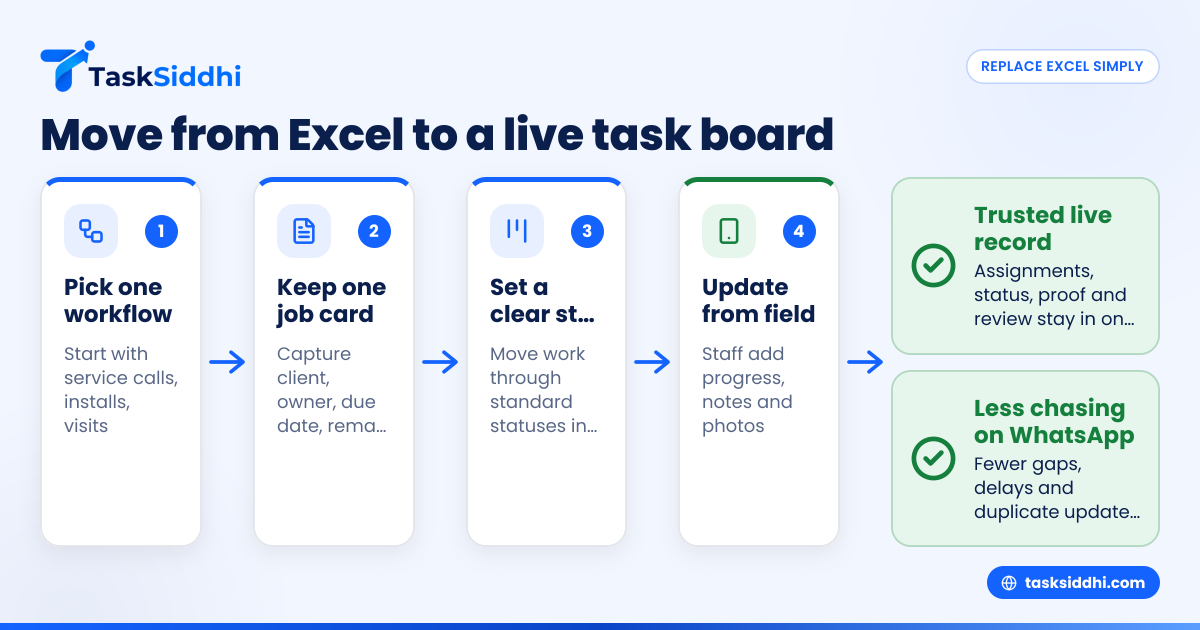
A team task tracker Excel alternative is simply a better way to assign work, track status, collect proof and review output without depending on one spreadsheet and many WhatsApp follow-ups. For small service and field teams in India, the right replacement is usually a shared task board with job cards, mobile updates, time logs and reports that managers can trust.
Key takeaways
- Excel works at the start, but breaks when work moves between office staff, field staff and clients.
- A good team task tracker excel alternative should handle assignments, deadlines, proof of work, comments and reporting in one place.
- Indian service teams need mobile-first updates, WhatsApp-friendly processes and clear records for billing and follow-up.
- You do not need a big ERP to replace spreadsheets. A simple task board often solves the real problem.
- The best rollout starts with one workflow, one team and one review rhythm, not a full company-wide change.
- If you are exploring an ai team task setup, first fix your process and data entry discipline.
Why Excel stops working for service and field teams
Excel is familiar. That is why most teams begin there.
A manager creates one sheet for tasks. Another sheet holds client details. A third sheet tracks payments or completion dates. Then the team adds colour codes, filters and formulas. For some time, it feels manageable.
But service and field work creates problems that spreadsheets do not handle well.
One task is rarely just one row. It has a client name, location, assigned staff member, planned date, actual visit time, photos, remarks, parts used and completion proof. If the client is in Mumbai and the technician is on the road, updates come on WhatsApp. Someone in the office then copies that message into Excel later. That delay creates errors.
This is where most small teams get stuck.
The owner still asks, “Has the job been completed?” The coordinator checks WhatsApp. The Excel file says “In progress”. The technician says “Done yesterday”. The client says “Share report”. Nobody is looking at one trusted record.
For Indian teams of 5 to 30 people, this gap becomes expensive very quickly. A missed follow-up can delay billing. An untracked repeat visit can reduce margins. A wrong site status can make your team look disorganised.
A spreadsheet is not bad. It is just not built for moving work.
What should a team task tracker excel alternative do?
A practical replacement should do a few basic things very well.
It should keep one record per job or task
Each service request, site visit or client task should have its own card or item. That card should hold all key details in one place. Your team should not need one Excel row, one WhatsApp thread and one notebook page for the same job.
It should make assignment clear
Every task needs an owner. If a job is assigned to Ramesh for 14/10/2026, everyone should see that clearly. If it is reassigned, the update should be visible immediately.
It should support real field updates
Field teams do not sit with laptops. They need a mobile app to mark arrival, add remarks, upload photos and complete work while on site. If they must wait until evening to update the office, your data will always be late.
It should show status without formulas
In Excel, status often depends on manual colour fills or formulas. In a better system, status should move naturally from new to assigned to in progress to done. This is where boards and views help. Managers can see bottlenecks without creating new tabs every week.
It should support proof and accountability
For field jobs, “done” is not enough. You need proof. That may be site photos, notes, timestamps or client confirmation. Teams that handle installations, maintenance and inspections especially need this. A process built around field visits is usually far more useful than a generic spreadsheet.
It should help with review and billing
Once jobs are complete, managers need a summary. Which technician handled the most calls? Which jobs were delayed? Which client work is ready for invoice follow-up? Good reporting turns daily activity into management decisions.
What are the signs your Excel tracker has become a risk?
If your Excel file is now a daily source of confusion, you have already outgrown it. The biggest warning signs are duplicate entries, delayed updates, unclear ownership and no reliable record of field activity.
Here are the signs to watch for in a small Indian service business:
- Only one person really understands the file If your operations depend on one coordinator who knows all the tabs and filters, that is a business risk.
- Tasks are updated after the work is done Late updates create blind spots. The file stops reflecting reality.
- Status lives on WhatsApp, not in the system If work completion is confirmed in group chats but not in your tracker, your process is broken.
- You cannot answer basic questions quickly For example, how many open jobs are pending in Pune, which technician has overdue tasks, or what is ready to bill this week.
- Proof is stored in phones Site photos, videos and notes remain in personal galleries and are hard to retrieve later.
- Billing follow-up is delayed If job completion is not recorded properly, GST invoice follow-up may also get delayed.
- You spend more time maintaining the tracker than using it At that point, the tracker is not helping operations. It is becoming extra admin work.
This is exactly why many SMEs search for a team task tracker excel alternative. They are not looking for fancy software. They just want work to stop slipping through gaps.
How do you replace Excel without disrupting the team?
Start small. Replace one workflow first, keep fields simple, and train the team on daily use. Do not migrate every old sheet at once. Build one live process that people actually update from the field and office.
Below that simple approach, there is a practical rollout plan.
Step 1: Pick one workflow, not the whole business
Do not begin with every department.
Start with one repeatable process such as:
- service calls
- installations
- maintenance visits
- pending client deliverables
- inspection follow-ups
If you run an appliance service team in Bengaluru, begin with service jobs only. If you run a site supervision team in Pune, begin with field visit records only.
This reduces confusion and lets your team learn one system properly.
Step 2: Define the fields you truly need
Most Excel files become messy because they try to capture everything.
Keep your first task card simple:
- client name
- phone number
- city or site address
- service type
- assigned staff member
- due date
- priority
- remarks
- proof of completion
- billing status
That is enough to begin. You can always improve later.
Step 3: Decide the status flow
Avoid vague statuses like “Pending”. Create a simple path such as:
- New
- Assigned
- In progress
- Waiting for client
- Completed
- Ready for billing
This makes work visible at a glance. It also makes daily review easier.
Step 4: Give each role a clear responsibility
The office team should create and assign tasks. Field staff should update progress and proof. Managers should review exceptions and overdue work.
If everyone can do everything, nobody owns the process.
Step 5: Move current open work first
Do not waste time importing old completed tasks from two years ago.
Bring over current open jobs, recent active clients and the next 30 to 60 days of work. This gives your team a clean start.
Step 6: Train on daily habits, not only features
Adoption comes from routine.
Train your team on three habits:
- update status before leaving the site
- upload proof immediately
- check assigned work every morning
These habits matter more than any advanced setup.
Step 7: Review every evening for two weeks
For the first 10 to 14 working days, review the board daily.
Check what was missed. Fix naming issues. Remove unnecessary fields. Tight feedback is what turns a software rollout into an operational improvement.
Which features matter most for Indian field and service teams?
For Indian SMEs, the most useful features are not always the most complex ones. What matters is whether your team can use them on a busy working day.
Mobile-first updates
Many technicians and field executives work mainly from phones. So the system must support fast updates from the road. This is essential for teams handling service jobs across local areas or multiple cities.
Work visibility for managers
Owners need a live view without asking ten people for updates. A proper task board should show what is due, delayed and completed in one place. That is the value of core features that are built around everyday operations, not only project planning.
Time logging where needed
Some businesses bill by visit, while others bill by hours spent. In those cases, time tracking helps compare planned effort with actual effort. It is also useful when clients ask what happened on a given day.
Repeatable workflows
When the same follow-up steps happen every day, automation can reduce manual admin. For example, it can help move routine work forward once a status changes, instead of depending on someone to remember each next step.
Reports that support decisions
You do not need thirty dashboards. You need a few useful reports.
For example:
- jobs completed this week
- overdue tasks by team member
- repeat visits by client
- time spent per service type
- work ready for invoicing
That is where reporting becomes practical.
What does it cost to move beyond Excel?
The real cost is not the monthly software fee. The bigger cost is missed work, delayed billing, poor client communication and time spent chasing updates on WhatsApp. Compare those losses with the value of faster completion and better control.
For many small businesses, Excel looks free because there is no visible line item. But hidden costs are very real.
Consider a 10-person service team in Mumbai.
If each person loses just 15 minutes daily because of update calls, duplicate entries or status confusion, that is 150 minutes a day. Across a month, that becomes a meaningful operational cost. Add one delayed invoice, one repeat visit due to bad records and one unhappy client, and “free” Excel starts looking expensive.
This is why buyers should compare total process cost, not only subscription cost.
When evaluating tools, ask:
- how much manager time will this save weekly?
- will job completion proof become easier to collect?
- will billing happen faster?
- will fewer tasks be missed?
- will clients get quicker updates?
Also compare whether a paid tool actually replaces other hidden costs such as manual tracking, separate logs and rework. For many teams, that is the real reason to move from free spreadsheets to a structured system. If you are weighing that decision, this guide on free vs paid can help frame the trade-off.
Can AI fix messy task tracking?
AI can help summarise, sort and highlight work, but it cannot fix a broken process by itself. If task details are incomplete or updates come late, even a smart ai team task setup will give weak results.
That is why process comes first.
Many owners now hear promises around AI. The idea sounds attractive. You imagine a tool that reads messages, assigns tasks, predicts delays and gives instant summaries.
Some of that can be useful later.
But if your current process still depends on unstructured WhatsApp voice notes, photo uploads without labels and late Excel updates, AI will only sit on top of messy data. It will not create discipline where none exists.
First, make sure each task has:
- a clear owner
- a clear due date
- a standard status
- consistent remarks
- proof in one place
Once that is in place, any future AI layer becomes far more valuable because the underlying data is usable.
So if you are considering an ai team task workflow, treat AI as an improvement layer, not the foundation.
A simple migration example for an Indian service business
Let us take a realistic example.
A 12-person water purifier service business in Pune receives leads from referrals, WhatsApp and IndiaMART. The office team logs service calls in Excel. Technicians send updates on WhatsApp. Photos remain on personal phones. Billing is followed up at week-end.
Here is how that team could switch.
Week 1: Set up one board
Create one board only for service jobs.
Use these columns:
- New
- Assigned
- Scheduled
- In progress
- Completed
- Ready for billing
Week 1: Add current open work
Bring in:
- all open service requests
- all jobs scheduled for the next 14 days
- repeat complaints still unresolved
Do not import old history first.
Week 2: Make field updates mandatory
Technicians must update each job before leaving the client site.
Required updates:
- status
- service notes
- one or two photos if relevant
- parts used if relevant
Week 2: Start daily review
At 6:00 pm, the manager checks:
- what remains in assigned
- what is overdue
- what is completed but missing proof
- what is ready for invoice follow-up
Week 3: Improve based on actual use
After two weeks, the business usually sees the real friction points. Maybe the address field needs better structure. Maybe repeat visit reasons should be tracked. Maybe city-wise filtering matters.
Only then should the board be refined.
This kind of phased change is practical. It feels less risky to staff. It also delivers visible control quickly.
How to choose the right replacement tool
Do not buy based on a long feature list alone. Buy based on fit for your daily work.
Use this checklist.
1. Is it easy for non-technical staff?
If your field team cannot use it after one short training session, adoption will fail.
2. Can office and field staff both work in it?
A tool that works only for managers will not solve update delays.
3. Does it support client and job-level detail?
You need more than a simple to-do list. You need records that map to real jobs and visits.
4. Can managers review work without building reports manually?
If every review still needs exporting to Excel, you have not solved the core issue.
5. Does it fit your use case?
A field service workflow is different from generic project management. Teams handling client work may need different tracking compared with teams doing site visits or repairs.
6. Can it scale from 5 to 30 people?
The best system should work now and still work when you add a second city, a second coordinator or a second team lead.