

Geo tagged site visit proof in India means keeping clear evidence that a staff member visited the right customer site, at the right time, and completed the expected work. For small field teams, the best proof usually combines GPS location, time, photos, job notes, and customer confirmation so the manager can review work without chasing updates on WhatsApp.
Key takeaways
- Geo tagged site visit proof India works best when you capture location, time, photos, job details, and visit outcome together.
- A single photo is usually not enough for review, billing, or dispute handling.
- Small teams should standardise what every technician or field executive must submit after each visit.
- Managers need a simple review checklist so proof is checked quickly and consistently.
- Customer data and staff location data should be handled carefully under the DPDP Act 2023 context.
- A mobile workflow with field visits, mobile app, and reporting is easier to manage than scattered WhatsApp messages.
What is geo tagged site visit proof in India?
Geo tagged site visit proof in India is a record that shows a team member reached a specific site and performed a task there. In a small business, this proof is often needed for service completion, client billing, staff accountability, and manager review.
If your team runs on phone calls, paper job cards, and WhatsApp groups, proof is usually incomplete. One person sends a photo. Another sends a location pin. Someone else writes “done” in the group. Later, when a customer disputes the visit or asks for details, the full record is missing.
That is why field teams in Mumbai, Pune, Bengaluru, Jaipur, Indore, or Coimbatore need a standard process. Every visit should leave behind one complete, reviewable record.
This matters in many Indian businesses:
- AMC service teams
- Facility maintenance vendors
- CCTV and electrical installers
- Pest control teams
- Water purifier service teams
- Solar site teams
- Interior fit-out supervisors
- Client servicing teams doing on-site checks
- Sales or collection staff visiting dealer locations
The goal is simple. Make every site visit easy to verify.
Why are small field teams in India asking for this now?
Small teams need geo-tagged proof because clients expect faster updates, managers need fewer disputes, and field work is harder to track across multiple locations. When proof lives in one record instead of many chats, billing and follow-up become simpler.
The pressure has increased for three practical reasons.
First, clients want clearer updates. A building manager, retailer, clinic, school, or housing society does not want vague status messages. They want to know whether the technician came, what was found, what was fixed, and what remains pending.
Second, business owners want tighter control without adding more supervisors. A team of 8 to 20 people can create a surprising amount of confusion in one day. If each person sends updates in a different format, the owner spends evenings checking call logs and photos instead of closing jobs.
Third, disputes are expensive. If a customer says, “No one came,” or “Your person came but did not complete the work,” the business needs evidence. Without proper records, the company may have to offer discounts, repeat visits, or delay invoices.
In India, this also links to practical back-office work. Visit proof can support job completion records, customer communication, and internal billing support before data moves to Tally or another accounting process. It also helps teams that get leads from IndiaMART or JustDial and need to look more organised after winning the job.
What should you capture on every site visit?
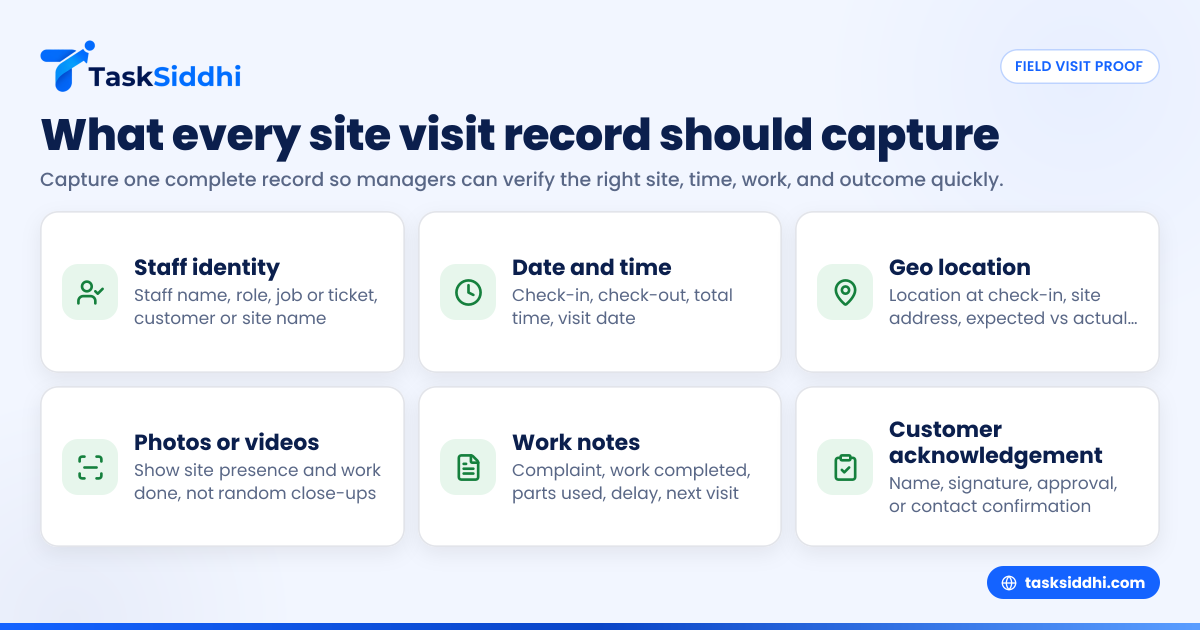
Capture six basics on every site visit: who went, where they went, when they arrived, what work was done, visual proof, and what happened next. If any one of these is missing, review becomes weaker.
1. Staff member identity
Every visit record should clearly show which employee, technician, or executive handled the site. Avoid proof that sits only in a personal phone gallery or private WhatsApp chat.
At minimum, capture:
- Staff name
- Team or role
- Assigned job or ticket number
- Customer name or site name
This matters when one customer location receives visits from multiple team members over a month.
2. Date and time
The record should show the date and time of the visit. This helps in service contracts, repeat complaints, and delayed billing discussions.
For Indian teams, it is useful to record:
- Check-in time
- Check-out time
- Total time spent
- Visit date in DD/MM/YYYY format
If the work takes longer than expected, that time record can help explain costs or staffing needs. This is especially useful when teams use time tracking alongside visit records.
3. Geo location
This is the core of geo tagged site visit proof India. The visit should capture the location of the staff member at check-in, and sometimes at check-out too.
A good record usually includes:
- Latitude and longitude from the device
- Site address
- Distance between expected site and actual check-in point, if available
- Location captured at the moment of update, not added later by memory
Do not rely only on a manually shared map pin. A map pin in WhatsApp is too easy to send without proper job context.
4. Photos or videos
Visual proof matters because location alone does not show what happened. A person may be near the site but may not have completed the task.
Useful photo proof can include:
- Storefront or building entrance
- Equipment before service
- Equipment after service
- Installed item
- Meter reading or panel status
- Damaged area
- Spare part used
- Customer signature area or work area
Ask the team to take practical photos, not random close-ups that prove nothing.
5. Work notes
The best field proof includes short, structured notes. A one-line “done” message is rarely enough.
Better notes include:
- Complaint observed
- Work completed
- Parts replaced
- Issue still pending
- Reason for delay
- Next visit needed or not
Simple fixed fields are better than long free-text paragraphs. Teams fill them faster and managers review them faster.
6. Customer acknowledgement
When possible, capture a simple customer confirmation. This can be a name, signature, OTP-style confirmation process in your own workflow, or a note that the site contact approved completion.
This is useful when the final invoice depends on visit completion, or when the customer later says the work was incomplete.
What does good proof look like in practice?
Good proof is one record that shows the job, the staff member, check-in location, time, photos, work notes, and final status. A manager should understand the full visit in under one minute without calling the field worker.
Here is a simple example.
A water purifier service technician visits a customer in Pune on 18/10/2026.
The record should ideally show:
- Job card number
- Customer name and address
- Technician name
- Check-in at 11:08 AM with geo location
- Two photos: purifier before service and after filter replacement
- Notes: “Sediment filter changed. Water flow restored. Next service due in 6 months.”
- Customer contact person name
- Check-out at 11:42 AM
- Job marked completed
Now compare that with a weak record:
- WhatsApp message saying “Visited”
- One blurry photo
- No address
- No check-in time
- No note on work done
- No confirmation
The second version creates doubt. The first version creates confidence.
How should your team capture proof in the field?
Use a fixed checklist inside a mobile workflow. Field staff should not decide each time what proof to send. When the required fields are standard, training is easier and missed details reduce.
Build one standard visit checklist
Start with one checklist for all routine visits. Keep it short. If it is too long, the team will skip steps.
A practical checklist may include:
- Check in at site
- Confirm customer or site contact
- Take required photos
- Add issue and work notes
- Mark parts used, if relevant
- Add customer acknowledgement
- Check out
- Set final status: completed, pending, revisit, cancelled
This kind of structure works well on digital boards and views because managers can see where each job stands.
Train for proof quality, not just app usage
Many teams teach staff where to click but not what counts as usable evidence. That is a mistake.
Train your team on:
- Which photo angles are useful
- What notes are too vague
- When to capture more than one photo
- When a revisit must be marked pending
- How to handle no-network situations
- What to do if the GPS is weak inside a building basement
A 30-minute training with good and bad examples can improve proof quality sharply.
Set rules for exceptions
Not every location is easy. Some industrial sites have poor signals. Some customer sites do not allow photography. Some staff may forget to check in before entering.
Create exception rules such as:
- If photos are restricted, note “photo restricted by site” and capture customer contact confirmation
- If GPS is weak, capture the nearest valid point plus manual note
- If network is poor, save and sync later
- If the wrong check-in happens by mistake, mark it and explain immediately
This keeps records honest instead of forcing fake compliance.
How should managers review geo-tagged proof?
Managers should review site visit proof with a short checklist: correct site, correct time, clear photos, useful notes, and correct status. If review takes too long, the process will fail within weeks.
Use a 5-point review checklist
For each completed visit, ask these five questions:
- Was the visit linked to the right customer and job?
- Does the geo tag match the expected site area?
- Do the photos clearly show presence and work done?
- Do the notes explain the outcome?
- Is the next action clear?
If the answer is “no” to any point, send it back for correction while the visit is still fresh.
Review by exception, not everything manually
Owners often try to inspect every single record. That works for three people, not for fifteen.
Instead, review exceptions first:
- Missing photos
- No check-out
- Very short visit duration
- Site mismatch
- Repeated pending jobs
- Jobs completed late
- High-value customer visits
- First visit to a new client
This is where automation and reporting can reduce manual chasing.
Keep evidence linked to job completion
Do not let visit proof sit separately from the job record. Proof should be connected to the job card, status, and follow-up task.
That way, if a customer calls after ten days, the office can quickly check:
- When the team visited
- What was found
- What was fixed
- Whether a second visit was planned
This is especially useful for recurring service jobs.
Can AI help review geo-tagged site visit proof?
Yes, but keep expectations practical. AI can help flag missing fields, weak notes, duplicate photos, or suspicious patterns, but it does not replace clear field discipline.
For small teams, the value of ai geo tagged review is not magic. It is speed and consistency. For example, a manager may want the system to highlight visits with no clear photo, very short duration, or notes like “done” that lack detail.
Over time, ai geo tagged checks may help with patterns such as:
- Repeat visits to the same site with no closure
- Staff who often miss check-out
- Frequent mismatch between expected site and actual location
- Weak proof quality for specific customers or teams
Still, AI is only useful if your base process is clean. If staff do not capture proper information, no review layer can fully fix it.
What mistakes should you avoid?
The biggest mistakes are collecting too little proof, asking for too much proof, and reviewing nothing until a dispute happens. Good systems are balanced.
Mistake 1: Depending only on live location
Live location in WhatsApp is not a visit record. It does not capture the job, the work done, or the final outcome in a structured way.
Mistake 2: Making the process too heavy
If every visit needs 12 photos, long notes, and multiple approvals, your staff will start skipping fields or entering fake data just to finish.
Mistake 3: Not defining photo standards
If you do not specify what counts as a valid proof photo, you will get random images that are useless later.
Mistake 4: Ignoring pending jobs
Many teams review only completed work. In reality, pending visits often create more customer frustration and more repeat calls.
Mistake 5: Storing data across too many places
If photos are in one phone, notes in a register, and location in a chat, review becomes messy. Bring proof into one workflow with clear features.
What about customer privacy and staff data?
If you collect location, photos, and customer details, handle that data carefully. Small teams should collect only what they need for the job and keep access limited to authorised staff.
In India, businesses should also stay aware of the DPDP Act 2023 context when handling personal data. That means being thoughtful about what customer details are captured, why they are captured, who can access them, and how long they are retained.
In practice, do these basics:
- Avoid collecting unnecessary personal details
- Limit access to managers and relevant office staff
- Keep customer and staff records inside a business system, not personal chats
- Explain to staff what location capture is used for
- Do not share visit photos casually in broad groups unless needed
The goal is operational proof, not over-collection.
A simple rollout plan for a 5 to 30 member team
Most small Indian businesses do not need a big transformation project. They need a simple rollout that sticks.
Step 1: Define mandatory proof fields
Decide what every visit must include. Keep it to the minimum needed for operational confidence.
Step 2: Start with one team or one city
Pilot with one group, such as the Pune service team or Mumbai installation crew.
Step 3: Review records daily for two weeks
Catch weak patterns early. Fix training gaps immediately.
Step 4: Create three final statuses
Use simple outcomes such as completed, pending, and revisit required.
Step 5: Link proof to billing or closure
When proof quality affects job closure, adoption improves.
Step 6: Track exceptions weekly
Use a basic dashboard to spot missing proof, repeated revisits, and delayed closures.
A field-first workflow on a mobile app is usually easier than forcing desktop updates at the end of the day.
How do you know if your proof system is working?
Your proof system is working when managers make fewer clarification calls, customer disputes reduce, and completed jobs move faster to closure. The test is simple: can someone in the office understand yesterday’s visits without asking the field staff again?
Watch for practical signs: