

If you run your Delaware business on Excel, email, and texts, task tracking usually breaks first. The best Excel replacement for task tracking is a simple work system that shows who is doing what, by when, and what happened on site without chasing updates across files.
For small-business owners in Delaware, that usually means moving from static spreadsheets to a task board with mobile updates, proof of work, time tracking, and reporting. You keep the control you want, but your team spends less time updating sheets and more time finishing jobs.
Key takeaways
- Excel works for early tracking, but it struggles when jobs move fast and several people update work at once.
- A good excel replacement for task tracking should be easy for office staff and field staff to use on day one.
- Delaware small businesses should look for clear job status, mobile updates, time logs, and simple reporting.
- The best setup reduces missed follow-ups, duplicate work, and “I thought someone else handled it” moments.
- If your team uses paper job cards, phone calls, and spreadsheets together, a task board often gives the fastest improvement.
- You do not need a complex ERP to replace Excel for daily work tracking in Delaware.
Why Delaware small-business owners outgrow Excel for task tracking
Excel is familiar. That is why many Delaware owners stick with it longer than they should.
A spreadsheet feels cheap and flexible. You can add columns, color cells, and build a process quickly. For a five-person team, that can work for a while. But once your business has several active jobs, repeat service calls, site visits, or client deadlines, the spreadsheet starts becoming the bottleneck.
The problem is not that Excel is bad. The problem is that Excel is not built for live team execution.
If you run a service company in Wilmington, a maintenance team near Newark, or a client-work business serving Dover, your work changes during the day. A technician gets delayed. A customer asks for a photo. A part is missing. A priority job comes in. Someone forgets to update the file. Then the office calls three people just to learn the current status.
That is where many owners start looking for an excel replacement for task tracking.
Here is what usually goes wrong with spreadsheets:
- Two people edit different versions
- Staff forget to update job status
- Notes live in email or text, not in the task
- Field teams cannot update work easily from the road
- Managers cannot see delays until a customer complains
- Time spent on jobs is tracked in another sheet, or not tracked at all
- Reporting takes manual effort every week
For a Delaware small business, that creates direct costs. Missed service windows can hurt trust. Poor visibility can lead to rework. Slow handoffs can delay invoicing. Owners end up spending evenings cleaning up the day’s information instead of running the business.
A better system should not add more admin. It should reduce it.
What should an Excel replacement for task tracking do?
It should act like a shared operating view for your business. Everyone sees the same task, the same owner, the same due date, and the same status.
That sounds simple, but it changes daily work in a big way.
At minimum, your replacement should handle:
- Task assignment Every task needs one clear owner.
- Status tracking You should know what is not started, active, blocked, or done.
- Due dates and priority Teams need to know what matters today.
- Notes and updates in one place No searching across email, texts, and paper.
- Mobile access Field staff should update jobs from their phones.
- Proof of work Site photos, visit confirmation, and completion notes should stay with the task.
- Time tracking Useful for payroll review, job costing, and client billing.
- Reporting Owners need to spot delays, workload gaps, and completed work.
This is where many buyers begin searching broader terms like an ai excel replacement. Usually, what they really want is not artificial intelligence by itself. They want less manual updating, faster status visibility, and cleaner records without hiring another coordinator.
What is the best excel replacement for task tracking in Delaware?
For most Delaware small businesses, the best replacement is a shared task board with mobile updates, proof of work, and simple reporting. It should fit how your team already works, not force a heavy system that takes months to learn.
The key is visibility. You need one place where office staff and field staff can both update work, see priorities, and close tasks without relying on spreadsheet edits.
A spreadsheet tracks data. A task board manages work in motion.
That difference matters when your business handles service jobs, client work, installations, inspections, or site visits across Delaware. Jobs move. Priorities change. Customers call. Your system has to keep up.
What a better system looks like day to day
Imagine a common Delaware workflow.
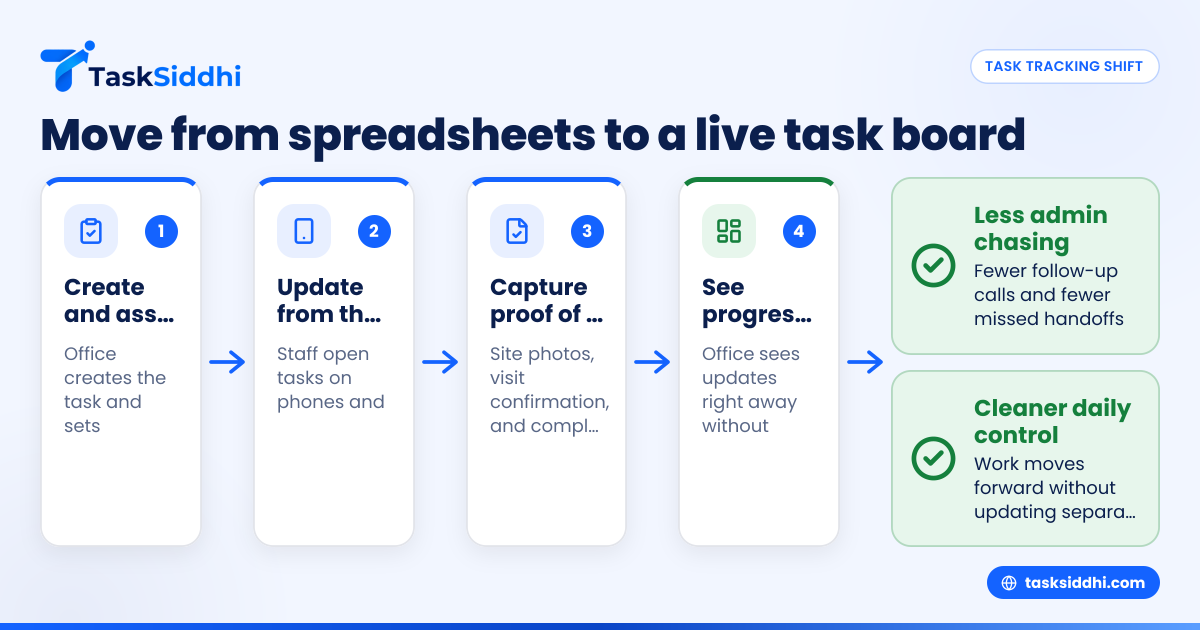
A customer calls in with a service need. Your office creates the task and assigns it. The field tech sees it on their phone. They travel to the site, add notes, upload proof, mark progress, and finish the job. The office sees the update right away. If the task needs a second visit, it stays visible. If it is complete, it moves forward without someone updating three separate files.
That is the practical difference between a spreadsheet and a work-management tool.
With TaskSiddhi, this kind of flow is built around boards and views, a mobile app, time tracking, and reporting. For Delaware owners, the point is not software for its own sake. The point is fewer follow-up calls and a cleaner workday.
When is Excel still okay?
Excel is still fine if your task tracking is simple, stable, and handled by one person.
For example, you may not need to switch yet if:
- You only track a small number of internal tasks
- One admin updates everything
- Deadlines rarely change
- No field staff need access
- You do not need proof of work
- You do not bill by time or review time by job
But many Delaware small businesses pass that point quietly. The spreadsheet does not fail all at once. Instead, you notice small signs:
- More “just checking status” calls
- More missed deadlines
- More tasks that are “almost done” but not closed
- More customer updates delayed by missing info
- More owner time spent verifying facts
Once that starts, your issue is not formatting. It is workflow control.
How do I know if my Delaware business needs to replace Excel?
If you need daily status checks, chase updates by phone, or lose notes across texts and files, it is time. When work moves through several people or happens in the field, Excel usually creates delay instead of clarity.
You can test this in one week. Count how many times you or your staff ask:
- “Who is handling this?”
- “Was this done?”
- “Where is the latest file?”
- “Did anyone visit the site?”
- “How long did this take?”
- “Why was this not invoiced yet?”
If those questions come up often, your current system is costing you time and margin.
A simple Delaware owner test
Ask yourself these five questions:
- Can I see every active task in one view right now?
- Can my team update work without opening a spreadsheet?
- Can I confirm site work without calling the technician?
- Can I see where jobs are getting stuck?
- Can I review time spent by person or by job?
If you answer “no” to three or more, an excel replacement for task tracking will likely pay off quickly in reduced admin time alone.
What features matter most for Delaware service and field teams?
Start with mobile updates, clear task status, proof of work, and time logs. Those four features solve the biggest spreadsheet problems for small teams in Delaware and make daily work easier for both the office and the field.
After that, you can add structure without making the system heavy.
Mobile use matters more than most owners expect
If your team works outside the office, desktop-first tools often fail in practice. Staff will delay updates until later. Then details get lost.
A mobile-friendly system lets field workers:
- Open assigned jobs fast
- See addresses and notes
- Mark status changes
- Upload photos from the site
- Record time while work happens
- Add completion details before leaving
That is why field visits and service jobs are common use cases for replacing spreadsheets. The closer the update is to the work, the better the record.
Status should be visual, not hidden in rows
In Excel, status is easy to miss. A delayed task looks like every other row unless someone checks it closely.
A board view solves that. You can separate work into columns like:
- New
- Scheduled
- In progress
- Waiting on customer
- Waiting on parts
- Complete
That structure makes bottlenecks obvious. If “Waiting on customer” grows, your follow-up process needs work. If “In progress” stays crowded, workload may be uneven.
Time tracking supports billing and control
Many owners first think of time tracking as payroll admin. But it also helps with pricing, staffing, and customer discussions.
When your team logs time inside the task, you can answer questions such as:
- Which job types take longer than expected?
- Which customers generate more repeat visits?
- Which techs are overloaded?
- Which jobs are profitable?
That matters for Delaware businesses that bill by work completed, service call, or project phase.
A practical migration plan for Delaware small businesses
Do not rebuild your whole business at once. Move one live workflow first, keep it simple, and train the team on real tasks instead of theory.
That approach works better than a big software rollout.
Step 1: Pick one workflow that causes daily friction
Choose a process like:
- Service requests
- Site visits
- Installation follow-ups
- Client deliverables
- Maintenance work orders
The best starting point is a workflow that creates repeated calls, missed handoffs, or delayed billing.
Step 2: Define your basic task fields
Do not overdesign this. Start with:
- Task name
- Customer name
- Assigned person
- Due date
- Status
- Priority
- Notes
- Photo or proof, if needed
- Time spent
You can always refine later.
Step 3: Create simple board stages
Keep the first version easy to follow. For example:
- New
- Assigned
- In progress
- Waiting
- Complete
If your process is more field-heavy, use stages that match reality.
Step 4: Train on phones and desktops
Show each role only what they need.
Office staff should learn how to create and assign tasks. Field staff should learn how to open tasks, update status, add proof, and log time. Managers should learn how to review workload and exceptions.
Step 5: Run the old and new system briefly
For one to two weeks, compare the board against your spreadsheet. This helps catch missing fields or unclear steps.
Then stop updating the spreadsheet. If you keep both systems too long, the old habit wins.
Step 6: Review after 30 days
Look for:
- Faster task closure
- Fewer status check calls
- Fewer missed updates
- Better proof records
- Better visibility into delayed work
This is also a good time to add rules or automation for recurring tasks and simple reminders.
Common mistakes when replacing Excel
Owners often think the tool failed, when the setup was the real issue.
Here are the most common mistakes:
Making the system too complex
A small Delaware business does not need a giant workflow map to get started. Too many required fields will slow adoption.
Copying the spreadsheet exactly
This is a big one. If you recreate every sheet, formula, and color rule, you may preserve the old problem in a new tool.
Instead, focus on what the business needs to know today:
- what the task is
- who owns it
- what stage it is in
- what happened
- what comes next
Not designing for field staff
If updates are hard on a phone, your records will still be incomplete. For owner-led businesses, this matters more than advanced features.
No owner review rhythm
A better system still needs a management habit. Spend 10 to 15 minutes each day reviewing delayed tasks, blocked items, and overloaded staff.
Can an ai excel replacement help without making things complicated?
Yes, but only if it reduces manual work instead of adding another layer to manage. For most Delaware small businesses, the best “AI” benefit is simpler updates, clearer visibility, and less chasing for information.
Many owners hear “AI” and assume they need advanced forecasting or automation everywhere. Usually, they do not.
In this category, the winning system is the one your team will actually use. If an ai excel replacement sounds smart but creates extra setup, it will not help your day-to-day operations.
The right question is not “Does it use AI?” The right question is “Does it help my team update work faster and give me a clearer picture of what is happening?”
That is why practical tools beat flashy ones for small teams.
How much does switching away from Excel really cost?
The real cost is not just software. It is setup time, training, and short-term adjustment. But for many Delaware owners, the bigger cost is staying on spreadsheets after they stop working.
Think in terms of hidden operating costs.
If your office manager spends 45 minutes a day chasing job status, that is nearly four hours each week. At $25 per hour, that is about $100 a week, or roughly $5,000 a year. Add missed follow-ups, delayed invoicing, or repeat trips, and the cost grows fast.
That is why the “free” spreadsheet is often not free.
Compare cost against these pain points
Measure your current process against:
- Hours spent chasing updates
- Jobs delayed by missing information
- Repeat site visits due to poor notes
- Late billing from incomplete records
- Owner time spent verifying work
- Customer frustration from weak communication
If a tool reduces even part of that, it may be worth more than its subscription price.
If you want to compare options, it helps to review free vs paid approaches before making the switch.
Choosing the right fit for a Delaware small business
The best tool is the one your team can adopt fast and use daily without extra supervision.
For many small-business owners in Delaware, the sweet spot looks like this:
- Easy board-based workflow
- Quick task assignment
- Mobile-first updates
- Site proof support
- Time tracking tied to work
- Clear reports for owners
- Enough structure without complexity