

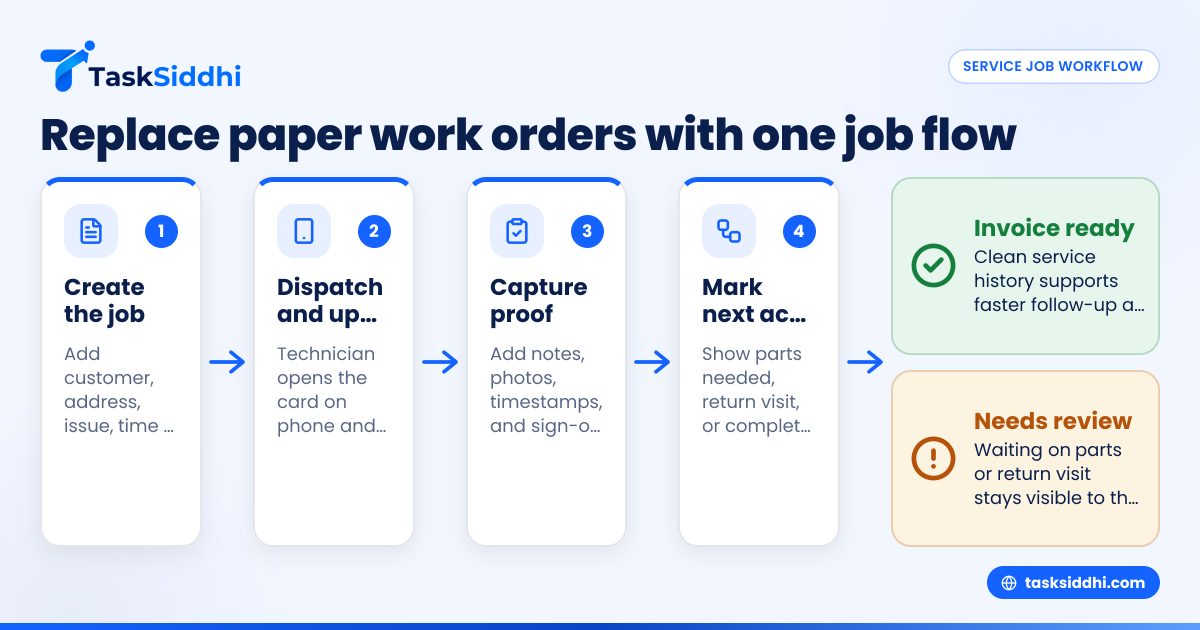
Job card software for appliance repair teams in the United States replaces paper work orders with one shared system for dispatch, technician updates, proof of service, and reporting. It helps small service teams stop losing job details in trucks, text threads, and clipboards, while giving owners a clear record of what happened at each home or site.
Key takeaways
- Paper work orders slow down appliance repair teams and create billing, scheduling, and proof problems.
- Good job card software keeps customer details, issue notes, photos, signatures, and status updates in one place.
- A mobile-first setup matters because technicians need to update jobs from driveways, basements, and laundry rooms.
- Proof of service should include timestamps, visit notes, photos, and customer sign-off when needed.
- For teams of 5 to 30 people, simple workflows beat bloated systems that take months to set up.
- The best rollout starts with one board, a few job stages, and clear rules for every technician.
Why paper work orders break down for appliance repair teams
Appliance repair work moves fast. A dispatcher books calls. A tech drives across town. Parts get reordered. Customers call back. Someone needs the final notes for billing. On paper, that sounds manageable. In real life, paper work orders create gaps everywhere.
A printed job card can stay in a van for days. Handwriting gets missed. Model numbers get copied wrong. Photos live on personal phones. The office has no clear view of whether a dishwasher repair in Chicago is done, delayed, or waiting on a part. That creates back-and-forth calls that waste time.
For small teams, the problem often starts with familiar tools. Jobs come in by phone or email. The office writes them in a spreadsheet. Technicians get details by text. Updates return through calls, WhatsApp-style group chats, or paper slips. Each step feels easy until volume rises. Then jobs fall through cracks.
That is where job card software for appliance repair teams becomes practical, not optional. It creates one record per service call. Everyone works from the same job card. The office sees status in real time. The tech sees the customer address, issue, notes, and checklist on a phone. Billing has a clean service history.
What should job card software for appliance repair teams include?
It should give your office and technicians one live job record with customer details, appliance issue, appointment time, parts needed, technician notes, photos, timestamps, and completion proof. It should be simple on mobile, easy to update in the field, and clear enough that your office can dispatch, follow up, and invoice without chasing people.
That short answer matters because many teams buy software that looks powerful but misses daily field needs. Appliance repair is not just “ticketing.” Each visit has a location, an appliance, a symptom, a diagnosis, a part decision, and often a return trip. Your system needs to capture all of that without slowing the technician down.
At a minimum, look for these functions:
A clear job card for every service call
Each call should have:
- Customer name and phone
- Service address
- Appliance type and brand
- Model and serial number when available
- Problem description
- Scheduled date and time
- Assigned technician
- Parts needed or ordered
- Visit notes
- Photos
- Completion status
This is the core record your team works from. If this record lives across paper, texts, and memory, errors are almost guaranteed.
Mobile updates from the field
Technicians should be able to open and update jobs from a phone. That includes changing status, adding notes, uploading photos, and recording time on site. A strong mobile app matters because many repairs happen in places where a laptop is unrealistic.
Proof of service
For appliance repair teams, proof of service is not just nice to have. It reduces disputes. If a customer says no one came, or claims the issue was never explained, you need a record. Good proof can include:
- Arrival and completion timestamps
- Photos before and after work
- Technician notes
- Customer signature, when your process needs it
- A summary of what was repaired or found
Status tracking that matches real repair workflows
Your team likely uses stages already, even if they are informal. A better system turns those stages into a visible workflow such as:
- New request
- Scheduled
- On the way
- On site
- Waiting on parts
- Return visit needed
- Completed
- Ready to invoice
Simple status tracking through boards and views helps the office spot stuck jobs quickly.
How do you replace paper work orders without confusing the team?
Start with one simple workflow, keep the fields short, and train technicians on only the updates they must make in the field. Do not try to digitize every old form on day one. Focus first on dispatch, notes, photos, and completion proof.
Most failed rollouts happen because owners try to recreate every paper sheet, every exception, and every old habit in software. That makes the new tool feel harder than paper. The better approach is to replace the most expensive pain points first.
Step 1: map your current process
Write down how a job moves today. Keep it practical. For example:
- Customer calls office
- Dispatcher books appointment
- Job details are texted to technician
- Technician visits site
- Technician calls in notes
- Office creates invoice
- Team handles any callback
Now mark where mistakes happen. Common ones include missing apartment numbers, no photo proof, unclear parts status, and delayed notes.
Step 2: choose the minimum job fields
Do not overload the form. Start with only what the office and techs need every day:
- Customer name
- Phone
- Address
- Appliance type
- Brand
- Problem summary
- Appointment window
- Technician
- Status
- Notes
- Photos
You can expand later. In the beginning, short forms increase adoption.
Step 3: define your standard job stages
Most appliance repair teams need only 6 to 8 stages. Keep stage names obvious. Everyone should know exactly when to move a card from one stage to the next. This is where task boards become useful. TaskSiddhi’s service jobs workflows are built for field and service work, not just office task lists.
Step 4: make field updates mandatory and quick
Set a few simple rules for every technician:
- Open the job card before arrival
- Change status when on site
- Add diagnosis notes before leaving
- Upload at least one photo when needed
- Mark whether a return visit or part is required
- Close the job only after notes are complete
This keeps the office from chasing updates at 6:00 PM.
Step 5: test with one team for two weeks
If you have 10 technicians, start with two or three. Use real jobs. Review what they skipped. If they avoid a field, ask why. Usually the form is too long or unclear.
Step 6: roll out with one-page training
Do not hand the team a thick manual. Give them one page with:
- What to update
- When to update it
- What photos to add
- What counts as job completion
- Who to call if the app fails
Small field teams learn by doing, not by reading policy documents.
How does proof of service help appliance repair businesses?
It gives you a time-stamped record of the visit, the work done, and the condition seen on site. That record helps with customer disputes, repeat visits, technician accountability, and cleaner billing.
Proof of service matters more in appliance repair than many owners realize. A dryer issue may look fine when the tech arrives. A refrigerator may be cooling intermittently. A photo, note, and timestamp can show what the technician actually observed and did.
What proof of service should include
For most service calls, a useful record includes:
- Arrival time
- Work performed
- Test result
- Photos of the unit or issue
- Any customer instruction given
- Need for return visit or parts
- Completion time
This does not need to be complicated. In fact, short records are usually more consistent. A technician is more likely to add three sharp photos and two useful notes than to type a long essay in a driveway.
Where proof helps most
Proof helps most when there is confusion after the visit. A clear record with timestamps, notes, and photos gives the office facts instead of guesses. It also helps the next technician, speeds billing, and gives managers a fair way to review work quality.
Customer disputes
If a customer says the technician never arrived, your timestamped update and service notes help. If the customer says the unit was scratched before your tech touched it, before-and-after photos help.
Repeat visits
A second technician can review the first visit record before heading out. That avoids duplicate diagnosis and saves time. It also helps if your original technician is off that day.
Billing accuracy
The office can invoice from the completed record instead of trying to reconstruct the visit from memory. If your team uses time tracking, that can also support labor visibility across jobs.
Technician coaching
Managers can spot patterns. If one tech often leaves vague notes, you can fix that with training. If another constantly marks “return visit needed,” you can look at diagnosis quality or parts readiness.
Can an ai job card actually help a small service team?
Yes, but only if it reduces typing and helps standardize job details. An ai job card is useful when it supports cleaner notes, consistent fields, and faster updates. It is not useful if it adds complexity or hides basic job status from your office.
For most appliance repair teams, “AI” should not be the buying reason. Reliability should be. Your team first needs a clear workflow, mobile updates, and visible job stages. If an ai job card helps technicians capture better visit notes or keeps records structured, that is a bonus. But it should never replace simple habits like status changes, photo uploads, and completion notes.
A practical owner asks better questions:
- Does this make field updates faster?
- Will dispatch see job status without calling the tech?
- Can I find all notes and photos in one place?
- Can I review waiting-on-parts jobs in seconds?
- Will this help us invoice sooner?
That is the right lens. Fancy features do not matter if the office still depends on calls and memory.
A simple workflow for appliance repair job cards
The best workflow is the one your team will actually follow. For appliance repair, that usually means a short sequence from intake to invoice, with clear points for diagnosis, parts, and return visits.
Here is a practical example.
1. Create the job
When a customer calls, the office creates a card with the address, issue, time window, and assigned technician. If your business handles both warranty and retail jobs, add a field for job type.
2. Dispatch the technician
The technician sees the day’s assigned work on a phone. With boards and views, managers can sort jobs by day, tech, or status.
3. Update on arrival
When the technician arrives, they change the status to “On site.” This creates a simple service record and gives the office confidence the call is active.
4. Add diagnosis notes and photos
The tech records what they found. For example: “Washer not draining. Drain pump seized. Standing water present.” Photos support the note and help if a return visit is needed.
5. Mark parts or follow-up needs
If the tech needs a part, the card should show that clearly. That prevents the office from treating the job as complete. It also helps managers review all waiting jobs at once.
6. Complete the visit
Once the work is done, the technician records the fix, test result, and any customer instruction. If your process uses a signature, add it here. For field-heavy teams, field visits records can help keep these updates organized.
7. Move to invoice-ready
The office reviews completed cards and prepares billing. Clean records reduce delays. If you rely on QuickBooks for accounting, the key point is that your service notes should be accurate before invoicing starts.
What does it cost to keep using paper?
Paper looks cheap, but it creates hidden labor costs, missed billing, extra callbacks, and weak records. If your office spends even 15 extra minutes per job chasing updates or rewriting notes, paper is already costing more than it seems.
The real cost is not the clipboard. It is the rework around it.
Hidden costs of paper work orders
Office follow-up time
If the dispatcher has to call five technicians every afternoon for missing notes, that labor adds up fast.
Slower invoicing
Incomplete job records delay billing. Delayed billing hurts cash flow, especially for small businesses.
More callbacks and repeat confusion
When one technician’s handwriting is unclear, the next technician starts from scratch. That wastes time and can frustrate customers.
Weaker proof in disputes
Without photos and timestamps, your team is left arguing from memory. That is a poor position for any service business.
No usable reporting
Paper makes trends hard to spot. You cannot easily answer basic questions like:
- Which technician closes the most jobs?
- How many jobs are waiting on parts?
- Which neighborhoods produce the most repeat calls?
- How long does the average job stay open?
With simple reporting, managers can review workload and completion patterns without digging through stacks of forms.
How to choose software your technicians will actually use
A good system for appliance repair is easy to open, easy to update, and easy to understand. If your technicians need too many taps, too much typing, or too much training, usage will fall.
When evaluating tools, focus on daily field reality.
Look for mobile-first design
Your techs work in homes, garages, utility rooms, and apartment buildings. They need fast updates from a phone. A desktop-only setup will fail quickly.
Keep the workflow visible
Managers should see what is new, scheduled, in progress, waiting on parts, and complete. If job status is buried in menus, the office will go back to phone calls.
Avoid over-customization at the start
You do not need a giant enterprise system to run a 12-person repair team in Houston or Detroit. Start simple. Build discipline first.
Use automation carefully
Basic automation can help move work forward, assign jobs, or remind the team of next steps. But automation should support a good workflow, not hide a bad one.
Choose software that supports your service model
Appliance repair has repeat visits, travel time, parts delays, and proof needs. Generic project tools often miss those realities. A work management system designed around field and service teams is usually a better fit. TaskSiddhi’s features focus on boards, field updates, time capture, and reporting for service work.