

A daily job report app for field employees gives your team one place to log what happened on each job, who did the work, how long it took, what photos were captured, and whether the crew was actually on site. For small U.S. teams, that usually means fewer missed updates, cleaner payroll support, faster customer follow-up, and better records than paper forms, spreadsheets, or scattered text messages.
Key takeaways
- A good daily job report app should capture work done, time, photos, notes, and site proof in one flow.
- Small field teams in the United States often need simple reporting first, not a heavy enterprise system.
- The best setup reduces back-and-forth on phone calls, texts, and end-of-day status chasing.
- Site proof matters when customers question visits, arrival times, or whether tasks were completed.
- Reports are most useful when managers can review trends, delays, and missed jobs in one dashboard.
- Mobile use is critical because field employees need to update jobs from the road or at the site.
What is a daily job report app for field employees?
A daily job report app for field employees is a work log tool built for crews who spend most of the day away from a desk. It helps technicians, installers, inspectors, service teams, and client-work teams record job activity in real time instead of trying to remember everything at 5:30 PM.
In a small business, the daily report usually needs five basic things:
- The job or customer name
- The work completed
- Time spent
- Photos or proof from the site
- Notes for the office or the next visit
That sounds simple. In practice, many teams still handle it through group texts, paper job cards, emailed photos, and spreadsheet updates. The result is messy records and slow follow-up.
A manager in Houston might ask three different people for the same update. One technician sends a photo by text. Another calls in hours worked. A third forgets to mention a return visit is needed. By the time the office creates an invoice or schedules the next stop, key details are already missing.
A daily job report app fixes that by making the update part of the job itself. When the visit ends, the report gets logged. When a photo is taken, it stays attached to the correct job. When hours are entered, they are tied to the work that happened that day.
For teams handling field visits, service jobs, or recurring client work, that structure matters more than another spreadsheet template.
Why do small field teams need one?
Small field teams need a daily job report app because reporting gaps become expensive fast. A missed note can lead to a repeat truck roll. A missing photo can trigger a customer dispute. Unclear time entries can create payroll confusion or hurt job profitability.
The cost is not only financial. It also shows up in slower service and stressed managers.
Common signs your team has outgrown manual reporting include:
- Employees send updates in multiple WhatsApp-like chat threads, texts, and emails
- Photos are saved on personal phones with no job reference
- Managers call the field team at the end of every day to reconstruct what happened
- Customer billing waits because job details are incomplete
- Return visits are missed because no one logged open issues
- Payroll support depends on memory, paper notes, or calendar guesses
For a 5-to-30-person team, these problems add up quickly. One owner in Chicago may still be close enough to the work to patch the gaps manually. But once the team grows across several vehicles, neighborhoods, or customer accounts, manual follow-up becomes the manager’s second job.
A daily job report app creates a repeatable habit. Workers know what to enter. Supervisors know where to check. Office staff know what record to use for billing, scheduling, and customer updates.
What should a daily job report include?
A strong daily job report should answer one basic question: what happened on this job today? That answer needs to be clear enough for the office, the customer, and a future crew member to understand without making more calls.
At minimum, each report should include:
Job details
The report should identify the customer, site, scheduled task, and assigned employee or crew. If your business runs several visits per day, this prevents mix-ups and lost context.
Work completed
Field employees should record the tasks finished, parts used if relevant, and any work that could not be completed. Short, structured updates work better than long free-form notes.
Time spent
Time data matters for payroll support, billing, utilization, and job costing. A simple time tracking flow can reduce disputes about when work started and ended.
Photos and attachments
Photos help prove conditions before and after the job. They also reduce callbacks when the office or customer wants visual confirmation.
Site proof
Site proof usually means showing that the employee was at the correct location when the visit happened. This is especially useful for route-based services, inspections, installations, and maintenance work.
Follow-up actions
A useful report should show whether the job is done, blocked, or needs another visit. That single status update can save the office from unnecessary calls.
How does a daily job report app improve reporting?
It improves reporting by making updates consistent, faster, and easier to review. Instead of collecting details from calls, texts, paper forms, and loose photos, the office gets one job record with time, notes, proof, and status in the same place.
That short answer is the core value. Better reporting is not about longer forms. It is about cleaner records that are easier to trust and act on.
When small teams move from paper or text-based reporting to an app, three reporting improvements usually happen first.
Reports become easier to complete
Field employees are busy. If the reporting process takes too long, they skip parts of it. A good mobile workflow keeps data entry short and tied to the actual job.
That matters because consistency beats perfection. A brief report submitted after every job is usually more useful than a detailed report filed only some of the time.
Managers see issues earlier
When reports come in during the day instead of at the end of the week, managers can spot delays, missed visits, or repeat problems sooner. This is where reporting matters. You are not only collecting updates. You are making them visible.
Records stay tied to the right job
One of the biggest failures in manual systems is separation. Photos live in the phone gallery. Hours live in payroll notes. Customer comments live in email. A daily job report app keeps the evidence together.
That makes it easier to answer questions like:
- Did we actually visit the site?
- How long did the work take?
- What did the area look like before and after?
- Did the employee note a return issue?
- Which jobs are still open?
Can field employees really update reports from the job site?
Yes. The best apps let employees log work, time, photos, and notes from a phone at the site, which reduces memory-based reporting later. That is important because details are more accurate when entered during or right after the visit.
For many small teams, mobile adoption is what makes the system usable. If a technician has to wait until returning to the office, reporting quality usually drops. People forget task details. Photos never get uploaded. End times become estimates.
A mobile-first process solves this by matching how field work actually happens.
What mobile reporting should feel like
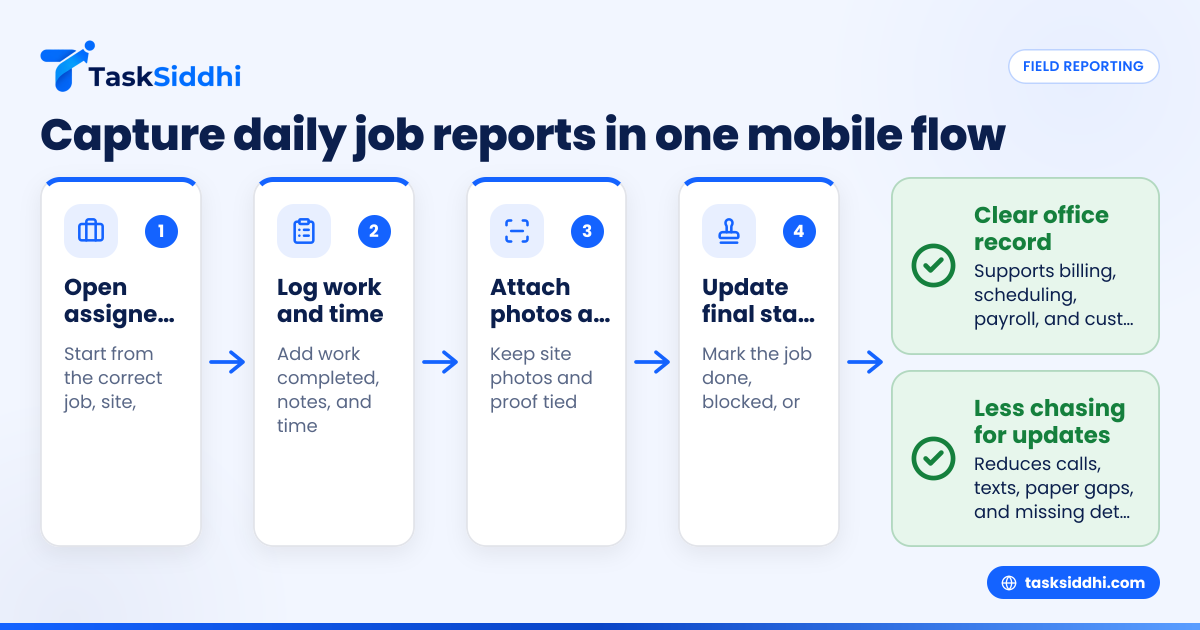
A field employee should be able to:
- Open the assigned job
- Mark arrival or start work
- Add notes as work progresses
- Attach photos from the site
- Log time spent
- Update the final status
- Submit the report before leaving
That is why a mobile app matters. The goal is not to add admin work to the crew. The goal is to capture proof while the job is fresh.
Why site proof matters in the United States
Customers may question no-show charges, missed appointments, service windows, or incomplete work. In those cases, site proof helps resolve disputes quickly. It can also help a manager review route compliance across multiple employees in the field.
This does not replace good customer communication. It strengthens the record when questions come up later.
What features matter most in a daily job report app for field employees?
The most important features are job-based reporting, mobile updates, time logging, photo capture, site proof, and simple dashboards. Small teams usually get more value from clarity and speed than from complex enterprise features they will not use.
Once that foundation is in place, the app becomes a daily operating tool instead of a reporting chore.
Job-based organization
A report should belong to a specific job, site, or customer record. That sounds obvious, but many teams still rely on general chat updates that do not tie back to a trackable job.
Using boards and views can help managers sort work by date, employee, status, or customer without building custom spreadsheets.
Standard report fields
If every employee writes updates in a different format, the office still has to interpret them. Standard fields create consistency. For example:
- Work completed
- Time on site
- Photos added
- Issues found
- Next action
- Job status
Simple automation
The right automation can reduce manual follow-up. For example, a manager may want a completed status to trigger a review step, or a missing report to stand out by end of day.
Field-friendly design
A field app has to work in real conditions. Employees may be standing outdoors, moving between stops, or rushing to the next appointment. The fewer taps required, the more likely the report gets done well.
Clear admin visibility
Owners and managers should be able to open one system and know:
- Which jobs were completed today
- Which employees are still active
- Which sites need follow-up
- Which reports are missing proof or notes
A good set of features should support that without forcing a small business into a complex setup.
Where does ai daily job reporting actually help?
AI daily job support can help summarize updates, spot missing fields, and make reports easier to review. It should reduce admin effort, not replace real field notes, photos, or site proof collected at the job.
That short answer matters because many owners hear “AI” and expect magic. In reporting, the practical use is much narrower. The best use of ai daily job workflows is to make routine records easier to process.
Useful AI help in daily reporting
For a field team, AI may be useful when it helps with:
- Turning short notes into cleaner summaries
- Highlighting incomplete daily reports
- Grouping similar issues across jobs
- Making manager review faster at the end of the day
Where AI should not be trusted alone
AI should not be treated as proof that work happened. Customers and managers still need actual records. That means timestamps, time entries, photos, job notes, and site proof captured by the employee in the field.
If a tool helps summarize, that is useful. If it tries to replace the underlying record, it creates risk.
How do you roll this out without frustrating the team?
Start with one simple reporting flow, train around real jobs, and keep required fields limited at first. If the process feels faster than texts and paper, adoption usually improves quickly.
The mistake many small businesses make is rolling out too much at once. They build a perfect reporting process on paper, then hand employees a long checklist that slows every visit.
A better rollout is phased.
Step 1: define the minimum daily report
Pick the few fields that matter most in week one:
- Job status
- Work completed
- Time spent
- Photos
- Follow-up needed
Do not start with every possible detail.
Step 2: train on real job examples
Use actual service calls or site visits from your business. Show one completed report and one incomplete report. Employees understand faster when the example looks like the work they already do.
Step 3: make submission part of job completion
The reporting habit should happen before the employee leaves the site or closes the day. If reporting is optional or delayed, gaps return quickly.
Step 4: review reports daily
For the first two weeks, managers should check submission quality every day. Fast feedback matters. If one field is constantly blank, fix the workflow or clarify the rule.
Step 5: add more detail only when needed
Once the basic habit is stable, you can add structure. For example, you may later track repeat issues, customer sign-off notes, or internal job categories.
How do owners measure whether the app is working?
Look at report completion rate, time-to-submit, missing photo rate, repeat visits, and how fast the office can close or bill jobs. If those improve, the app is doing its job.
That short answer keeps the focus on operations, not software excitement. A reporting app is valuable only if it improves execution.
Signs the rollout is working
Within a reasonable period, you should see:
- Fewer end-of-day calls for status updates
- More complete job histories
- Faster customer response when questions come up
- Better support for payroll and billing records
- Less confusion about open versus completed work
Signs the setup needs adjustment
Watch for these issues:
- Employees still sending photos outside the app
- Time entries added days later
- Managers maintaining a backup spreadsheet
- Office staff calling the field team to fill obvious gaps
- Reports submitted with no clear outcome
If those continue, the process is probably too complicated or not tied closely enough to the actual job flow.
Choosing the right app for a small U.S. field team
Small businesses in the United States do not usually need a heavy system built for a large enterprise rollout. They need a tool their crew will actually use in the field and their office can trust when payroll, billing, scheduling, and customer communication depend on clean records.
When comparing options, ask practical questions:
Is it fast enough for field use?
If each report takes several minutes of extra admin time, employees will resist it. Field reporting has to fit between real work, travel, and customer conversations.
Does it support proof, not just notes?
Notes alone are weak. Photos, time, and site proof make reports more useful when a customer asks questions later.
Can managers review the day quickly?
The owner or dispatcher should not need to export data just to see what happened. Review should be easy enough to do during the workday.