

A team task tracker Excel alternative is a tool that replaces shared spreadsheets with one live system for jobs, visits, proof of work, time, and status. For small field service teams in the United States, the best option is one that works well on phones, keeps the office and field in sync, and reduces the manual follow-up that usually happens over email, calls, and text messages.
Key takeaways
- Excel works for very small teams, but it breaks when jobs change all day.
- A better system gives each job one owner, one status, and one place for proof.
- Field service teams need mobile updates, visit records, and simple reporting.
- The best switch from spreadsheets is gradual, with one workflow at a time.
- Managers should look for task boards, time logs, mobile access, and automation.
- A practical tool should help reduce missed jobs, duplicate work, and status chasing.
Why Excel stops working for field service teams
Excel is familiar. That is why many small service businesses start there. A dispatcher in Houston can make a sheet in an hour. A manager in Chicago can filter rows and add color. For a five-person team, that may be enough for a while.
The problem starts when work moves faster than the sheet.
Field service work changes during the day. A technician gets delayed in traffic. A customer asks to move the appointment. A site needs a return visit because a part is missing. A supervisor needs a photo before closing the job. None of that fits neatly into a spreadsheet that several people keep editing.
Spreadsheets also create version problems. One person downloads a file. Another edits an older copy. A third person texts updates that never reach the sheet. Soon, the office does not know which row is correct. The field team does not know which job is most urgent.
This is where a team task tracker Excel alternative becomes important. Instead of rows in a file, each job becomes a live task with status, owner, notes, proof, and time history. Everyone sees the same record. That cuts confusion and shortens the time between assignment and completion.
For field service teams, this shift is not about replacing Excel because it is old. It is about replacing it because the work itself is dynamic.
What should a small field service team use instead of Excel?
Use a task system built for changing work, not static records. The right setup gives your team live status, mobile updates, task ownership, due dates, photos, visit notes, and reporting in one place.
That matters because field operations are not just task lists. They include dispatch, follow-up, proof of work, and customer communication. A simple spreadsheet can store job data, but it cannot manage the flow of work very well once several people are involved.
A useful alternative should handle these core needs:
- A clear board for active jobs Jobs should move through stages like New, Scheduled, In Progress, Waiting, and Done.
- One owner per task Every job needs a responsible person. Shared ownership often means no ownership.
- Mobile updates from the field Technicians should update jobs from a phone without calling the office for every change.
- Visit notes and proof Photos, checklists, timestamps, and comments should stay attached to the job.
- Time records Managers need to know how long work takes, both for payroll review and job costing.
- Simple reports Owners should quickly answer basic questions like which jobs are late, which techs are overloaded, and how many visits happened this week.
TaskSiddhi is designed around that kind of work. Teams can organize jobs with boards and views, record hours with time tracking, and manage updates from the mobile app. For companies doing on-site work, the field visits workflow is especially relevant.
What makes a good team task tracker Excel alternative?
A good alternative is easy for the office to manage and easy for the field to use. If technicians avoid it, managers go back to calls, texts, and spreadsheets within a week.
Here is what separates a real task tracker from a digital spreadsheet.
Live status instead of manual updates
In Excel, someone has to remember to edit a row. In a task system, status changes are part of doing the work. The technician marks the job in progress. The dispatcher sees it instantly. The manager does not need to ask for updates by phone.
This matters most when the team has 5 to 30 people. At that size, the owner often still reviews operations personally. They need fast visibility without becoming the central messenger.
Job records instead of loose messages
A field service business runs on details. Gate code. Customer note. Unit number. Photo of the issue. Follow-up task. If these are scattered across text threads and notebooks, errors become common.
A proper tracker keeps those details in one record. That makes handoffs easier. If one tech cannot finish the job, another can pick it up without guessing what happened.
Mobile-first use in the field
A spreadsheet is usually built for desktops. Field work is not. Teams need a tool that works from a parking lot, a mechanical room, or a customer driveway. That means fast updates, easy photo capture, and simple status changes.
An ai team task workflow can help managers spot what needs attention faster, but the basics still matter most. If your team cannot update a job in seconds from a phone, adoption will suffer.
Reporting without extra admin work
Managers often keep Excel because they think reporting will be harder elsewhere. In practice, the opposite is true. Spreadsheets require manual cleanup before they become useful. Task systems can show work in progress, overdue items, and completion trends as work happens.
With reporting, the goal is not complex analytics. It is operational clarity.
How do you know Excel is hurting your team?
If your team spends more time asking for updates than doing work, Excel is already slowing you down. Missed changes, duplicate rows, and late follow-ups are the common warning signs.
You can usually spot the problem before it becomes a crisis. Look for these signs in your daily operations:
The office is always chasing status
If dispatchers must call or text technicians to ask, “Did you reach the site?” or “Is this done yet?” your tracker is not doing its job. The system should surface that information without repeated follow-up.
Work gets lost between estimate, visit, and completion
Many small service teams track the initial request in one sheet, the visit in another, and the billing notes somewhere else. That creates gaps. A task should carry the work from intake through completion.
Managers depend on one person who “knows the sheet”
This is a major risk. If only one office coordinator understands how the spreadsheet works, the process is fragile. A better system should be understandable to any manager after a short walkthrough.
There is no reliable proof of work
In field service, customers often want confirmation. Owners also need records when disputes happen. If photos, visit notes, and timestamps are not connected to the task, your team is relying too much on memory.
Excel has become a communication tool
Spreadsheets are useful for storing information. They are not good at coordinating moving work. Once the sheet becomes the center of dispatch, updates, reminders, and escalation, it is doing a job it was not built to do.
How to replace Excel without disrupting the team
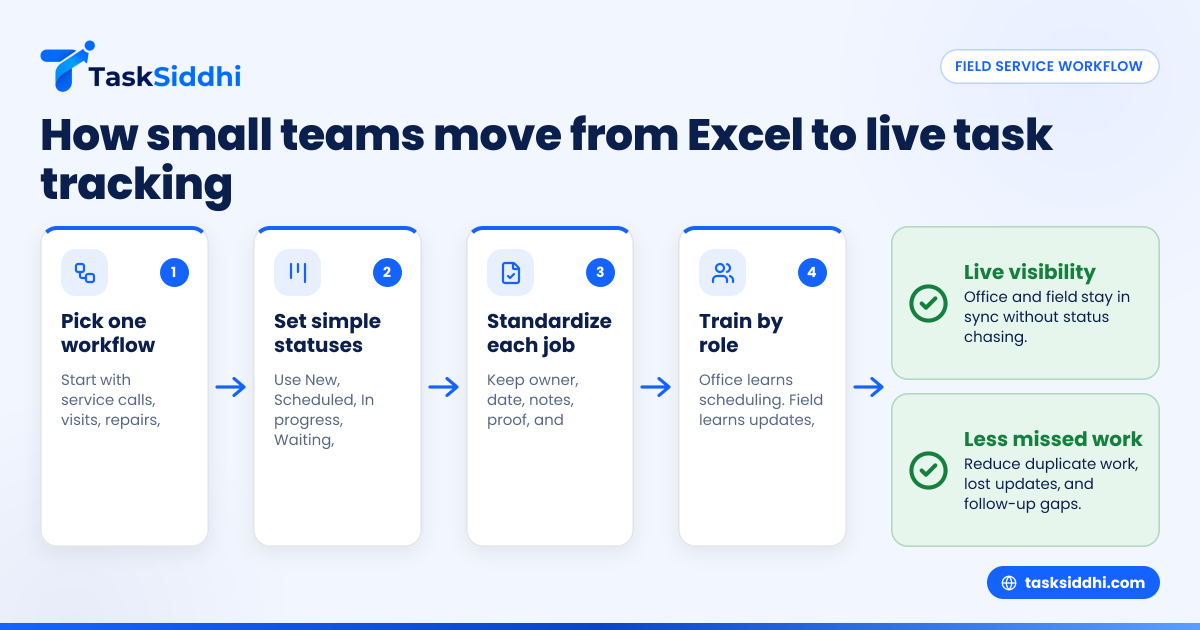
Start with one workflow and one board. Keep the setup simple, train on real jobs, and move active work first instead of migrating every old spreadsheet line.
A careful rollout works better than a full reset. Most small businesses do not need a long software project. They need a cleaner way to run next week’s jobs.
Step 1: Pick one process to move first
Do not move everything at once. Start with the workflow that causes the most confusion. For many field teams, that is scheduled service calls or site visits.
Examples include:
- Daily maintenance visits
- Repair jobs
- Inspection follow-ups
- Client service requests
- Open punch list items
If your team handles several work types, choose the one with the highest volume or the most coordination pain.
Step 2: Define simple statuses
Keep statuses practical. A small team does not need twelve stages. Start with five:
- New
- Scheduled
- In progress
- Waiting
- Done
You can refine later. At the start, clarity matters more than detail.
Step 3: Create one standard task format
Every job should contain the same key fields. That keeps work consistent and easier to review. Include:
- Customer name
- Address
- Contact details
- Assigned technician
- Scheduled date
- Priority
- Notes
- Required proof
- Completion status
This is where features matter. The system should support the way your team already works, without forcing a heavy setup.
Step 4: Train the office and field differently
Office staff need to learn assignment, scheduling, and review. Field staff need to learn how to open a job, update status, add notes, and attach proof. Keep training short and based on actual jobs.
One common mistake is giving everyone the same demo. That wastes time and confuses adoption.
Step 5: Run Excel in parallel for one week only
A short overlap can reduce risk. But do not keep both systems alive for too long. If people think the spreadsheet is still the real record, they will keep using it.
Set a clear switch date. After that date, all active work lives in the task system.
Step 6: Review the first two weeks closely
Check where the team gets stuck. Usually, the issue is not resistance. It is one missing field, one unclear status, or one extra step on mobile. Fix those quickly.
If your work includes both shop tasks and on-site work, service jobs and client work can help you think through how to structure the board.
Which features matter most for a field service team?
The most important features are mobile updates, clear ownership, simple statuses, proof of work, time logs, and basic automation. Fancy dashboards matter less than fast updates and reliable records.
When owners compare tools, it is easy to get distracted by long feature lists. For a small team, what matters is daily usefulness. Here is how to evaluate the essentials.
Task boards that match real work
A board should show where every active job stands. That gives dispatchers and owners a fast view of the day. If the board is hard to scan, people will return to side notes and text chains.
Time tracking tied to the job
A separate timesheet creates extra admin work. Time should connect directly to the task. That helps with labor review, profitability checks, and estimating future work more accurately.
For many businesses, this is one of the fastest wins. Instead of asking how long jobs usually take, managers can see a real pattern over time.
Automation for reminders and routine steps
Small teams lose a lot of time on repetitive follow-up. Reminders for overdue work, auto-assignment rules, and status-based actions help keep jobs moving. Automation is useful when it removes repeat admin, not when it adds setup complexity.
Mobile use that is genuinely simple
Field teams will only use a tool consistently if updates take very little effort. Opening a job, adding a note, changing status, and attaching proof should all be straightforward.
That is why many owners test the phone workflow before anything else.
What does it cost?
The real cost is not just software. It is also missed jobs, slow updates, extra admin time, and poor visibility. A better tracker should save enough labor and confusion to justify the switch.
When comparing options, avoid looking only at subscription price. Think about the current cost of spreadsheet-based coordination.
For example, if your office manager spends 45 minutes a day chasing updates, that is almost 4 hours a week. If technicians call in for routine clarifications several times a day, that adds even more hidden cost. If one missed follow-up causes a return trip across town, the expense grows quickly.
There are also softer costs:
- Slower invoicing because job details are incomplete
- More disputes because proof is missing
- Delayed payroll review because time logs are unclear
- Poor workload balance because managers cannot see capacity
A practical tool should reduce those losses. If you are deciding between free and paid options, the free vs paid comparison can help frame the trade-offs. The right decision is usually the one your team will actually use every day.
A simple checklist for choosing the right tool
If you are comparing software this week, use a short checklist. Do not let the buying process become bigger than the problem.
Ask these seven questions
- Can the office assign and track jobs in one place?
- Can technicians update tasks from a phone in a few taps?
- Can each job hold notes, photos, and proof of work?
- Can we see overdue and in-progress work without manual sorting?
- Can we track time inside the task?
- Can we create basic reports without exporting to Excel?
- Can the team learn the core workflow in under a day?
If the answer is no to several of these, the tool may not be a true team task tracker Excel alternative for field service work.
Focus on adoption, not just features
The best system is the one your team uses consistently. That means simple screens, clear statuses, and no need for constant retraining.
For most small teams, success comes from reducing friction. The tool should feel like a cleaner way to run the same business, not a whole new operating model.
If your team is already relying on phone updates from the field, the mobile app experience should be near the top of your evaluation list.
Final thoughts
Excel is helpful until it becomes the reason your team misses updates, repeats work, and spends the day asking for status. A good team task tracker Excel alternative gives your field service team one live system for assignment, progress, proof, time, and follow-up.
If you want to see how TaskSiddhi supports boards, field updates, time logs, and reporting, take the product tour or compare options on pricing.
Frequently asked questions
Is Excel ever good enough for task tracking?
Yes, for a very small team with simple and stable work. But once jobs change often during the day, Excel usually becomes hard to keep accurate. That is when a live task system becomes more useful.