

A daily work report for field staff is a simple record of what each technician, installer, inspector, or service rep did during the day. In the United States, the best report is short, consistent, and easy to review, so managers can spot delays, confirm work completed, and keep payroll, billing, and customer follow-up clean.
Key takeaways
- A good daily work report for field staff captures jobs done, time spent, location proof, issues, and next steps.
- The best format is simple enough for mobile use and structured enough for weekly review.
- Managers should review reports for exceptions, not read every line the same way every day.
- Photos, timestamps, and customer notes reduce billing disputes and missed callbacks.
- A standard report helps connect field work to payroll, invoicing, and customer communication.
- Digital reporting is usually more reliable than WhatsApp threads, paper forms, or scattered spreadsheets.
What is a daily work report for field staff?
A daily work report for field staff is the end-of-day summary of work completed outside the office. It usually covers where the employee went, what work was done, how long it took, what materials were used, what problems came up, and what still needs action.
For a U.S. business, this matters because field teams often affect both payroll and revenue on the same day. A missed note can delay an invoice. A missing timestamp can create a time dispute. An unclear status can cause a second truck roll that costs real money.
Think about a service company in Houston with 12 technicians. If each tech finishes four jobs a day, that is almost 1,000 job outcomes every month to track. Without a standard report, the owner is left guessing which jobs are complete, which need parts, and which customers still expect a callback.
A strong daily work report helps in five practical ways:
- It confirms work completed.
- It supports payroll and time records.
- It helps invoice faster.
- It gives managers a review trail.
- It improves customer follow-up.
The report does not need to be long. In fact, shorter is usually better if the fields are structured. Most teams do better with checkboxes, dropdowns, and short notes than with open-ended paragraphs.
What should a daily work report for field staff include?
It should capture the minimum facts needed to confirm the day’s work, resolve exceptions, and decide the next action. Keep it short: job, time, outcome, proof, issues, and next step.
The core fields every report should have
If you want consistency, start with the same basic fields for every role. A field employee should not have to guess what to enter. A manager should not have to decode different report styles from different people.
Here is a practical format for most U.S. field teams:
- Employee name
- Date
- First start time
- Last finish time
- Total hours worked
- Jobs or site visits completed
- Customer or site name
- Address or service area
- Arrival time and completion time
- Work performed
- Job status
- Photos or proof of visit
- Materials or parts used
- Customer signature or approval, if required
- Issues, delays, or safety concerns
- Follow-up needed
- Return visit needed: yes or no
This structure works for many businesses, including HVAC, plumbing, pest control, security systems, property maintenance, low-voltage installation, and field inspection teams.
If your team does client work rather than service calls, the same structure still helps. You simply shift the language from “job” to “task,” “site visit,” or “deliverable.” For those teams, client work often needs progress notes and approvals rather than materials used.
What to track by role
Different field roles need different levels of detail. Do not force one giant form on everyone.
For example:
- A technician may need parts used, fault found, and fix completed.
- An installer may need equipment installed, measurements, and sign-off.
- A field sales rep may need visit outcome, follow-up date, and decision maker met.
- An inspector may need checklist completion, photos, and issue severity.
- A maintenance crew may need labor hours by site and unresolved issues.
The rule is simple. Track only what the business actually uses to make a decision the next day.
Why do field teams struggle with daily reporting?
Most teams struggle because the process is unclear, too long, or built around office habits instead of field reality. If a report takes 20 minutes after a long day, people delay it, rush it, or skip key details.
A lot of U.S. small businesses still run daily updates through phone calls, texts, email, paper sheets, or group chats. That feels fast at first. But over time it creates four common problems.
First, updates get buried. A manager cannot easily find one technician’s note from three days ago in a message thread.
Second, details are inconsistent. One person sends “done,” another sends a photo, another sends nothing until Friday.
Third, review becomes manual. Someone in the office has to call back, retype notes into QuickBooks, or ask who was at which site.
Fourth, there is no clean audit trail. That matters when a customer asks why a bill shows 3.5 hours, or when an employee disputes a shift record.
This is where structured reporting helps. A system built around field visits can keep site proof, timestamps, and notes tied to the job itself instead of spreading them across multiple tools.
The biggest mistake: tracking too much
Many owners try to fix bad reporting by adding more fields. Usually that makes things worse.
If your team has 18 required fields but only five are truly used, people will start entering low-quality information just to finish the form. That gives you more data, but less truth.
A better approach is to define:
- What must be entered before a job can be marked complete
- What is optional
- What only applies to certain job types
- What a manager reviews daily versus weekly
Simple beats complete. Complete only helps if it gets filled accurately.
How should you format a daily work report?
Use a mobile-first format with short fields, clear statuses, and required proof where needed. The best daily work report for field staff can be completed in a minute or two after each visit, not only at the end of the day.
A simple daily work report format
Here is a practical layout for one employee’s day:
Daily work report
- Employee:
- Date:
- Total jobs assigned:
- Total jobs completed:
- Start time:
- End time:
- Total hours:
- Mileage or travel notes:
- Job 1:
- Customer/site:
- Address:
- Arrival:
- Completion:
- Work done:
- Status:
- Photos added:
- Parts/materials used:
- Customer note:
- Follow-up needed:
- Job 2:
- Customer/site:
- Address:
- Arrival:
- Completion:
- Work done:
- Status:
- Photos added:
- Parts/materials used:
- Customer note:
- Follow-up needed:
- End-of-day issues:
- Safety concern reported:
- Ready for tomorrow: yes or no
This format works well because it mirrors how a field day actually happens. It also makes reporting easier to review in batches.
Status options to standardize
Statuses are one of the most useful parts of a report. Keep them limited and precise.
Good options include:
- Completed
- Partially completed
- Customer unavailable
- Waiting for parts
- Follow-up required
- Rescheduled
- Canceled
- Could not access site
When everyone uses the same statuses, reporting becomes much more useful. You can quickly see why work is getting stuck.
If you use a digital board, boards and views can help managers sort jobs by status instead of digging through text messages.
What should managers review every day?
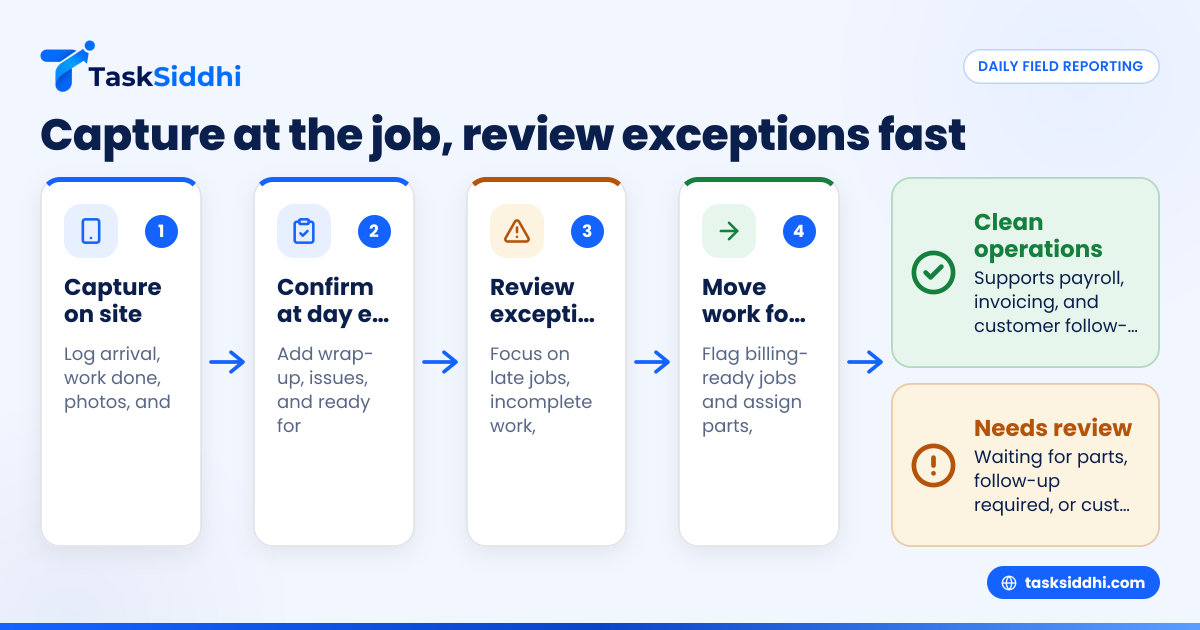
Review exceptions first: late jobs, incomplete work, missing proof, customer issues, and time gaps. Do not spend the same effort on routine completed jobs that have clean notes and proof.
A fast daily review process
A manager does not need to read every report the same way. The goal is to spot risk, unblock tomorrow’s work, and keep payroll and billing clean.
Use this five-step review process:
- Check missing reports See who did not submit by the cutoff time.
- Review incomplete or exception statuses Focus on “waiting for parts,” “customer unavailable,” and “follow-up required.”
- Check proof for completed work Confirm timestamps, notes, and photos where required.
- Flag billing-ready jobs Move jobs with complete documentation toward invoicing.
- Assign next actions Order parts, schedule return visits, call customers, or correct timesheets.
This process can often be done in 20 to 30 minutes for a small team if the reporting format is structured.
What managers should not do
Do not use the daily report as a place to micromanage every minute. Field staff will resist reporting if they feel it is mostly surveillance.
Do not wait until Friday to review the week. By then, memory is weaker and customer recovery is harder.
Do not mix payroll approval, coaching, and performance discipline into one rushed review. Daily review should focus on facts and next actions first.
A better system separates operational review from trend review. Daily work reports tell you what happened today. Weekly reports tell you whether a pattern is developing.
Can AI help with ai daily work reports?
Yes, but only if your reporting process is already structured. AI can summarize patterns, flag exceptions, and highlight missing items, but it cannot fix vague updates or poor data capture.
Where AI can actually help
The phrase “ai daily work” sounds impressive, but the practical value is simple. AI is most useful after your team already captures standard job data the right way.
For example, AI-style review can help managers by:
- Summarizing all unfinished jobs at day end
- Highlighting technicians with repeated missing photos
- Grouping delays by reason
- Spotting customers who need follow-up
- Turning raw updates into a cleaner manager summary
That is helpful when your team grows from five people to fifteen. A manager cannot manually interpret everything forever.
Still, do not build your process around fancy language. Build it around clean data entry and useful review. Then any ai daily work workflow becomes more useful because the source information is reliable.
For many teams, the bigger win is not AI itself. The bigger win is moving from free-form updates to structured reporting that can actually be reviewed.
How often should field staff submit reports?
At the end of each job for key details, then once at day end for the final summary. Waiting until evening for everything usually creates errors, missing notes, and forgotten issues.
The best timing for submission
The strongest reporting habit is “capture at the job, confirm at day end.”
That means:
- Enter arrival, work done, photos, and outcome while still on site
- Add a short day-end wrap-up before clocking out
- Submit before a fixed daily cutoff
This timing improves accuracy. It also helps the office team act faster. If a customer in Chicago needs a return visit, the scheduler can see that today instead of hearing about it tomorrow morning.
If your team works in the field all day, mobile entry matters. A mobile app reduces the gap between the job happening and the report being entered.
Cutoff times and late submissions
Set a clear rule. For example, all reports must be complete before the employee ends the day unless there is an approved exception.
If reports are often late, look at the cause before blaming the team:
- Is the form too long?
- Are people duplicating data?
- Is cell coverage a problem in some areas?
- Do supervisors review inconsistently?
- Are staff expected to remember everything at the end of the day?
Fix the process first. Then enforce the standard.
How to roll out a reporting system without pushback
The easiest rollout is a short pilot with one team, one report format, and one review routine. Tell staff exactly why the report exists and how it helps them close jobs, avoid disputes, and reduce repeat calls.
A simple rollout plan
Use this approach if you are moving from paper, spreadsheets, or message threads.
- Pick one report template Start with the minimum fields.
- Train on real jobs Use examples from the team’s actual day.
- Define submission rules Set the cutoff time and required fields.
- Show managers how to review A bad review process kills compliance.
- Pilot for two weeks Collect feedback from both field staff and office staff.
- Remove fields that no one uses Keep the form lean.
- Track adoption Look at missing reports, late reports, and incomplete reports.
The key is to show that the report leads to action. If employees submit reports and nothing happens, quality drops fast.
Connect reports to payroll, billing, and follow-up
A daily work report should not live in isolation. It should support the rest of your operation.
For example:
- Time records can support payroll review
- Job completion can support invoicing
- Site proof can support customer questions
- Open issues can support dispatch planning
That is why many service businesses also tie reports to time tracking and job workflows for service jobs. When time, proof, and status sit together, office work gets easier.
You can also use automation to route incomplete jobs, flag missing proof, or notify a manager when a critical issue is reported.
A practical review scorecard for owners
If you own or manage a field business, you do not need to read every report line by line forever. You need a simple scorecard that tells you whether the reporting system is healthy.
Review these each week:
- Report submission rate
- On-time submission rate
- Completed jobs with proof
- Incomplete jobs by reason
- Return visits created
- Average time from job completion to invoice-ready status
- Jobs missing customer notes
- Repeated issues by employee or area
This scorecard helps you move from chasing updates to managing performance.
As your team grows, a good reporting process becomes operational control. You can see what happened, what is blocked, and what needs attention next. That is far better than calling five people at 7:30 p.m. to reconstruct the day.
If you want to move from scattered updates to structured job reporting, see the product tour or compare plans on pricing.
Frequently asked questions
Is a daily work report the same as a timesheet?
No. A timesheet mainly records hours worked. A daily work report explains what happened during those hours, including job outcomes, proof, issues, and follow-up needs.
Should field staff write one report per day or one per job?
Usually both in a simple way. Capture key details at each job, then use a short day-end summary to confirm totals, issues, and next actions.
What is the best format for a small field team?
A short mobile form with standard statuses is usually best. It should be easy to complete on the road and easy for a manager to review quickly.