

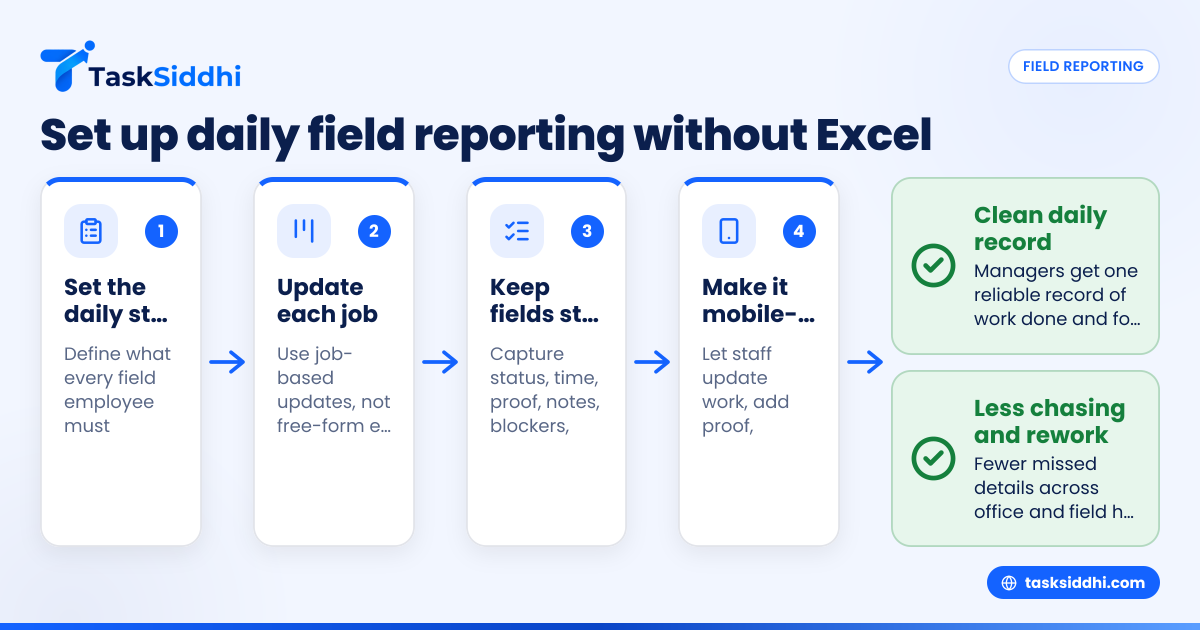
A field staff daily report system in the United States is a simple process for collecting job updates, site proof, time spent, and issues from every field employee in one place each day. The goal is to replace Excel files, text threads, and paper notes with a repeatable system that managers can trust and staff can complete quickly from the field.
Key takeaways
- A good field staff daily report system captures status, time, proof of work, and blockers in one daily routine.
- Excel and text threads break down when you need accountability, search, reporting, and clean handoffs between office and field teams.
- The best setup is short, mobile-first, and tied to active jobs, site visits, or client tasks.
- Standard fields matter more than long reports. Keep entries fast so teams actually submit them.
- A clear review process is just as important as the reporting form itself.
- Small service and field teams in the United States can set this up without buying a large ERP system.
Why daily reporting matters for field teams in the United States
If you run a field team in Chicago, Houston, or Detroit, you already know the problem. Updates come in through calls, text messages, WhatsApp-like habits, photos in personal phones, and scattered spreadsheets. At the end of the day, nobody has one clean record of what happened.
That creates expensive confusion. A manager may not know which jobs were completed. Payroll or billing may be missing hours. A customer may say your tech never arrived. Your office team may spend the next morning chasing basic answers.
A daily report system solves that by creating one standard end-of-day record for each person or crew. It should answer a few key questions:
- What jobs or site visits were handled today?
- When did work start and stop?
- What work was completed?
- What proof was collected?
- What issue needs follow-up tomorrow?
For many small businesses, this is not about “more reporting.” It is about less chasing, less rework, and fewer missed details.
What should a field staff daily report system include?
A field report should be short enough to complete in a few minutes. If it feels like paperwork, people will avoid it. If it is too vague, managers cannot use it.
Start with the minimum fields that make the report useful.
Core information to capture every day
For each staff member or crew, collect:
- Employee or crew name
- Date
- Job, client, site, or work order name
- Arrival and departure time
- Work completed
- Work still pending
- Photos or proof of visit
- Materials used, if needed
- Customer note or site note
- Issue, delay, or blocker
- Next action
This structure works well for HVAC, maintenance, pest control, property services, electrical work, plumbing, security, landscaping, and other mobile service teams.
Keep the report tied to actual work
The biggest mistake is making daily reporting separate from the day’s jobs. Then staff have to remember everything later. That is where details get lost.
A better setup links reporting to the board, task, or job card staff already use. That way the daily report becomes the final update on work already assigned. If your team manages jobs on digital boards and views, daily updates are faster and easier to review.
Proof matters more than long writing
Most managers do not need a long essay. They need proof and clarity. In field operations, proof usually means:
- Timestamped photo
- Job status update
- Visit confirmation
- Time spent
- Note about exceptions
This is especially important when customers dispute service, internal handoffs break, or billing depends on completed work.
Why do Excel sheets and text threads fail?
Excel and text threads fail because they separate work updates from the job itself. Managers cannot easily search, verify, summarize, or follow up. You get duplicate entries, missing context, and no reliable daily record when someone forgets to reply or updates the wrong file.
Excel seems simple at first. A text group seems even simpler. But both create the same long-term problems.
Excel breaks in the real world
A spreadsheet can list jobs and employee names. But field work changes fast. Staff arrive late because of traffic. A customer adds extra work. A site is locked. A crew moves from one stop to another. Excel does not capture that well unless someone keeps manually updating it all day.
That means the office ends up maintaining the sheet instead of running operations.
Common issues include:
- Multiple versions of the same file
- Delayed updates from the field
- Missing photos and proof
- No clear audit trail
- Hard-to-read notes
- Manual summary work at the end of the week
Text threads create noise, not records
Text threads feel fast because everyone already uses them. But speed is not the same as structure. Important updates get buried under unrelated messages. Photos arrive with no job ID. Managers cannot tell whether silence means “done” or “forgot.”
When someone leaves the company, finding old updates becomes painful. Even worse, job details often stay in one supervisor’s phone instead of a shared system.
For businesses that depend on phone and text for customer communication, internal reporting still needs a better format than free-form messaging.
How do you set up a field staff daily report system?
Start with one daily workflow tied to each active job or visit. Make reporting mobile-first, keep required fields short, require proof where needed, and assign one manager to review submissions before the next workday begins.
Step 1: define the daily reporting standard
Write down exactly what every field employee must submit before the end of the day. Keep it simple. One page is enough.
For example, your standard might say:
- Update every assigned job before clocking out.
- Mark each job as complete, pending, or needs follow-up.
- Add one short work summary.
- Upload at least one photo for onsite work.
- Record total time spent.
- Flag any issue that affects tomorrow’s schedule or billing.
This turns reporting into a routine instead of a judgment call.
Step 2: use job-based updates, not free-form reports
Do not ask people to write “what I did today” from memory. Ask them to update each assigned job as they complete it.
That keeps context attached to the work itself. It also makes review easier. A manager can sort jobs by status, employee, region, or due date instead of reading a long message thread.
For teams handling site work and mobile assignments, this works especially well with field visits and service jobs.
Step 3: standardize the required fields
Use the same reporting fields across the team. If one employee writes “done,” another writes “finished at 4,” and another sends only a photo, your reports are not useful.
A standard field set might include:
- Job status
- Arrival time
- Departure time
- Work summary
- Customer/site note
- Issue or delay
- Photo upload
- Follow-up needed
This is where many teams begin using simple workflows and automation to reduce manual reminders and status changes.
Step 4: make it mobile-first
Field staff should not have to wait until they get home or back to the office. Reporting needs to happen from the truck, jobsite, parking lot, or customer location.
That means the system should work well on a phone. Staff should be able to open assigned work, add notes, upload proof, and mark status in a few taps using a mobile app.
If it takes too many screens or too much typing, adoption drops fast.
Step 5: build a manager review routine
Many companies focus on submission but ignore review. That is a mistake. A daily report system only works if someone checks it consistently.
Assign one person to review all submissions at a fixed time. That review should answer:
- Which jobs are complete?
- Which jobs need customer follow-up?
- Which hours need payroll review?
- Which materials or extra work affect billing?
- Which issues change tomorrow’s plan?
A daily review prevents small problems from becoming end-of-week surprises.
What data should managers review each day?
Managers should review job status, time spent, proof of service, exceptions, and next-day risks. Focus on anything that affects customer communication, billing, scheduling, or employee accountability. The review should take minutes, not hours, if the reporting format is standardized.
Focus on exceptions first
Do not read every report the same way. Start with exceptions:
- Jobs marked incomplete
- Missing proof
- Missing time entries
- Delays or blocked access
- Customer complaints
- Extra work requested onsite
This lets managers act quickly before the next morning’s dispatch or schedule.
Use reports to spot patterns
Over time, daily reporting helps you find patterns that text threads never reveal. You may notice one route always runs late, one property manager often changes scope, or one crew consistently forgets materials.
That is where reporting becomes operational control, not just recordkeeping. Clean reporting makes weekly reviews and staffing decisions much easier.
How can ai field staff workflows help without adding complexity?
Ai field staff workflows can help by summarizing repeated issues, highlighting missing updates, and surfacing patterns managers may miss in manual review. But the base system still needs clean job data, simple forms, and a daily review habit.
A lot of owners hear “AI” and imagine a bigger system than they need. For a team of 5 to 30 people, the real value is not fancy prediction. The real value is faster visibility.
If your data is already structured, ai field staff tools can support managers by helping them:
- Spot jobs with missing proof
- Flag delayed work
- Summarize field notes
- Surface repeat customer issues
- Identify crews with incomplete end-of-day submissions
But AI cannot fix poor process. If updates still live in random texts and separate spreadsheets, the system has nothing reliable to work with.
That is why you should build the daily reporting habit first. Then add smarter review and summary workflows later if they save time.
A practical setup for a small U.S. field business
Let’s say you run a seven-person service team in Houston. Today, you may dispatch jobs by phone, track hours in a spreadsheet, and ask for photos by text. At 6:30 PM, your office manager still does not know which jobs are actually done.
A better daily reporting system would look like this:
Morning
- Assign jobs to each technician.
- Set due dates and priorities.
- Add site details and customer notes.
During the day
- Techs open the assigned job on their phone.
- They update status as work progresses.
- They add time, notes, and photos onsite.
- They flag any issue before leaving the site.
End of day
- Each tech confirms all assigned jobs are updated.
- The manager reviews exceptions.
- The office team follows up on incomplete work, billing notes, or schedule changes.
This process gives you one operating record. It also reduces the “I thought someone else handled it” problem.
For teams that juggle ongoing client deliverables and field tasks, the same approach can also support client work.
What does it cost to move off Excel?
The real cost is usually not software. It is the time lost to chasing updates, fixing billing mistakes, and resolving customer disputes. For most small teams, even one missed job or one unbilled visit can cost more than a structured reporting system.
Count the hidden cost of manual reporting
Owners often compare a spreadsheet to software and say the spreadsheet is free. It is not free. It costs labor and errors.
Look at common weekly losses:
- 3 hours of manager follow-up
- 2 payroll corrections
- 1 missed customer update
- 1 disputed service visit
- 1 delayed invoice
Even at modest wage rates, those costs add up quickly. If one manager spends 30 minutes each day cleaning up reports, that is around 10 hours each month. At $30 per hour, that is $300 in management time alone, before you count missed revenue or customer friction.
That does not mean you should buy the largest platform available. It means your decision should be based on total operating cost, not just subscription cost.
If you are comparing options, it helps to look at free vs paid and then evaluate pricing based on your workflow, not just headcount.
How to roll this out without staff resistance
The best rollout is small, clear, and consistent. Do not launch a huge process change all at once.
Start with one team or one workflow
Pick one service line, one supervisor, or one crew. Run the new daily reporting process for two weeks. Track only a few things:
- Submission rate
- Missing proof
- Time to review
- Number of follow-up calls needed
- Billing or payroll corrections
This gives you a real baseline.
Train on actions, not theory
Do not explain the whole system in a long meeting. Show staff exactly what to do:
- Open assigned job.
- Update status.
- Add note.
- Upload photo.
- Submit before end of day.
That is enough to start.
Set non-negotiable rules
If reporting is optional, it will fail. Set a few clear rules:
- No job is complete without status update.
- Onsite work needs proof.
- Time must be entered daily.
- Blockers must be flagged the same day.
Rules create consistency. Consistency creates useful data.
Review and coach weekly
In the first month, expect mistakes. That is normal. Use weekly reviews to coach the team on missing details, unclear notes, or slow submission habits.
If your team also needs clean labor records by task or visit, built-in time tracking can help reduce separate logs and duplicate entry.
Choosing the right tool for daily field reporting
You do not need a heavy back-office system just to collect daily field updates. Most small and midsize field teams need a simpler setup.
Look for a tool that supports:
- Job-based workflows
- Mobile updates
- Photo proof
- Status tracking
- Time capture
- Manager-friendly summaries
It should be easy for field workers and useful for supervisors. If either side struggles, adoption will be weak.
TaskSiddhi is built for teams that need clear work status, proof from the field, and simple manager review without relying on Excel or text threads. You can explore the core features to see whether the workflow fits your operation.
Common mistakes to avoid
Even a good tool will fail if the process is weak. Watch out for these problems.
Asking for too much detail
Long forms reduce completion rates. Keep required inputs short. Add optional notes only where needed.
Reviewing too late
If you wait until Friday, the daily report has lost much of its value. Review while details still matter.