

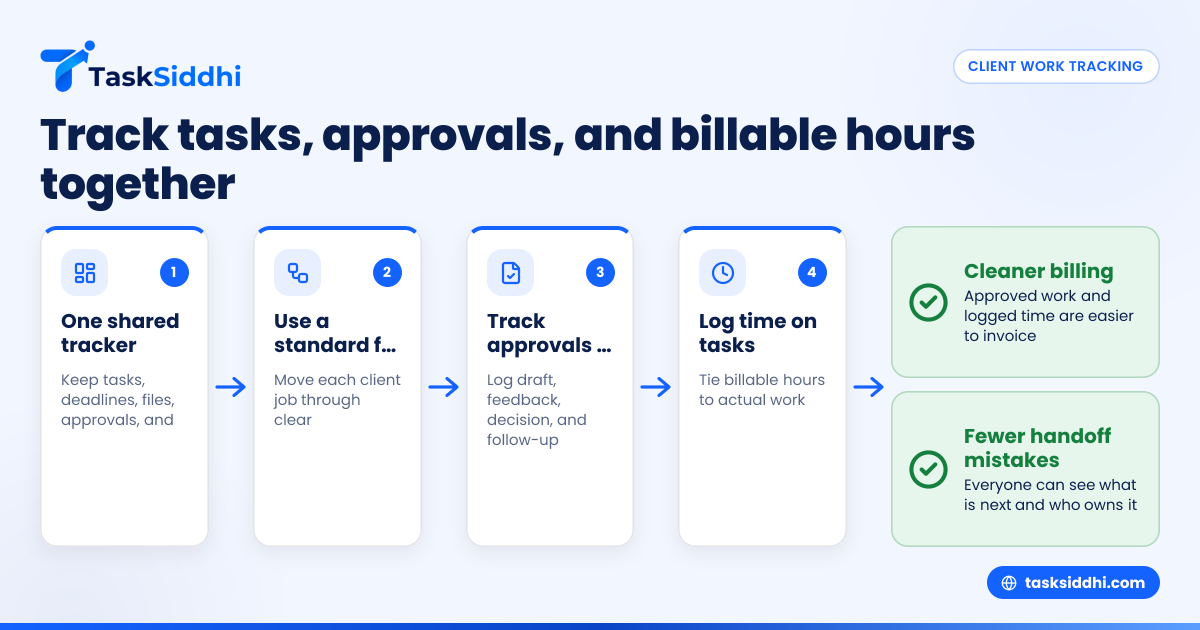
A client project tracker for small agencies in the United States is a simple system that keeps tasks, approvals, deadlines, files, and billable hours tied to each client job. The goal is not more software. The goal is fewer handoff mistakes, cleaner billing, and a clear view of what each team member needs to do next.
Key takeaways
- A good client project tracker gives small agencies one place for tasks, approvals, deadlines, and time entries.
- The best setup is simple: one board for work status, one standard job flow, and clear owners for every task.
- Approvals should be tracked as part of the project, not buried in email threads or text messages.
- Billable hours need rules. Decide what gets tracked, who tracks it, and when managers review it.
- Small agencies in the United States often outgrow spreadsheets when they handle multiple clients, revisions, and recurring work.
- A tracker works best when your team can update it from the office and the field through a mobile app.
What is a client project tracker for small agencies?
A client project tracker for small agencies is a shared workspace that shows every active client job, its current stage, who owns each next step, what the client has approved, and how much time has been spent. For a five-person creative, marketing, production, or service agency, this removes the need to piece together updates from email, spreadsheets, and paper notes.
In many small agencies, the real problem is not lack of effort. It is scattered information. The account manager has the client request in email. The designer has the latest file in a folder. The owner has billable hours in a spreadsheet. The client approval sits in a text thread. By the time invoicing happens, someone is guessing.
A client project tracker fixes that by making the project itself the center of the work. Each client job becomes a record with tasks, due dates, status, notes, files, and time. Instead of asking, “Who has the latest update?” the team can see it right away.
This matters for agencies in cities like Chicago, Houston, or Detroit where client work moves fast and response times affect renewals. Small teams do not have extra project coordinators. They need a system that helps them stay organized without adding a lot of admin time.
For agencies doing recurring retainer work, campaign production, web updates, design revisions, or on-site client work, a tracker also creates accountability. You can see where work slows down, where approvals get stuck, and whether a project is still profitable.
Why do small agencies need one place for tasks, approvals, and billable hours?
Small agencies need one place because client work breaks down when project data lives in separate tools. When tasks, approvals, and billable time are split across email, spreadsheets, and chat, teams miss deadlines, lose context, and bill late or inaccurately.
That short answer is the business case. A small agency usually runs on speed and trust. Clients expect quick updates. Team members switch between accounts all day. Owners need to know which work is on track and which work is eating margin.
When your process is spread out, three problems show up fast:
1. Tasks slip between handoffs
A client request comes in. Someone acknowledges it. Another person starts work. Then the project waits because no one assigned the revision, booked the review, or updated the due date. This happens more often than most teams admit.
A tracker reduces that by giving every task a clear owner and a visible status. With boards and views, teams can see work by stage, person, or due date instead of scanning long message threads.
2. Approvals get lost or become unclear
Many agencies think they have approval records because they have emails. But searching old inbox threads is not a process. If a client disputes a revision, asks why something shipped early, or questions a bill, your team needs a clear project history.
A tracker should show when a draft was submitted, what feedback came back, what was changed, and when approval happened. That is much easier than rebuilding the story at month end.
3. Billable hours become a guess
Without a consistent method for time capture, agencies either underbill or over-argue. Neither is good. Time entries need to be tied to real tasks and reviewed often. If they are not, invoices go out late and clients question line items.
Using a structured approach to time tracking helps agencies connect hours to project stages, revisions, and individual contributors.
What should a client project tracker include?
A client project tracker for small agencies should include project stages, assigned tasks, due dates, approval records, files or links, billable hours, and reporting. If it does not help your team answer “what is next, who owns it, and what can we bill,” it is incomplete.
That is the simple version. In practice, the tracker should support the daily reality of small agency work, where priorities change fast and clients request updates by email or phone.
Core fields every agency should track
Start with these:
- Client name
- Project or job name
- Service type
- Current status
- Owner
- Due date
- Priority
- Approval status
- Billable or non-billable tag
- Actual hours logged
- Notes and client requests
You do not need dozens of custom fields on day one. Too much detail slows adoption. Begin with the fields your team will actually update.
A standard workflow for every project
Most agencies benefit from a simple project flow such as:
- New request
- Scope review
- In progress
- Internal review
- Client review
- Approved
- Delivered
- Invoiced
- Closed
This standard flow matters because it makes reporting useful. If every project has a different set of statuses, your dashboards become hard to trust.
With client work, agencies can organize repeatable delivery steps so each project follows a clear path.
Time entries tied to actual work
A separate timesheet can help with payroll or accounting, but project control improves when time is attached to tasks. That way, if a logo revision took four extra hours or a content update turned into a full rewrite, you can see where that happened.
This is also where the phrase ai client project becomes relevant. Many teams want smarter project summaries and trend spotting, but the input still has to be clean. If tasks, statuses, and time entries are messy, no ai client project workflow will fix the basics.
How to set up a client project tracker for a small agency
The fastest way to set up a useful tracker is to start with one repeatable workflow, one board, and a short list of required fields. Do not build for every edge case. Build for the 80 percent of projects your team handles every week.
Here is a practical setup process.
1. List your common project types
Write down the work you do most often. For example:
- Website updates
- Monthly marketing deliverables
- Design requests
- Client onboarding
- Site visits
- Maintenance or support work
These categories help you see what should be standardized and what needs a different workflow.
2. Define your project stages
Use a short, consistent stage list. Avoid vague statuses like “working on it” or “waiting.” Pick statuses that show movement and decision points.
Good examples include:
- New
- Scheduled
- In progress
- Awaiting internal review
- Awaiting client approval
- Approved
- Delivered
- Invoiced
If a stage matters to billing or handoff, it belongs in the tracker.
3. Decide who owns each stage
A tracker works when ownership is clear. For each project type, define who is responsible at each point. This may include:
- Account manager for intake
- Designer or specialist for execution
- Team lead for review
- Client for approval
- Owner or admin for invoicing review
The person owning the stage should be responsible for updating it.
4. Set rules for approvals
Approvals need structure. Decide:
- What must be approved
- Who can approve it
- Where the approval is recorded
- What happens after approval
- What counts as a revision versus new scope
This keeps your team from acting on “looks good” comments that later become disputes.
5. Create time tracking habits
Set a simple rule. For example, every billable task must have time logged on the same day it is completed. Managers then review entries twice a week. This is easier to maintain than a big Friday catch-up.
Use features that let the team keep project status and time updates close together, so they do not need to jump between several systems.
6. Add recurring reporting
Agency owners need quick visibility. A weekly report should show:
- Active projects by stage
- Overdue tasks
- Projects waiting on client approval
- Billable hours by client
- Work completed this week
- Capacity by team member
A simple reporting view can help managers spot bottlenecks before they hurt delivery or invoicing.
How do you track client approvals without losing email context?
Track approvals inside the project record, with the related task, due date, file link, and decision date attached. Email can still be the communication channel, but the approval result should be logged in the tracker so the whole team sees the latest approved version.
That short answer solves the core problem. You do not need to stop using email. Most clients in the United States still approve work by email or phone. But your internal process should not depend on searching inboxes later.
Build a simple approval routine
A practical approval routine looks like this:
- Submit the draft and set the project stage to “Awaiting client approval.”
- Add a due date for expected feedback.
- Attach or link the file being reviewed.
- Record any client comments in the project notes.
- Mark the result as approved, changes requested, or on hold.
- If revisions are needed, create a follow-up task with a new owner and due date.
This approach gives you a usable project history. It also reduces confusion when a client contact changes or another team member needs to step in.
Keep approval language clear
Avoid vague notes like “sent to client” or “waiting.” Be specific:
- “Sent homepage draft for review on 03/14/2026”
- “Client approved copy changes by email on 03/16/2026”
- “Requested two revisions to pricing section”
- “Awaiting final sign-off before publish”
Specific notes support billing and reduce rework.
Separate revisions from scope changes
This is where agencies often lose margin. A client asks for “one more small change,” but the request expands. If your tracker shows the original approval and then logs new requests as fresh tasks, you have a cleaner basis for discussing billable work.
For agencies that also manage on-site delivery or proof of service, field visits can help when the project includes physical checks, site reviews, or client sign-offs outside the office.
How should small agencies track billable hours?
Small agencies should track billable hours against tasks and projects, not only by employee timesheet. This helps owners see whether client work is profitable, whether revisions are eating time, and whether invoices match the work delivered.
That answer is short because the principle is simple. If billable hours are not tied to actual project activity, you lose context. Then billing becomes a debate.
What to track
At minimum, every billable time entry should include:
- Client
- Project
- Task
- Team member
- Date
- Hours or minutes
- Short note about the work done
If your agency bills by the hour, this is essential. If you bill by project or retainer, it is still useful because it shows whether the work stays within your expected margin.
Build review into the week
Do not wait until the end of the month. Review billable time every week. This helps you catch missing entries, unusual overruns, and tasks that should have been re-scoped.
A practical rhythm is:
- Team logs time daily
- Manager reviews twice weekly
- Owner checks client totals weekly
- Finance uses approved totals for invoicing
If you use QuickBooks or Stripe in your finance workflow, the tracker should support clean handoff of approved billable information, even if invoicing happens elsewhere.
Watch for the usual causes of underbilling
Small agencies in the United States often miss billable hours in these areas:
- Client calls that turn into work sessions
- Revision rounds beyond agreed scope
- Internal fix requests caused by unclear approvals
- Rush jobs
- On-site visits
- Admin work attached to client change requests
A strong tracker does not just record hours. It helps you see patterns. If one client always consumes extra review time, you can address that with scope, pricing, or process.
What does a good weekly agency workflow look like?
A good weekly workflow reviews active jobs on Monday, updates status and time daily, checks approval bottlenecks midweek, and reviews billable totals on Friday. The goal is to catch delays early and keep invoicing accurate without adding a lot of admin work.
That pattern works because it creates a repeatable rhythm. Small agencies often do not need a complex operating system. They need a few review points that keep client work moving and stop surprises from building up.
Monday: review all active client work
Check what is due this week, what needs approval, and what is overdue. Reassign blocked tasks fast.
Daily: update status and log time
Make it part of finishing the task. Work is not done until the status is updated and time is logged.
Midweek: review approval bottlenecks
Look for anything sitting in client review too long. Follow up by email or phone as needed.
Friday: review billable totals and next week’s load
See whether projects are over budget, waiting on input, or ready for invoicing. This is where automation can reduce manual follow-ups and routine status changes.
For agencies that also manage repeat service delivery alongside account work, service jobs can help teams standardize recurring client tasks.
What should you look for in a client project tracker?
Look for fast task updates, clear ownership, visible due dates, approval records tied to work, billable time linked to tasks, mobile access, and reporting managers can read quickly. If the team avoids updating it, the setup is too heavy or too confusing.
The best client project tracker for small agencies is one that matches how your team already works, while fixing the parts that are messy. It should be easy to update, easy to review, and clear enough that an owner can understand project status in a few minutes.
Look for these traits:
- Fast task updates
- Clear boards and ownership
- Visible due dates
- Approval notes tied to work
- Billable time linked to tasks
- Mobile access
- Useful reports for managers