

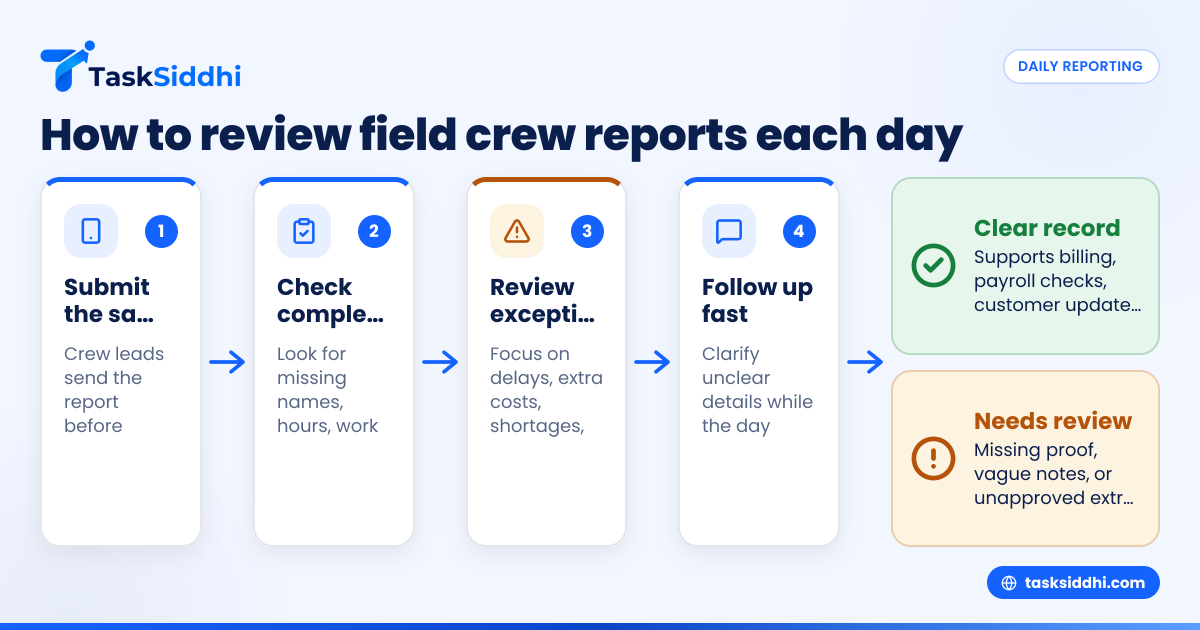
A field crew daily report template is a simple, repeatable way to capture what happened on each job site that day. For contractors in the United States, it should record labor, work completed, materials, equipment, delays, safety issues, photos, and customer sign-off so managers can review progress fast and protect the business if questions come up later.
Key takeaways
- A good field crew daily report template tracks people, work, time, materials, equipment, site conditions, and issues in one place.
- The best daily reports are filled out the same day, ideally from the field on a phone.
- Managers should review reports for missing proof, cost overruns, delays, and repeated job-site problems.
- Daily reports help with billing support, payroll checks, customer communication, and dispute prevention.
- A template should be short enough for crews to use every day and detailed enough to be useful later.
What is a field crew daily report template?
A field crew daily report template is a standard form contractors use to log the day’s site activity. It gives every crew lead the same structure, so reports stay consistent across jobs, customers, and locations.
For a small contractor, this report often replaces scattered notes from calls, text threads, paper sheets, and memory. Instead of asking three people what happened in Houston on Tuesday, a manager can open one report and see the full picture.
A useful template should answer basic questions quickly:
- Who was on site?
- What work was completed?
- When did the crew arrive and leave?
- What materials were used?
- What equipment was used or down?
- Were there delays, safety issues, or customer requests?
- Is there proof, such as photos or signatures?
This matters because field work changes fast. A crew may finish ahead of plan, hit a missing-part delay, wait on access, or discover extra work. If that information is not recorded the same day, it gets lost.
For contractors in cities like Chicago, Detroit, or Houston, daily reports also help when several crews are active at once. Managers can spot which jobs are moving, which are slipping, and where labor hours are going.
Why do contractors in the United States need daily crew reports?
Daily crew reports give contractors a written record of job progress, labor use, and site events. In the United States, that record helps with billing support, payroll review, customer communication, and disputes over delays, change requests, or completed work.
A daily report is not just paperwork. It is operating control.
Many contractors still run field communication through phone calls, email, paper job cards, and group messages. That works until work volume rises. Then common problems appear:
- Crews forget exact hours
- Material use is not tracked by job
- Managers learn about delays too late
- Customers dispute what was done
- Office staff chase missing details for invoices
- Owners cannot compare planned work against actual work
A daily reporting process reduces those problems. It creates a record the office can trust. It also makes review easier at the end of the week, when payroll, customer updates, and invoicing start piling up.
For contractors that bill by time and materials, daily reports support invoice backup. For fixed-price jobs, they still matter because they show labor effort, site issues, and scope growth. If a customer questions an extra charge or a schedule slip, the daily record is often the first place a manager looks.
What should a field crew daily report template include?
A strong field crew daily report template should capture the minimum facts needed to understand the job day without creating a long form crews avoid. Start with the essentials, then add only the fields your team actually uses to make decisions.
1. Job and customer details
Start with basic identifiers so the report is tied to the right work.
Include:
- Job name or number
- Customer name
- Site address
- Crew lead name
- Date
- Service type or project phase
This sounds obvious, but missing job details create confusion fast, especially when crews visit several sites in one day.
2. Crew attendance and labor hours
You need to know who worked and for how long.
Include:
- Names of crew members
- Arrival time
- Start work time
- Breaks, if tracked
- End work time
- Total hours on site
- Overtime notes, if needed
This section helps managers compare labor use against estimate and check payroll accuracy. If you already track time separately, keep this section short, but still connect labor to the job day. Tools with built-in time tracking can reduce duplicate entry.
3. Work completed today
This is the heart of the report.
Ask crews to record:
- Main tasks completed
- Units installed, repaired, inspected, or delivered
- Areas worked on
- Open items remaining
- Whether work matched the plan
Make this a structured section if possible. “Worked on electrical” is too vague. “Installed conduit in west corridor, tested panel A, and completed 8 fixture replacements” is much more useful.
4. Materials used
Materials affect job cost and future scheduling.
Record:
- Key materials used
- Quantities used
- Materials delivered to site
- Shortages or missing items
- Items needed next day
This is where cost creep often shows up. If crews use more material than planned or repeatedly wait on parts, managers need to know early.
5. Equipment and vehicles
For many contractors, equipment issues cause hidden delays.
Track:
- Equipment used
- Vehicle used, if relevant
- Equipment downtime
- Breakdowns
- Fuel or maintenance notes, if your process requires them
You do not need a full fleet system in the daily report. Just record what affected the day’s work.
6. Site conditions and delays
This section protects the business when schedules slip.
Capture:
- Weather conditions
- Access problems
- Waiting on customer approval
- Waiting on other trades
- Missing permits or inspections
- Utility issues
- Safety stoppages
- Material delays
Keep delay notes factual. Avoid blame-heavy language. The goal is a clear record of what happened and how long it affected the work.
7. Safety and incidents
Even if there were no incidents, include a simple safety field.
Record:
- Safety meeting held or not
- Hazards observed
- Incidents or near misses
- Corrective actions taken
- PPE issues
A short “no incidents today” option keeps the template fast while preserving the record.
8. Photos and proof of work
Photos turn a report from a note into evidence.
Add space for:
- Before photos
- Progress photos
- Completed work photos
- Damage or issue photos
- Customer sign-off, if used
For crews in the field, this is much easier through a mobile app than through paper or email attachments.
9. Customer notes and approvals
If the customer gave direction or raised concerns, record it the same day.
Include:
- Customer requests
- Change discussions
- Site contact name
- Approval to proceed
- Signature, if part of your process
This section can prevent later arguments about what was requested or approved on site.
What does a good daily review process look like?
A good daily review process means each report is submitted the same day, checked quickly by a manager, and flagged for missing proof, delays, extra costs, or customer issues before they turn into bigger problems.
That short answer is the goal. The process itself should stay simple.
Step 1: Require same-day submission
Reports lose value when they are filled out the next morning or at the end of the week. People forget times, quantities, and events. Require crew leads to submit before clocking out or within a set evening cutoff.
If crews are moving between sites, a phone-first workflow works best. This is one reason contractors shift from paper to digital field visits reporting.
Step 2: Review for completeness first
Managers should first check whether the report is complete, not whether it is perfect.
Look for:
- Missing crew names
- Missing hours
- No work summary
- No delay notes when progress was low
- No photos when proof is expected
- Missing customer note on a sensitive job
A fast completeness review takes only a few minutes per report.
Step 3: Check exceptions, not every line equally
Not every job needs the same level of attention. Focus on exceptions:
- Labor hours much higher than expected
- Work completed much lower than planned
- Material shortages
- Return visit required
- Safety issue noted
- Customer complaint
- Unapproved extra work
- Equipment downtime
This is where daily reports become management tools, not just records.
Step 4: Follow up the same day when needed
If something is unclear, ask while the details are still fresh. Waiting three days weakens the report and often creates a second round of confusion.
A quick call or message can clarify:
- Why did labor run long?
- Was the extra material approved?
- Is tomorrow’s crew blocked?
- Did the customer ask for additional work?
Step 5: Use trends in weekly review
Daily reports are useful one by one. They are even more useful when patterns emerge.
Over a week or month, review:
- Jobs with repeated delays
- Crews with incomplete reports
- Customers with frequent change requests
- Sites with access issues
- Common rework reasons
- Time-heavy job types
This is where reporting becomes valuable. You can move from reading single updates to spotting repeat problems across the business.
A practical field crew daily report template
Below is a simple template contractors can start using right away.
Basic template
Job details
- Date:
- Job name / job number:
- Customer:
- Site address:
- Crew lead:
- Project phase or service type:
Crew on site
- Crew members:
- Arrival time:
- Start work time:
- End work time:
- Total labor hours:
Work completed today
- Tasks completed:
- Areas worked on:
- Units installed / repaired / inspected:
- Work still open:
Materials
- Materials used:
- Quantities:
- Materials delivered:
- Missing materials / shortages:
Equipment
- Equipment used:
- Equipment issues or downtime:
Site conditions and delays
- Weather:
- Access issues:
- Delays and cause:
- Time lost:
Safety
- Safety concerns:
- Incident / near miss:
- Action taken:
Customer communication
- Customer requests:
- Changes discussed:
- Approval received:
Proof
- Photos attached:
- Signature attached:
- Additional notes:
This template is enough for many small contractors. The bigger question is how to make crews use it consistently.
How do you make crews actually fill it out?
Keep the template short, make the fields clear, and require same-day submission. If crews can complete the report from their phone with photos already attached, compliance usually improves.
Consistency depends on design and habit.
Keep required fields limited
Do not start with twenty mandatory fields. Start with the items you truly need to run the business. If every report feels like a long admin task, crews will rush it or skip it.
Use the same template across jobs
Avoid making each manager create a different format. One standard template builds better habits and cleaner review. If your business handles both repair calls and project work, use one core format with a few job-type fields added.
Train crew leads on why it matters
Most crews resist reporting when they think it only helps the office. Explain the real benefits:
- Fewer disputes about what was done
- Better support for extra work
- Less back-and-forth on missing details
- Cleaner payroll checks
- Faster approvals and billing
Make proof easy
If photos require extra steps later, they often get skipped. A mobile workflow that captures notes and images together is better than asking crews to text photos separately.
For companies handling service jobs or client work, this can also improve customer communication after the visit.
Can AI help review field crew daily reports?
Yes. AI can help by flagging missing fields, repeated delay reasons, unusual labor hours, and notes that suggest billing risk or customer issues. It works best after you already have a clean daily reporting process.
The key point is not to expect magic from messy input.
If crews write vague notes, even a strong review system will struggle. But once reports are structured, an ai field crew workflow can help managers review faster by drawing attention to exceptions.
For example, AI-style review logic can highlight:
- Jobs with no proof photo
- Reports that mention “waiting” or “customer not ready”
- Labor hours above estimate
- Repeated equipment downtime
- Extra work noted without approval record
That does not replace management judgment. It simply reduces the time needed to find issues worth checking.
Even without advanced AI, simple automation can route incomplete reports, remind crew leads, or notify managers when a report includes a delay or safety issue.
Common mistakes to avoid
Contractors often fail with daily reports for simple reasons. Most are process problems, not software problems.
Making the form too long
If the report takes fifteen minutes every day, adoption will drop. Keep it focused on facts that drive action.
Allowing end-of-week reporting
A Friday memory dump is not a daily report. Same-day entry is what makes the data useful.
Collecting reports but not reviewing them
If no one reads the reports, crews notice. Review must be visible and consistent.
Recording vague summaries
“Worked on site issues” does not help. Require clear, short descriptions of completed work and blockers.
Separating photos from the report
Photos lose value when they sit in personal phones or text threads. Tie them to the job record.
Ignoring repeat delay patterns
One delay may be normal. The same delay across ten jobs is a management issue.
How to move from paper reports to a digital process
Start by copying your current paper fields into a simple digital format. Then remove anything no one uses, standardize job types, and train crew leads to submit from the field every day.
Do not overbuild on day one.
A simple rollout plan
- List the fields you use today. Include paper forms, text updates, and spreadsheet columns.
- Choose your required daily fields. Keep only what supports payroll, billing, scheduling, and proof.
- Standardize the format. Use one template across all crews where possible.
- Pilot with one or two crew leads. Fix confusing fields before rolling it out wider.
- Set a submission deadline. For example, before leaving the site or by 6:00 PM.
- Assign a daily reviewer. Reports need ownership in the office.
- Track compliance weekly. Look at missing reports, late reports, and incomplete reports.
- Use a board to monitor open jobs. A visual system with boards and views helps managers see which jobs need follow-up.
As the process matures, connect reporting to the rest of your workflow. Daily reports should not live alone. They should support scheduling, payroll checks, invoice backup, and customer updates. A single system with core features can cut duplicate entry and make the office less dependent on calls and manual chasing.
If you want a practical way to manage daily reports, field proof, and follow-up in one place, see the product tour or compare plans at pricing.