

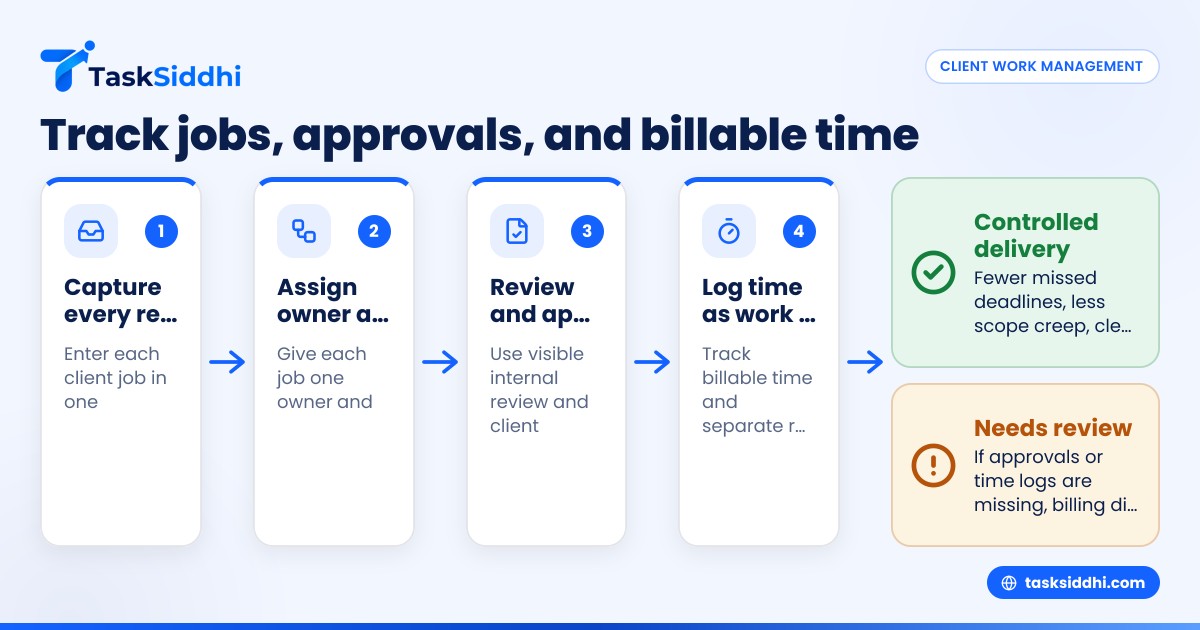
Client work management for a small agency means having one clear system to track every job, owner, deadline, approval, and billable hour. For small agencies in the United States, the goal is simple: stop chasing updates across email, spreadsheets, and chat, and move work into a shared workflow the whole team can trust.
Key takeaways
- Client work management small agency teams need is usually a simple operating system, not a complex enterprise tool.
- The basics are job intake, task ownership, due dates, approval steps, billable time, and status reporting.
- A good process reduces missed deadlines, scope creep, and billing disputes.
- Small agencies should connect delivery work to time tracking and reporting from day one.
- Mobile visibility matters when account managers, freelancers, or client-facing staff work away from their desks.
- Start with one board, one workflow, and a few repeatable rules before adding automation.
What is client work management for a small agency?
Client work management is the day-to-day system your agency uses to move client jobs from request to delivery. It includes incoming requests, internal tasks, reviews, approvals, revisions, deadlines, and billable time.
For a small agency, this is often the difference between controlled growth and daily chaos. Many teams start with email threads, shared spreadsheets, and notes from calls. That works for a while. Then work volume grows. More clients ask for updates. More jobs overlap. Team members start asking the same questions every day.
A better system gives each client job a home. Everyone can see what is due, who owns it, what is blocked, and what has already been approved. That visibility matters whether you run a marketing agency in Chicago, a design studio in Austin, or a service-based client team in Houston.
Small agencies do not usually need heavy project management software built for large enterprises. They need clarity. They need a way to break client work into repeatable stages and track it without extra admin.
That is why many teams look for a practical client work setup instead of a giant platform with dozens of modules they will never use.
Why do small agencies struggle with client work management?
Because work arrives from too many places, and decisions live in people’s inboxes.
A client sends a request by email. An account manager forwards it. A designer starts working from a chat message. The owner promises a delivery date on a phone call. Feedback comes back in a long email thread. Billable hours sit in personal notes and never make it into invoicing. By Friday, nobody has one reliable picture of the job.
That creates four common problems.
1. Deadlines live in too many places
If due dates are spread across calendars, chats, and spreadsheets, work gets missed. The issue is not effort. The issue is fragmentation.
2. Approvals are unclear
A job looks done internally, but the client has not approved it. Or one stakeholder approved it while another asked for changes. Without a visible approval stage, teams ship too early or wait too long.
3. Scope creep becomes normal
Small extra requests feel harmless. Then they pile up. If your team does not log change requests and time spent, the agency absorbs the cost.
4. Billable time is captured late, or not at all
When people enter time days later, accuracy drops. That leads to lost revenue, awkward client conversations, and weak profitability reporting.
What should a client work management system include?
It should show every active job, the current stage, the owner, the deadline, and the time spent. It should also make approvals visible and easy to audit.
For a small agency, that usually means six core parts.
A clear intake process
Every new request should enter in one place. It should include the client name, job type, requested deliverable, due date, priority, and any files or notes.
This does not need to be complicated. The important part is consistency. If every request enters differently, your team will spend more time organizing work than doing it.
A shared board for active jobs
A board helps the team see jobs by stage. Common stages might include:
- New request
- Planned
- In progress
- Internal review
- Client approval
- Revisions
- Delivered
- Invoiced
This is where boards and views help. You can organize client work visually so people stop asking where things stand.
Owners and due dates
Each job needs one owner. Not three. Not “the team.” One person is accountable for moving it forward.
Each job also needs a due date. If there are internal milestones, add those too. For example, if the final delivery is due on 09/20/2026, internal review may need to finish by 09/17/2026.
Approval checkpoints
Approvals should be built into the workflow. That means a clear stage for internal review and another for client approval if needed.
Without formal checkpoints, teams often treat “sent to client” as “finished.” Those are not the same thing.
Billable time capture
Even fixed-fee agencies benefit from time tracking. You need to know whether the work was profitable. You also need records when a client questions effort or asks for more revisions than expected.
A simple time tracking setup can show where hours go by client, project, and team member.
Reporting for managers
Owners need a quick view of open jobs, jobs at risk, overdue tasks, and time spent. They also need to know which clients generate healthy margins and which ones drain the team.
That is where reporting matters. It helps you make staffing and pricing decisions with real data.
How do you set up client work management in a small agency?
Start with one workflow that your whole team can follow. Do not build for every edge case on day one.
Use this process.
1. List your most common job types
Write down the work you do most often. For example:
- Monthly content work
- Design requests
- Website updates
- Campaign setup
- Client revisions
- Retainer tasks
You are looking for patterns. Most agencies have fewer than ten repeatable job types.
2. Map the real stages each job passes through
Do not copy another agency’s workflow. Use your actual delivery steps.
A simple flow might be:
- Request received
- Job scoped
- Assigned
- In progress
- Internal review
- Client review
- Changes requested
- Approved
- Delivered
- Ready to invoice
This becomes the structure of your board.
3. Define what must be captured for every job
Keep required fields short. Good examples include:
- Client name
- Job title
- Job type
- Owner
- Due date
- Priority
- Estimate
- Billable or non-billable
- Approval required
- Files or links
The more consistent this data is, the easier your reporting becomes later.
4. Decide who can move a job to the next stage
This matters more than many agencies expect. If anyone can mark a job approved, your system loses trust fast.
For example:
- The account manager can move work to client review
- The creative lead can mark internal review complete
- Only the client owner can mark approved after client sign-off
5. Add time tracking rules
Make time logging part of the work, not a Friday chore.
Set simple rules:
- Log time the same day
- Track against the correct client and job
- Separate revisions from original scope
- Mark non-billable internal work clearly
These rules make invoicing and profitability much easier.
6. Review the system weekly
Every week, review:
- Jobs due in the next 7 days
- Jobs waiting for approval
- Overdue tasks
- Time spent versus estimate
- Blocked work
- Client requests not yet assigned
This keeps the workflow alive. A board no one reviews becomes another stale list.
What does a practical workflow look like?
A good small-agency workflow is visible, simple, and strict enough to prevent confusion. It should not require a project manager to interpret it.
Here is a practical example for a 12-person agency handling marketing and design work in Detroit.
Intake
All client requests enter one board. Each job gets a standard title, owner, due date, and scope note.
Planning
The account manager confirms the ask, checks whether it fits the retainer or needs a change order, and sets the expected deadline.
Production
The assigned team member completes the work and logs billable time as they go.
Internal review
A lead reviews quality, accuracy, brand fit, and completeness before anything goes to the client.
Client approval
The client owner sends the deliverable and waits for approval or revision requests. The job stays visible in the approval stage until confirmed.
Delivery and billing
Once delivered, the job moves to complete. If applicable, time and scope details support invoicing in QuickBooks or another billing workflow your agency already uses.
This kind of workflow gives managers a way to spot problems early. If too many jobs sit in client approval, you may have a follow-up problem. If internal review is always overloaded, you may have a capacity problem. If billable hours routinely exceed estimate, you may have a pricing problem.
How do approvals and revisions stay under control?
Put approvals into the workflow as a stage, not an assumption. Track revision rounds separately so you can see when work exceeds the original scope.
Most small agencies lose margin in the gap between “almost done” and “actually approved.” That gap includes review delays, stakeholder changes, and extra rounds of edits. If those steps are not visible, managers cannot control them.
Create a simple approval rule set:
- Define what counts as ready for client review
- Record when it was sent
- Mark whether approval is pending, approved, or revision requested
- Log revision rounds separately
- Note whether extra revisions are billable
This protects the agency in two ways. First, it improves delivery discipline. Second, it creates a clean record when a client asks why the invoice is higher than expected.
For agencies serving business clients in the United States, this visibility also helps with buyer expectations. Larger clients often want cleaner process, better status updates, and reliable documentation before they trust a small agency with more work. They may ask about your internal controls, data handling practices, or how work is approved before release. You do not need a complex compliance stack to improve here. You do need a reliable process.
Can ai client work tools replace agency process?
No. ai client work tools can speed up summaries, drafting, or status updates, but they do not replace ownership, deadlines, approvals, or time records.
That short answer matters because many agency owners hope software will fix messy operations by itself. It will not. If requests arrive in five places and nobody owns deadlines, adding AI just helps chaos move faster.
That said, AI can still help small agencies if the basics are already in place. For example, teams may use AI to summarize client notes, prepare internal handoff details, or draft standard follow-up messages. Those uses save time. But the source of truth still needs to be your workflow.
If you are evaluating systems, ask a practical question: does this tool make the job clearer, or does it add another layer between the team and the work?
For most small agencies, the real win comes from structure:
- one place for requests
- one board for active jobs
- one owner per task
- one visible approval path
- one time capture habit
After that foundation is working, simple automation can help reduce repetitive admin, such as moving jobs when stages change or assigning standard next steps.
How do you track billable time without annoying the team?
Keep time entries fast and tied to real jobs. People resist time tracking when it feels like duplicate admin with no clear purpose.
The biggest mistake is treating time tracking as a finance task only. It is also an operations tool. It shows whether work is profitable, whether estimates are realistic, and whether certain clients or job types drain capacity.
To make time tracking stick:
Use short, clear categories
Avoid vague labels like “misc work.” Use client and job names people recognize immediately.
Ask for same-day logging
Same-day entries are more accurate than end-of-week reconstruction. They also reduce missing hours.
Track revisions separately
This is one of the easiest ways to spot margin leakage. If revision time is hidden inside production time, scope creep stays invisible.
Share the reason behind the habit
Tell the team what the data is for:
- better pricing
- better staffing
- cleaner invoicing
- fewer disputes
- less unpaid work
When people understand the purpose, compliance improves.
Make it visible to managers
Managers should review time against estimates weekly. If one designer is constantly over estimate, maybe the brief quality is poor. If one client always triggers non-billable work, maybe the contract needs tighter scope.
A connected features setup helps because work status, ownership, and time do not live in separate tools.
What should owners and managers review every week?
Review open jobs, at-risk deadlines, pending approvals, and time versus estimate. In 30 minutes, you can catch most delivery and margin problems before they grow.
A weekly review is where client work management turns into management, not just task storage. Without this rhythm, teams only notice issues after a client follows up or a deadline is missed.
Use a short weekly review checklist:
- Which jobs are due in the next 7 days?
- Which jobs are overdue?
- Which jobs are waiting on internal review?
- Which jobs are waiting on client approval?
- Where has time exceeded estimate?
- Which clients have too many urgent requests?
- Which team members are overloaded?
- What work is complete but not yet ready for billing?
This review should end with decisions, not just observations. Reassign work. Move deadlines when needed. Escalate blocked approvals. Clarify scope. Follow up with clients. Protect the week before it gets away from you.
For agencies with account managers or field-facing staff who are not always at a desk, a mobile app can help them update job status, notes, and progress quickly.
A simple way to choose the right tool
Do not start with a feature checklist. Start with your real workflow problems.
Ask these questions:
Where does work get lost today?
Is it between request and assignment? Between production and review? Between approval and invoicing?
What do managers ask for every day?
If they constantly ask for status, ownership, deadlines, or billable hours, your current system is not visible enough.
What should improve within 30 days?
Good answers include:
- fewer missed deadlines
- cleaner approval records
- more complete time logging
- better workload visibility
- faster weekly reviews
Can the team use it without training for weeks?
If the system is too hard to maintain, people go back to email and spreadsheets.