

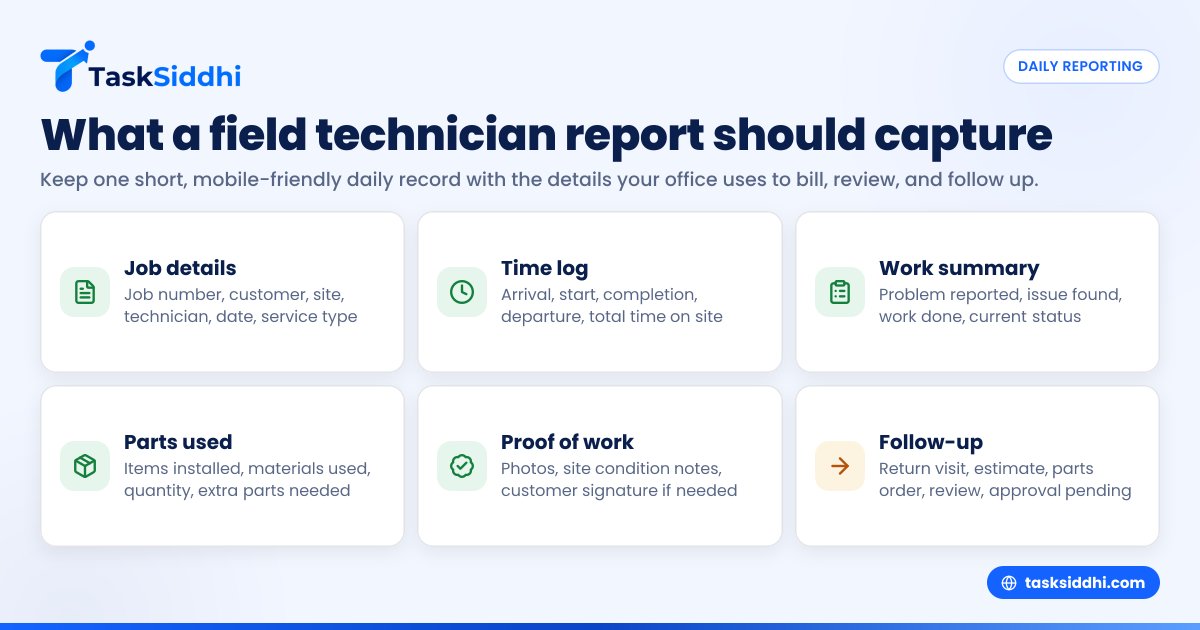
A field technician daily report template is a simple, repeatable format your team uses to log what happened on each job each day. For small service teams in the United States, the best template captures work completed, time on site, parts used, customer notes, proof of visit, and any follow-up needed, without making technicians write long reports.
Key takeaways
- A strong field technician daily report template helps owners replace scattered texts, calls, and paper notes with one daily record.
- The template should capture job details, arrival and departure times, work performed, parts used, photos, signatures, and next steps.
- Keep the report short enough for technicians to complete from the field on a phone.
- Daily reports improve payroll review, invoicing accuracy, callbacks, and customer communication.
- Standardized reporting works best when paired with field visits, time tracking, and reporting.
- Small teams should start with one template for all technicians, then add service-specific fields only when needed.
What is a field technician daily report template?
A field technician daily report template is a standard form your technician fills out after each service call or at the end of the day. It gives managers a consistent snapshot of what happened in the field. That includes where the technician went, what work was done, what issues were found, and what needs to happen next.
For a small business in Chicago, Houston, or Detroit, this matters because most daily confusion comes from missing details. A technician may text “job done” in a group chat, but that does not tell you how long the work took, whether the customer approved it, whether a part was installed, or whether the issue was fully resolved.
A good template fixes that. It turns verbal updates into structured records. That helps with scheduling, payroll review, follow-up visits, and invoicing. It also reduces disputes with customers because you have a dated record of what your team saw and did on site.
The phrase “template” is important. You do not want every technician writing reports in a different style. One person writes two lines. Another writes a page. A third forgets key facts. A template gives every technician the same checklist, which makes reports easier to review and compare.
Why do small service teams need one?
Small teams usually feel reporting pain first. A team of 5 to 30 technicians often has enough jobs that memory and chat threads stop working, but not enough office staff to chase every detail.
Without a daily report template, common problems pile up:
- The office does not know which jobs are truly complete.
- Technicians forget exact arrival and departure times.
- Parts used in the field never make it onto the invoice.
- Managers cannot spot repeat issues or technician delays.
- Customers call back, and no one has a clear record of the last visit.
- Payroll questions become harder when time logs are incomplete.
These issues cost real money. If a technician forgets to note a replaced thermostat, filter, or pump component, that line item may never be billed. If the job status is unclear, the office may delay invoicing by days. If a return visit is needed, another technician may show up without the right background.
A daily report template is not just paperwork. It is the handoff between field work and the rest of the business. It connects dispatch, service delivery, invoicing, and customer communication.
What should a field technician daily report include?
A field technician daily report template should capture only the details your office actually uses. If the form is too long, technicians will skip it. If it is too vague, managers cannot act on it.
Start with these core fields.
1. Job and customer details
Every report should identify the job clearly. Include:
- Job number or work order number
- Customer name
- Site address
- Technician name
- Date of service
- Service type
This sounds basic, but it prevents mix-ups when one technician visits multiple sites in the same day.
2. Arrival, start, and completion times
Time data matters for scheduling, payroll review, and customer billing. Capture:
- Arrival time
- Work start time
- Work completion time
- Departure time
If your team bills hourly, this section is essential. Even if you bill flat-rate, time data helps you understand job profitability and route efficiency.
3. Work performed
This is the heart of the report. Ask the technician to describe:
- The problem reported
- The issue found on site
- The work completed
- Whether the issue was fully resolved
Keep this section structured. For example, technicians can select from job outcomes such as completed, partially completed, needs follow-up, waiting on parts, or customer unavailable.
4. Parts and materials used
Technicians should list parts installed or materials consumed. Include quantity where relevant. This supports invoicing and inventory review.
For example:
- Capacitor, 1 unit
- PVC fittings, 3 units
- Cleaning solution, 1 bottle
If your office uses QuickBooks for invoicing, accurate field records make it much easier to bill correctly later.
5. Proof of work
Proof matters when customers question a visit or ask for service history later. Useful proof fields include:
- Before-and-after photos
- Site photos
- Notes on equipment condition
- Customer signature, when needed
For teams doing residential or commercial service jobs, simple proof often prevents long back-and-forth later.
6. Follow-up actions
Some jobs do not end on the first visit. The report should show what happens next:
- Return visit required
- Estimate needed
- Part to be ordered
- Supervisor review needed
- Customer approval pending
This keeps jobs from getting lost after the technician leaves the site.
What does a good template look like?
A good field technician daily report template is short, clear, and easy to complete from a phone in under five minutes. It should guide technicians through the right fields in the same order every time.
Here is a practical layout small service teams can use.
Basic field technician daily report template
Technician details
- Technician name
- Date
- Crew members, if any
Job details
- Job number
- Customer name
- Site address
- Service category
Time log
- Arrival time
- Start time
- End time
- Departure time
- Total hours on site
Work summary
- Customer issue reported
- Inspection findings
- Work completed
- Current job status
Parts and materials
- Item used
- Quantity
- Additional parts needed
Proof
- Photos attached
- Customer signature collected
- Notes on site condition
Follow-up
- Return visit needed
- Office action required
- Customer informed
- Next appointment, if scheduled
Technician notes
- Safety issue
- Access issue
- Recommendation for future service
This layout works for HVAC, electrical, plumbing, equipment maintenance, and general field service teams. If your team handles recurring service visits, keep the same base template and add only one or two special fields for that service type.
How can you keep technicians from skipping reports?
Keep the daily report short and mobile-friendly. Ask for only the details needed to bill, review, and follow up on the job.
Most technicians do not resist reporting itself. They resist slow reporting. If the report feels like duplicate work after a long day, completion rates drop fast.
To improve adoption, design the process around field reality. Technicians are often in trucks, parking lots, mechanical rooms, rooftops, and customer sites. They need a report they can finish quickly on a phone, not a long form better suited to a desktop in the office.
A few rules help:
- Use checkboxes and dropdowns where possible.
- Keep writing fields short.
- Make photo uploads part of the report flow.
- Require only the fields that drive action.
- Train every technician on one standard.
If you are using software, a mobile app matters because technicians can complete the report before leaving the site. That reduces forgotten details and late-night catch-up entries.
How should small teams use daily reports in their workflow?
The best report template is only useful if it fits the way your business already runs. For most small service teams, that means connecting the report to the full job lifecycle.
Step 1: Create the job before dispatch
Start with a job card or task that includes the customer, site, and service details. That gives the technician the right context before arrival.
Step 2: Record activity in the field
The technician updates the job during or after the visit. That includes time, work completed, photos, and parts used.
Step 3: Review reports daily
A manager or dispatcher should review reports the same day. That helps catch missing details while the job is still fresh.
Step 4: Trigger next actions
Use the report to decide what happens next:
- Mark complete
- Schedule follow-up
- Request estimate approval
- Order parts
- Prepare invoice
Step 5: Use reports for weekly review
Over time, daily reports become operating data. You can spot long jobs, repeat failures, customer patterns, and technician workload issues.
Teams using structured boards and views and automation can move jobs between stages based on what the report says. For example, a completed report can move a job into billing review, while a report marked “needs return visit” can create a follow-up queue.
What mistakes make daily reports useless?
The biggest mistake is asking for too much. The second biggest is asking for the wrong things.
A report becomes useless when technicians see it as busywork and managers do not actually use the information. That often happens when the template includes fields no one reviews, or when reports are stored but never tied back to real decisions.
Here are the most common mistakes.
Making the form too long
If a daily report feels like a 15-minute task, it will be rushed or skipped. Keep only the fields that support billing, scheduling, quality control, or customer communication.
Letting every technician report differently
Free-form notes create inconsistent records. One technician may write “fixed unit.” Another may list detailed readings. Standard fields make reports easier to understand.
Forgetting proof of visit
Without photos, timestamps, or customer confirmation, you may struggle to verify what happened on site. This is especially important for warranty disputes and repeat service calls.
Not reviewing reports the same day
If managers wait until Friday, missing details are harder to recover. Daily review keeps reports useful.
Separating reports from the actual job record
A report should live with the job, not in a random spreadsheet, email chain, or notebook. That way anyone can see the service history when a customer calls.
Can AI help with field technician daily reports?
Yes, but AI works best when your team already captures clean job data, time logs, and technician updates in one place.
An ai field technician workflow can help summarize notes, flag missing fields, and make reports easier to review. But it cannot fix a broken process. If technicians still send updates through texts, photos, and voice calls with no standard format, AI has very little to work with.
The practical use of AI here is not replacing technicians. It is reducing admin work. For example, a manager may want faster summaries of incomplete jobs, repeat issues, or missing job proof. AI can help organize and surface that information once the underlying reports are structured.
For a small team, the priority should still be the basics:
- One template
- One place to submit reports
- One review process
- One job status flow
After that, AI becomes much more useful because the data is consistent.
How do you turn daily reports into better business decisions?
Use daily reports to see patterns, not just close jobs. The value grows when you review trends across technicians, job types, and repeat visits.
Most owners start using daily reports to know what happened today. That is a good first step. But the bigger value comes when those reports become a record of how the business actually performs.
For example, reports can help you answer questions like:
- Which job types take longer than expected?
- Which customers need repeat visits most often?
- Which technicians are missing parts on first visits?
- Which service categories create the most follow-up work?
- How many jobs are completed on the first trip?
This is where structured reporting becomes useful. Instead of reading every note one by one, you can look for trends in completion rates, time spent, follow-up work, and technician activity.
That is also why daily reports should not live on paper alone. Paper can capture information, but it is hard to review across weeks or months. Digital records make pattern tracking much easier.
A simple example for a U.S. service team
Imagine a seven-person HVAC service business in Houston. The owner dispatches jobs by phone and tracks progress through text messages. At the end of the week, the office tries to rebuild what happened from technician notes, customer calls, and handwritten job sheets.
Now imagine the same team using one daily report template. Every job record includes:
- Site and customer details
- Arrival and departure time
- Unit issue found
- Repair completed
- Part installed
- Photo of completed work
- Whether cooling was restored
- Need for return visit
The office now knows which jobs are ready to invoice, which need estimates, and which require follow-up. Payroll review is easier because service time is recorded consistently. Customer callbacks are easier to handle because the last visit details are already in the record.
That is the practical value of a field technician daily report template. It removes guesswork from daily operations.
How should you set this up in TaskSiddhi?
Set up one standard job template, require technicians to complete it from the field, and review submissions before closing the day.
In TaskSiddhi, small service teams can manage job records using service jobs or client work, then capture field activity with structured updates. The goal is not to create more admin. It is to make sure each visit leaves a complete record that the office can act on.
A practical setup looks like this:
- Create a board for open, in progress, follow-up, and complete jobs.
- Standardize the daily report fields your technicians must fill in.
- Ask technicians to log time, notes, parts, and photos before leaving the site.
- Review incomplete or follow-up jobs daily.
- Use the same records to support invoicing and service history.
If your team is still choosing between spreadsheets and software, this is where free vs paid can help frame the trade-off. Free tools may store notes, but paid systems usually make it easier to standardize field reporting and review it consistently.
A good system should support the way service teams actually work: jobs moving across stages, field updates coming from phones, and managers needing quick visibility into what happened today.
If you want to standardize daily reporting without adding more chaos, see the product tour or compare plans at pricing.