

A daily work report for field staff in the United Kingdom is a simple record of what each person did, where they went, how long it took and what happened on site. If your team still updates jobs through WhatsApp, paper sheets or end-of-day calls, a clear daily report helps you spot delays, prove work done and review team performance without chasing people.
Key takeaways
- A good daily work report should track jobs done, site visits, time spent, outcomes, issues and proof.
- Keep the format short enough for field staff to complete on the same day.
- Review reports daily for exceptions, not just activity, so managers can act quickly.
- Standard fields improve payroll, invoicing, customer updates and internal accountability.
- Mobile reporting works better than paper when your team travels across cities such as London, Manchester or Birmingham.
- The best system is one your team will actually use every day.
What is a daily work report for field staff in the United Kingdom?
A daily work report for field staff in the United Kingdom is a structured summary of each employee’s workday. It records what jobs were assigned, what was completed, where staff attended, how much time was spent and whether follow-up is needed.
For field teams, this report matters because work happens away from the office. Managers cannot see every site visit, service call or client meeting. A report creates a shared record that helps the office, supervisors and accounts team stay aligned.
In many small UK businesses, the current process is messy. One technician sends a voice note. Another sends photos by WhatsApp. A supervisor updates an Excel sheet later. A paper job card comes back two days after the job. That creates gaps, especially when you need to answer a customer complaint, approve timesheets or prepare invoices.
A daily report does not need to be complex. In fact, simple is better. The aim is to capture useful facts while the day is still fresh.
Common teams that benefit include:
- property maintenance teams
- electrical and plumbing services
- cleaning and facilities staff
- installation crews
- pest control technicians
- inspection teams
- client service teams visiting multiple sites
If your team already uses digital task boards, job cards and field visits, daily reporting becomes easier because much of the job information already exists in one place.
What should a daily work report include?
A useful daily work report should answer five basic questions: who worked, where they went, what they did, how long it took and what happened next.
At a minimum, include these fields:
- Staff member name
- Date
- Job or task reference
- Customer or site name
- Location
- Start time
- End time
- Travel time if relevant
- Work completed
- Status at end of visit
- Materials or parts used if relevant
- Issues, delays or risks
- Photos, signatures or proof of visit where needed
- Follow-up actions
- Manager notes
This gives enough detail for operations and accounts without making the report too long.
The most useful fields to track every day
Not every field has equal value. For most UK field businesses, these are the fields that matter most in daily review:
1. Job status
Was the job completed, partly completed, rescheduled or blocked? This is the fastest way to understand progress.
2. Time spent
Actual time on site helps with scheduling, payroll checks, customer billing and planning future jobs. If you use time tracking, this becomes easier to capture accurately.
3. Proof of work
Photos, notes and timestamps reduce disputes. This is especially helpful for site services, maintenance and installations.
4. Exceptions
Managers need to see what went wrong, not just what happened. Delays, access issues, missing parts and customer no-shows should be easy to flag.
5. Next action
A report should move work forward. If another visit is needed, the report should say who owns it and by when.
What does a simple daily work report format look like?
A simple daily work report format should fit on one page or one mobile form. Staff should be able to complete it in a few minutes at the end of each visit or shift.
Here is a practical format:
Format 1: Single-job report
Best for teams doing one main job per report.
- Date:
- Staff member:
- Job reference:
- Customer:
- Site address:
- Arrival time:
- Departure time:
- Work carried out:
- Outcome:
- Materials used:
- Issues found:
- Photos attached: Yes/No
- Customer sign-off: Yes/No
- Follow-up required:
- Manager comments:
Format 2: End-of-day summary
Best for staff visiting several sites in one day.
- Date:
- Staff member:
- Total jobs assigned:
- Total jobs completed:
- Total travel time:
- Total time on site:
- Job 1 summary:
- Job 2 summary:
- Job 3 summary:
- Delays or failed visits:
- Customer escalations:
- Safety or site concerns:
- Parts needed for tomorrow:
- Support needed from office:
Format 3: Supervisor review sheet
Best for team leads managing multiple field workers.
- Date:
- Team members reporting:
- Jobs completed:
- Jobs carried forward:
- Highest priority issue:
- Missed SLA or customer concern:
- Staff attendance concerns:
- Vehicle or equipment problems:
- Follow-ups assigned:
- Manager sign-off:
If you run service-heavy work, digital job records linked to service jobs can remove duplicate entry and keep reporting tied to the actual work.
How can I make field staff fill reports every day?
Make the report short, mobile-friendly and part of job closeout. If staff must write long notes after hours, compliance will drop. Ask only for fields you use, and review submissions daily so the team sees the purpose.
The biggest reason daily reports fail is friction. Staff are busy. They travel. They work in poor weather. They may have weak signal in some areas. If your process feels like admin for the sake of admin, completion rates will fall quickly.
Use these five rules
- Keep it short Most daily reports should take three to five minutes.
- Collect information during the job Photos, timestamps and status updates are easier to capture on site than later in the evening.
- Use standard options Drop-down choices such as “completed”, “part completed” or “no access” make reports faster and easier to review.
- Make it part of closing the task Staff should not be able to mark a job complete without adding the essential report fields.
- Show that reports are used If managers review and act on them, staff understand the value. If nobody reads them, reporting becomes a box-ticking exercise.
A mobile-first process matters here. A mobile app can help staff update work from the site instead of relying on memory at the end of the day.
What should managers review in a daily work report?
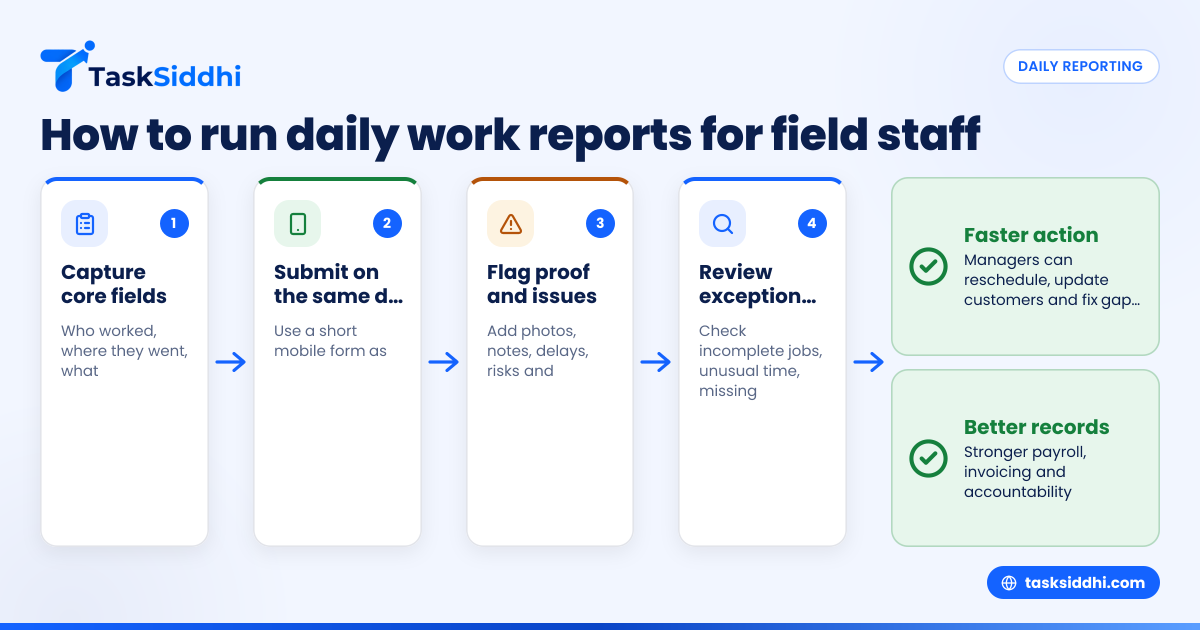
Managers should review exceptions first: incomplete jobs, delays, repeat visits, missing proof and anything that affects the customer. Daily reports are most useful when they trigger action on the same day, not when they sit unread until the end of the week.
Once reports start arriving regularly, managers often make the mistake of reading every line with equal attention. That is time-consuming and rarely necessary. A better method is to scan for exceptions, then drill into details where needed.
Review in this order
1. Jobs not completed
These need immediate attention. You may need to reschedule, update the customer or send parts.
2. Jobs with unusual time spent
If a one-hour call took four hours, there may be a training issue, a site issue or a pricing problem.
3. Missing proof
No photo, no note and no sign-off can create disputes later. Check the reason while the visit is still recent.
4. Repeat failures by site or staff member
Patterns matter. One missed report is an admin issue. Repeated missed reports point to a process problem.
5. Follow-up actions
Assign ownership before the next day starts.
A practical daily review routine
For a team of 5 to 30 people, use this simple review process:
- Review all submitted reports at a fixed time each day.
- Filter by incomplete, delayed or escalated jobs.
- Contact staff only for missing or unclear details.
- Update tomorrow’s schedule based on today’s outcomes.
- Share one short summary with the office team.
- Use weekly reporting to spot trends.
This is where clear reporting helps. You want managers to see patterns without manually combining messages, paper notes and spreadsheets.
Why do daily work reports matter for payroll, invoicing and customer service?
Daily work reports improve accuracy across the business. They support wages or contractor payments, strengthen invoice backup and give customer-facing staff a reliable record of what happened on site.
For UK businesses, reporting often connects operational work to finance and compliance. If the office needs to issue an invoice, check time spent, review materials used or prepare VAT records in Xero or Sage, poor field reporting causes delays and errors.
Better payroll and time records
When start times, end times and travel details are recorded daily, managers can compare planned hours against actual hours. This helps reduce disputes and makes approval faster.
Better invoices
If you bill by visit, hour or completed work, a same-day record makes invoicing more reliable. It also gives your accounts team useful backup if a customer queries a charge.
Better customer communication
When a customer in London asks why a second visit is needed, your office should not need three phone calls to find out. A good daily report should already show the issue, the evidence and the next step.
Better audit trail
Even where there is no legal requirement for a specific daily report format, keeping clear operational records is good practice. If your reports contain personal data, handle them properly under UK GDPR and the Data Protection Act 2018. Keep access limited to people who need it, and avoid collecting more personal information than necessary.
Can AI help with ai daily work reporting?
Yes, but only if your process is already clear. AI can summarise notes, flag missing details and highlight exceptions, but it cannot fix poor inputs. Start with a standard report format, then use ai daily work support to save manager time.
Used well, AI should reduce admin, not add another layer of complexity. For field teams, the most helpful use cases are simple:
- turning short notes into cleaner summaries
- spotting incomplete records
- grouping common issues across jobs
- highlighting delays or repeat site problems
- preparing daily manager summaries
The key is not to chase novelty. If your team still lacks standard status options, job references or proof of visit, fix that first.
Where can AI genuinely help?
AI helps most with summaries, missing-field checks and exception spotting. It is useful when reports already follow a standard format. It saves manager time on review, but it still needs human oversight for customer context and decisions.
End-of-day summaries
If ten technicians submit reports, AI can create a short daily overview for the manager. That is useful when supervisors need to scan the whole day quickly and decide where to step in first.
Exception detection
AI can highlight missing fields, unusual time entries or jobs likely to need follow-up. This is especially helpful when a manager reviews many updates late in the day.
Cleaner handover notes
Short site notes can be turned into clearer summaries for office staff. That makes customer updates, scheduling decisions and next-day planning easier.
Still, human review remains essential. Managers know the customer, the job history and the team context. AI should support judgement, not replace it.
If you want less manual chasing, workflow automation is often just as valuable as AI. For example, you can require proof before a task is marked complete or trigger follow-up when a job is left incomplete.
Paper, Excel or software: what works best?
Paper works for very small teams, but it slows reporting, creates delays and makes trends hard to spot. Excel is better than paper, but it still depends on manual updates. Software works best when you need live visibility, proof of work and easier review.
Each method has trade-offs.
Paper forms
Paper can feel familiar. It is simple to start and cheap to print. But pages get lost, handwriting is unclear and reports arrive late. Office staff then need to re-enter data.
Excel sheets
Excel improves consistency. It works for basic summaries and weekly reviews. But field staff still need a practical way to submit updates during the day, and someone still has to chase, copy and clean data.
Work management software
Software is usually best once your team has multiple visits per day, several managers or regular customer reporting needs. It links tasks, status, time, photos and notes in one place.
If your team manages many active jobs at once, shared boards and views can help managers see work by stage, person or priority instead of reading updates in chat threads.
How do I set up a daily work report process for my team?
Start with the decisions you need to make each day. Then build the report around those decisions. If a field does not help scheduling, billing, customer service or accountability, remove it.
Follow this setup process:
1. List your common job types
A maintenance visit, inspection and installation may need different fields. Keep a core format, then add only the extra fields needed by job type.
2. Define mandatory fields
Choose the minimum information needed before a job can be treated as complete.
3. Standardise status options
Avoid free-text where a standard choice will do. This makes reports faster to complete and easier to analyse.
4. Decide when reports are submitted
Best practice is at job completion or before the end of shift on the same day.
5. Set a manager review time
Create a daily routine. Reports have value only when reviewed.
6. Train the team with examples
Show one good report and one poor report. Staff usually learn faster from examples than instructions.
7. Review after two weeks
Remove fields nobody uses. Add fields only if they solve a real problem.
For teams handling repeat visits, service calls and client updates, digital features can reduce duplicate data entry and help keep reporting linked to real work rather than separate admin.
What does a good rollout look like?
Start small with one report format, a fixed review time and clear mandatory fields. Pilot it with a few staff for one to two weeks. Then adjust only the parts that affect scheduling, proof of work, invoicing or customer updates.
A poor rollout usually fails because the team gets too many fields on day one. Keep the first version simple. Focus on job status, time spent, proof, exceptions and next action. Once staff can complete it consistently, you can improve the process without making it heavier.