

A site visit proof app in the United States helps small field teams capture the evidence needed to show a job was done, where it was done, and what happened on site before anyone marks the work complete. For a team that still runs jobs through texts, paper forms, and calls, this cuts disputes, speeds billing, and gives managers a clean record they can trust.
Key takeaways
- The best proof is simple, consistent, and captured before the technician leaves the site.
- Small U.S. field teams usually need photos, timestamps, location, notes, customer sign-off, and job status.
- Proof should match the kind of work you do, not become extra admin for the crew.
- A standard closeout checklist reduces missed evidence and billing delays.
- Mobile-first tools matter because most proof is captured in the field, not back at the office.
- A site visit proof app works best when it connects proof, job status, and reporting in one place.
What is a site visit proof app in the United States?
A site visit proof app is a mobile tool that helps field staff record job evidence while they are still at the location. In the United States, small service businesses use it to document work for customers, office staff, and internal accountability.
That proof often includes before-and-after photos, arrival and completion times, job notes, customer sign-off, and location details. Some teams also capture parts used, issues found, or follow-up work needed.
If you run HVAC service in Houston, property maintenance in Chicago, or equipment repair across Detroit suburbs, you likely already collect some of this information. The problem is usually not whether proof exists. The problem is that it lives across phones, WhatsApp messages, paper sheets, and scattered folders.
A site visit proof app fixes that by putting the job record in one place. The office can see what happened without chasing the tech. Billing can move faster. Managers can review quality. Customers get clearer updates.
For small teams, this matters even more. When you have 5 to 30 people in the field, one missed photo or one vague note can delay an invoice, trigger a callback, or start an avoidable argument about whether the work was completed.
Why does proof matter before closing a job?
Because once the tech leaves, missing proof is hard to recreate. Photos cannot be retaken in the same conditions. Notes get shorter. Customer memory gets weaker. Office staff have to chase details by phone and email.
Strong proof helps with several everyday business tasks:
- confirming attendance at the right location
- showing the work condition before and after
- reducing customer disputes
- supporting invoice approval
- tracking technician performance
- creating a clean service history
It also helps your team operate with less dependence on memory. Instead of asking, “Did Mike replace that filter on Tuesday?” you can check the job record.
For U.S. businesses that bill commercial clients, landlords, builders, or multi-site operators, documentation often affects how fast you get paid. A customer may not need a long report. But they usually want enough evidence to approve the work without back-and-forth.
What goes wrong when teams close jobs with weak proof?
A short answer: jobs look finished in the system, but not finished to the customer or the office.
The common failures are predictable:
- The technician marks the job done without photos.
- The office gets a handwritten note that cannot be read.
- The customer says no one visited the site.
- A manager cannot verify whether the problem was fixed.
- Billing waits for missing details and the invoice slips by days.
Each failure costs time. Sometimes it also costs money. A return trip for missing proof can easily cost more than the original admin problem you were trying to avoid.
What should you capture before closing a field job?
Capture enough proof to confirm who did the work, when it happened, where it happened, what was found, and what changed. Keep it consistent across every job type so your office can review it quickly.
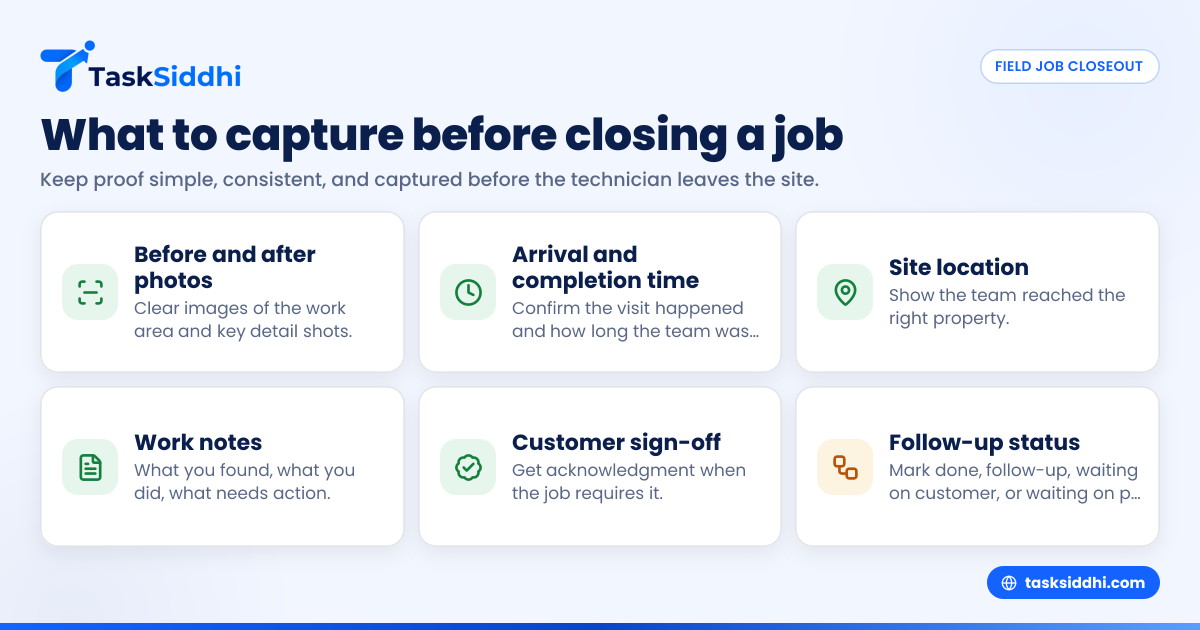
For most small field teams in the United States, a practical closeout record includes six core items.
1. Before and after photos
Photos are often the fastest way to prove work happened. They are useful for cleaning, maintenance, repairs, installations, inspections, and site checks.
Good photo rules are simple:
- take clear images in decent light
- capture the full work area first
- add detail shots where needed
- use the same angles for before and after when possible
Do not ask crews to take ten photos when three will do. The goal is useful proof, not photo overload.
2. Arrival and completion time
A time record helps confirm the visit happened and supports payroll, customer updates, and internal review. It also helps if a customer later asks how long the team was on site.
If your business bills labor by the hour, time records matter even more. A tool with built-in time tracking can reduce manual follow-up later.
3. Site location
Location proof can be important when teams cover large service areas or multi-site accounts. It helps show the team reached the right property and completed the visit there.
This is especially useful for route-based work, recurring service, and jobs where multiple addresses look similar, such as apartment units, retail branches, or utility sites.
4. Work notes
Notes should answer three questions:
- What did you find?
- What did you do?
- What still needs action?
Keep the format short and repeatable. Free-form notes are better than nothing, but a standard structure makes office review much easier.
5. Customer sign-off or acknowledgment
Not every job needs a formal signature. But many do. If the customer, tenant, supervisor, or site contact can confirm the work, that helps reduce later disputes.
For example, if a property manager in Chicago says the gate repair was not completed, a signed or acknowledged closeout record gives your office something clear to reference.
6. Follow-up status
Some jobs should not be closed as fully complete. They may need a return visit, quote approval, parts, or outside access.
A proof app should make it easy to mark whether the job is:
- completed
- completed with notes
- needs follow-up
- waiting on customer
- waiting on parts
This protects your team from closing work too early just to clear a queue.
Which proof fields matter most for different job types?
The exact proof depends on the work. A plumbing visit, a pest control route, and a signage install do not need the same closeout checklist.
Here is a practical way to think about it.
Service and repair jobs
For service calls, prioritize diagnosis, work completed, replaced parts, and customer acknowledgment. Photos are useful, but notes often matter just as much.
Example: An HVAC technician in Houston should record unit condition, issue found, repair completed, and whether the system was tested before leaving.
Recurring maintenance visits
For scheduled work, consistency matters most. The office should be able to compare one visit with the next.
Example proof:
- timestamp
- site location
- checklist completion
- photos of serviced areas
- issues found for follow-up
Installations and project visits
Install work usually needs stronger before-and-after documentation. Material use, progress stage, and exceptions are important too.
If you work across multiple days, do not save all proof for the final visit. Capture it at each stage.
Inspections and site audits
Inspection teams need a stronger record of observations than repairs. The proof should show what was checked, what passed, what failed, and what action is recommended.
This is where a consistent mobile process helps. A team doing field visits can collect evidence in a standard format instead of writing different notes every time.
How should a small team set a closeout checklist?
Start with a short required list that every field employee can finish in under two minutes. Then add job-type fields only where they truly help.
A good closeout checklist is short enough to be used every time and strong enough to support billing, service history, and dispute handling.
Build it in four steps:
- List your common disputes. Look at where jobs break down now. Missing photos? No time record? No customer confirmation? Start there.
- Set core proof for every job. For most teams, that means photos, times, notes, and status.
- Add trade-specific proof only where needed. If a technician must record a serial number or part used, make that specific to the right job type.
- Train the team on “close before you leave.” Do not let proof become an end-of-day office task. It should happen on site.
The biggest mistake is overbuilding the form. If your team hates the process, they will skip parts of it. A shorter checklist used every time beats a perfect checklist used half the time.
Can a site visit proof app reduce disputes?
Yes. It reduces disputes by replacing vague updates with a time-stamped, site-linked job record that shows what happened before the crew left.
That does not mean every customer complaint disappears. It means your team has better evidence when questions come up about attendance, quality, condition, or completion.
Here is how disputes usually play out without proof:
- customer says the issue was never fixed
- technician says it was handled
- office has to mediate with partial information
- nobody can quickly verify the facts
With a proper record, the office can review the job file and respond faster. That might include photos, notes, completion time, and acknowledgment from the site contact.
This matters for both residential and commercial work, but commercial teams often feel the impact more because documentation affects approval chains. If the building manager, facilities lead, or regional contact cannot verify what happened, the invoice may sit.
For teams handling service jobs, standardized proof is often one of the fastest ways to reduce avoidable callbacks.
What does a good mobile proof workflow look like?
A good mobile workflow lets a field worker open the job, capture proof in a clear order, and close the visit without calling the office for next steps. It should feel like part of the job, not extra paperwork.
A simple workflow looks like this:
- Open the assigned job on the phone.
- Review the address, customer, and work requested.
- Capture arrival status and start time.
- Add before photos if needed.
- Complete the work.
- Add notes, after photos, and issues found.
- get sign-off or acknowledgment if required.
- Set final status: done, follow-up, or waiting.
- submit and move to the next job.
This is where a strong mobile app matters. If the experience is slow or confusing, your team will fall back to texts and memory.
For managers, the value is not only in collection. It is in visibility. A board-based setup can help the office see what is assigned, in progress, waiting, and closed. If you want that kind of view, boards and views can help organize field work without long spreadsheets.
Is an ai site visit tool worth it for a small team?
It can be, if it speeds up proof capture or review without adding complexity. For a small team, the real test is whether it saves office follow-up and helps crews finish cleaner records in the field.
The phrase ai site visit sounds advanced, but the practical question is simple: does it make the job closeout easier and more consistent?
For small field teams, “AI” should support three things:
- cleaner job summaries
- easier review of uploaded proof
- faster spotting of missing closeout items
If it does not help those basics, it is mostly marketing.
Where AI can help in site visit proof
An AI-assisted workflow can help managers review records faster. For example, it may help summarize notes, flag missing photos, or surface jobs that were marked complete without customer acknowledgment.
That matters when one dispatcher or office manager is reviewing dozens of closeouts a day.
It can also help standardize language in job summaries. A field worker may write rough notes in a hurry. Office staff still need something clear enough for customer communication and billing review.
Where AI should not replace judgment
AI should not be the only check on whether a job is truly complete. Managers still need a process for exceptions, safety concerns, and customer-specific requirements.
For example, if a technician closes a generator service call in Detroit but forgets to mention a warning light, no smart summary should replace the need for a proper technician note and manager review.
Use AI to speed review, not to remove accountability.
How do you roll this out without slowing your crew down?
Start with one job type, one closeout checklist, and one field supervisor. Keep the first version simple enough that the team can learn it in a day.
Then roll it out in phases:
Phase 1: standardize the minimum proof
Choose the 4 to 6 fields every job must have. Train the team to capture them before leaving the site.
Phase 2: review real job records for two weeks
Look for skipped fields, unclear notes, and extra steps that the team avoids. Fix the process before expanding it.
Phase 3: add automation for routine steps
Once the basics work, add useful rules. For example, you can use automation to move jobs after submission or flag incomplete closeouts for review.
Phase 4: improve manager reporting
After the process is stable, use reporting to see closeout rates, pending follow-ups, and proof completion trends across the team.
This staged rollout matters. If you try to change dispatch, billing, proof collection, and reporting all at once, crews often reject the whole system.
What should owners and managers look for in an app?
Do not shop for the longest feature list. Shop for the shortest path to consistent proof.
Look for these practical traits:
- mobile-first job updates
- easy photo capture in the field
- simple notes and status changes
- clear job history
- board visibility for the office
- reporting on completed and pending work
- flexibility for different service types
A lot of small teams do not need heavy software. They need a system that replaces paper job cards, text updates, and scattered photos with one reliable workflow.
If your work includes recurring visits, customer updates, and field completion proof, a dedicated work management system will usually beat trying to force everything through Excel and group chats. You can review TaskSiddhi’s core features to see the basics in one place.
What does it cost?
The real cost is usually not the software alone. It is the time lost to billing delays, callbacks, missing photos, and office follow-up when job proof is incomplete.