

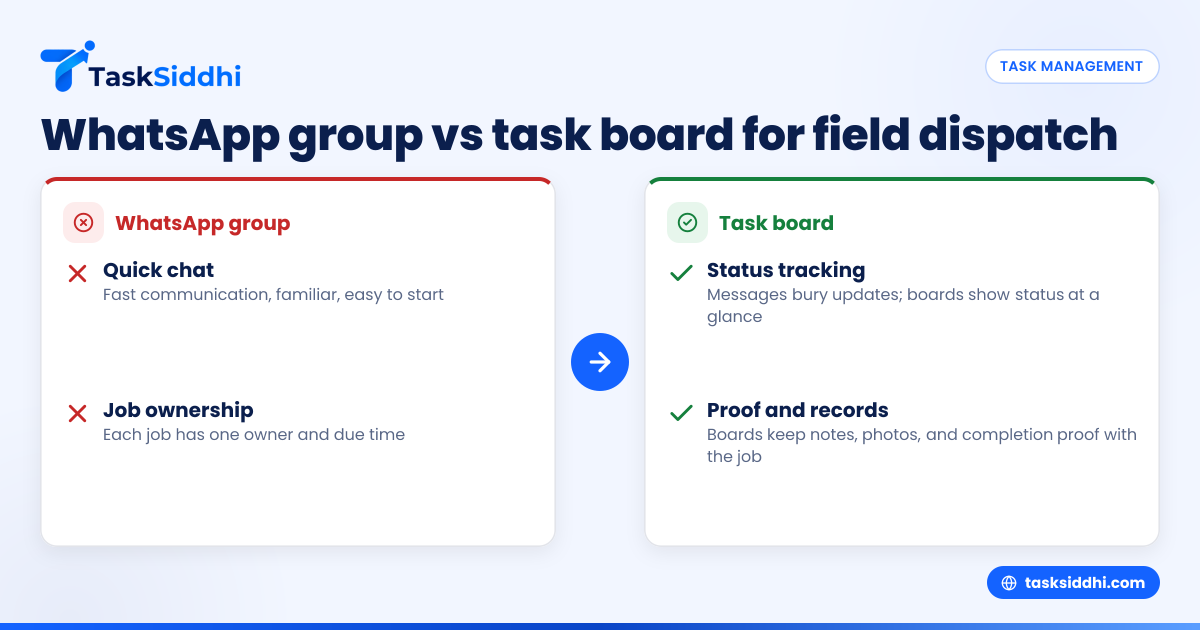
If your team dispatches field jobs through WhatsApp groups, you can get work out the door fast. But once volume grows, a task board gives you better control, clearer accountability, and cleaner records for scheduling, proof of work, and reporting in the United States.
For most U.S. service businesses with 5 to 30 people, WhatsApp works as a chat tool, not a work system. A task board is the better fit when you need to assign jobs, track status, capture site proof, and see what happened without scrolling through messages.
Key takeaways
- WhatsApp groups are quick for communication, but weak for tracking field jobs at scale.
- A task board gives each job an owner, due time, status, and record of completion.
- U.S. service teams often need better records for payroll, customer disputes, and QuickBooks workflows.
- The biggest risk with group chat is not speed. It is lost context, missed follow-ups, and weak visibility.
- A simple board plus mobile updates can replace paper job cards, scattered texts, and status calls.
- You do not need a complex system. Most teams improve with one board, a few job stages, and clear rules.
What is the real difference between a WhatsApp group and a task board?
A WhatsApp group is built for conversation. A task board is built for execution.
That sounds simple, but it matters a lot in field service. In a chat group, jobs arrive mixed with photos, voice notes, customer questions, and side conversations. The information is there, but it is hard to reuse. A dispatcher may know what is happening right now, but not what was promised yesterday or what still needs action before 5:00 PM.
A task board treats each field job like a record. It has a title, customer, address, owner, due date, notes, proof, and status. That structure reduces confusion. It also gives managers a way to see open work across the whole team without reading every message thread.
For a U.S. service business, this becomes important very quickly. Think about an HVAC company in Houston, a commercial cleaning team in Chicago, or a facility maintenance crew in Detroit. All three need fast communication. But they also need job history, photo proof, time records, and a way to answer customer questions with confidence.
If your team is debating a "whatsapp group vs task board for service business united states" decision, the key test is this: do you just need to talk, or do you need to run operations? If you need to run operations, a task board usually wins.
Why do service teams start with WhatsApp?
Because it is easy, familiar, and already on everyone’s phone.
For a small team, that matters. A manager can create a group in minutes. Techs can send arrival photos, ask for parts, and report delays. Nobody needs training. Nobody has to log into a new system. When jobs are few and the owner is involved in every dispatch, this can feel good enough.
There is also a real speed advantage. A dispatcher can type, “Mike to 814 W Madison, water heater issue, customer waiting,” and the job moves. For urgent work, chat is useful.
That is why many businesses stick with group messaging longer than they should. It solves the first problem, which is communication. But it does not solve the next problems, which are coordination, accountability, and recordkeeping.
As job count rises, old messages become your job database. That is where things start to break. You search for an address. You miss a customer note. A tech says the photo was posted earlier. Nobody can find it. The owner calls asking what happened on Friday. The answer is probably somewhere in the group.
This is also where people start searching terms like ai whatsapp group because they want a smarter way to summarize conversations and pull out action items. That need is real. But the better fix is often not smarter chat. It is moving work into a system designed for tasks.
When does WhatsApp stop being enough?
It stops being enough when work starts falling through the cracks.
That usually happens before the team notices it clearly. A few common signs show up first:
1. Jobs are assigned in chat but not owned clearly
A message in a group does not always equal accountability. If three people see the message, each may assume someone else took it. A task board assigns one owner.
2. Status is hard to see
In chat, “on the way,” “done,” and “need revisit” are buried in separate messages. On a board, status is visible at a glance.
3. Dispatchers become the human memory system
One person knows everything because one person read every message. That does not scale. It also creates risk when that person is out sick or leaves.
4. Job proof is incomplete
Photos, signatures, notes, and timestamps often end up scattered. For field teams, this matters during billing, callbacks, and customer complaints. A better process for field visits helps keep that proof attached to the right job.
5. Reporting is manual
If the owner wants to know how many jobs were completed this week, someone counts messages or updates a spreadsheet. That wastes time and leads to errors.
6. Time and payroll questions increase
When field staff clock time loosely through messages, payroll review gets messy. This is especially painful when job duration affects invoicing or labor analysis. A cleaner setup with time tracking can reduce those disputes.
Which tool is better for dispatching field jobs?
For dispatching field jobs in the United States, a task board is better once your team needs reliable assignment, status tracking, proof of work, or reporting. WhatsApp is fine for fast chat, but it is not built to manage a growing service workflow.
The reason is not complexity. It is clarity.
Dispatching is not just sending an address. It is matching the right person to the right job at the right time, then confirming what happened. A task board supports that process because each job moves through defined stages. New. Scheduled. En route. On site. Done. Follow-up needed. Billed. The exact stages vary, but the idea is the same.
That visual flow matters for service managers. It lets you see bottlenecks quickly. If too many jobs sit in “scheduled” late in the day, you know dispatch is overloaded. If many jobs end in “follow-up needed,” you may have training or parts issues.
With boards and views, teams can separate urgent jobs, revisit work, or jobs by crew without losing the big picture. That is a major upgrade from one busy group chat.
How a task board changes daily dispatch
A good dispatch process does not need many steps:
- Create the job with customer name, address, problem, and due time.
- Assign one owner or crew.
- Add notes, photos, and any required parts or instructions.
- Move the job through clear status stages.
- Capture proof on site.
- Review completed work and unresolved issues at day end.
That process reduces phone calls and “just checking” texts. It also gives office staff and field staff one shared source of truth.
What does it cost to keep using WhatsApp?
Using WhatsApp looks cheap, but the hidden cost is missed work, slower billing, dispatcher overload, and weak records. If one missed job or one disputed visit costs you a few hundred dollars, the “free” tool gets expensive fast.
Most owners do not feel the cost as one big line item. They feel it as friction.
A dispatcher spends 45 extra minutes each day chasing updates. A technician drives to the wrong site because details were buried in chat. An invoice waits because nobody can match photos to the right customer. A callback happens because the first visit notes were incomplete. Each issue seems small. Together, they add up.
Here is a simple example. Say a 10-person plumbing or maintenance team loses:
- 30 minutes a day in dispatcher follow-ups
- 15 minutes a day per tech from unclear job details or status confusion
- one missed or delayed invoice each week
- one avoidable callback each month
Even without complex math, that is real money. In the United States, labor is expensive. Fuel is expensive. Rework is expensive. Slow cash collection hurts.
A task board will not remove every problem. But it gives structure where chat creates sprawl. That usually lowers the daily waste that owners have accepted as normal.
What should a U.S. service business track on a task board?
Track the details that help you dispatch, complete, prove, and review each job. Start with customer, site address, scheduled time, assigned tech, status, notes, photos, and completion proof.
Keep it simple at first. Too many required fields slow people down. Too few create gaps.
For most U.S. field service teams, a job card should include:
Core dispatch details
- Customer or site name
- Service address
- Contact name and phone
- Job type
- Scheduled date and time
- Assigned tech or crew
Work instructions
- Problem description
- Access notes
- Required tools or parts
- Priority level
- Safety or site restrictions
Completion record
- Arrival and completion time
- Photos before and after
- Notes on work performed
- Customer confirmation if needed
- Follow-up or revisit requirement
Office follow-through
- Ready to invoice
- Warranty or callback flag
- Parts ordered
- Internal review note
This is where dedicated service jobs workflows become useful. They keep the office, dispatcher, and field team aligned without turning every update into a separate text thread.
If you also do recurring client projects, installations, or account-based work, the same setup can support client work without creating separate tracking habits.
Can you use both WhatsApp and a task board?
Yes. Many teams should.
You do not need to ban chat to improve operations. In fact, chat still has value. Fast coordination, urgent updates, and simple questions are part of daily field work. The problem comes when the chat thread becomes the official record of the job.
A practical setup is this:
- Use the task board as the system of record.
- Use chat for quick communication.
- Put final instructions, assignment, and proof in the job card.
- Train the team that “if it is not on the job, it is not confirmed.”
That one rule changes behavior fast.
For example, a tech can still message, “Traffic on I-90, 20 minutes late.” That is fine. But the job status should still be updated on the board. A customer can still call the office. That is fine. But the new site note should still go on the task.
This blended approach is easier to adopt than a full communication reset. It also helps teams move away from paper and spreadsheets gradually. If your current process is split across WhatsApp, Excel, and handwritten notes, start by replacing only the job record first.
A mobile-first workflow matters here. Field teams need updates on the road, not just from the office. A mobile app makes it easier for techs to update jobs, add photos, and close work from the field.
How do you move from WhatsApp groups to a task board without chaos?
Start with one board, five to seven statuses, and one team. Do not migrate everything at once. Keep chat for communication, but make the board the place where jobs are assigned, updated, and closed.
A rushed rollout often fails because it adds too much process. A simple rollout works better.
Step 1: map your current workflow
Write down how jobs move today. Include intake, dispatch, on-site work, proof, and invoicing. Keep it practical. You are not designing a perfect process. You are capturing reality.
Step 2: create basic stages
Most service teams can start with stages like:
- New
- Scheduled
- En route
- On site
- Done
- Follow-up needed
- Ready to invoice
That gives enough visibility without overcomplicating the board.
Step 3: define mandatory job info
Pick the few details every job must have before dispatch. Usually that means customer, address, issue, due time, and owner.
Step 4: train one behavior at a time
Do not teach every feature in one meeting. Start with three habits:
- every job goes on the board
- every job has one owner
- every completed job needs proof
Once those habits stick, add reporting and automations.
Step 5: review daily for two weeks
Use a short end-of-day review. Check open jobs, blocked jobs, revisits, and missing proof. This helps managers catch process gaps early.
Step 6: automate repetitive steps
Once the workflow is stable, simple automation can reduce manual updates, reminders, and handoffs.
Step 7: use reports to improve, not just monitor
When the team starts working from the board consistently, reporting can show job volume, completion trends, and stuck work. That helps owners coach better and staff smarter.
Why does this matter for billing, disputes, and management?
Because clean job records make the rest of the business easier.
In many U.S. service businesses, operations and finance are connected more tightly than owners realize. If job details are messy, invoicing slows down. If proof is missing, customer disputes take longer to resolve. If time records are unclear, payroll review gets painful. If managers cannot see open work, they overstaff some days and scramble on others.
This is especially true if you invoice through QuickBooks or collect payments later through email and phone follow-up. The stronger your job record, the easier it is to confirm billable work.
Customers also expect more documentation than before. Commercial clients may ask for arrival proof, site photos, service notes, or a clear visit timeline. Some buyers expect organized vendor processes during onboarding. Even when they do not ask for formal security reviews, they do expect professionalism and traceability.
A task board helps create that discipline. Not because it is fancy, but because it turns daily work into visible, reviewable records instead of temporary chat messages.
If your business has grown to the point where the owner cannot personally monitor every dispatch, this shift is not optional forever. It becomes part of management.
Is a free tool good enough for a small service team?
It can be, for a while. But small teams outgrow free tools when they need mobile field updates, job proof, reporting, or cleaner control over day-to-day dispatch.
The issue is not team size alone. It is workflow complexity. A six-person team doing ten simple jobs a week may be fine with basic tools longer than a five-person team handling urgent calls, recurring visits, and customer disputes.