

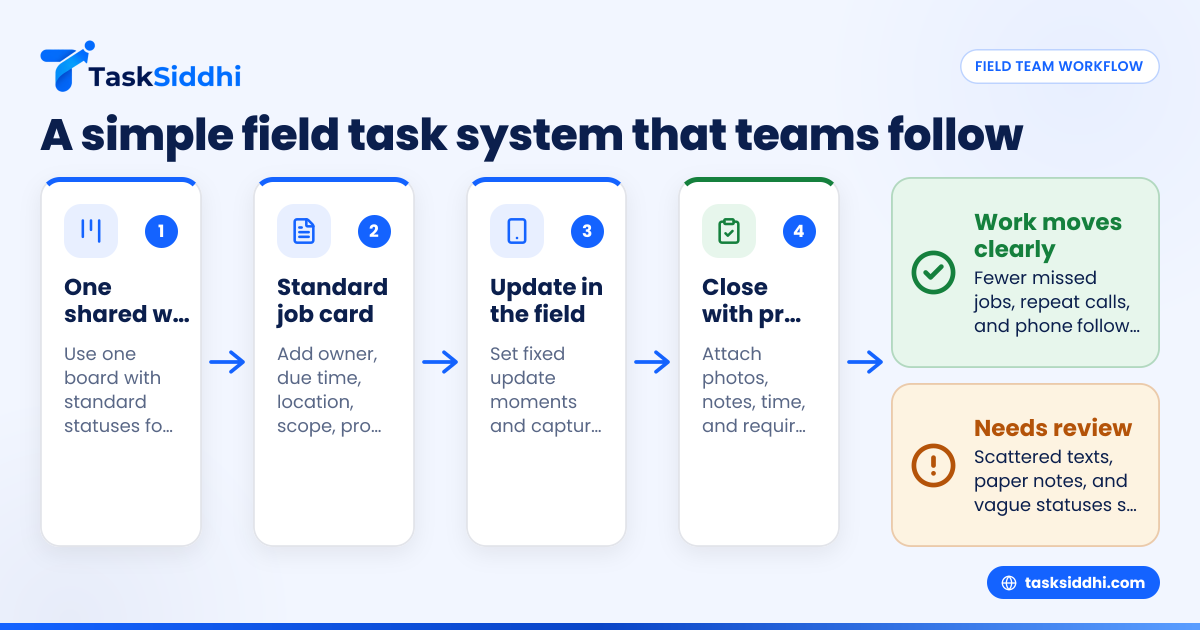
Field team task management is the process of assigning, tracking, and closing work done away from the office. For small service businesses in the United States, the best system is simple: one shared task board, clear job details, proof from the field, time tracking, and fast reporting.
Key takeaways
- Good field team task management reduces missed jobs, repeat calls, and long phone follow-ups.
- Small service businesses should move work out of scattered texts, calls, and paper job cards.
- Every field task should include owner, due time, location, scope, proof needed, and next step.
- Mobile updates matter because office staff need real-time status without chasing technicians.
- Weekly reporting helps owners spot delays, overload, and no-profit job types early.
- The right system should be easy for a team of 5 to 30 people to use every day.
Why field team task management matters for small service businesses
Field team task management matters because service work breaks down when information is scattered. A dispatcher has one view. A technician has another. The owner gets updates only when something goes wrong.
That creates delays, missed appointments, and confusion over who did what. In a small business, those mistakes are expensive. A single missed service window can lead to a refund, a bad review, or a lost account.
This is common in businesses that still run on group texts, spreadsheets, whiteboards, and paper forms. That setup may work with three people. It usually fails when the team grows, jobs get more urgent, or customers expect tighter response times.
A better system gives everyone one source of truth. The office can see what is scheduled. The field team can see what comes next. The owner can see completion status, bottlenecks, and workload.
For a plumbing company in Houston, that may mean knowing which technician has two emergency calls and which one can take a same-day water heater job. For a maintenance team in Chicago, it may mean seeing which site visit is still waiting on customer approval. For a repair business in Detroit, it may mean proving a job was completed before sending an invoice.
What does good field team task management look like?
Good field team task management means each job is easy to assign, easy to understand, and easy to close. Everyone sees the same status. The office does not have to call the field team for routine updates.
At a minimum, every field task should include:
- Customer name
- Site address
- Assigned technician
- Scheduled date and time
- Job scope
- Priority level
- Required parts or tools
- Photo or proof requirement
- Time spent
- Outcome or next action
That sounds basic, but many small businesses skip half of it. Then the team relies on memory. Memory fails under pressure.
The cost of poor task control
Poor task control shows up in small leaks first. A technician arrives without the right part. A customer says nobody told them about the visit. A follow-up is forgotten. A paper note stays in a truck. Over time, those leaks become real money loss.
You may also lose back-office time. Office staff spend hours every week calling for updates, rewriting notes, checking addresses, and asking for job photos. That is labor you are already paying for.
If your service business uses QuickBooks for accounting or Stripe for payment collection, task errors can also slow billing. The office cannot invoice quickly if job completion details are missing.
How should you organize field work for a team of 5 to 30 people?
Use one shared workflow with a small number of statuses. Keep it simple enough that every technician updates it the same way, every time.
Start with five core stages. New, scheduled, in progress, waiting, and done are enough for most small service teams.
Then expand only if a real need appears. Many small businesses add too many labels too early. That makes the system harder to use and easier to ignore.
A clear structure often looks like this:
- New
- The job is received but not yet assigned.
- Scheduled
- The visit date, time, and technician are set.
- In progress
- The technician is on site or actively working.
- Waiting
- The job needs a part, approval, access, or customer response.
- Done
- Work is finished and proof is attached.
This kind of layout works well on a visual board. A shared board helps dispatchers, managers, and owners see work at a glance. If you want a practical example of this setup, TaskSiddhi’s boards and views show how teams can organize jobs without building a complicated system.
Keep one board per team or service line
Do not create a new board for every customer or every technician unless there is a strong reason. That creates silos.
For most small service businesses, one board per team or service line is enough. For example:
- Residential service
- Commercial maintenance
- Installations
- Warranty calls
This keeps planning simple. It also helps managers rebalance work faster when one technician is overloaded.
What information should every field task include?
Every field task should answer five questions before the technician leaves: where am I going, what am I doing, what proof do I need, how urgent is it, and what happens next?
That prevents confusion in the field and cuts repeat calls to the office.
Below is a practical checklist.
Required task fields
Use the same fields on every job card:
- Customer and site name
- Full service address
- Contact name and phone
- Assigned technician
- Scheduled window
- Service category
- Job description
- Priority
- Checklist or scope steps
- Photos required
- Signature required, if your process needs it
- Materials used
- Time on site
- Notes for billing
- Follow-up date, if needed
Add proof rules before the team needs them
Do not wait until a dispute to define proof. Decide ahead of time what counts as a completed job.
For many service businesses, proof may include:
- Before and after photos
- Arrival and completion times
- Technician notes
- Customer sign-off
- Site condition notes
TaskSiddhi’s field visits and mobile app are useful here because proof is strongest when it is captured on site, not recreated later from memory.
How do you reduce missed updates from technicians?
Make updates part of the job, not an extra admin task. If the update takes less than a minute and happens at fixed points, adoption improves fast.
Pick three mandatory update moments: when the job starts, when the status changes, and when the job ends.
Most missed updates happen because the process is vague. The office says, “Keep us posted.” The field hears, “Call if there is a problem.” Those are not the same thing.
Instead, create a standard rule:
- Update status when leaving for the site.
- Update status when work starts.
- Add notes if blocked.
- Upload proof before marking done.
- Log time before closing the job.
This gives the office enough visibility without constant calling. It also creates a history you can review later.
Use short, repeatable update habits
Small teams do best with very short update rules. For example:
- Start job
- Waiting on part
- Need approval
- Complete
That is easier than asking technicians to type full reports during a busy day.
For teams that handle many service calls, time tracking can help connect labor time to each task. That matters when owners want to know which job types are profitable and which only look busy.
Why do so many field teams struggle with task management?
Most field teams struggle because their process grew by habit, not by design. They added jobs faster than they added structure.
That is why many small service businesses end up with the same problems:
- Work assigned in text messages
- Details stored in one person’s notebook
- No standard job status
- No proof of completion
- No easy way to see delays
- Billing held up by missing notes
Another issue is overcomplication. Owners sometimes buy a system built for large enterprises with heavy setup, deep ERP links, and complex permissions. Their team stops using it because the daily workflow feels harder than the old one.
For a small business, the best process is the one people actually follow. That means fewer clicks, clearer steps, and mobile-first use.
Watch for hidden bottlenecks
A field workflow may look fine on the surface but still break in the same places each week. Common bottlenecks include:
- One dispatcher who approves every assignment
- One manager who must review all closed jobs
- Technicians waiting until evening to enter notes
- Jobs reopened because required proof was missing
- Customer callbacks that are never tied to the original task
Use weekly reviews to spot these patterns. If one status fills up and does not move, that is your signal.
Build a simple process your team will actually follow
A practical field team task management process should be easy enough for a new hire to learn in one day. If it takes a week of explanation, it is too complex.
Step 1: define your standard workflow
Write down the exact statuses your team uses. Keep them short. Define what each one means.
For example:
- New = received but not assigned
- Scheduled = assigned with date and time
- In progress = technician working
- Waiting = blocked by part, customer, or approval
- Done = proof added and work finished
Step 2: create one standard job card
Every job should look the same. The fields may vary by service line, but the structure should stay consistent.
This removes guesswork. It also helps office staff check jobs faster before billing.
Step 3: assign one owner per task
A job can have support from others, but one person should own the next action. Shared ownership often means no ownership.
Step 4: set proof requirements
Be specific. If a completed HVAC maintenance visit needs four equipment photos and filter notes, say so. Do not rely on habit.
Step 5: review open work daily
A 10-minute review is enough for many teams. Check overdue jobs, waiting jobs, and overloaded technicians.
Step 6: review patterns weekly
Use weekly reporting to answer practical questions:
- Which technician has the most overdue jobs?
- Which customers create the most repeat visits?
- Which job types sit in waiting too long?
- How much time is spent on non-billable work?
TaskSiddhi’s reporting can help managers answer those questions without manually combining notes from calls, sheets, and paper forms.
Where can AI help an ai field team without making the process harder?
AI can help an ai field team by summarizing notes, flagging overdue jobs, and spotting repeat delays. It should support the workflow, not replace simple habits your team already understands.
The key is restraint. Small service businesses do not need flashy automation that nobody trusts. They need small wins.
Useful examples include:
- Summarizing long technician notes into clear job updates
- Highlighting tasks likely to miss a deadline
- Grouping repeat issues by customer or site
- Suggesting follow-up reminders for waiting jobs
What matters is that AI works inside a clean process. If your job data is messy, AI will not fix the root problem. It may only speed up the confusion.
That is why the first step is always structure. Standard statuses. Standard job cards. Standard proof. Once those are in place, AI becomes more useful because the inputs are consistent.
You can also use simple rules before advanced AI. For many teams, basic automation does most of the heavy lifting by moving routine work without constant manual follow-up.
How do you measure whether your system is working?
Track a few operating metrics every week. If the team can see improvement, adoption gets easier.
Start with these:
- Jobs completed on time
- Average time from assignment to completion
- Number of waiting jobs
- Number of repeat visits
- Missing proof rate
- Labor hours per job type
You do not need a large dashboard at first. A short weekly review is enough.
Focus on business outcomes, not software activity
Do not measure success by how many comments people leave or how often they log in. Measure whether the work runs better.
For example:
- Are invoices going out faster?
- Are fewer customers calling for status?
- Are fewer jobs getting lost between dispatch and completion?
- Can the owner see workload without asking three people?
Those are better signals than app usage alone.
Common mistakes to avoid
Many small service businesses improve field team task management quickly once they stop doing a few things.
Using too many channels
If jobs come in by phone, get scheduled in a spreadsheet, updated in text messages, and closed on paper, errors are guaranteed. Choose one operating system for the work.
Allowing free-form statuses
If one technician writes “done,” another writes “finished,” and another writes “closed,” reporting becomes messy. Standardize status names.
Waiting until the end of the day for updates
End-of-day updates are often incomplete. Require updates at the point of work.
Skipping close-out rules
A task should not move to done until the required proof is attached. That one rule prevents many disputes and billing delays.
Building a process around one person
If only one dispatcher or manager knows how work moves, the system is fragile. Write the process down and make it visible.
For teams handling recurring service jobs or client assignments, TaskSiddhi’s features, including support for service jobs and client work, can help centralize work without forcing a heavy enterprise setup.
Choosing software for field team task management in the United States
The best software for a small service business is not the one with the longest feature list. It is the one your office and field team will use consistently.
Look for these basics:
- Simple job assignment
- Mobile access
- Real-time status updates
- Proof from the field
- Time tracking
- Reporting
- Easy workflow setup
If your customers expect stronger vendor reviews, you may also hear questions about data handling and buyer security expectations. Larger clients may ask how you manage access, devices, and records. Even if your business is small, being organized helps in those conversations.
Do not overbuy. If your team is moving from paper and texts, first choose a system that replaces those cleanly. Then improve from there.
If you are comparing options, it can also help to review free vs paid tools based on how much coordination, proof, and reporting your team actually needs.
Field team task management works best when it matches real field behavior. The software should support the job, not create a second job.
If you want to see a practical setup for small service businesses, take the product tour or compare options on the pricing page.