

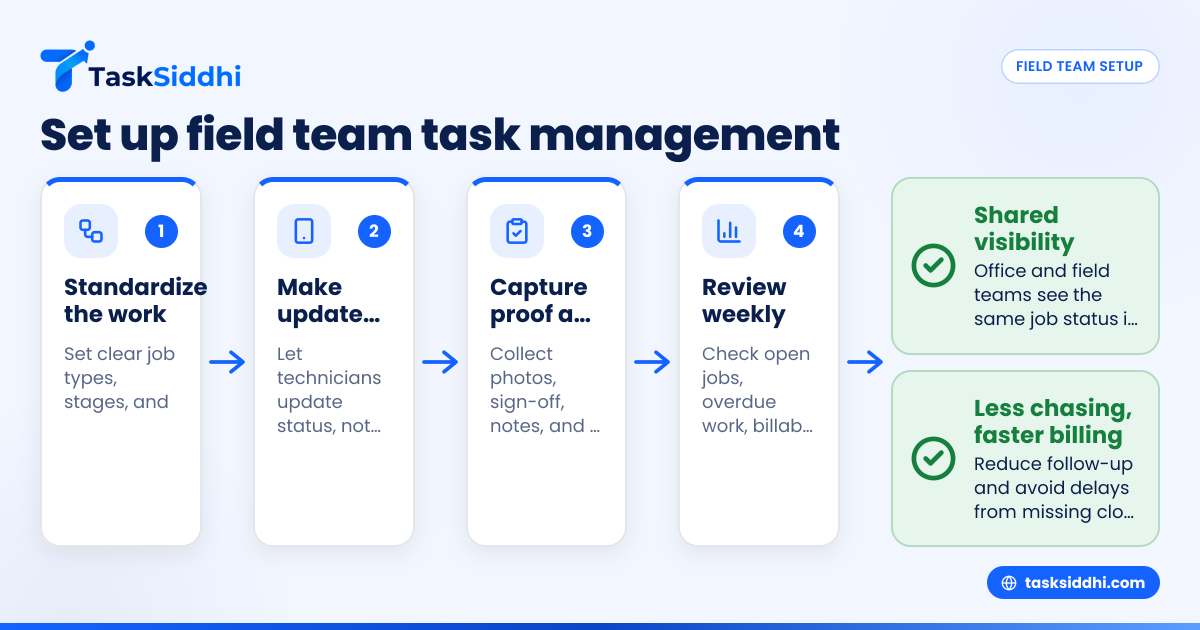
Field team task management is the simple system you use to assign work, track job status, capture proof from the field, and keep customers updated without chasing people on calls and texts all day. For a small service business in the United States, the best setup is usually one shared board, clear job stages, a mobile workflow for technicians, and a basic reporting rhythm that owners can review every week.
Key takeaways
- Field team task management works best when every job follows the same simple stages.
- Small service businesses should replace scattered calls, texts, and paper notes with one shared system.
- Mobile updates matter because office staff and field staff need the same job status in real time.
- Good setup starts with job cards, owner names, due dates, proof of work, and time logs.
- Reporting should focus on a few numbers, like open jobs, overdue work, first-time completion, and billable hours.
- An ai field team workflow can help summarize updates faster, but only after the basic process is clear.
What is field team task management?
Field team task management is the process of planning, assigning, tracking, and closing work done outside the office. For a small service company, that includes service calls, maintenance visits, installations, inspections, warranty jobs, and follow-ups.
If your team runs jobs through phone calls, text threads, sticky notes, and spreadsheets, work falls through gaps. A technician may finish a job, but the office does not know. A customer may ask for an ETA, but dispatch has to call three people. An invoice may be delayed because no one has the final notes.
A better setup gives everyone one source of truth. That usually means a central task board, standard job cards, mobile updates from the field, and simple reports for owners.
This matters even more for small businesses with 5 to 30 people. At that size, the owner still sees most of the work, but cannot personally track every job. You need enough structure to stay organized, but not so much that your team stops using it.
For example, a Chicago HVAC service company with 12 technicians may handle emergency calls, planned maintenance, and small installs in the same week. Without a shared system, dispatch, billing, and field crews all maintain their own notes. With a structured workflow, each job moves through the same stages and the office can see what is late, what is blocked, and what is ready to bill.
Why do small service businesses struggle with field team task management?
Most small service businesses struggle because their process grew job by job instead of being designed on purpose. What worked for three people becomes messy at ten.
The biggest problems usually look like this:
- Work requests come from too many places.
- No one uses the same job status names.
- Technicians keep notes on paper or in personal text threads.
- Photos, signatures, and site proof are hard to find later.
- Time spent on jobs is estimated, not tracked.
- Office staff re-enter the same information into invoices or reports.
- Owners only hear about problems after the customer calls.
These issues create real costs. Dispatch spends time chasing updates. Jobs get double-booked or missed. Customers wait longer for answers. Invoices go out late. Cash flow slows down.
In many small businesses, the issue is not effort. People are working hard. The issue is that the system depends too much on memory and individual follow-up.
That is why field team task management should be treated as an operating system, not just a task list. The goal is not to add more admin. The goal is to reduce confusion.
How should you set up your field workflow?
Start with one standard path for every job: new, scheduled, in progress, waiting, done, and billed. Keep each stage clear so the office and field team always know what happens next.
Once those stages are fixed, build your process around them. Most small service businesses do best with a workflow that is simple enough to use on busy days.
Step 1: Define your job types
Begin by listing the kinds of work you handle. Keep it practical. For many service businesses, the list might include:
- Service call
- Preventive maintenance
- Installation
- Inspection
- Warranty work
- Callback
- Estimate visit
Each type may need slightly different fields. An estimate visit may need photos and measurements. A service call may need parts used and time on site. A maintenance visit may need a checklist.
Do not create too many categories. If your team cannot tell the difference quickly, the system will slow them down.
Step 2: Set clear job stages
A good field team task management setup uses the same stages every day. A basic version often works best:
- New request
- Needs review
- Scheduled
- On the way
- On site
- Waiting on parts or customer
- Completed
- Ready to invoice
- Closed
These stages should match real decisions. Avoid vague labels like "active" or "pending." They create confusion because no one knows what action is required.
Using shared boards and views can make these stages visible to dispatchers, managers, and technicians at the same time.
Step 3: Standardize the job card
Every job should collect the same basic information. At a minimum, include:
- Customer name
- Site address
- Contact phone and email
- Job type
- Priority
- Assigned technician
- Scheduled date and time
- Work requested
- Notes from dispatch
- Photos or attachments
- Time spent
- Completion proof
This is where many businesses cut corners. They rely on memory, especially for repeat customers. That works until someone is absent or a customer disputes what happened.
A standard job card reduces back-and-forth and helps train new hires faster.
Step 4: Make field updates mobile-first
Technicians in the field should not wait until the end of the day to report status. They need a fast way to update jobs from their phones.
A strong mobile workflow should let them:
- See today’s assigned work
- Open job details
- Mark arrival and completion
- Add notes
- Upload photos
- Track time
- Flag issues
For teams doing on-site work, a mobile app matters because updates need to happen where the work happens, not later from memory.
Step 5: Decide what proof is required
Proof protects your business and speeds up billing. Depending on your work, that might include:
- Before and after photos
- Site visit timestamp
- Customer sign-off
- Completed checklist
- Part or equipment details
- Technician notes
For teams that regularly visit customer locations, field visits workflows help make proof collection part of the job instead of an afterthought.
What should be on every field job card?
Every field job card should show who, what, where, when, status, proof, and next step. If a dispatcher or owner opens the card, they should understand the job in under 30 seconds.
That short rule keeps your setup practical. A job card is not a dumping ground for every detail. It is a working record that helps the office, the field team, and billing stay aligned.
For most small service businesses in the United States, the best job cards include three layers.
First, include core scheduling details. This means customer name, address, contact, assigned technician, priority, and due date.
Second, include execution details. This covers what the technician needs to do, site notes, tools or parts needed, and any service history that affects the visit.
Third, include closeout details. This is where you capture work done, time spent, photos, customer approval, and issues that need follow-up.
If you do a lot of recurring repair or install work, a setup built for service jobs can help keep those details consistent across visits.
How do you roll this out without overwhelming your team?
Roll it out in one team, one workflow, and one set of rules. Do not try to standardize every process in the business during week one.
A staged rollout is the safest approach because field teams usually resist systems that feel like extra paperwork. The answer is not more training slides. The answer is a simpler process.
Start with one service line
Pick the work that causes the most daily noise. That may be emergency service calls, scheduled maintenance, or installations.
Do not start with your hardest exception cases. Start with high-volume work that repeats often.
Train around actions, not software menus
Your team does not need a long software tour. They need to know:
- How to see assigned work
- How to update status
- How to add notes and photos
- How to log time
- How to mark a job complete
That is enough for a first phase. If those actions happen consistently, the rest can improve over time.
Set non-negotiable rules
Adoption improves when your rules are simple. For example:
- Every job must be created before work starts.
- Every status change must happen the same day.
- Every completed job needs notes and proof.
- Every billable visit needs time logged.
Use time tracking if labor hours affect payroll, customer billing, or job profitability.
Review results weekly
In the first month, managers should review the workflow every week. Look for missing information, slow status updates, and stages that confuse the team.
Ask technicians what takes too many taps. Ask dispatch what they still need to chase manually. Then simplify.
What reports should an owner review each week?
Review open jobs, overdue work, completed jobs, billable hours, and jobs waiting on parts or customer action. These numbers show whether work is moving, stuck, or leaking profit.
That short list is enough for most small service businesses. You do not need a giant dashboard. You need a few numbers that help you act.
Here are the most useful weekly reports:
Open jobs by stage
This shows how much work sits in each status. If too many jobs pile up in "waiting on parts" or "needs review," your process is slowing down.
Overdue jobs
This helps you spot missed commitments before customers complain. It also shows whether workload, scheduling, or technician capacity is the issue.
Completed jobs not ready to invoice
This is a common hidden cash flow problem. The work is done, but billing is waiting on notes, proof, or internal approval.
Labor hours by technician or job type
This helps you compare estimated time with actual time. It is especially useful for repeat job types and warranty work.
Repeat visits or callbacks
If customers need a second visit too often, your first-time completion rate may be too low. That usually points to poor diagnosis, missing parts, or weak handoffs.
Simple reporting helps owners see these patterns without waiting for a month-end surprise.
Common mistakes in field team task management
Small service businesses usually do not fail because they chose the wrong tool. They fail because they set up the process in a way the team will not follow.
Here are the most common mistakes.
Too many status options
If your board has 14 columns, people will guess where work belongs. Keep statuses clear and limited.
No owner for each job
Every job should have one person responsible for moving it forward. Shared responsibility often becomes no responsibility.
Missing closeout rules
If "completed" can mean anything, billing and follow-up will suffer. Define what completed means.
Office-only workflow design
Managers often build the process from the desk. Then technicians ignore it because it is too slow in the field. Design for phone use first.
Trying to automate chaos
Automation is useful only after your stages and rules are stable. Otherwise, you just move confusion faster. Once your process is clear, automation can reduce repetitive updates and reminders.
When should you move from spreadsheets and texts to a real system?
Move when job volume, team size, or customer expectations make manual follow-up too risky. If the owner or dispatcher spends hours each day chasing updates, you have already waited too long.
There are a few strong signals:
- You cannot tell which jobs are late without asking around.
- Technicians send photos by text and they get lost.
- Customers call for updates before your team calls them.
- Time logs are reconstructed from memory.
- Invoices are delayed because closeout details are missing.
- Managers cannot compare performance across technicians or job types.
At that point, a structured system is no longer optional. It becomes part of running a predictable business.
TaskSiddhi is built for teams managing client work, field jobs, and service operations, especially when the current process lives across phone calls, spreadsheets, and paper notes. The most useful starting point is not every feature at once. It is a simple shared workflow your whole team will actually use.
You can also review the broader features if you want to see how boards, reporting, mobile updates, and field workflows fit together.
Can an ai field team workflow actually help a small service business?
Yes, but only after you standardize statuses, job cards, and closeout rules. If your process is messy, AI will not fix it. If your process is clean, it can help summarize updates and reduce admin.
The phrase "ai field team" sounds advanced, but the real value is basic. Owners want quicker visibility. Dispatchers want less manual follow-up. Technicians want fewer duplicate updates.
That means AI should support your workflow, not replace it. For example, it may help summarize technician notes, highlight blocked jobs, or surface overdue work faster. But none of that matters if your team is still using five different status names for the same stage.
For a small service business, the winning order is simple:
- Standardize the work
- Make updates easy from the field
- Capture proof and time consistently
- Review a few reports each week
- Add smarter workflow support later
This order keeps your investment practical and lowers change fatigue for the team.
How much should a small business simplify before setting up software?
Simplify until every job follows one clear path and every technician can explain the process in under a minute. If the workflow needs a long explanation, it is still too complex.
This is one of the most overlooked parts of field team task management. Many owners assume software will organize the business for them. In reality, software reflects the process you build inside it.
Before you configure anything, answer these questions:
- What types of jobs do we really do?
- What stages does every job move through?
- What proof is required before a job is complete?
- Who changes status at each step?
- What must billing receive to invoice the customer?
If you can answer those clearly, setup gets easier. If you cannot, pause and clean up the process first.