

Field team task management software in the United States helps small service and site-visit teams assign work, track progress, capture proof from the field, and report results without relying on scattered texts, calls, spreadsheets, and paper forms. For a U.S. business with 5 to 30 people, the right system should make dispatch, job updates, timesheets, and customer follow-up simpler on both desktop and mobile.
Key takeaways
- Good field team task management software gives you one place for jobs, site visits, photos, notes, time logs, and status updates.
- Small U.S. teams often outgrow WhatsApp-style group chats, spreadsheets, and paper job cards before they realize how much time they lose.
- The best setup is simple: clear boards, mobile updates, proof from the field, time tracking, and useful reporting.
- You do not need a heavy enterprise system to improve dispatch and accountability for a 5 to 30 person team.
- A practical rollout starts with one workflow, one team, and a few required fields for every visit or service job.
- An ai field team workflow only helps if the basics are clean, consistent, and easy for your crew to use every day.
Why small U.S. field teams need better task management
If you run service calls, inspections, installations, or recurring site visits, you already have task management software. It is just spread across too many places.
A manager sends a text. A technician calls back. A customer emails a change. A paper note stays in the truck. A spreadsheet gets updated later. At the end of the week, someone tries to rebuild what happened.
That system works for a while. Then the cracks show.
A small team in Houston may miss a follow-up because the office thought a job was complete. A property service team in Chicago may finish a site visit but forget to send photos. A contractor in Detroit may struggle to confirm hours because the crew recorded time in three different ways.
Field team task management software fixes this by giving your team one operating system for daily work. It should help you:
- assign jobs clearly
- set due dates and priorities
- track status in real time
- capture proof of work
- log time and materials notes
- keep customer context attached to the job
- see what is late, blocked, or complete
For small teams, the biggest gain is not complexity. It is consistency.
When every task follows the same path, your office can answer simple questions fast. What is due today? Who is on site? Which jobs are waiting on customer approval? Which visits have proof attached? Which hours are still missing?
That visibility reduces missed work, repeat calls, and end-of-week chaos.
What does field team task management software do?
It organizes field jobs, assigns owners, tracks progress, and captures updates from the office and the field in one system. For a small U.S. service team, it should replace scattered texts, spreadsheets, and paper job cards with a clear workflow.
In practice, this software is not just a digital to-do list. It becomes the shared record of each job.
Core functions that matter for small teams
For a service and site-visit business, the most useful functions are usually the simplest ones.
1. Job and task assignment
Each job needs an owner, a due date, a status, and enough context to act. A good system makes that visible without long text threads.
2. Board-based workflow
Many small teams understand work best as stages. New, scheduled, on-site, waiting, complete, and billed are common examples. Visual boards and views help managers see workload quickly.
3. Mobile updates from the field
Your crew should be able to open the day’s work, update status, add notes, and upload proof from a phone. A solid mobile app matters because field work rarely happens from a desk.
4. Proof of service or site completion
Photos, timestamps, visit notes, and customer sign-off details reduce disputes and make follow-up easier. This is especially important for recurring field visits.
5. Time logging
Even if you do not bill by the hour, labor visibility matters. Time tracking helps with payroll review, job costing, and checking whether schedules are realistic.
6. Reporting
Owners need to know what happened this week without reading every message thread. Basic reporting should show completion rates, overdue work, technician workload, and turnaround times.
What it should not become
For a team of 5 to 30 people, field team task management software should not feel like a long IT project.
If your crew needs heavy training before they can close a task, the system is too hard. If managers still export everything to a spreadsheet every day, the workflow is not complete enough. If the office still asks for status updates by phone because the tool is stale, adoption is weak.
The goal is simple daily use. Not extra admin.
How do you choose software for a field team in the United States?
Choose software that matches your real workflow: dispatch, site updates, proof, time, and reporting. For a U.S. small business, prioritize fast setup, easy mobile use, clear status tracking, and records that help with payroll, invoicing, and customer communication.
Start with your current bottlenecks
Do not begin with a list of features. Begin with the moments where work breaks down.
Ask questions like these:
- Where do jobs first enter the system?
- Who assigns them?
- How does the field know what changed?
- What proof is required before a job is complete?
- How do hours get approved?
- How does the office know a customer can be invoiced in QuickBooks or Stripe?
- What happens when a customer calls and asks for an update?
Your answers show the minimum workflow your software must support.
Pick tools that fit a small business reality
In the United States, many small service businesses run on a practical stack. Email and phone handle customer communication. QuickBooks often handles accounting. Stripe may be used for payments. The field team software does not need to replace everything.
It needs to connect the work itself.
That means your system should make it easy to move from request to assignment to completion. It should also create records that support payroll review, customer billing, and basic management decisions.
Look for these must-have criteria
Easy setup
You should be able to start with one board and a few statuses, not a six-month rollout.
Fast mobile adoption
If technicians cannot update jobs from the field in under a minute, they will stop using it.
Flexible task structure
Different jobs need different details. A service call is not the same as a site inspection. Strong features let you keep one system while handling different work types.
Repeatable workflows
Recurring maintenance, inspections, and follow-up visits should not require manual recreation every time. Basic automation helps small teams stay consistent.
Clear reporting for owners
You need to know what was completed, what slipped, and where team capacity is tight.
Which teams benefit most from this software?
Small service, repair, installation, inspection, and property teams benefit most. If your business sends people into the field, juggles daily schedules, and needs proof of work, field team task management software can reduce missed updates and improve accountability.
Common U.S. use cases
This kind of software fits many small business models.
Service and repair teams
HVAC, maintenance, equipment servicing, and general repair teams often need a clean handoff from office dispatch to field execution. Structured service jobs reduce back-and-forth and missed notes.
Site visit teams
Property checks, inspections, recurring route work, and on-site assessments need proof and consistency. Every visit should produce the same minimum record.
Client-work teams with field components
Some businesses do project or account-based work where part of delivery happens on-site. If tasks must be tracked across staff and customer accounts, organized client work becomes easier to manage.
Signs you have outgrown spreadsheets and paper
You are likely ready for better software if any of these feel familiar:
- jobs are assigned in text threads
- managers call technicians for status updates
- proof photos are stored in personal phones
- timesheets arrive late every week
- customers ask for updates that take too long to answer
- office staff rebuild job history before invoicing
- recurring visits get missed when someone is out sick
When those problems stack up, the issue is not employee effort. It is the system.
What features matter most for a 5 to 30 person team?
The most important features are shared task boards, mobile updates, proof capture, time logs, simple automation, and reporting. Small teams need software that removes confusion fast, not enterprise tools that add layers of setup and admin.
The practical feature shortlist
Here is the shortlist most small U.S. teams should start with.
Shared boards
A visual board gives everyone the same picture of work. The office sees volume and bottlenecks. Field staff see what is assigned and what comes next.
Required proof fields
For many teams, a task should not be marked complete until the right details are attached. That may include photos, notes, visit outcomes, or customer confirmation.
Time and activity logs
A task history reduces disputes. It also helps with payroll review and job costing.
Templates and checklists
If every site visit requires the same steps, use a template. Repeatable checklists improve consistency without long training.
Filters and owner views
Managers need to see overdue jobs. Technicians need to see only their assigned work. That sounds basic, but it is critical for adoption.
Where an ai field team approach can help
An ai field team process is useful when it reduces admin, not when it adds novelty. For example, smart suggestions, cleaner summaries, or better routing logic can help managers act faster. But no AI layer can fix a workflow where tasks are missing owners, statuses, or proof requirements.
Start with disciplined task structure first. Then look for ways to speed up routine work.
How to roll out field team task management software without chaos
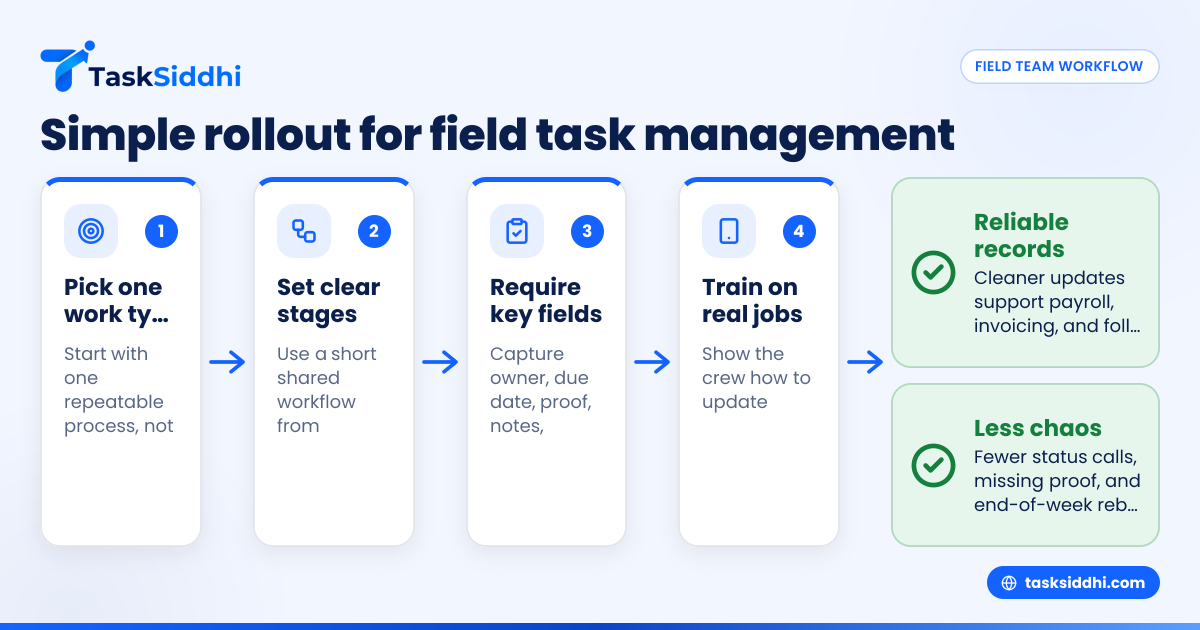
The safest rollout is to start with one workflow, one manager, and one team for two to four weeks. Keep the setup simple, require a few must-fill fields, and review usage daily until updates become routine.
A simple rollout plan
Small teams do best with a narrow rollout. Here is a practical way to do it.
1. Pick one work type first
Start with one repeatable process. Good examples are service calls, weekly inspections, or installation jobs.
Do not launch every department at once.
2. Define the workflow stages
Keep stages short and clear. For example:
- New
- Scheduled
- On site
- Waiting
- Complete
- Ready to bill
If your stages are confusing, your reports will be confusing too.
3. Decide the required information
Choose the minimum information every task must contain, such as:
- customer name
- address
- contact phone
- assigned owner
- due date
- job type
- proof photo
- completion notes
- time spent
This is the backbone of reliable records.
4. Train on real jobs, not theory
Use live work from day one. Show technicians how to open a task, update status, attach proof, and close it correctly.
Keep training short. Repeat it during the first week.
5. Review every day for two weeks
Managers should check adoption daily. Look for missing notes, stale statuses, and unlogged time. Fix problems early before bad habits spread.
6. Add reporting after the basics stick
Do not start with dashboards. Start with usage. Once updates are reliable, reports become valuable.
Common mistakes small field teams make
Most problems come from overbuilding the system or underdefining the workflow.
Mistake 1: Too many statuses
If every manager names stages differently, no one trusts the board.
Use a short, shared status list.
Mistake 2: Optional proof of completion
If proof is optional, it often disappears. Then the office chases technicians later.
Require proof when it matters.
Mistake 3: No owner on the task
A task without an owner is just a suggestion.
Every active job should have one clear person responsible for the next action.
Mistake 4: Measuring only activity, not outcomes
A long job list is not a useful metric. Completion rate, overdue work, repeat visits, and turnaround time tell a clearer story.
Mistake 5: Rolling out software without process cleanup
Software should support your workflow. It should not be the first time anyone asks how work actually moves.
Write the process down first.
How TaskSiddhi fits a small U.S. field team
TaskSiddhi is built for teams that need structured daily work without heavyweight complexity. If you run service, site-visit, or client-facing field operations, it gives you a practical system for boards, job tracking, proof from the field, time entries, and manager visibility.
A small team can use TaskSiddhi to organize work on shared boards, update tasks from the field, capture visit details, and review progress without piecing together messages and spreadsheets. For teams that rely on mobile execution, the combination of board-based planning, field updates, and reporting is what matters most.
The value is not just digital records. It is cleaner operations.
That means fewer status calls, fewer missing proof photos, fewer late timesheets, and less end-of-week reconstruction. It also gives owners a better view of capacity and service delivery without needing an enterprise ERP-style rollout.
If you are comparing options, it is also useful to look at the tradeoff between a basic tool and one built for work execution. This guide on free vs paid software can help frame that decision.
Field team task management software should help your office and field crew work from the same source of truth. That is where the real improvement shows up.
If you want to see a practical setup for your team, take the product tour or compare plans on pricing.
Frequently asked questions
What is field team task management software in the United States?
It is software that helps U.S. businesses assign, track, and complete work done outside the office. It is commonly used for service calls, site visits, inspections, installations, and recurring field jobs. The best tools also capture proof, time, and updates from mobile devices.
Is this the same as dispatch software?
Not exactly. Dispatch is one part of the workflow. Field team task management software covers assignment, status tracking, field updates, proof of work, time logs, and reporting across the full job lifecycle.
Can a small team use this without a full operations manager?
Yes. A team of 5 to 30 people can often start with one owner or office manager running the workflow. The key is keeping stages simple, requiring a few important fields, and reviewing usage during the first weeks.