

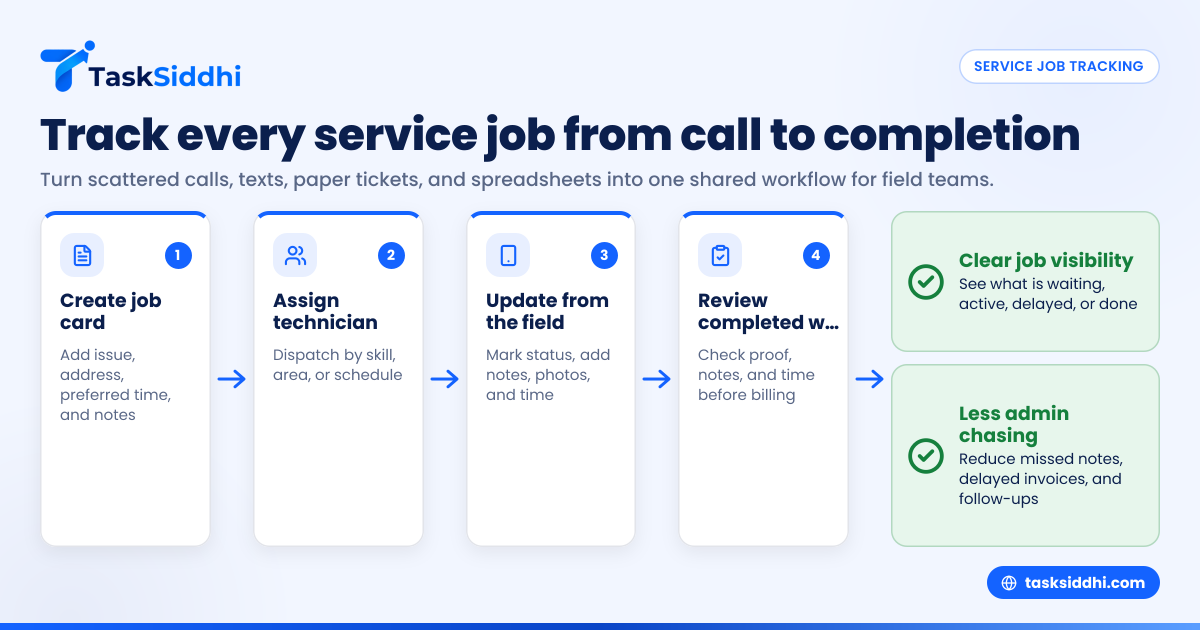
If you run a small HVAC, plumbing, or repair business in the United States, service job tracking software helps you keep every job in one place. It replaces scattered calls, texts, paper tickets, and spreadsheets with a clear system for scheduling, dispatching, proof of work, time tracking, and status updates.
Key takeaways
- Service job tracking software gives small field teams one shared place to manage work from request to completion.
- It helps reduce missed appointments, lost job notes, delayed invoices, and unclear technician accountability.
- For HVAC, plumbing, and repair teams, the best setup is simple: job cards, mobile updates, photos, timestamps, and reports.
- In the United States, owners often need tools that fit common workflows like QuickBooks, email, phone calls, and technician dispatch.
- An ai service job workflow is most useful when it cuts admin work, not when it adds complexity.
- Small teams should focus on adoption first. A tool only works if field technicians actually use it every day.
What is service job tracking software in the United States?
Service job tracking software in the United States is a system that helps service businesses manage field work from first call to completed job. It usually includes job creation, technician assignment, schedules, notes, photos, location-based proof, and completion records.
For a small business, this matters because service work moves fast. A customer in Houston calls about a broken AC unit. Another wants a leaking pipe fixed in Chicago. A property manager in Detroit needs repair updates before approving payment. If your team is using phone calls, whiteboards, and paper job cards, details get missed.
That usually leads to the same problems:
- Jobs are assigned verbally and forgotten
- Technicians arrive without the right details
- Office staff chase updates by phone
- Photos stay on personal devices
- Time records are incomplete
- Billing gets delayed because job proof is missing
A good service job tracking setup keeps all of that together. The office can see job status. The field team can update work from a phone. Managers can check what was done, when it was done, and where delays happened.
For small HVAC, plumbing, and repair teams, the goal is not more software. The goal is fewer dropped balls.
Why do small service teams in the United States need it?
Small service teams need service job tracking software because growth breaks informal systems. What works for three people often fails at eight, and definitely fails at fifteen.
When the owner handles dispatch personally, memory fills the gaps. But once multiple technicians are on the road, you need a shared operating system. That is especially true for businesses handling same-day calls, repeat maintenance, warranty work, or property management accounts.
A small team in the United States also deals with practical issues that software should support:
- Customers expect appointment windows and follow-up
- Office staff use email and phone as core channels
- Invoices often move through QuickBooks
- Commercial buyers may ask for clear records and better process controls
- Service managers need timesheets and job history for payroll or contractor records, including 1099-related documentation where relevant
Without a proper system, every update depends on chasing people. That creates admin overload.
Common signs your current process is breaking
You likely need software if any of these sound familiar:
- Dispatch lives in one person’s notebook or head.
- Technicians text photos to the office with no job reference.
- Customers call asking for updates your team cannot find quickly.
- Paper job cards come back late or incomplete.
- You cannot tell which jobs are waiting, active, or done.
- Time worked and travel time are logged inconsistently.
- You review jobs only after a customer complaint or payment delay.
None of these are rare. They are normal for growing service businesses. The problem is that each one costs money through rework, missed billing, and slower response time.
What features matter most for HVAC, plumbing, and repair teams?
The most important features are simple job cards, technician assignment, mobile updates, photos, timestamps, and reporting. Small service teams need speed and clarity more than a long feature list.
Start with the core workflow. Can the office create a job in under a minute? Can a technician open that job on a phone, see the address, customer notes, task details, and update status without calling back? If not, the system will not stick.
Job cards that match real service work
A job card should show the basics clearly:
- Customer name
- Job address
- Contact number
- Problem description
- Scheduled date and time
- Assigned technician
- Required parts or notes
- Photos before and after
- Completion details
For service teams, job cards should also capture what happened on site, not just whether the visit happened. That is why service jobs workflows matter. You need a record that supports operations, customer communication, and invoicing.
Mobile-first technician updates
Field teams work from trucks, job sites, basements, rooftops, and mechanical rooms. They need a phone-friendly system. A desktop-only tool slows everyone down.
A strong mobile app setup helps technicians:
- Start work
- Mark arrival
- Add notes
- Upload photos
- Log time
- Mark completion
That reduces office back-and-forth. It also gives the manager a live view of what is moving and what is stuck.
Time, proof, and reporting
For many service businesses, job completion is not enough. You need proof.
That may include:
- Arrival and completion times
- Site photos
- Technician notes
- Customer sign-off if your process requires it
- Job status history
This is where time tracking, field visits, and reporting become useful. They help you answer basic management questions without chasing technicians at 6:30 PM.
How does service job tracking software work day to day?
It works by turning each service request into a trackable job with clear ownership, status, and proof. The office creates the work, assigns it, and follows progress while technicians update the job from the field.
Here is a simple day-to-day process for a small team.
1. Create the service job
When a customer calls, the office creates a job card. That includes the issue, address, preferred time, and any notes. If the customer is a repeat client, prior history can be attached or referenced in your process.
The key is consistency. Every request should become a trackable job, not just a text message or verbal instruction.
2. Assign the right technician
The dispatcher or owner assigns the job based on skill, area, or schedule. This works better when you can see jobs on shared boards and views, instead of scanning chat threads or paper sheets.
For example:
- HVAC maintenance calls go to one tech
- Emergency plumbing calls go to another
- Appliance repair jobs in a certain service area go to a third
That reduces confusion and makes responsibility visible.
3. Let the technician update from the field
The technician opens the job on a phone and updates status during the day. That might include “on the way,” “started,” “waiting on part,” or “completed.” Photos and notes are added directly to the same record.
This is where even a basic ai service job flow can help. For example, your team may use structured notes, suggested fields, or repeatable templates so technicians do less typing and still submit complete updates.
4. Review completed work
Once the visit is done, the office checks the job record. If the notes, photos, and time are complete, the job can move to billing or follow-up.
If a callback is needed, the history is already there. That is much better than asking, “What happened at that property yesterday?”
5. Use reporting to improve operations
Over time, completed jobs become usable data. You can review turnaround time, repeat visits, open jobs, and technician workload. That helps owners make better scheduling and staffing decisions.
What should small teams look for before buying?
Pick software your team will actually use. For most small HVAC, plumbing, and repair businesses, ease of use matters more than advanced settings.
Start by checking whether the tool fits your current process without forcing a full rebuild on day one. If setup feels heavy, the team will drift back to phone calls and paper.
Then go deeper.
Keep your checklist practical
Look for these points:
- Can office staff create and assign jobs fast?
- Can technicians update jobs easily from a phone?
- Can you attach photos, notes, and proof to one job record?
- Can managers see open, active, delayed, and completed work?
- Can you track time without extra paperwork?
- Can you use simple automation for repeat steps?
- Does it support your business as it grows from 5 to 30 people?
A lot of small teams overbuy. They choose a system built for large enterprises with complex field service modules, then struggle with training and adoption. Simpler software often wins because people use it consistently.
Watch for hidden friction
Before deciding, ask:
- How many taps does it take to update a job?
- Can a technician use it with minimal training?
- Does it work well in the field?
- Can the office get answers without calling the technician?
- Will this replace existing spreadsheets and paper, or just sit beside them?
Those questions matter more than feature lists.
How much does missed job tracking really cost?
Poor job tracking costs small service teams through missed invoices, repeat visits, wasted office time, and lost customer trust. Even one incomplete job per day can create a meaningful monthly loss.
A missed photo, unclear note, or forgotten time entry can delay billing. A weak handoff can cause a callback. A lost status update can lead to avoidable customer calls and schedule disruption.
For a five-to-fifteen person team, the bigger cost is not software. It is process leakage.
Real cost areas to pay attention to
Most owners first notice the labor cost. But the bigger impact is often spread across several parts of the business:
- Office time spent chasing updates
- Delayed invoicing
- Repeat site visits
- Unclear technician accountability
- Slower scheduling decisions
- Poor visibility into backlog
- Customer frustration from weak communication
Let’s say a plumbing company in Chicago has two office staff members who spend part of each day calling technicians for status checks. If software cuts that back materially, the savings are not only labor savings. It also frees time for dispatch, follow-up, and collections.
That is why the best buying question is not “What does the software cost?” It is “What is poor tracking already costing us?”
Can service job tracking software help with customer communication?
Yes. It helps because your team can respond faster and with better information. When job details, status, notes, and photos live in one place, office staff do not need to guess.
For small teams, this changes the customer experience right away. When a customer calls, your staff can quickly answer:
- Was the technician assigned?
- Has the technician arrived?
- Is the job completed?
- Is a part needed?
- Is a follow-up visit required?
That matters for homeowners and even more for commercial clients. Property managers, landlords, and small business customers usually want quick answers and documented work.
Better records mean better follow-up
Service communication is not only about speed. It is also about accuracy.
If a customer says, “Your technician did not fix the issue,” your team should be able to review the job record before responding. That reduces conflict and makes callbacks easier to handle.
Small businesses in the United States also need to think carefully about outreach rules. If you send promotional emails or text campaigns outside the job workflow, make sure your process respects laws like CAN-SPAM and TCPA where they apply. Service job tracking software helps with operational communication, but your marketing practices still need their own review.
Should you replace spreadsheets all at once?
No. Most small teams do better with a phased change. Start with live jobs first, then move reporting and historical habits later.
That lowers resistance. It also helps your team learn the new workflow without trying to fix every old process in the same week.
A simple rollout plan for a 5 to 30 person team
Use this approach:
- Start with new jobs only.
- Standardize one job card format.
- Train office staff first.
- Train one or two field leads next.
- Require status updates on every active job.
- Add photos and time logging after the first week.
- Review adoption every Friday for the first month.
This works because it keeps the change manageable. Small wins matter. If technicians can update jobs fast and the office stops chasing information, adoption improves naturally.
You can also compare whether a free tool is enough for your stage by reading about free vs paid. For many field businesses, the answer depends on whether basic task tracking is enough or whether you need proof, reporting, and mobile usage across the team.
Why does TaskSiddhi fit small service teams?
TaskSiddhi fits small service teams because it focuses on practical field execution. It helps you manage jobs, assign work, track progress, capture proof, and review results without adding unnecessary complexity.
For HVAC, plumbing, and repair businesses, that often means using a shared workflow instead of juggling calls, chats, and paper. With TaskSiddhi, teams can use features built around real work movement, not just static lists.
Where it helps most
TaskSiddhi is especially useful when your team needs to:
- Assign jobs clearly
- Update work from the field
- Capture photos and notes on site
- Track time spent on jobs
- Review completion and pending work
- See performance through reports
If your business handles recurring visits, reactive service calls, or client-driven repair work, a structured board and mobile workflow can tighten daily operations fast.
What does implementation look like for a small business?
Implementation should be simple: define job stages, create your job card template, train dispatch, then get technicians updating jobs from the field on day one. The best rollout is short, clear, and tied to daily work.
In practice, a small business does not need a long consulting project. It needs a working setup that matches how jobs already move through the business.
Keep your setup focused
Start with these basic stages:
- New request
- Scheduled
- Assigned
- In progress
- Waiting on part
- Completed
- Needs follow-up
Then decide what every technician must enter before a job can be marked complete. Keep it short:
- Work done
- Time spent
- Photos
- Next step if unresolved
This gives owners and managers control without making the field team feel buried in admin.
The strongest implementations are boring in the best way. Jobs come in. Jobs get assigned. Technicians update status. Managers review open work. Billing gets what it needs. That is the whole point.