

If your field or service team still runs jobs through Excel, group texts, and paper notes, the right time to change is when work starts slipping between handoffs. In the United States, small teams usually need to replace Excel with a team task tracker when scheduling, proof of work, follow-ups, and payroll hours are no longer reliable in one sheet.
Key takeaways
- Excel works for simple lists, but it breaks down when several people update jobs all day.
- The switch usually makes sense when missed jobs, duplicate work, and status confusion become weekly problems.
- A team task tracker gives each job an owner, due date, status, and record of what happened.
- Mobile updates matter for field teams that work across cities like Houston, Chicago, or Detroit.
- The best setup replaces scattered spreadsheets gradually, not all at once.
- Look for boards, time logs, reporting, and mobile proof of work in one place.
What replacing Excel really means
To replace Excel with a team task tracker United States teams do not need a giant software rollout. They need a simpler way to assign work, track progress, and see what happened without chasing people by phone.
For many small businesses, Excel starts as the fastest option. One person builds a sheet. Everyone knows the columns. It feels cheap and familiar. That works when the team is small, the job volume is low, and one office person controls updates.
But field and service work changes fast. A technician gets delayed in traffic. A customer asks for a different time window. A site visit needs a photo. A manager wants to know which jobs are still open before 4:00 PM. A spreadsheet is not built for those moving parts.
A team task tracker is different because each row becomes an active job record. It has an owner. It has a current status. It can hold notes, photos, timestamps, and next steps. Instead of asking, "Who updated column G?" you can see what changed and what still needs action.
That is the real shift. You are not just moving data out of Excel. You are moving from static lists to managed work.
When is the right time to switch?
You should switch when Excel stops helping the team make decisions during the day. If people still need calls, text threads, and side notes to understand the sheet, the sheet is no longer your system.
There are a few clear signs.
1. Your spreadsheet needs a spreadsheet manager
If one person has become the only person who can safely edit the file, you already have a bottleneck. When updates depend on one dispatcher, office coordinator, or owner, work slows down and errors rise.
This is common in teams with 5 to 30 people. The sheet becomes fragile. People are afraid to sort it. Filters get broken. Rows get overwritten. Nobody knows which version is current.
2. Field updates arrive outside the spreadsheet
If your crew sends progress updates by text, call, or photos in personal threads, Excel is no longer where the work lives. It is just a summary someone updates later.
That delay creates real business problems. A manager sees a job as open when it is already done. A customer gets a follow-up call even though the visit happened. Payroll hours need cleanup on Friday.
3. Jobs move through several stages
Many service jobs are not one-step tasks. They move from intake to scheduling, dispatch, site visit, approval, revisit, and closure. Excel can list those stages, but it does not manage them well when many jobs move at once.
A tracker with boards and views makes that flow easier to see. Managers can spot blocked work quickly. The team can focus on the next action, not on scrolling through rows.
4. You need proof, not just completion
A field team often needs proof of work. That may be a photo, a note, a timestamp, or the fact that someone visited the location. Excel can link to files, but it does not make proof easy to collect in the moment.
If customers ask, "Did your tech come out?" you need a system built for field visits, not just a spreadsheet with comments.
5. Reporting takes too long
If your weekly reporting is a manual cleanup exercise, your system is costing more than it seems. The time spent fixing statuses, copying hours, and counting completed jobs is real labor.
A proper tracker helps you move from cleanup to visibility. Instead of rebuilding reports, you use reporting to see open jobs, completion trends, and workload by person or team.
What problems show Excel is no longer enough?
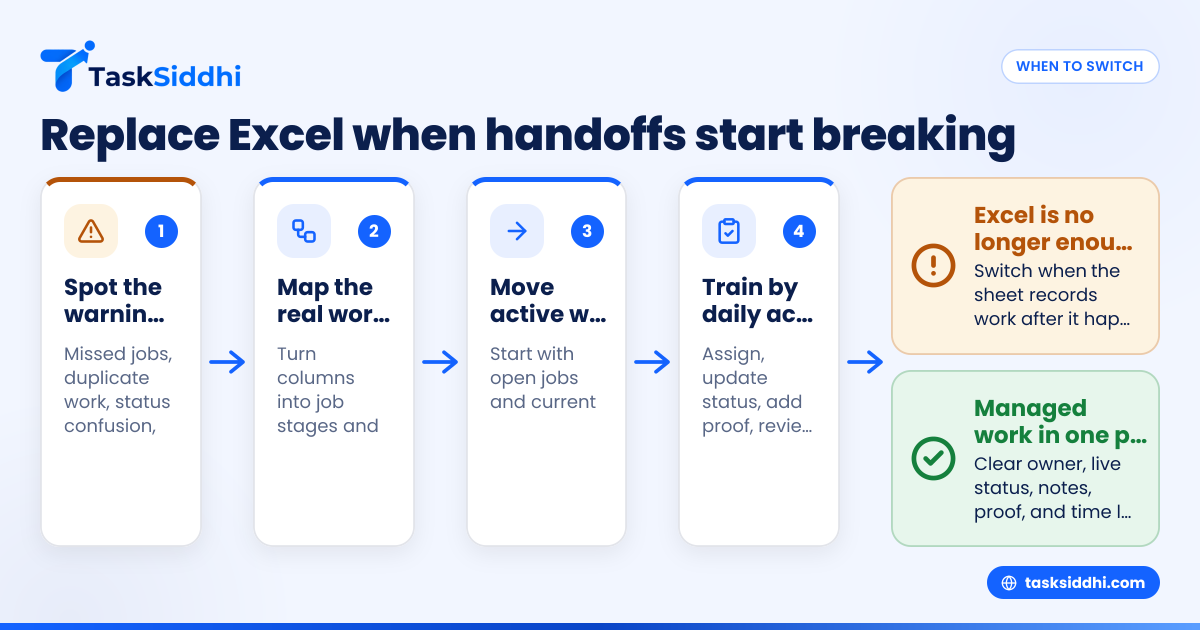
Excel is no longer enough when the sheet records work after it happens instead of helping the team run work as it happens.
That usually shows up as late updates, unclear ownership, duplicate dispatches, missing notes, and Friday cleanup. If the crew uses calls and texts to clarify basic status, Excel is now just a backup log.
Watch for these operational warning signs
Here are practical signs that the switch should move up your list:
- Two people get assigned the same job.
- A customer asks for an update and nobody knows the latest status.
- A technician arrives without the right job details.
- Photos and notes sit in phones, not with the job.
- Hours worked are tracked in a separate file.
- Completed work still appears open.
- Managers ask for an end-of-day summary by text.
- You cannot tell which jobs are aging.
- Your office team spends Monday morning fixing last week.
- New hires struggle to learn the process.
None of these problems look huge in isolation. Together, they create waste. They also make the business feel harder to run than it should.
Why not keep Excel and just improve the sheet?
You can improve an Excel file for a while, but once work depends on live updates from several people, the sheet becomes a workaround.
Better formulas do not solve ownership. More tabs do not solve field proof. Color coding does not solve handoffs. At some point, the issue is not spreadsheet skill. The issue is using the wrong tool for moving work.
The hidden cost of staying too long
Excel looks inexpensive because most teams already have it. But the real cost sits elsewhere:
- missed jobs
- slower dispatch
- office rework
- extra customer follow-ups
- payroll cleanup
- lost job context
- owner involvement in routine status checks
If those costs happen every week, the spreadsheet is not saving money.
This is where people start searching phrases like ai replace excel because they want less manual updating, less chasing, and clearer job records. The useful question is not whether a new tool is more advanced. It is whether it reduces avoidable operational friction for your team.
What should a small field or service team use instead?
A small field or service team should use a task tracker that matches how jobs move in real life: intake, assignment, in progress, done, and follow-up. It should work well on phones, show clear ownership, and keep notes, proof, and time in one place.
For teams in the United States, that often means a lightweight work-management tool instead of a big enterprise system. You do not need a complex ERP rollout to manage daily service calls. You need a system people will actually update from the field.
The core features that matter most
If you are choosing a replacement, focus on basics that remove daily friction.
1. Clear task ownership
Every job should have one person responsible now. Supervisors should see assignments without asking around.
2. Status stages that match your workflow
Your team should be able to move jobs through stages without editing several columns. This matters a lot for service jobs and repeat visits.
3. Mobile access
Field staff should update jobs from the road or on site. A strong mobile app matters more than fancy setup options.
4. Time logging
If labor time drives payroll, billing, or job costing, built-in time tracking saves a lot of end-of-week cleanup.
5. Reporting for managers
Managers need a live view of workload, overdue jobs, and completed work. That is where useful features and reporting make a real difference.
How do you move from Excel without disrupting the team?
Start with one workflow, one team, and one clear owner. Do not migrate every sheet at once.
Pick the process that causes the most confusion today. That may be new service calls, site visits, or recurring client work. Move that workflow first. Keep the old sheet as a reference for a short period, but stop adding complexity to it.
A simple 5-step rollout
1. Map your current columns to real job stages
Look at your sheet and ask what each column is trying to represent. Usually it comes down to a few basics: customer, location, assigned tech, due date, status, notes, and proof.
2. Standardize your status names
Avoid vague labels like "pending" for everything. Use simple stages such as New, Scheduled, In Progress, Waiting, Done, and Follow-up.
3. Move only active work first
Do not import years of old data just because you can. Start with open jobs and current customers. That lowers risk and confusion.
4. Train on daily actions, not software theory
Show each role exactly what to do:
- dispatch assigns the job
- field staff update status and proof
- managers review overdue items
- office staff close completed work
5. Review after one week and two weeks
Check where people still fall back to text threads or side notes. Those gaps tell you what to simplify next.
Keep the process simple
The biggest mistake is overbuilding. Small teams do better with a clean board, a few status stages, and a short set of rules. If the process feels heavier than Excel, adoption will stall.
Tools with automation can help remove repetitive steps later. But first make sure the team understands who updates what and when.
What does it cost?
The real cost is not only software. It is also the time spent fixing bad handoffs, missing updates, duplicate work, and manual reporting. If Excel creates weekly rework, a tracker can pay back value by reducing those hidden labor costs.
Think about cost in three buckets.
Software cost
There is the monthly subscription. That is the visible part, and it is easy to compare.
Change cost
There is also setup time, training, and a short adjustment period. Small teams should expect some friction in the first week or two.
Delay cost
The largest cost is often waiting too long. If your office staff spends several hours each week reconciling work, or if managers constantly chase status updates, that waste adds up fast.
When comparing options, do not just ask, "What is the monthly price?" Ask:
- How many hours of admin work will this remove?
- Will technicians actually update it from the field?
- Will managers stop using phone calls as the main reporting method?
- Will it improve job completion and follow-up?
That gives you a more honest business case.
If you are deciding between basic tools, it can also help to review free vs paid tradeoffs before choosing.
What changes after the switch?
The first visible change is fewer status questions. Managers stop asking where every job stands because the system shows it. Dispatchers spend less time repeating instructions. Field staff spend less time sending separate updates by text and photo.
The second change is cleaner accountability. Each job has an owner. Each stage has a clear meaning. You can see what is late and why.
The third change is better end-of-day and end-of-week control. Instead of rebuilding the story from messages and spreadsheets, you already have the record.
For office teams
Office staff usually gain time first. They stop maintaining the spreadsheet as a living rescue tool.
For field staff
Field staff get fewer calls asking for updates they already gave once. This matters most when jobs are spread across a metro area and schedules shift during the day.
For owners and managers
Leaders get a better operating view. They can see volume, bottlenecks, and overdue work without waiting for someone to prepare a manual summary.
That is why the move often feels bigger than a software change. It changes how the business communicates.
Choosing the right tool for small teams
Not every tracker fits field and service work. Some are great for office projects but weak for day-to-day job execution. For a business that runs site visits, recurring service, or client delivery work, the right system should support simple assignment, mobile updates, proof of work, and fast reporting.
TaskSiddhi is built for that kind of work. It supports client work, service workflows, mobile updates, and manager visibility without forcing a complex setup.
Still, the decision should come back to your real process. Ask for a tool that helps your team complete work faster and with fewer handoff errors. If it does that, it is doing its job.
If your spreadsheet is now a patchwork of tabs, calls, and manual follow-ups, that is usually your signal. It is time to replace Excel with a team task tracker that fits how your team actually works in the United States.
See how it works on the product tour or compare options on pricing.
Frequently asked questions
Is Excel always bad for small teams?
No. Excel is fine for simple tracking when one person updates it and the workflow rarely changes. It becomes a problem when several people need live updates, clear ownership, and field proof.
How many people usually justify a task tracker?
There is no exact number, but many teams feel the need between 5 and 30 people. The trigger is usually work complexity, not headcount alone.
Can we switch without importing old spreadsheets?
Yes. Many teams start with active jobs only and keep old sheets as reference. That makes the rollout faster and easier to manage.
Does a task tracker help with payroll hours?
It can, especially if the system includes time logging tied to jobs. That reduces manual cleanup and makes weekly review easier for managers.
Will field technicians actually use it?
They usually will if updates are quick, mobile-friendly, and clearly part of the daily process. Adoption drops when the tool asks for too many steps or duplicate entry.
Should we replace every spreadsheet in the business?
No. The goal is to replace the spreadsheet that is trying to run daily operations. Excel can still be useful for analysis, one-off exports, and supporting records.