

Client work management for a small agency in the United Kingdom means having one clear place to track every brief, task, deadline, approval and handover. If your team still runs work across WhatsApp, email, spreadsheets and paper notes, you will spend too much time chasing updates and too little time delivering work.
Key takeaways
- Small agencies in the United Kingdom need one shared system for briefs, tasks, approvals and delivery.
- The biggest problems are usually missed deadlines, unclear ownership and lost client feedback.
- A simple board with standard stages can make work visible without adding admin.
- Time logs, approval records and reports help owners spot delays early and protect margins.
- A mobile-friendly setup is useful when staff move between client sites, meetings and home working.
- Good client work management supports better delivery without forcing a large-agency process.
Why client work management matters for small agencies in the United Kingdom
For a small agency, work moves fast. One person may sell the project, write the brief, chase approval and deliver the final file. That can work when the team is tiny. It starts to break when five to 30 people are handling several client jobs at once.
The main issue is not effort. It is visibility. When work sits in inboxes, chat threads and separate spreadsheets, nobody sees the full picture. A deadline slips because feedback was buried in email. A designer waits because the brief changed on WhatsApp. A client asks for status and the account manager spends 20 minutes piecing it together.
Client work management small agency united kingdom is really about control. It gives the owner or manager a clear view of what has been promised, what is in progress and what is blocked. It also helps the team know what to do next without constant checking.
In London, Manchester or Birmingham, small agencies often compete on speed and responsiveness. Clients expect quick answers and a professional process. They may not care which tool you use, but they do care that deadlines are met, approvals are recorded and work does not go missing.
A practical system does not need to be heavy. It needs to be clear, repeatable and easy for the team to follow every day.
What usually goes wrong in small agency client work?
The most common problem is that work is organised by conversation instead of by job. A message says, “Can we get this done by Friday?” Someone replies yes. Nobody records the task properly. By Thursday, three people think someone else owns it.
Another common issue is unclear scope. Small agencies often say yes quickly to keep clients happy. That is fine until extra requests pile up and the team cannot tell which tasks belong to the original job. Without one job record, scope creep hides in plain sight.
Approvals are another weak point. A client may approve copy by email, then ask for changes in a meeting, then send final comments in a chat. If there is no single record, the team works from different versions.
Signs your current process is too messy
You likely need a better system if any of these happen often:
- Staff ask each other for updates more than they check a shared board.
- Deadlines live mainly in calendars or memory.
- Client feedback is spread across email, chat and phone notes.
- Nobody can quickly answer, “What is due this week?”
- You find out a job is late only when the client asks.
- Time spent on work is guessed, not logged.
These are not unusual problems. They are normal for growing agencies. The fix is to move from scattered communication to one workflow.
What should a simple client work system include?
A useful setup should cover the full life of a client job. It should start at the brief and end at delivery. It should also be simple enough that the team uses it daily.
At minimum, your system should include:
- A record for each client job
- Clear ownership for every task
- Deadlines and priority
- A standard workflow stage
- Space for files, notes and approval comments
- A record of time spent
- Basic reporting for managers
This is where a visual board helps. A board lets your team see what is waiting, what is active, what is under review and what is done. TaskSiddhi’s boards and views are designed for this kind of day-to-day work visibility.
A practical workflow for small agencies
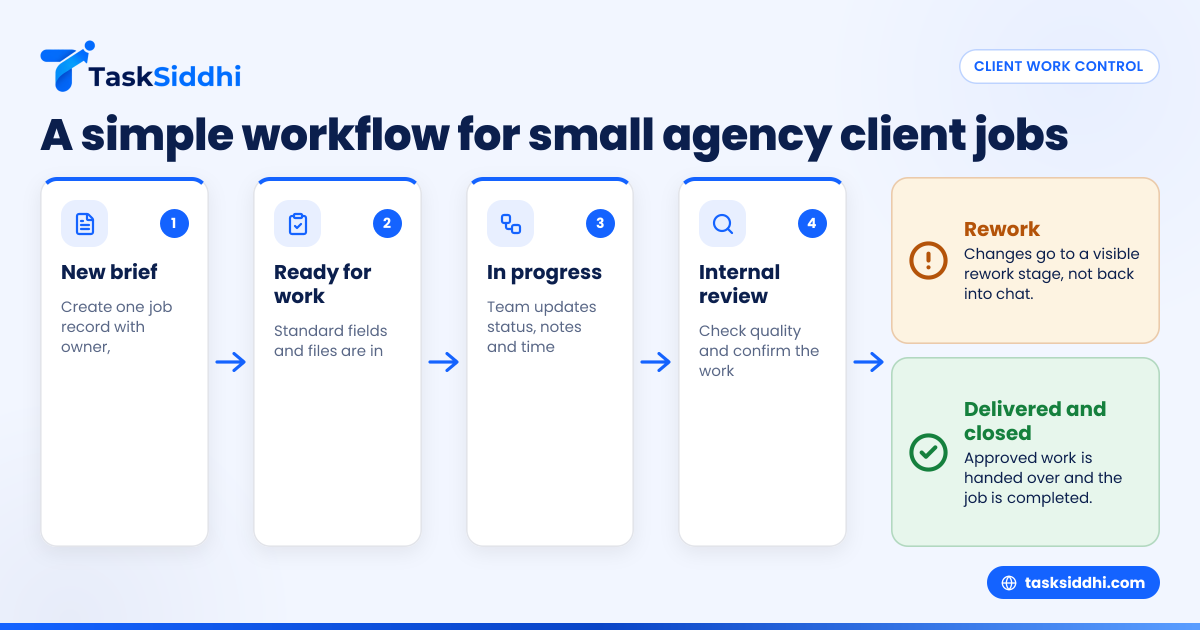
Most small agencies do not need a complicated process. A simple flow often works best:
- New brief
- Ready for work
- In progress
- Internal review
- Client approval
- Rework
- Delivered
- Closed
This structure gives enough control without slowing work down. It also makes reporting easier because every job moves through the same stages.
How do you set up client work management without slowing the team down?
Start with one board, one workflow and one naming rule. Keep every client job in the same place, assign one owner, and use standard stages from brief to delivery. If the process takes more than a minute to update, it is too heavy.
The goal is adoption, not perfection. Many small agencies fail because they build a process that looks tidy on paper but is too slow in real work. Staff then return to chat messages and memory.
Step 1: define what counts as a job
First, decide what should be tracked as its own item. For one agency, that may be each client request. For another, it may be a campaign, monthly retainer task or one-off deliverable. Be consistent.
A good rule is this: if it has an owner, a deadline or a client approval, it should be on the board.
Step 2: standardise the information on every job
Each item should include the same core fields. That reduces confusion and makes reports more useful. Start with:
- Client name
- Job name
- Service type
- Owner
- Due date
- Status
- Priority
- Approval stage
- Estimated effort
- Actual time spent
If your team works across creative, content, digital and account management, this standard view stops each person tracking work in a different way.
Step 3: agree one place for feedback and approvals
You do not need to stop clients using email. You do need your internal team to copy key feedback and approval notes into the job record. That creates one source of truth.
The same rule applies to verbal feedback from calls or meetings. If it changes the work, record it on the job straight away.
Step 4: use time tracking where margin matters
Small agencies often avoid logging time because it feels like extra admin. The problem is that untracked time hides poor margins. If a £1,200 job takes far longer than planned, you need to know why.
A lightweight time tracking setup can help you compare expected effort with real effort. That gives you better pricing, better planning and fewer overloaded team members.
What does a good approval process look like?
A good approval process has one named approver, one place for comments and one clear outcome: approved, approved with changes, or not approved. Every approval should be tied to a version or deliverable so the team knows exactly what was signed off.
Under that simple rule sits a lot of day-to-day discipline. Without it, delays are common. One client contact says yes in a call. Another sends edits later. The team starts work again, even though nobody knows which direction is final.
Keep approvals simple and visible
For most small agencies, approvals need four parts:
- What was submitted
- When it was submitted
- Who reviewed it
- What decision was made
If that information lives inside the job record, the team can move quickly. If it is buried in inboxes, work stalls.
This matters even more when several clients have urgent work live at once. A visible approval queue helps your team prioritise and chase the right people.
Build a rework stage into the workflow
Not every approval leads straight to delivery. That is normal. Add a specific rework stage so changes do not disappear into “in progress”. This keeps reporting honest and helps you see which jobs are looping too often.
Too many small agencies treat rework as invisible. Then they wonder why utilisation is poor and deadlines feel impossible.
Can ai client work actually help a small agency?
Yes, but only if it reduces admin or improves visibility. For a small agency, ai client work is useful when it helps organise updates, highlight delays or support faster decisions. It should not replace clear ownership, deadlines or approval rules.
The phrase sounds bigger than it needs to be. Most agency owners do not need complex systems. They need fewer surprises. If AI features ever enter your workflow, the test is simple: does it save time on repetitive admin, or does it create another thing to manage?
For example, a team may benefit from better automated reminders, clearer status summaries or flagged overdue jobs. That is useful because it supports the manager’s judgement. It does not replace it.
The risk is believing technology fixes a weak process. It does not. If briefs are vague, owners are unclear and approvals are not recorded, no smart layer will solve the real issue. Start with a simple workflow first. Then add helpful tools around it.
TaskSiddhi includes automation and reporting, which can help small agencies reduce chasing and improve oversight. The value comes from making work easier to run each day.
How can you manage client work across office, home and client sites?
Use one shared system that works on desktop and mobile. Staff should be able to check tasks, update status, add notes and confirm next steps wherever they are. That keeps work moving between meetings, travel and home working.
Hybrid work is normal for many agencies. Account managers may be in client meetings. Project leads may work from home. Creative staff may switch between locations during the week. If updates only happen when someone is back at their desk, your board quickly becomes out of date.
Make mobile updates part of the process
A mobile-friendly process is not just a nice extra. It helps the system stay current. For example, after a client meeting, the owner of the job should update the brief, log any change and note the next action straight away.
That prevents the usual delay where someone promises to update the spreadsheet later and forgets. TaskSiddhi’s mobile app helps teams update work on the move, which is useful for client-facing staff.
Separate urgent work from important work
Small agencies often mix everything together. One urgent client request can then knock out planned delivery for the day. Use priority and due dates to make this visible.
A simple rule helps:
- Urgent: action needed today
- High priority: due soon, needs active progress
- Normal: planned work with clear timing
- Low: can wait without risk
This stops every new request from being treated like a crisis.
Reporting and visibility for agency owners
Many owners do not need advanced reporting. They need practical answers to practical questions:
- What is due this week?
- Which jobs are blocked?
- Who is overloaded?
- Which clients create the most rework?
- Where are approvals waiting?
- Which jobs took longer than expected?
If your current setup cannot answer these quickly, you are managing reactively.
The reports that matter most
Start with a small set of views and reports:
- Jobs due this week
- Overdue jobs
- Jobs waiting for approval
- Work by team member
- Time logged by client or job type
- Completed work this month
That is enough to support better weekly planning. It is also enough to improve client communication because your updates are based on live work, not guesswork.
If you handle retainer and ad hoc work together, it is worth separating them in your board or fields. That lets you see whether reactive requests are eating into planned client delivery.
Choosing a system your team will actually use
The best client work system is not the one with the longest feature list. It is the one your team updates consistently. That means it must feel easy, quick and relevant to real agency work.
Look for a setup that:
- Shows all current jobs clearly
- Works well for repeatable workflows
- Lets you assign work easily
- Records comments and progress in one place
- Supports time logging where needed
- Gives simple manager visibility
TaskSiddhi is built for teams that need practical work control, including client work. For small agencies, that matters more than having a complicated platform that only one person understands.
Start small, then improve
Do not try to rebuild your whole agency process in one week. Start with one team or one service line. Use one board. Run it for a month. Notice where jobs get stuck. Tighten the workflow only where needed.
This gradual approach works better because staff can see the benefit quickly. They spend less time asking for updates. Managers spend less time chasing. Clients get clearer answers.
A simple weekly rhythm for better client work management
Even with a good board, teams still need a routine. A weekly rhythm helps turn the system into a habit.
Monday: plan the week
Review all jobs due in the next seven days. Check ownership, approval status and capacity. Raise any risks early.
Midweek: clear blockers
Look at jobs waiting on feedback, assets or decisions. Chase blockers before they become deadline failures.
Friday: close and learn
Mark completed work, review overdue items and compare estimated versus actual effort. This helps next week’s planning and improves pricing over time.
This rhythm is especially useful for owners who still carry delivery responsibility. It gives a quick management structure without adding meetings all day.
Common mistakes to avoid
Small agencies often make the same mistakes when trying to improve client work management.
Tracking only deadlines, not stages
A due date alone is not enough. You also need to know where the work sits now and what must happen next.
Letting every client have a different process
Some flexibility is fine. Too much variation creates confusion. Keep one core workflow and allow only a few exceptions.
Ignoring time spent on revisions
Rework can quietly destroy margin. If you do not track it, you cannot manage it.
Relying on one person’s memory
If one account manager is the only person who knows a job’s real status, your process is fragile. Shared visibility matters.