

Service job tracking software in Canada helps small HVAC, plumbing, and repair teams organise work orders, technician schedules, site updates, time, and job records in one place. If your team still runs jobs through calls, texts, paper slips, and spreadsheets, the right system can reduce missed jobs, speed up invoicing, and give you clearer control over daily work.
Key takeaways
- The best service job tracking software Canada teams use should cover scheduling, job cards, technician updates, proof of work, and reporting.
- Small service businesses often outgrow WhatsApp chats, Excel files, and paper job sheets long before they realise it.
- A good setup should be simple for office staff and easy for technicians on mobile while they are at customer sites.
- In Canada, job records may include personal information, so privacy handling matters, especially under PIPEDA and Quebec Law 25 where applicable.
- You do not need a bloated system. A small team usually needs clear boards, mobile updates, time tracking, and reports first.
- The right software should help you finish jobs faster and get cleaner records for billing, payroll, and customer follow-up.
What is service job tracking software in Canada?
Service job tracking software is a system that helps a service business manage work from booking to completion. For a small HVAC, plumbing, or repair team in Canada, that usually means tracking new requests, assigning technicians, recording site visits, capturing notes and photos, logging time, and checking job status in real time.
This matters because service work moves fast. A technician may start the morning in Toronto, get rerouted to an emergency call by noon, and finish with a maintenance visit before the day ends. If your office uses one spreadsheet, a whiteboard, and several phone threads, details get lost. The result is late arrivals, repeated site visits, and slower cash flow.
A job tracking system gives each job a home. The team can see what is booked, what is in progress, what is waiting on parts, and what is completed. That creates less back-and-forth and a more reliable process.
For many small teams, the goal is not advanced software for its own sake. The goal is fewer mistakes, faster updates, and cleaner records.
Why do small HVAC, plumbing, and repair teams need it?
Small teams often think software is only for bigger operations. In practice, a team of 5 to 30 people can benefit the most because they feel every delay. One missed update can affect the whole day.
Here are common signs your current setup is breaking down:
- Jobs are assigned in chats and forgotten later.
- Technicians call the office to ask for addresses or customer history.
- Paper job cards arrive late, incomplete, or not at all.
- The office cannot quickly tell which jobs are done.
- Time spent on a site does not match what gets billed.
- Managers have no clear view of technician workload.
- Customer photos and notes are spread across different phones.
In service work, the office and the field need the same information. Without that, dispatch becomes reactive. A job tracking system creates a shared workflow for everyone.
That is especially useful in cities with heavy traffic and tight schedules, such as Vancouver or Montreal. When a technician is delayed, the office should be able to update the next job and keep a record without starting a long call chain.
What should service job tracking software Canada teams look for?
The core need is simple. You need one place to track every job from first request to final completion.
Start with the workflow, not the feature list
Many small teams buy software based on a long feature page and then struggle to use it. A better approach is to map your day-to-day workflow first.
Ask these questions:
- How does a new service request come in?
- Who creates the job?
- How is the technician assigned?
- What information does the technician need on site?
- How do you record time, parts, notes, and photos?
- How does the office know the job is complete?
- What information is needed for invoicing and reporting?
If software supports this flow clearly, it is likely a better fit than a system with dozens of tools your team will never touch.
Core features that matter most
For small HVAC, plumbing, and repair teams, these are usually the most important tools:
- Job cards with customer details, site notes, and instructions
- Status tracking for booked, in progress, waiting, and completed jobs
- Technician assignment and rescheduling
- Mobile access for field teams
- Photo and proof capture from site visits
- Time logs for labour tracking
- Reports for completed jobs, technician activity, and delays
TaskSiddhi focuses on these practical needs through service jobs, boards and views, mobile app, and reporting.
How does service job tracking software improve daily operations?
It reduces confusion by giving every job a clear status, owner, and record. Office staff can assign work faster, technicians can update jobs from site, and managers can see delays before they become customer complaints.
Once that basic visibility is in place, the gains add up quickly.
Better scheduling and dispatch
The first improvement is usually in scheduling. Instead of scanning messages and paper notes, dispatch can view jobs in one system. That makes it easier to assign work based on area, urgency, or technician availability.
For example, a plumbing team in Calgary may have routine service calls booked for the day, then receive an urgent leak repair. Without a central board, that emergency job can disrupt the whole schedule. With a tracking system, dispatch can see what is flexible and reassign work with less confusion.
This is where simple automation also helps. Even a few automatic status changes or reminders can reduce manual follow-up.
Better field updates
A technician should not need to call the office for every small update. Good job tracking software lets them check details, add notes, upload photos, and mark progress from site.
That matters for proof and accountability. If a repair team services a unit in a condo building in Toronto, the office may need proof of attendance, time on site, and a clear note on what was completed. Mobile updates make that easier and more consistent.
For teams that visit customer sites often, field visits and time tracking can make daily records far cleaner.
Better handoff to billing and reporting
The final job record should support the next step. If your office has to chase technicians for missing notes before invoicing, cash flow slows down.
A well-run process means completed jobs already include the essentials:
- customer details
- work done
- time spent
- photos if needed
- completion date
- outstanding issues
That makes it easier to pass clean information into bookkeeping systems such as QuickBooks Online or Xero, even if invoicing itself happens elsewhere.
What does it cost?
For a small team, the real cost is not only software fees. It is also wasted office time, missed billable hours, repeat visits, and delayed invoicing. Compare the monthly software cost with the value of one avoided callback, one faster invoice cycle, or a few saved admin hours each week.
When owners ask this question, they often focus only on subscription price. That is understandable, but it can hide the bigger picture.
The hidden cost of staying manual
A manual setup can look cheap because you already use it. But it creates ongoing waste.
Examples include:
- An administrator spending two extra hours a day chasing updates
- A technician arriving without the correct job details
- A missed note leading to an underbilled job
- A repeated visit because the first site record was incomplete
- A manager spending evenings building reports from spreadsheets
Even a few of these each month can cost more than software.
If you are comparing options, it helps to look at free vs paid tools based on team size, job volume, and how much manual work you want to remove.
What should a small Canadian service business ask before choosing software?
Ask whether it fits your actual jobs, your team’s habits, and your record-keeping needs. The best system is the one your office and technicians will use every day without long training or constant workarounds.
That short answer is the test. If a tool looks powerful but feels hard to adopt, it may fail in practice.
Ask these practical questions
Use this checklist before choosing software:
- Can office staff create and assign jobs quickly?
- Can technicians update jobs easily from a phone?
- Can you attach notes, photos, and proof of work to each job?
- Can managers see job status without calling the field team?
- Can you track time spent on each job?
- Can you generate useful reports without exporting data every day?
- Does the setup match service work rather than generic project management?
- Can the system support English and French job details if your team serves bilingual customers?
- How will customer and site data be stored and handled?
That last point matters in Canada. Service jobs often contain names, phone numbers, addresses, access details, and site photos. Depending on your operations, privacy obligations under PIPEDA and Quebec Law 25 may be relevant. You should know what information you collect, who can access it, and how long you keep it.
Can an ai service job tool replace your dispatcher?
No. An ai service job system can help organise information, suggest next actions, or reduce admin work, but small service teams still need human judgement for urgent calls, technician matching, customer communication, and exceptions on the day.
That is the useful way to think about it. Software should support your dispatcher, not pretend to become one.
Where smarter tools help
Even without chasing buzzwords, modern systems can improve routine work:
- highlighting stalled jobs
- flagging missing job details
- reminding teams to update status
- making reports easier to review
- reducing repetitive admin steps
In real service businesses, the biggest wins often come from structure, not hype. A cleaner workflow beats a complicated promise.
If you are evaluating an ai service job option, ask a simple question: does it make dispatch, field updates, and completion records clearer? If not, it may be adding noise instead of value.
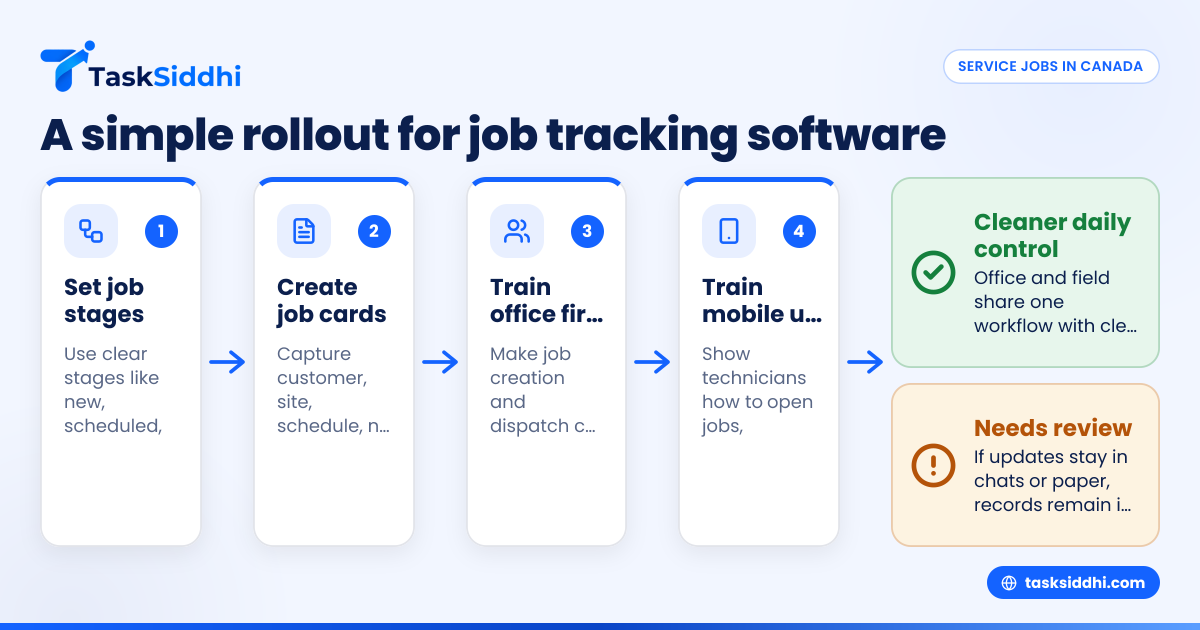
A simple way to roll out job tracking software
Rolling out software does not need a major transformation project. Small teams usually do better with a phased setup.
Step 1: standardise your job stages
Pick 4 to 6 clear stages that fit your work. For example:
- New
- Scheduled
- In progress
- Waiting on parts
- Completed
- Follow-up needed
These stages should be easy for everyone to understand.
Step 2: create one standard job card
Your job card should include only the information needed to do the work properly. Start with:
- customer name
- service address
- contact number
- problem description
- scheduled time
- assigned technician
- site notes
- required photos
- completion notes
A clean template improves consistency from day one.
Step 3: train the office first
The office usually drives job creation and dispatch. Make sure they are comfortable before rolling out to the field team. If dispatch is messy, technician adoption will also be messy.
Step 4: train technicians on mobile updates
Keep this training simple. Show technicians only what they need to do in the field:
- open job
- view instructions
- add notes
- upload proof
- log time
- mark complete
Too much training at once slows adoption.
Step 5: review reports weekly
In the first month, check patterns weekly. Look for jobs stuck in one stage, missing notes, incomplete time logs, or technicians who need extra help.
This is where features that connect boards, mobile updates, time logs, and reports become useful together.
Common mistakes when choosing service job tracking software
Buying for future complexity instead of current needs
A small repair team does not need a huge enterprise setup. Start with the workflow you use now and improve it.
Ignoring mobile use
If your technicians cannot update jobs easily on site, the system will not stay accurate. Mobile use is not optional in field service.
Keeping paper as the real system
Some teams buy software but still rely on paper slips as the main record. That creates duplicate work and conflicting information.
Tracking status but not time
Job status matters, but time matters too. Without time records, labour analysis and payroll checks become harder.
Failing to define completion
A completed job should mean the same thing for everyone. Usually that means notes are added, proof is attached if needed, and time is logged.
How TaskSiddhi fits small service teams
TaskSiddhi is built for teams that need practical job control without a complicated setup. For small HVAC, plumbing, and repair businesses, that means using boards to track each job, mobile updates from the field, time logs, and reports that show what is done and what is slipping.
It is especially useful for businesses moving away from chats, spreadsheets, and paper job cards. You can organise recurring and one-off work, track field progress, and keep office and technician updates in one place. If your team also handles ongoing customer projects, the same setup can support client work as well.
The value is not in adding more software. It is in making daily service work easier to see, assign, complete, and review.
If you want to reduce manual follow-up, clean up job records, and get better visibility across your team, see the product tour or compare plans at pricing.
Frequently asked questions
What is the best service job tracking software Canada businesses should look for?
The best option is the one that matches your actual workflow and is easy for both office staff and technicians to use. For small teams, that usually means clear job boards, mobile updates, time tracking, and reporting rather than a long list of advanced features.
Is service job tracking software worth it for a team of fewer than 10 people?
Yes, often even more so. Smaller teams feel the impact of every missed update, delayed invoice, and repeat visit, so a simple system can quickly save time and reduce errors.
Can service job tracking software help with invoicing?
Yes, indirectly. It helps collect complete job records, labour time, notes, and proof of completion so your office can prepare invoices faster and with fewer missing details.
Do Canadian service businesses need to think about privacy rules?
Yes. Service job records often include personal information such as customer names, phone numbers, addresses, and site details. Depending on your business, PIPEDA and Quebec Law 25 may affect how you collect, use, and protect that information.