

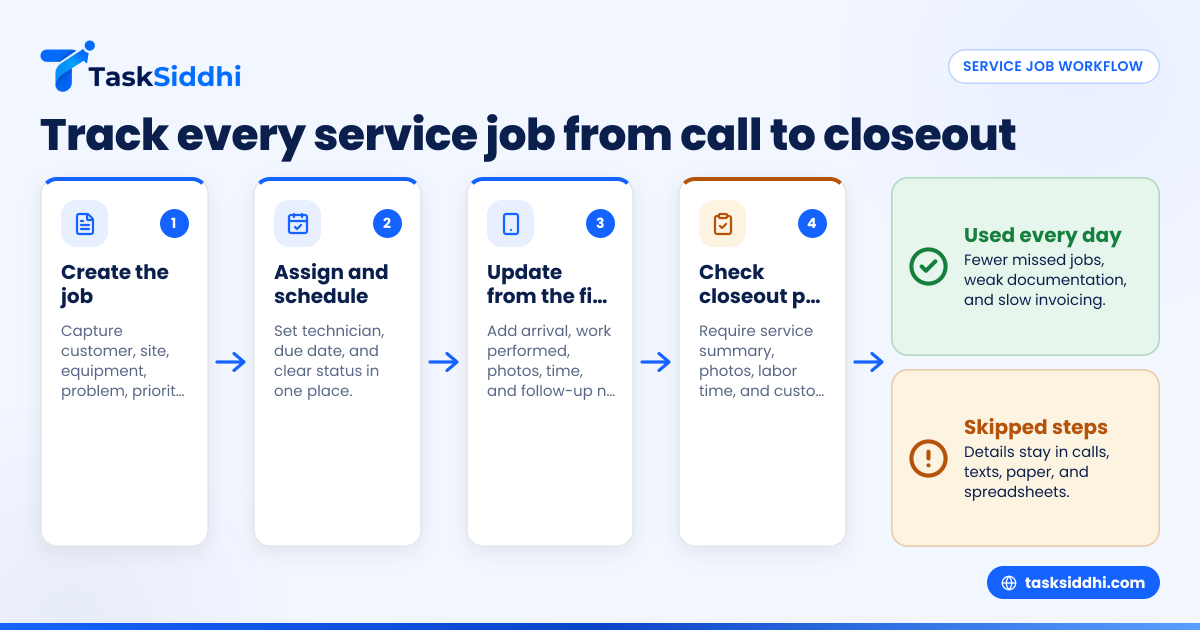
A service job tracker is a simple system that helps a small equipment service team assign calls, track technician progress, capture proof from the field, and close each job with less back-and-forth. In the United States, it is especially useful for teams that still run service work through phone calls, text threads, paper job cards, and spreadsheets.
Key takeaways
- A service job tracker gives one place to manage incoming calls, dispatch, proof of work, and job status.
- Small service teams usually need five basics: scheduling, job details, field proof, time records, and simple reporting.
- The fastest gains come from standardizing job cards and making every technician update the same fields.
- Mobile updates matter because most delays happen when office staff wait for callbacks from the field.
- Good tracking reduces missed jobs, weak documentation, and slow invoicing.
- The best setup is the one your team actually uses every day.
What is a service job tracker?
A service job tracker is a work system for managing service calls from start to finish. It shows what was reported, who is assigned, where the job is, what happened on site, and whether the work is ready to close.
For a small equipment service team, that usually means handling repair and maintenance work for machines, tools, installed equipment, or customer-owned assets. Think of HVAC support tools, shop equipment, pumps, compressors, food service machines, pressure washers, forklifts, or specialty industrial equipment.
In many small businesses in cities like Houston or Chicago, this process still lives in too many places at once. A customer calls the office. The dispatcher writes notes on paper. A technician gets a text message. Photos stay on one phone. Parts used are remembered later. Time gets entered at the end of the week. Then the office tries to piece it all together for billing.
That approach works until volume rises. Once a team handles several calls a day across multiple technicians, the gaps start to show. Jobs get missed. Arrival times are unclear. Proof is incomplete. Customers call asking for updates that no one can answer quickly.
A service job tracker fixes that by making each job a trackable record instead of a chain of messages. Teams can use service jobs workflows to keep assignment, notes, proof, and completion in one place.
Why small equipment service teams need one
Small teams often think they are too small for a proper system. In reality, teams of 5 to 30 people often feel the pain the most. They are large enough to have coordination problems, but small enough that owners and managers still end up solving every exception personally.
Here are the common pain points:
Calls come in faster than you can organize them
One customer needs urgent service. Another needs a routine visit. A third wants a return trip because the first fix did not hold. If those requests arrive by phone, email, and text, priorities become hard to see.
A tracker gives every call a job record with a clear status. That lets the office decide what is new, what is scheduled, what is in progress, and what is waiting on parts.
Technicians work from incomplete information
A field tech should not have to call back for the address, model number, contact person, access instructions, or complaint summary. Yet that happens every day in small service businesses.
A standard job card helps the office send the full context the first time. With boards and views, teams can sort jobs by status, technician, due date, or priority.
Proof gets lost or arrives too late
Customers may want photos, service notes, arrival confirmation, or a sign-off. Managers may need proof to resolve disputes or approve billing. If that proof sits in text messages or personal camera rolls, it is hard to retrieve.
A tracker makes proof part of the job workflow, not an afterthought.
Billing gets delayed
A surprising number of service jobs stay open because no one has all the final details. The office is waiting on labor time. The tech forgot the serial number. The customer signature is missing. A follow-up question is still unresolved.
When every closeout item is required in one system, jobs move to invoice-ready faster.
What should a service job tracker include?
A useful service job tracker does not need to be complicated. It needs to be consistent. For small equipment service teams in the United States, these are the essentials.
1. Clear intake for every service request
Each new job should capture:
- Customer name
- Site address
- Contact person
- Phone number
- Equipment type
- Model or serial details, if known
- Problem description
- Priority
- Requested date
- Internal notes
This sounds basic, but consistency here prevents a lot of rework later.
2. Simple dispatch and assignment
The office should be able to assign a technician, set a target date, and update the status in seconds. If managers need to open several screens to dispatch one call, people will go back to texting.
3. On-site proof of work
This often includes:
- Before and after photos
- Notes from the technician
- Arrival and completion updates
- Customer acknowledgment
- Follow-up actions needed
For businesses that send technicians to customer locations, field visits tools can help capture proof directly from the field.
4. Time tracking
Labor time affects job costing, payroll workflows, and invoicing. Even if your business exports final billing to QuickBooks, the service team still needs accurate records from the field. Built-in time tracking helps keep hours attached to the right job.
5. Basic reporting
Managers need to know what is open, what is late, who is overloaded, and how long jobs take to close. Good reporting helps owners spot bottlenecks without chasing updates all day.
How do you assign calls without losing details?
Use one job record per service request, then assign the technician inside that record. The record should hold the customer issue, location, equipment details, due date, notes, and proof. That way, the assignment is tied to the work itself, not buried in a text thread.
Once the team starts doing this consistently, the difference is immediate. Dispatch becomes more reliable because the office no longer has to retype or repeat details. The technician gets a complete job card instead of fragments from several channels.
A good process looks like this:
- Create a new job as soon as the request arrives.
- Add all known customer and equipment details.
- Set priority and due date.
- Assign the technician.
- Change status to scheduled or dispatched.
- Require the technician to update the same record from the field.
- Move the job to completed only after all proof is added.
This is also where basic automation helps. With automation, teams can standardize status changes and reduce manual follow-up.
Why assignment breaks down in small teams
In many small shops, assignment fails for simple reasons:
- The office sends only an address
- The technician does not know the customer history
- Notes stay in someone’s notebook
- Priority changes do not reach the field
- Managers cannot tell who has seen the job
These are not software problems first. They are process problems. A service job tracker works best when every call follows the same path.
What proof should technicians capture on site?
At minimum, technicians should capture enough proof to answer three questions: Did they arrive, what did they find, and what did they do?
For most small equipment service teams, that means a short checklist:
- Arrival update
- Photos of the issue
- Equipment details confirmed on site
- Work performed
- Parts used, if relevant
- Final condition photo
- Customer acknowledgment or service note
- Any return visit or parts-needed note
This proof matters for more than customer communication. It protects your business when there is confusion about scope, access, damage, repeat issues, or completion.
Build proof into the closeout process
If proof is optional, it will often be skipped on busy days. Make it part of job completion instead. A technician should not mark a job done until required fields are complete.
That might include:
- Service summary
- Time spent
- Photos attached
- Follow-up required yes or no
- Customer informed yes or no
A mobile app matters here because field teams need to update records at the site, not hours later from memory.
Can an ai service job workflow help a small team?
Yes, but only if it saves clicks and speeds decisions. An ai service job workflow should help summarize notes, suggest next steps, or flag missing details. It should not replace your dispatch process or technician judgment.
For a small service business, the practical use of AI is not flashy. It is about faster admin work. For example, AI can help turn messy intake notes into a clearer job summary. It can help a manager review open jobs and spot which ones are missing closeout details.
That said, a small team should not start with AI. Start with a clean process first. If your statuses are inconsistent and technicians are not updating jobs, AI will only organize messy data faster.
Use this order instead:
- Standardize how jobs are created.
- Standardize how technicians update them.
- Standardize what is required to close them.
- Add AI only where it reduces repetitive office work.
The goal is not to say you use AI. The goal is to close service jobs faster with fewer mistakes.
How to set up a service job tracker in a small business
The best rollout is simple and fast. Do not try to redesign your whole operation in one week. Start with one team, one workflow, and a few required fields.
Step 1: map your current job flow
Write down how a service call moves today. Include intake, assignment, travel, on-site work, proof, and closeout. Most owners find extra steps they did not realize existed.
Step 2: define your job stages
Keep stages clear and practical. A common setup is:
- New
- Scheduled
- Dispatched
- In progress
- Waiting on parts
- Return visit needed
- Completed
- Ready for billing
- Closed
These stages should reflect how your team actually works, not how you wish it worked.
Step 3: create one standard job card
Your job card should capture only what matters. Too many fields slow people down. Too few fields create confusion.
Use required fields for the basics:
- Customer
- Address
- Contact
- Equipment
- Problem
- Assigned tech
- Due date
- Status
Then add closeout fields:
- Service summary
- Photos
- Labor time
- Follow-up needed
- Billing ready yes or no
Step 4: train the office first
Dispatch discipline starts in the office. If incoming requests are incomplete, the field team will never get clean jobs. Train whoever creates and assigns work before you train technicians.
Step 5: train technicians on updates and proof
Show technicians exactly when to update status and what proof to attach. Keep the rules short and specific.
For example:
- Update to in progress when you arrive
- Add at least one issue photo
- Log time before leaving
- Add final note before marking complete
Step 6: review after one week
Do a quick review after the first week. Look for jobs with missing proof, wrong status, or duplicate entries. Fix the process early before bad habits stick.
TaskSiddhi’s features can support this kind of setup without forcing a heavy system on a small team.
Common mistakes when using a service job tracker
Even a good tool can fail if the workflow is weak. Watch for these common mistakes.
Too many statuses
If people cannot tell the difference between similar statuses, updates become unreliable. Keep stages limited and obvious.
Free-form notes for everything
Notes are useful, but key details should live in structured fields. Otherwise, managers must read every update to understand job status.
No closeout checklist
This is one of the biggest causes of billing delays. If technicians can complete jobs without required proof, the office will keep chasing details later.
Separate systems for office and field
When the office tracks work in one place and technicians update another place, records drift apart. A service job tracker works best when the same job record stays with the job from intake to closeout.
No review rhythm
Managers should review open and aging jobs daily or at least several times each week. Without that habit, the tracker becomes a storage tool instead of a management tool.
What does it cost to keep using paper and spreadsheets?
More than most owners think. The cost shows up as missed calls, repeat questions, slower billing, and office time spent chasing updates. Even a few delayed jobs each week can create real cash flow pressure for a small service business.
The direct software cost is only one part of the decision. The bigger issue is operational drag. If a dispatcher spends an extra hour each day checking technician status, that time has a cost. If a tech forgets proof and the office delays invoicing by several days, that also has a cost.
Here are common hidden costs:
- Repeat phone calls to confirm status
- Lost photos and weak documentation
- Missed or late appointments
- Slower invoice preparation
- More owner involvement in routine dispatch
- Customer frustration from unclear updates
For many teams, the right question is not “Can we afford a tracker?” It is “How much are delays already costing us?”
Choosing the right service job tracker
Not every work tool is a fit for a small equipment service team. Some are built for large enterprises with complex ERP integrations. Others are too generic and do not handle field service work well.
Look for a tool that supports:
- Simple boards and job status tracking
- Mobile use in the field
- Photo and note capture
- Time records
- Basic reporting
- Easy assignment and follow-up
Keep the buying decision practical. Ask whether your office team can dispatch in seconds. Ask whether technicians can update jobs without extra steps. Ask whether the owner can see what is open right now without sending texts.
If the answer is yes, you are close to the right fit.
Final thoughts
A service job tracker helps small equipment service teams run tighter operations with less confusion. It gives the office a clear dispatch process, gives technicians one place to update work, and gives the business better proof for customer communication and faster closeout.
If you want to see how TaskSiddhi handles service work, take the product tour or compare options on the pricing page.
Frequently asked questions
Is a service job tracker only for larger service companies?
No. Small teams often benefit the most because they have fewer layers and less room for errors. A clear job tracking process helps owners spend less time chasing updates.