

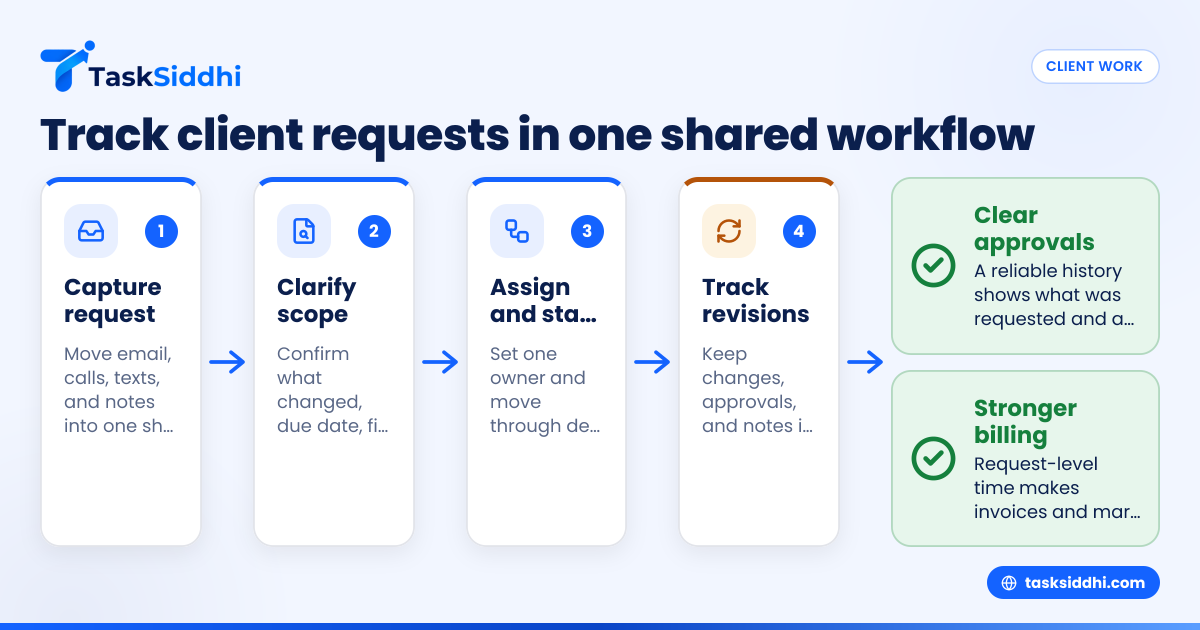
Client request tracking for small agencies in the United States means having one clear system to capture incoming work, assign it, track revisions, collect approvals, and log billable time. If your team still runs requests through email threads, spreadsheets, and Slack messages, you can tighten response times, reduce missed work, and bill more accurately by moving requests into a shared workflow.
Key takeaways
- Small agencies lose time when client requests live across email, spreadsheets, chat, and paper notes.
- A simple request workflow should capture scope, owner, due date, approval status, and billable time.
- Revisions need rules, not just goodwill, or small changes turn into unpaid work.
- Approval tracking protects margins and reduces confusion about what was requested and when.
- Billable time is easier to defend when it is logged against each request, revision, or deliverable.
- A shared board, mobile access, and basic reporting help managers see bottlenecks early.
Why client request tracking breaks down in small agencies
Most small agencies do not start with bad processes. They start with speed. A client emails an update. Someone replies, “Got it.” A project manager adds a line to a spreadsheet. A designer gets a message in chat. Later, the client asks for one more revision, and nobody remembers whether it was approved, estimated, or billed.
This is common in agencies with 5 to 30 people. The work moves fast. Teams handle creative requests, website changes, campaign updates, content edits, and account support at the same time. The problem is not a lack of effort. The problem is that the request system is scattered.
In a small agency in Chicago or Houston, client work often comes through the same few channels every day:
- Phone calls
- Text messages
- Client meeting notes
- Internal chat
- Shared spreadsheets
Each channel creates a new chance for work to get lost. The more clients you serve, the worse this gets. One missed revision can delay a launch. One untracked approval can trigger rework. One forgotten hour can reduce profit.
Client request tracking for small agencies works best when every request follows the same path. The request should enter one system, get assigned to one owner, move through defined stages, and carry its time and approval history with it.
What should a client request tracking system include?
A good system for small agencies in the United States should be simple enough that people actually use it. It does not need to be complex. It needs to be consistent.
At minimum, each client request should include:
- Client name
- Request title
- Date received
- Requested by
- Scope or task details
- Priority
- Due date
- Assigned team member
- Approval status
- Revision count
- Billable or non-billable status
- Time logged
- Files, notes, or proof of completion
If your team cannot see these details in one place, managers spend too much time chasing updates. Account managers become the human bridge between the client and the team. That does not scale well.
A central board helps because it shows where every request stands. This is especially helpful when several departments touch the same work. An account manager may own the client conversation. A designer may do the asset changes. A copywriter may update messaging. A director may need to approve final output. Shared boards and views make those handoffs visible.
What should happen when a client sends a new request?
Every new request should be captured in one place, tagged to the client, assigned an owner, given a due date, and marked as billable or not. If the scope is unclear, the request should pause in a review stage before work starts.
Under that short answer, the real challenge is intake discipline. Many agencies accept requests too casually. A client says, “Can you make a few quick edits?” The team jumps in before confirming what “few” means. That feels helpful in the moment, but it creates hidden work.
A better intake flow looks like this:
- Capture the request Put the request into a shared system as soon as it arrives. Do not leave it in an inbox.
- Clarify the scope Confirm what needs to change, what files are involved, and when the client needs it.
- Set the owner One person should own the request, even if several people help complete it.
- Mark the billing status Decide whether it is covered by a retainer, part of an active project, or extra billable work.
- Set the next stage Typical stages include new, in review, ready to work, in progress, waiting for client, awaiting approval, and done.
This process keeps your team from starting work on vague requests. It also creates a record you can use later if billing or scope is questioned.
How do you organize revisions without losing profit?
Set a revision workflow before work starts. Track each revision as part of the same request, note what changed, who approved it, and whether the extra work is billable once the included revision limit is reached.
Revisions are where many small agencies lose control. A client asks for “one last pass.” Then another stakeholder joins and wants “minor updates.” Then legal, sales, or a founder adds comments. Without structure, your team keeps working while the original budget quietly disappears.
The fix is not to become rigid. The fix is to define revision rules clearly.
Set revision rules early
Your proposal, statement of work, or email summary should explain:
- How many revision rounds are included
- What counts as a revision
- What counts as a new request
- Who can approve changes
- When extra revisions become billable
You do not need legal language to make this work. You need plain language your client understands. If expectations are clear, account managers can handle revision requests with less friction.
Track revisions inside the original request
Do not scatter revisions across fresh emails and new spreadsheet rows. Keep them linked to the same request record. That gives your team a full history:
- Original request
- First draft date
- Client feedback
- Revision one
- Approval checkpoint
- Revision two
- Final approval
This is where an ai client request summary can help internally. If a long email thread contains several edits, someone still needs to confirm the final instructions, but a concise summary inside the request card reduces confusion for the assignee.
Separate “small edits” from real scope changes
Agencies often undercharge because they treat every extra ask as a simple revision. But changing a typo is not the same as redesigning a landing page section. Your system should let account managers flag a request for scope review before more work is started.
That review can be as simple as one status: “needs approval for added scope.” Once that status exists, your team stops assuming all work is included.
Build an approval process that clients and teams both understand
Approvals matter because they create decision points. Without them, teams keep polishing work that is ready to move forward, or they complete work that later gets challenged.
In a small agency, approvals usually break in one of three ways:
- No one knows who the client approver is
- The team starts the next step before approval is final
- Approval happened in a call, but nobody recorded it
You can fix this with a lightweight process.
Use clear approval stages
For many agencies, these stages are enough:
- Draft ready
- Sent to client
- Client reviewing
- Approved
- Changes requested
- Final delivered
Each request should sit in one stage at a time. That matters because work tends to stall in “waiting” states. If your team cannot see stalled items, deadlines slip quietly.
Record the approval source
When a client approves something, note how it happened:
- Email approval
- Meeting approval
- Phone approval
- Text confirmation
Then add the date and the name of the approver. This sounds basic, but it protects your team when memories differ later. If a client says, “We never approved that version,” you need a reliable internal record.
Keep approvals close to the work
Approvals should live where the request lives. If proof, comments, status, and logged hours are all in one place, fewer details get lost. For agencies handling ongoing retainers or recurring work, this also makes handoffs easier when account managers are out or teams change.
For client-facing delivery teams, client work tools are most useful when they tie requests, task status, and ownership together without forcing the team into a heavy project management setup.
How should small agencies track billable time on client requests?
Track time at the request level, not only by client or project. Log time as work happens, separate billable from non-billable entries, and tie hours to specific revisions or approval cycles so invoices and margin reviews are easier to defend.
Time tracking often fails because agencies treat it as a finance task instead of an operations task. If people enter hours days later, time records become estimates. That weakens billing and hurts planning.
Tie time to actual requests
A time entry should answer a simple question: what did we do? “Three hours for Client A” is not enough detail when the client disputes an invoice. “Three hours on homepage revision round two” is much easier to explain.
This is why request-level time tracking matters. It connects effort to deliverables. It also helps managers see which clients, services, or revision patterns consume the most time.
Track billable and non-billable work separately
Some client requests are fully billable. Some are covered by a monthly retainer. Some are internal cleanup caused by poor handoff. If your system does not separate these, your margins become hard to understand.
You do not need complicated accounting categories to start. A simple structure works:
- Billable
- Included in retainer
- Non-billable internal
- Waiting on billing decision
That last category is useful because not every request is clear on day one. Teams should still log time even if billing is undecided.
Review time weekly, not monthly
By the end of the month, people forget details. Weekly review is far more accurate. Managers can spot patterns like:
- One client sends too many unplanned requests
- One service line takes longer than estimated
- One team member is overloaded with revision work
- Approval delays are increasing labor time
This helps with staffing, pricing, and client communication. It also makes your QuickBooks or Stripe workflow cleaner because the underlying work record is stronger before billing happens.
A practical workflow for client request tracking for small agencies
You do not need a big rollout. Start with one workflow and use it for all incoming client requests for 30 days.
Step 1: define your request stages
Keep the stages simple. For example:
- New request
- Needs clarification
- Approved to start
- In progress
- Waiting on client
- Revisions
- Final approval
- Completed
- Ready to invoice
This gives every team member a common language.
Step 2: create one intake format
Use a standard intake template. Require the same fields every time. If a request comes by phone or email, your team should still enter it in the same structure.
That template should ask:
- What is needed?
- Why is it needed?
- When is it due?
- Who requested it?
- Is it part of current scope?
- Does it need approval before work?
- Is it billable?
Step 3: assign one owner
One request should have one clear owner. That does not mean one person does all the work. It means one person is responsible for moving it forward.
This reduces the “I thought someone else was handling it” problem that hurts small agencies.
Step 4: track every revision and approval
Do not overwrite old notes. Add to the record. Build a timeline. If the request changes shape over time, the record should show that.
For teams juggling client updates in the field or between meetings, a shared mobile app can help staff update status, notes, and time without waiting to get back to a desk.
Step 5: review bottlenecks every week
Managers should review all requests stuck in:
- Needs clarification
- Waiting on client
- Revisions
- Final approval
Those stages often hide the biggest delays. If you only review completed work, you see problems too late.
Step 6: automate the repetitive follow-up
You do not need advanced automation to save time. Basic triggers help a lot. For example:
- Notify the owner when a new request is added
- Alert a manager when a request sits too long in revisions
- Remind the team when approval is still pending near the due date
Simple automation can reduce the need for manual follow-up and keep work from stalling in silent queues.
Common mistakes to avoid
Even a good system can fail if the rules are unclear. Watch for these common mistakes.
Treating every request as urgent
If everything is urgent, nothing is prioritized. Use a small set of priority labels and define them. Teams work better when “urgent” has a real meaning.
Letting clients bypass the system
A client may still text, call, or email a favorite team member. That is normal. But your team should move that request into the shared system right away. If not, work becomes invisible.
Starting before scope is clear
Fast starts feel helpful. They also create rework. If the request is unclear, move it to clarification first.
Tracking approvals outside the workflow
Approvals in inboxes and meeting notes are hard to find later. Keep them attached to the request.
Logging time too late
Late entries are weak entries. Encourage same-day logging whenever possible.
When is it time to stop using spreadsheets?
If you miss requests, lose track of revisions, cannot explain billed hours, or spend too much time asking for status updates, spreadsheets are no longer enough. A shared workflow tool becomes necessary once coordination, not data entry, is your real problem.
Spreadsheets are useful for lists. They are weak for live work. They do not naturally show status movement, approval history, responsibility, or time tied to each task. They also depend too much on one person to keep them updated.
That is usually the breaking point for small agencies. The spreadsheet itself is not the real issue. The issue is that the business has become more dynamic than the spreadsheet can handle.
A better setup gives your team:
- Shared visibility
- Clear ownership
- Request history
- Approval records
- Time logs
- Status-based reporting
If that sounds like where your agency is headed, tools built around task flow are easier to maintain than custom spreadsheet systems. TaskSiddhi’s features are designed to bring requests, work stages, and team accountability into one place without making daily use feel heavy.