

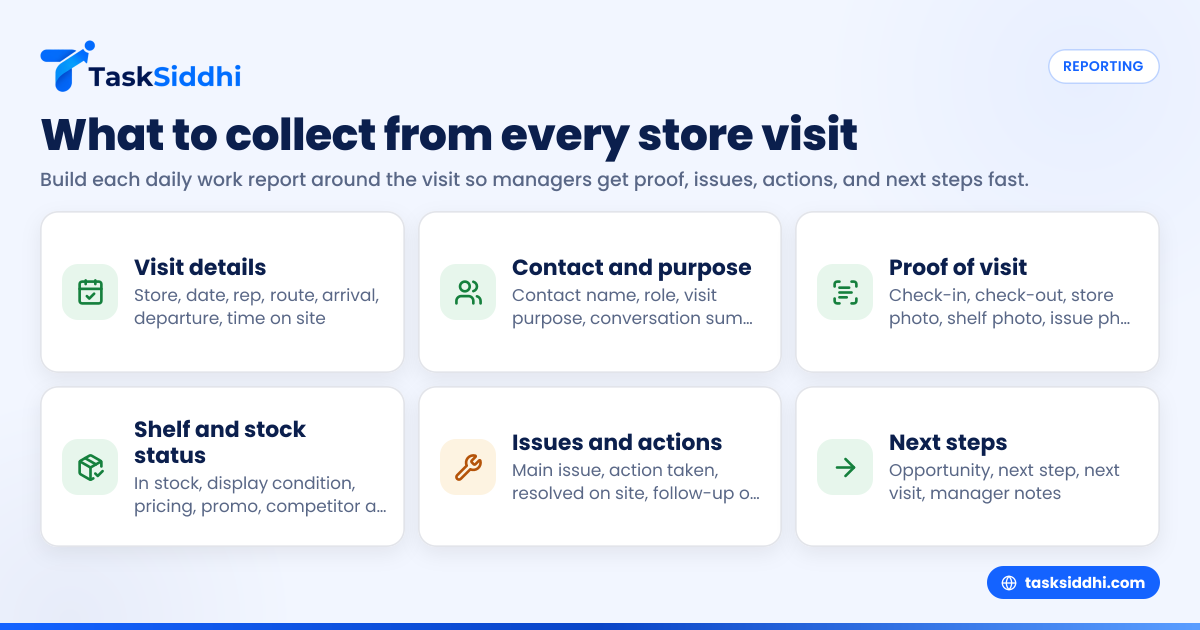
A daily work report template for field staff is a simple, repeatable record of what happened at each store visit. For field sales and merchandiser teams in the United States, the best template captures proof of visit, shelf conditions, stock issues, actions taken, next steps, time spent, and manager-ready notes without forcing reps to write long updates.
Key takeaways
- A strong daily work report template for field staff should be built around each store visit, not vague end-of-day summaries.
- Managers should collect proof of visit, timing, contact details, shelf photos, stock status, issues, and next actions.
- The best reports are short enough for reps to finish in the parking lot after each stop.
- Standard fields make it easier to compare territories, coach reps, and spot missed opportunities.
- Mobile reporting works better than paper or scattered texts because photos, notes, and time stamps stay in one place.
- Good reporting supports payroll, customer follow-up, and performance reviews without creating extra admin work.
Why daily work reports matter for field sales and merchandiser teams in the United States
A daily work report is not just a manager’s checklist. It is the operating record of what your team actually saw and did in stores.
If your team works across Chicago, Houston, Detroit, or smaller regional markets, the same problem shows up fast. Reps visit stores all day, then send loose updates through email, text, or a WhatsApp-style chat thread, and key details get lost. A district manager cannot tell which locations were visited, what displays were fixed, which shelves were out of stock, or which buyer asked for a callback.
That leads to missed sales, weak follow-up, and bad forecasting. It also creates payroll and accountability issues when no one can confirm how much time was spent at each stop.
A good daily work report template for field staff fixes this by turning every store visit into a standard record. Each record should answer a few basic questions:
- Did the rep visit the location?
- Who did they meet?
- What did they find?
- What action did they take?
- What needs follow-up?
- Is there proof?
This matters for both field sales and merchandiser teams, but the focus is slightly different.
Field sales teams need reports that capture customer conversations, order opportunities, competitive activity, and next meetings.
Merchandiser teams need reports that capture display compliance, shelf share, out-of-stocks, pricing issues, photo proof, and correction work completed.
If you manage a team of 5 to 30 people, consistency matters more than complexity. A short, required template used every day is far better than a detailed form that reps avoid.
What should managers collect from each store visit?
Collect the facts that prove the visit happened, show the store condition, and make follow-up easy. For most teams, that means store details, arrival and departure times, contact name, photos, stock or shelf status, issues found, actions taken, and clear next steps.
Start with the smallest set of fields that helps managers make decisions. Then add only what your team truly uses. If you ask for too much, report quality drops.
Core visit information to collect every time
Every store visit report should begin with basic location and visit data. This gives your manager a clean log of rep activity across the day.
Include these fields:
- Date of visit
- Rep name
- Territory or route
- Store name
- Store address
- Store type or account type
- Arrival time
- Departure time
- Total time on site
- Name and role of store contact
- Visit purpose
This basic section sounds obvious, but many teams skip one or two of these fields. That becomes a problem later when a manager is reviewing route coverage, customer follow-up, or payroll questions.
For example, if a rep in Houston says they visited 12 stores but only entered names and no times, the manager cannot tell whether the route was realistic or whether priority stores got enough attention.
Proof of visit fields
If your team works in the field, proof matters. It protects the business and makes coaching easier.
Useful proof fields include:
- Check-in time
- Check-out time
- Photo at the store
- Shelf or display photo
- Photo of issue found
- Optional location capture, if your process supports it
- Customer signature, if needed for your workflow
For many teams, a mobile process is the easiest way to collect this. A mobile app lets reps add photos and notes at the store instead of rebuilding the day from memory at 6:00 PM.
Store condition and merchandising fields
For merchandiser teams, this is the most important section. Managers need a quick, repeatable view of shelf execution.
Common fields include:
- Were products in stock?
- Were all SKUs present?
- Shelf space assigned
- Shelf space actually used
- Display present or missing
- Display condition
- Pricing label correct or incorrect
- Promo material installed
- Competitor placement nearby
- Issues found
- Fixes completed during visit
You do not need to overdesign this. Short yes-or-no fields plus one note box usually work better than long free-text sections.
Sales and relationship fields
For field sales teams, the report should capture conversation outcomes, not just shelf checks.
Include fields such as:
- Contact spoken to
- Main discussion points
- New opportunity identified
- Order likelihood
- Product interest
- Objection raised
- Competitive mention
- Follow-up required
- Next meeting date
- Manager support needed
This turns the report into a pipeline and account management tool, not just a compliance form.
What does a good daily work report template look like?
A good template is short, structured, and completed right after each visit. It should take about two to five minutes, guide reps to enter only useful information, and give managers a clear view of activity, issues, and next actions.
In practice, the template should feel like a checklist with a few short notes, not a mini essay. Reps in the field do not have time for long reports between stops.
A practical daily work report template for field staff
Below is a simple format you can use for field sales and merchandiser teams.
Section 1: visit details
- Date:
- Rep name:
- Territory:
- Store name:
- Store address:
- Visit number of the day:
- Arrival time:
- Departure time:
- Time on site:
Section 2: contact and purpose
- Store contact name:
- Store contact role:
- Visit purpose:
- Was contact available? Yes / No
- Summary of conversation:
Section 3: execution check
- Products in stock? Yes / No
- Any out-of-stocks? Yes / No
- Display present? Yes / No
- Display condition: Good / Fair / Poor
- Pricing correct? Yes / No
- Promo material installed? Yes / No
- Competitor activity noticed? Yes / No
- Photos attached? Yes / No
Section 4: issues and actions
- Main issue found:
- Action taken during visit:
- Could issue be resolved on site? Yes / No
- Follow-up needed? Yes / No
- Follow-up owner:
- Follow-up due date:
Section 5: sales and next steps
- Opportunity identified? Yes / No
- Estimated value:
- Next step:
- Next visit needed? Yes / No
- Next visit date:
Section 6: manager notes
- Escalation needed? Yes / No
- Notes for manager:
- Priority level: Low / Medium / High
This structure works because it lets a manager scan 20 visits quickly. It also reduces the amount of reading required.
If your team handles field visits, the same structure can work for store audits, retail checks, account visits, and merchandising runs.
How do you keep reps from skipping or faking reports?
Make reporting part of the visit itself, not a separate admin task at the end of the day. Short forms, required photos, time stamps, and immediate manager review reduce skipped entries and low-quality updates.
The biggest cause of poor reporting is delay. When reps wait until evening, details get fuzzy. Photos are missing. Times become estimates. Important issues are forgotten.
Use a five-minute rule
Ask reps to complete each report within five minutes of leaving the store. That one rule improves accuracy more than adding more fields.
Keep required fields limited
If every visit needs 25 mandatory fields, reps will rush, guess, or skip. Focus on the few fields that your manager actually reads each day.
A good starting point is:
- Store visited
- Arrival and departure time
- Contact met
- Main issue or outcome
- Photo proof
- Next step
Review reports daily, not weekly
Teams take reporting seriously when managers use it fast. If a district manager only reviews reports at the end of the month, reps will treat reporting as busywork.
Instead, check reports each day for:
- Missed visits
- Missing photos
- Repeated out-of-stocks
- Unresolved display issues
- Customer requests waiting on follow-up
- Reps spending too little or too much time at key stores
A board-based workflow also helps. With boards and views, managers can group store visits by rep, route, status, or priority instead of hunting through text threads.
Should reports be different for sales reps and merchandisers?
Yes. Both teams visit stores, but they need different report fields. Sales reports should focus on conversations, opportunities, objections, and next meetings. Merchandiser reports should focus on shelf condition, stock levels, display compliance, pricing, and photo proof.
That said, do not create two totally unrelated systems if the teams share managers or accounts. Keep one common visit structure, then add role-specific sections.
Shared fields for both teams
These should stay the same:
- Store details
- Date and time
- Rep name
- Contact name
- Visit purpose
- Proof of visit
- Main issue
- Action taken
- Next step
Sales-specific fields
Add these for field sales reps:
- Opportunity value in USD
- Product interest
- Objection raised
- Decision maker identified
- Follow-up date
- Quote needed
- Competitive mention
Merchandiser-specific fields
Add these for merchandisers:
- Out-of-stock SKU count
- Display installed or repaired
- Facing count
- Shelf compliance
- Price tag issue
- Promo material used
- Photo set attached
If both teams use one tool, managers can still compare visit volume, route completion, and issue trends without losing role-specific detail.
How can managers use ai daily work reporting without making it messy?
Use ai daily work support to summarize patterns, flag missing information, and highlight follow-ups. Do not let it replace proof, photos, visit times, or rep accountability.
The phrase sounds modern, but the best use is simple. AI should help managers read reports faster, not invent details or write fake updates.
Practical uses for AI in daily work reporting
If your team records structured visit data, AI can help in a few useful ways:
- Summarize the day by rep or territory.
- Highlight stores with repeated stock or display issues.
- Flag missing fields or missing photos.
- Pull out customer follow-ups due this week.
- Surface common objections from field sales visits.
This is helpful when a manager oversees several reps and dozens of store visits per day. Instead of reading every note line by line, they can focus on exceptions and trends.
What AI should not do
AI should not replace store photos, contact names, check-in times, or the rep’s actual observations. Those are the facts.
The risk with overusing AI is that reports become polished but less reliable. Managers do not need prettier writing. They need accurate field data.
That is why structured reporting matters first. Once your daily records are consistent, AI can help summarize them. Without structure, it only adds noise.
Building a reporting process your team will actually follow
A template alone will not fix reporting. You need a process around it.
1. Define the non-negotiable fields
Choose the 6 to 10 fields that must be completed after every store visit. Keep this list short.
For most teams, that means:
- Store name
- Date
- Arrival and departure time
- Contact met
- Visit result
- Photo proof
- Issue found
- Next step
2. Set reporting timing rules
Require reports to be completed immediately after each visit or before the rep starts driving to the next stop. Do not allow end-of-day reconstruction unless there is an exception.
3. Create a manager review habit
Managers should review the same day’s reports before the day ends or early the next morning. The goal is fast correction.
4. Track trends, not just activity
A stack of completed reports is not enough. Managers should look for patterns across stores and territories.
For example:
- Which accounts have the most out-of-stocks?
- Which reps are finding the most display problems?
- Which territories have the highest follow-up backlog?
- Which stores are visited but not improving?
This is where reporting becomes useful. You want to move from “Did the rep submit something?” to “What are we learning from the visits?”
5. Connect reports to work, not storage
If a report reveals a pricing issue, display fix, or customer follow-up, that should become an assigned task. Otherwise, reports become archives instead of action tools.
For teams that want less manual chasing, automation can help turn certain report outcomes into follow-up tasks automatically.
Common mistakes in daily work reports
Many businesses already have a template, but it still fails because it collects the wrong things or creates too much friction.
Reports ask for long writing
Reps should not be writing mini stories after each stop. If your form depends on long paragraphs, quality will drop.
The report is submitted once per day
A daily summary is useful, but it should not replace per-visit records. A manager needs to know what happened at each store.
No photo proof
Without photos, managers must trust text alone for merchandising and display work. That creates avoidable disputes.
Too many custom fields
Every extra field reduces completion quality. Ask only what affects decisions.
No clear next step
A report that says “Shelf issue found” is incomplete. A good report says what was done and what still needs follow-up.
Reports are not connected to time
For field teams, time on site matters. If your team also needs labor visibility, time tracking can support a cleaner record of hours and visit effort.
A simple standard for managers
If you are not sure whether your template is good enough, use this test. Every store visit report should let a manager answer these five questions in under 30 seconds:
- Did the rep go there?
- What did they find?
- What did they do?
- Is there proof?
- What happens next?
If the answer to any of those is unclear, the template needs work.
For small and midsize field teams, the goal is not perfect documentation. It is fast, reliable visibility into the work happening across stores every day. A clean template, used consistently, will do more for execution than a complex form no one likes.
If you want a simpler way to capture store visits, team updates, and follow-ups in one place, see the product tour or compare plans at pricing.