

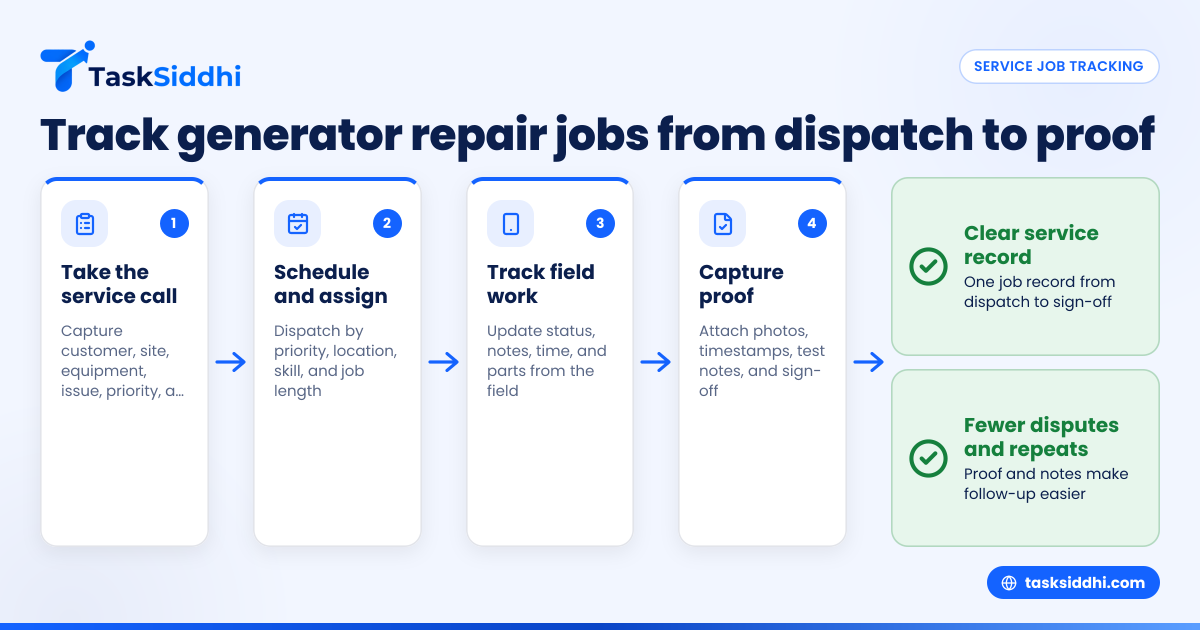
Service job tracking is the system you use to schedule repair calls, assign technicians, record work done in the field, and prove the job was completed. For mobile generator repair teams in the United States, it replaces scattered phone calls, paper job cards, and spreadsheet updates with one clear workflow from dispatch to sign-off.
Key takeaways
- Good service job tracking gives you one place for call details, schedules, work notes, parts used, and proof of completion.
- Mobile generator repair teams need fast dispatch, clear technician updates, and reliable records from the field.
- Proof matters. Photos, timestamps, site notes, and customer sign-off reduce billing disputes and repeat calls.
- A simple board-based workflow helps owners and dispatchers see every open, active, and completed job at a glance.
- Time tracking and reporting help you understand labor costs, response times, and technician workload.
- The best setup is one your team will actually use from the truck, job site, and office.
What service job tracking means for generator repair teams
For a mobile generator repair business, service job tracking is more than a calendar. It is the full operating system for your field work.
A typical generator service call has many moving parts. A customer calls about a no-start issue. A dispatcher gathers the address, unit model, service history, and site contact. A technician is assigned. The tech drives out, diagnoses the problem, replaces a part, tests the unit, and sends proof back to the office. Then the office closes the job and prepares billing.
If any step lives in a different place, things get missed.
That is why many small teams feel constant friction. Dispatch notes sit in email. Technician updates come through text messages. Part usage is written on paper. Photos stay on a phone. The office later tries to rebuild the story for invoicing or customer questions.
Service job tracking fixes that by creating one record per job.
That record should include:
- Customer name and location
- Site contact and phone number
- Generator make, model, and serial number
- Problem description
- Priority and due time
- Assigned technician
- Visit notes
- Photos and proof
- Time spent
- Completion status
For teams handling emergency service in cities like Houston or planned maintenance routes around Chicago, visibility is everything. You need to know who is free, which jobs are waiting, and what happened on each site visit.
Why do generator repair teams struggle with service job tracking?
Most generator repair teams struggle because the real work happens in the field, but the job record stays in the office. That gap causes delayed updates, missing proof, duplicate calls, and billing errors. A simple mobile-first workflow closes the gap and makes every job easier to track.
The problem usually starts small. A five-person team can run on memory and group texts for a while. Then volume increases.
Now the owner is asking:
- Did Mike reach the site?
- Did the customer approve the repair?
- Was the transfer switch tested?
- How long did the tech spend there?
- Do we have photos before and after the repair?
- Can we invoice today?
Without a proper process, every answer requires another call or text.
Generator repair adds extra pressure because jobs are often urgent. A standby generator failure can affect a medical office, restaurant, apartment building, or warehouse. Customers want updates fast. Dispatch needs to know whether the tech is still diagnosing, waiting for parts, or wrapping up testing.
The office also needs records that hold up later. If a customer in Detroit questions a charge two weeks later, you need timestamps, notes, and proof of work. If you subcontract independent technicians, clear records also help support accurate payments and year-end bookkeeping.
What should a service job tracking system include?
A strong service job tracking system for generator repair should cover dispatch, field updates, proof of completion, labor time, and status reporting. It should be easy for dispatchers in the office and technicians in the field to use. If either side avoids it, the system breaks.
1. A clear job intake process
Every service call should start with a standard intake form. This keeps dispatch from forgetting key details.
Use the same fields every time:
- Customer and site address
- Contact name and phone number
- Equipment details
- Complaint or fault description
- Urgency level
- Access instructions
- Warranty or contract status, if relevant
When this information is captured well, technicians arrive prepared.
2. A live schedule and assignment view
Your team should be able to see what is new, scheduled, in progress, waiting, and complete. A visual workflow reduces confusion.
This is where boards help. A simple setup with columns like New Call, Scheduled, En Route, On Site, Waiting for Parts, and Done works well for many teams. TaskSiddhi’s boards and views can support this kind of day-to-day operational view.
3. Mobile updates from the field
Technicians should not need to call the office for every update. They should be able to open the job, change status, add notes, and upload proof from the field. A mobile app matters because most service work happens from a truck, plant floor, rooftop, or outdoor enclosure.
4. Time capture
Labor is often the largest service cost. If you do not track time consistently, you lose margin and create billing disputes.
Time records should show:
- Travel start or en route time
- On-site start time
- Work completion time
- Total labor time
Built-in time tracking can make this easier than chasing handwritten notes later.
5. Proof of completion
Proof is what turns “we think the job is done” into “we can prove the job is done.”
For mobile generator repair, useful proof may include:
- Before and after photos
- Notes on tests completed
- Site condition notes
- Customer sign-off
- Timestamps
- Completed checklist items
This is especially useful for preventive maintenance and recurring service jobs where customers want evidence that all required checks were done.
How do you schedule calls without overloading technicians?
Schedule calls by priority, location, skill, and expected job length. Leave room for urgent breakdowns. Do not fill every technician’s day to 100%, because generator service work often changes after diagnosis.
Start with simple rules instead of perfect optimization.
Prioritize by business impact
Not every call is equal. A generator down at a critical site may need same-day service. A routine battery replacement can wait.
A practical priority model might look like this:
- Emergency outage or no-start
- Site with contractual response window
- Time-sensitive commercial site
- Routine maintenance
- Non-urgent follow-up
This gives dispatch a repeatable system.
Group by geography
If one technician has three calls across Houston and another is closer to all three, poor routing wastes hours. Even simple geographic grouping improves response time and fuel use.
You do not need complex software to start. Just schedule with map awareness and avoid back-and-forth driving.
Match technician skill to the job
Some jobs are basic. Others need deeper electrical troubleshooting or transfer switch knowledge. Assigning the wrong person creates delays, second visits, and customer frustration.
Track who is best at:
- Emergency diagnostics
- Preventive maintenance
- Load testing
- Control panel issues
- Electrical troubleshooting
- Warranty follow-up
Leave buffer time
Generator service rarely fits the original estimate. A one-hour visit can turn into a three-hour problem if the issue is not what the customer described.
Good schedules leave room for:
- Traffic delays
- Site access issues
- Extra testing
- Parts runs
- Unexpected follow-up work
How to track field work during the repair
Once a technician is assigned, field tracking should be simple and fast. The goal is not to create admin work. The goal is to capture the job story while it is happening.
Use status changes as milestones
Status changes help dispatch know what is happening without repeated calls.
A useful sequence may be:
- Assigned
- En route
- On site
- Diagnosing
- Repair in progress
- Testing
- Completed
- Follow-up needed
Each update gives the office and customer-facing staff better visibility.
Record notes in real time
Technicians should add short notes while the job is fresh. Waiting until the end of the day leads to vague updates.
Good field notes are specific:
- “Unit would not crank. Battery voltage low.”
- “Replaced starter solenoid.”
- “Test ran for 20 minutes under load.”
- “Customer advised to replace battery at next visit.”
This makes later billing and follow-up easier.
Capture parts and materials used
If your team uses filters, batteries, belts, fuses, or electrical components, record them on the job. Even if final inventory and accounting happen elsewhere, the service record should show what was used.
That helps with:
- Billing accuracy
- Warranty review
- Repeat service diagnosis
- Office follow-up
Use field visit records, not loose photo threads
A photo in a text message is easy to lose. A photo attached to the service job is much more useful.
For teams that do regular on-site service, field visits can help structure this kind of record so the office sees what happened at each location.
How do you capture proof of completion for generator repairs?
Capture proof with photos, timestamps, work notes, and customer confirmation attached to the same job record. For generator repairs, include evidence of the issue found, the work performed, and the final test result. That makes invoicing faster and disputes easier to resolve.
Proof of completion is one of the biggest gaps in small service businesses. The tech knows the job is done. The office believes it is done. But later, no one can prove exactly what happened.
For generator service, strong proof usually includes several items together.
Before and after photos
Photos help show the condition of the unit and the work completed. They are useful for damaged components, replaced parts, and finished repairs.
Examples include:
- Faulty battery terminal before replacement
- New starter component installed
- Control panel status after reset
- Area cleaned and closed after service
Test results in notes
Photos alone do not tell the full story. Add a short note that says what was tested and what passed.
Examples:
- “Generator started and ran normally.”
- “Transfer switch tested successfully.”
- “Output voltage checked after repair.”
- “Alarm cleared and no active fault shown.”
Customer acknowledgment
A customer sign-off or on-site confirmation can reduce later disputes. It is useful for both emergency repair and planned maintenance work.
Timestamps and technician identity
Every record should show when the job was updated and who completed it. This helps with internal accountability and customer questions.
For teams using dedicated service jobs workflows, the key is to keep all proof tied to the same service record.
Building a simple service job tracking workflow
You do not need a complicated rollout. Start with one repeatable workflow that the whole team follows.
Step 1: Define your job stages
Keep the stages short and obvious. Too many stages create confusion.
A good starting set:
- New call
- Scheduled
- En route
- On site
- Waiting for parts
- Completed
- Invoiced or closed
Step 2: Standardize required job fields
Decide what must be captured before a job can move forward.
At minimum:
- Customer
- Address
- Contact
- Equipment details
- Issue description
- Assigned tech
- Completion notes
- Proof
Step 3: Set rules for technician updates
Tell the team exactly when updates are expected.
For example:
- Change to En route when leaving
- Change to On site on arrival
- Add notes before leaving site
- Upload photos before marking complete
Step 4: Review completed jobs daily
A dispatcher, service manager, or owner should review completed jobs before they disappear into billing.
That review catches:
- Missing photos
- Incomplete notes
- Unclear labor time
- Jobs that need follow-up parts
- Repeat issues that should be flagged
Step 5: Measure a few core numbers
Use reporting to track a small set of useful operational numbers.
Examples include:
- Jobs completed per week
- Average response time
- Average time on site
- Number of return visits
- Open jobs by technician
- Jobs waiting on parts
Where can AI help with service job tracking?
AI can help summarize notes, flag missing details, and suggest next steps, but it should support your process, not replace it. A practical ai service job workflow still depends on clear job stages, technician updates, and proof captured at the site.
For most small generator repair teams, the first win is not advanced AI. It is consistency.
That said, AI can become useful after your job data is clean. If notes, statuses, and proof are stored in one place, AI can help managers spot patterns.
Examples include:
- Finding jobs with missing completion proof
- Summarizing long technician notes
- Highlighting repeat failures by equipment type
- Flagging delays between dispatch and arrival
- Suggesting follow-up tasks after unresolved jobs
But do not start with AI if your team still runs jobs through scattered text threads. The better first step is a shared workflow, then automation for repetitive updates, and later smarter analysis.
Common mistakes that break service job tracking
Even good tools fail if the process is weak. Most problems come from unclear expectations, not bad software.
Too much dependence on memory
If dispatchers and techs are expected to remember details without recording them, mistakes multiply as volume grows.
Long forms that no one completes
Keep required fields short. If every update feels like paperwork, technicians will delay it or skip it.
No rule for proof
If proof of completion is optional, many jobs will close without enough evidence for billing or customer support.
No daily review
Jobs marked complete can still be incomplete from an office perspective. A quick daily review prevents backlog and confusion.
Separating scheduling from field updates
When the schedule lives in one place and field notes live somewhere else, no one sees the real status of the work.
A single system with connected features is easier to manage than piecing together calls, texts, and spreadsheets.
Choosing a service job tracking tool for a small U.S. field team
For a generator repair company with 5 to 30 people, the right tool is usually the one that fits real field behavior. It should work well for dispatchers, owners, and technicians without heavy training.
Look for these basics:
- Fast job creation
- Clear board or schedule view
- Mobile-friendly updates
- Time capture
- Photos and notes on the same record
- Simple reports
- Easy adoption for field staff
Also think about the rest of your operations. Many U.S. service businesses use QuickBooks for accounting and Stripe for payments. Even if billing happens outside your job tracking system, your service records still need to be clean enough to support invoices, collections, and customer questions.
If you serve commercial customers, clean records also help when buyers ask about controls, documentation, and operational reliability during vendor reviews.