

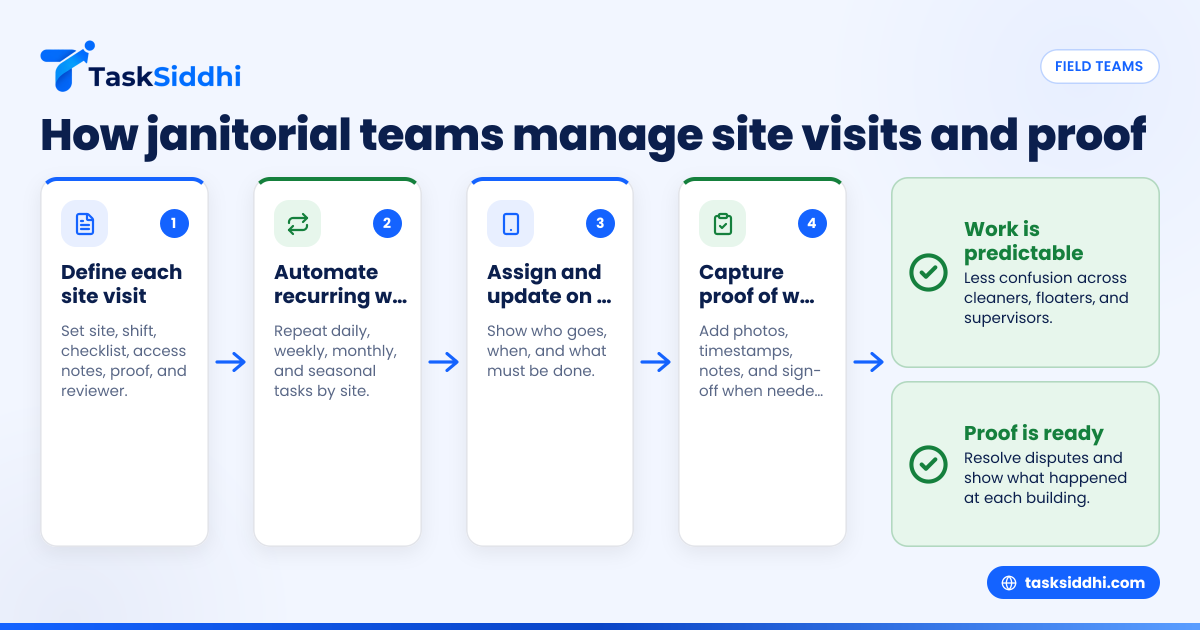
Field team task management for janitorial service companies in the United States means giving every cleaner, supervisor, and floater a clear schedule, a clear checklist, and a simple way to prove the work was done. For a growing janitorial business, the goal is not just assigning site visits. It is making recurring work predictable, reducing missed tasks, and having proof ready when a customer asks what happened at a building.
Key takeaways
- Janitorial companies need one system for recurring cleanings, one-off calls, inspections, and proof of completion.
- The best setup assigns work by site, shift, cleaner, and checklist, not by scattered texts and paper logs.
- Proof matters. Photos, timestamps, notes, and supervisor sign-off help resolve disputes and protect revenue.
- Recurring task management should cover daily, weekly, monthly, and seasonal work without manual re-entry.
- Mobile updates help managers see missed visits, late arrivals, and incomplete checklists before a client complains.
- A good process works even before software. Clear jobs, standards, and reporting come first.
Why field team task management matters for janitorial service companies
Janitorial work is repetitive, but the operation is not simple. Teams move across sites, shifts change, clients request extras, and supervisors need to know what happened without calling every cleaner.
Many janitorial service companies in the United States still run work through group texts, spreadsheets, and paper checklists. That can work when you have five people and a few sites. It breaks when you add recurring contracts, weekend coverage, relief staff, and different service levels across offices, schools, clinics, or warehouses.
The common issues are predictable:
- A cleaner goes to the wrong site.
- A recurring task gets skipped because it was not on that day's list.
- A customer says the restroom was not serviced.
- A supervisor has no photo or timestamp to verify the visit.
- A manager spends Sunday night building next week's schedule by hand.
Field team task management solves this by putting site visits, tasks, proof, and status updates into one workflow. For janitorial companies, that usually means each building gets its own recurring plan, each visit gets assigned to a person or crew, and every job has a checklist tied to service standards.
This is especially important when you serve multiple sites across cities like Chicago, Houston, or Detroit, where travel time, traffic, and building access can affect the shift.
What should a janitorial field task system include?
A practical setup for janitorial operations should be simple enough for cleaners to use on a phone and structured enough for managers to trust the data.
At minimum, your system should include:
- Site-based scheduling Every customer location should have its own service plan, visit frequency, and access notes.
- Recurring task templates Daily, weekly, and monthly tasks should repeat automatically.
- Clear job assignments Each visit should show who is going, when, and what must be done.
- Completion proof Teams should be able to attach notes, timestamps, and photos.
- Escalation for issues If supplies are low or a task cannot be completed, the team should flag it fast.
- Supervisor visibility Managers should see completed, late, and missed jobs without chasing updates.
A janitorial business does not need a complicated enterprise platform to get value. It needs consistency. If a floor tech, day porter, and night cleaner all report differently, your data becomes hard to trust.
That is why many companies start with a board view that shows each site visit as a task card, then add checklists, due dates, proof, and reports. A tool with boards and views can make work visible by site, team member, or job status, which is useful when you manage both routine service and urgent callouts.
How do you assign janitorial site visits without confusion?
Create one task for each visit with the site name, arrival window, checklist, and assigned worker. Add building access notes, customer instructions, and proof requirements. When every visit follows the same format, cleaners know what to do and supervisors can verify work faster.
Start by standardizing what “assigned” means in your company. In many janitorial businesses, people say a job is assigned when they mentioned it in a text. That is not enough. A real assignment should answer six questions:
- Which site?
- What date and time?
- Which cleaner or crew?
- What tasks are included?
- What proof is required?
- Who reviews completion?
Build site visit templates
For each building, create a repeatable template that includes:
- Site name and address
- Entry instructions
- Contact person
- Alarm or lockbox steps if needed
- Shift window
- Standard cleaning checklist
- Special notes for restrooms, lobbies, trash, or break rooms
- Photo or note requirements
- Supply issues to watch for
This reduces errors when relief staff cover a route.
Assign by site, not just by person
A common mistake is scheduling by employee first. In janitorial operations, the site should drive the work. Each location has a service level agreement, timing, and checklist. Once that is clear, assign the right person or crew.
This matters when a cleaner calls out. If the site task is well defined, a floater can step in with less confusion.
Include travel and access time
Do not schedule site visits back-to-back without accounting for drive time, parking, elevator delays, and security check-in. A missed start time is often a planning problem, not a worker problem.
For companies handling many visits per day, a mobile app helps field teams see assignments, instructions, and updates without relying on calls.
How do you track recurring cleaning tasks across multiple buildings?
Use recurring task templates by site and frequency. Split daily work from weekly and monthly work so nothing hides inside one long checklist. Then review missed recurring items every week, not only when a customer complains.
Recurring janitorial work is where profit is made or lost. If daily work gets done but weekly high-dust tasks, carpet edges, or deep restroom details are skipped, the account slowly degrades. The customer notices later, but by then the issue is already operational.
Separate recurring work by frequency
Do not put every requirement into one giant checklist. Break it into task groups:
- Daily cleaning
- Two-times-per-week cleaning
- Weekly detail work
- Monthly deep cleaning
- Quarterly project work
- Seasonal extras
This makes the job easier to complete and easier to audit.
Tie recurrence to the actual contract
Match the schedule to what the customer bought. If a client pays for lobby glass three times per week, build that exact recurrence into the plan. If floor burnishing is monthly, schedule it monthly with a due date and proof requirement.
This reduces “we thought it was included” disputes.
Review completion trends
Recurring tasks need active monitoring. A report should help you answer:
- Which sites had missed recurring tasks this week?
- Which crew members leave tasks incomplete?
- Which buildings need more time than scheduled?
- Which supervisors have not reviewed completed visits?
This is where reporting becomes useful. You can look for patterns before they become customer issues.
Set up checklists that people actually complete
A checklist should support the work, not slow it down. Janitorial teams often fail to use checklists because they are too long, too vague, or written for managers instead of cleaners.
Good checklists are:
- Short enough to finish during the shift
- Specific enough to inspect
- Grouped by area
- Tied to the site type
- Clear about proof needed
For example, a medical office, fitness center, and warehouse office should not all use the same checklist. Their priorities differ.
Write task lines that can be verified
Weak checklist item:
- Clean restroom
Better checklist items:
- Restock soap, paper towels, and toilet tissue
- Clean and disinfect toilets, sinks, and counters
- Spot clean mirrors and partitions
- Mop floor and leave dry
- Remove trash and replace liners
Each item should describe visible work. That helps both cleaners and inspectors.
Use exception reporting
Do not force cleaners to write long notes when everything is normal. Instead, have them mark completion and only add notes for issues such as:
- No building access
- Supply shortage
- Damage found
- Area blocked by tenant
- Extra cleanup requested
This makes updates faster while still creating a useful record.
Proof of work: what janitorial clients expect
Proof of work is not just for disputes. It also helps with quality control, supervisor coaching, and renewals.
Most janitorial clients want confidence in three things:
- Your team arrived
- The required work was completed
- Problems were reported
What counts as proof
Useful proof often includes:
- Timestamped check-in and completion
- Before-and-after photos when needed
- Completed checklist
- Supervisor review
- Notes about access or exceptions
For field-heavy businesses, field visits can support this kind of proof workflow in a more structured way than scattered texts.
Use proof selectively
Not every site needs ten photos per visit. Too much proof creates admin work and makes the team rush the wrong things. Set proof rules by account type.
For example:
- High-complaint account: require more photo proof
- Stable office account: checklist plus timestamp may be enough
- Periodic deep clean: require before-and-after photos
- Supervisor inspection: require notes and corrective actions
Protect margin while improving accountability
Proof should not turn a 45-minute cleaning visit into a 60-minute reporting exercise. Keep the process light. Capture only what helps verify the work and improve service.
An ai field team workflow can also help managers spot patterns in missed proof, late updates, or recurring exceptions without manually reading every note.
Build a supervisor process that catches problems early
Even the best assignment system fails if no one reviews completion. Supervisors should not only react to complaints. They should inspect work, monitor patterns, and coach the team.
Use a simple review rhythm
A practical approach looks like this:
- Daily review Check missed, late, and incomplete visits.
- Weekly review Look at recurring tasks that were skipped or delayed.
- Site inspection review Compare field proof with spot inspections.
- Customer issue review Link complaints to visit history and assigned crew.
This is easier when tasks, status updates, and proof all sit in one place. A tool with features designed for field and service work can help managers review the operation without building custom spreadsheets every week.
Set rules for escalation
Decide in advance what needs immediate action. Examples include:
- Missed opening clean at a customer site
- Repeated late arrival at the same building
- Safety hazard reported on site
- No-show by assigned cleaner
- Complaint from a key account
Without escalation rules, teams normalize problems and managers learn too late.
Connect task management to time and labor
Janitorial contracts are won on service quality and kept on labor control. If you do not know how long visits actually take, you cannot schedule well or price well.
Track planned time vs actual time
At the site level, compare:
- Scheduled shift length
- Actual start and finish
- Checklist completion
- Travel time if relevant
- Rework or return visits
This tells you whether the account is healthy.
A team using time tracking can see where labor drifts beyond plan, especially on multi-site routes or accounts with frequent extras.
Use the data carefully
Time data should improve staffing and routing. It should not become a punishment tool for every small delay. Cleaners work in real buildings with real obstacles. Use trends, not isolated incidents, to make decisions.
For example, if one downtown office in Chicago always runs 20 minutes over, the answer may be parking and elevator time, not worker performance.
What should you automate first?
Automate recurring task creation, missed-task alerts, and supervisor follow-ups first. These save time every week and reduce the most common service failures. Leave advanced workflows for later until your team follows one clean process consistently.
Automation works best after you standardize your jobs, checklists, and statuses. If every manager names things differently, automation creates noise.
Best first automations for janitorial companies
Start with these:
- Recurring visit creation Generate site visits automatically by schedule.
- Reminder before shift Alert the assigned worker before arrival time.
- Missed or overdue flag Notify a supervisor when a visit is not completed on time.
- Exception alert Escalate supply shortages, lockout issues, or damage reports.
- Follow-up task creation If an inspection fails, create a corrective task automatically.
These are practical, low-risk improvements. Automation is most useful when it removes repeat admin work for managers.
A simple rollout plan for a 5-to-30 person janitorial team
The biggest mistake is rolling out a new system to every site at once. Start small, prove the process, then expand.
Step 1: Pick 5 to 10 active sites
Choose a mix of stable and messy accounts. You want enough variety to test your process.
Step 2: Standardize task types
Create a few clear categories:
- Recurring cleaning visit
- Supervisor inspection
- Extra work request
- Supply issue
- Corrective revisit
Step 3: Build reusable checklists
Keep them site-specific where needed, but avoid starting from scratch each time.
Step 4: Train supervisors first
If supervisors are inconsistent, cleaners will be inconsistent too. Train reviewers before assignees.
Step 5: Require proof on selected tasks
Do not overload the team at launch. Start with proof for inspections, problem accounts, and deep-clean jobs.
Step 6: Review weekly for 30 days
Look for missed visits, confusing instructions, duplicate tasks, and checklist fatigue.
Step 7: Expand to the rest of the operation
Once the workflow is stable, roll it out by route, region, or account type.
For janitorial companies that also handle periodic projects and special requests, service jobs and client work can help organize non-routine work alongside recurring visits.
Common mistakes to avoid
Treating every account the same
A medical office and a warehouse office need different standards, proof, and frequency. Uniform process is good. Uniform service design is not.
Overloading the cleaner with admin
If the reporting process is too heavy, completion quality drops. Keep updates fast and useful.
Using text messages as the system of record
Texts are fine for urgent communication. They are poor for recurring operations, audits, and client questions.
Skipping supervisor accountability
If no one checks completion, missed work becomes normal.
Failing to review route economics
A well-completed task can still be unprofitable if labor and travel are poorly planned.
Choosing software for janitorial field operations
Software should fit your operation, not force you into a complex setup. For most janitorial businesses, the important things are ease of assignment, recurring tasks, mobile updates, and proof of work.
Look for these basics:
- Easy scheduling by site
- Recurring task support
- Checklists and attachments
- Clear job status
- Mobile-friendly use
- Reports by site and worker
- Enough flexibility for inspections and corrective work