

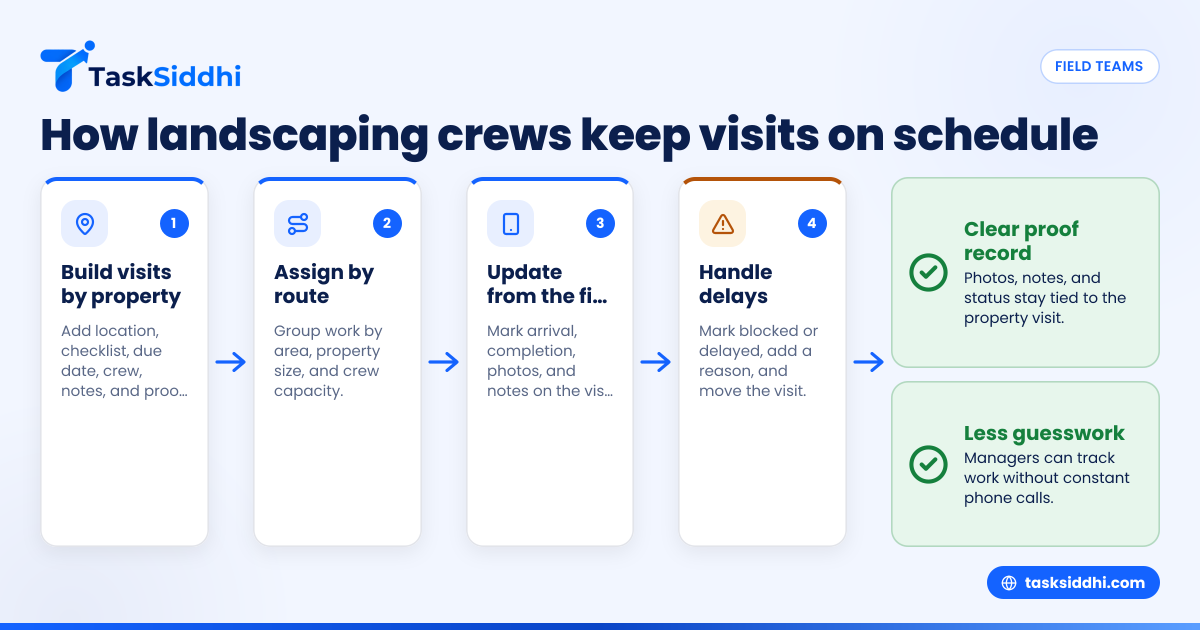
Field team task management for commercial landscaping crews means giving every crew a clear property list, visit instructions, due dates, and proof requirements in one place. In the United States, that usually replaces a mix of phone calls, paper route sheets, text messages, and photos scattered across different phones.
Key takeaways
- Commercial landscaping crews need property-based task assignment, not generic to-do lists.
- Photo proof, arrival notes, and timestamps help managers confirm work without constant phone calls.
- Recurring work should run on schedules by property, service type, and season.
- A mobile-first system reduces missed stops, duplicate visits, and lost job details.
- Reporting matters when owners manage multiple crews across cities, routes, and contracts.
- Good field team task management for commercial landscaping crews improves both crew accountability and client communication.
Why commercial landscaping crews need a different task system
Commercial landscaping is route-based, property-based, and deadline-driven. A crew is not just completing random tasks. They are visiting office parks, retail centers, apartment complexes, schools, and industrial properties on a repeat schedule.
That creates a different kind of work-management problem.
A landscaping owner in Houston may manage 12 crews across 80 properties. Some sites need mowing every week. Some need irrigation checks twice a month. Some need seasonal cleanups, mulch refreshes, or storm debris removal after a weather event. If all of this lives in group texts and spreadsheets, details get missed.
The biggest issue is usually not effort. It is visibility.
Managers often ask the same questions every day:
- Did Crew 3 finish the retail plaza on Westheimer?
- Who handled the irrigation issue at the apartment complex?
- Where are the before-and-after photos?
- Was the missed property skipped on purpose because of rain, or was it forgotten?
- Which recurring jobs are due tomorrow?
A proper task system gives one source of truth. It ties the property, the crew, the schedule, and the proof of work together.
For commercial landscaping, that matters because clients expect consistency. Property managers want clean grounds, reliable service windows, and fast answers when they ask for proof.
What should field team task management for commercial landscaping crews include?
It should let you assign each property visit with the exact work needed, due date, crew owner, and proof requirements. It should also support recurring schedules, mobile updates from the field, and fast reporting so managers can see what was done, what was missed, and what needs follow-up.
For landscaping crews, the system should be built around jobs in the field, not desktop-only project plans. It needs to work on a phone while a crew lead is standing at a gate, walking a property, or finishing a cleanup before the next stop.
Core needs for landscaping field operations
A useful setup usually includes six basic parts.
- Property-based task assignment Each visit should be tied to a property or client location. The crew should see the address, site notes, gate codes, contact details, and service checklist.
- Recurring scheduling Weekly mowing, biweekly bed maintenance, monthly irrigation inspections, and seasonal work should repeat automatically on the right cadence.
- Photo proof and visit updates Crews should be able to upload before-and-after photos, mark arrival and completion, and add notes from the field.
- Mobile access Crew leads should not need to call the office for every detail. A mobile app helps them open tasks, view instructions, and update status on site.
- Time visibility Managers need to know how long properties actually take. That helps with staffing, routing, and contract pricing. Built-in time tracking is useful here.
- Manager reporting At the end of the day or week, owners need to see which visits happened, which were delayed, and where proof is missing. Clear reporting helps with this.
Why generic task apps often fail landscaping teams
Generic task tools usually assume office work. They are good at personal to-do lists or long projects. They are less useful for route-based field service with recurring property visits.
Commercial landscaping has operational details that matter every day:
- different crews on different routes
- weather-driven changes
- site access rules
- recurring contracts
- proof for client disputes
- add-on work found on site
- large volumes of repeat visits
If the app does not match that reality, managers go back to whiteboards and text threads.
How do you assign property visits without constant phone calls?
Use one task for each property visit with the location, service checklist, due date, assigned crew, and proof needed. Crews update the visit from the field, so managers can see status without calling for every stop.
The goal is not to remove communication. The goal is to stop using phone calls as your main operating system.
Build assignments around the property, not around the person
A common mistake is assigning work like this: “Mike, do 6 properties tomorrow.”
That sounds simple, but it leaves too much in people’s heads. When someone is absent, delayed, or moved to another route, the office loses visibility.
A better method is to create each property visit as its own task or job card. That task should include:
- property name
- street address
- service date
- service type
- assigned crew or lead
- checklist of work
- notes about gates, hazards, or watering restrictions
- required photos
- customer contact if needed
With boards and views, managers can sort these visits by date, crew, area, or status. That makes route planning easier, especially when a week includes weather delays or extra cleanup requests.
Use a standard visit template
Commercial landscaping teams do similar work over and over. Standard templates reduce confusion.
For example, a weekly mowing visit template may include:
- mow turf areas
- edge sidewalks and curbs
- blow hardscapes
- inspect irrigation for visible issues
- photograph front entrance and main lawn
- note any damage, trash overflow, or unsafe conditions
This helps newer crew leads do the work the same way as experienced ones. It also makes proof more consistent when a client questions service quality.
Make reassignment fast
A strong field process lets the office reassign a visit quickly when:
- rain delays part of the route
- equipment breaks down
- a crew member calls out
- a property manager requests a same-day correction
- another crew is already nearby
This is where features built for field work matter more than a simple spreadsheet. A manager should be able to move work without rebuilding the whole day.
How can you track photo proof for commercial landscaping work?
Require photos as part of task completion, with images tied to the property visit itself. That keeps proof organized by site and date, so managers and clients can verify work without digging through texts or camera rolls.
Photo proof solves two real business problems.
First, it confirms the crew was there.
Second, it shows what condition the property was in before and after service.
What photo proof should include
For most commercial landscaping crews, useful proof includes:
- a front entrance or sign photo
- one or two overview shots of serviced areas
- a close-up if there was a special issue
- notes when weather, parked cars, locked gates, or access limits affected the work
That creates a better record than a random photo sent in a text message.
For example, if a property manager in Chicago says the crew skipped a section near the loading area, the office can pull the visit record, review the photos, and check the field notes. Maybe the section was blocked by delivery trucks. Maybe the issue is real and needs a return visit. Either way, the answer is faster.
Use photo proof to coach crews, not just police them
Owners sometimes worry that proof systems feel like surveillance. That is a fair concern. But the best use of proof is operational, not punitive.
Photo records can help you:
- train new crew leads on quality expectations
- verify completion before invoicing
- document storm damage or extra work opportunities
- protect the business during client disputes
- improve estimates for future work
That is especially useful for enhancement work, cleanup jobs, and one-time corrective visits.
Keep proof attached to the actual visit
The main rule is simple. Do not store proof in separate places.
When photos live in personal phones, text threads, or email inboxes, they become hard to find. A field management setup should keep updates connected to the visit itself. TaskSiddhi supports this kind of field execution for teams handling field visits and repeat service work.
Keeping recurring work on schedule
Recurring landscaping work is where manual systems usually break first. It is manageable when you have 10 properties. It gets messy when you have 60, with different service levels, add-ons, and seasonal exceptions.
The issue is not just remembering the next visit. It is remembering the right next visit.
Set recurrence by service type
Different work has different rhythms.
Examples include:
- weekly mowing from April through October
- monthly irrigation inspection
- quarterly shrub pruning
- spring cleanup
- mulch installation
- fall leaf removal
- post-storm debris checks
If you manage recurring tasks manually, someone in the office must remember every date and every exception. That leads to missed work and rushed scheduling.
A better system creates recurring visits in advance, so the upcoming workload is visible. That helps staffing, route balancing, and equipment planning.
Account for weather and exceptions
Landscaping is not perfectly repeatable. Rain, heat, storms, and property access issues can shift the schedule.
You need a process for what happens when a recurring visit cannot happen on the planned day.
A simple method looks like this:
- Mark the visit delayed or blocked.
- Add a reason, such as rain or locked access.
- Move it to the next workable date.
- Notify the assigned crew.
- Keep the proof trail and notes with the rescheduled visit.
This creates a record. It also helps when a customer asks why a property was not serviced on the usual day.
Use automation for repeatable admin work
Landscaping companies spend a lot of office time doing simple repeat actions. Creating next week’s mowing tasks. Following up on incomplete visits. Reminding crews about missing photos.
That is where automation helps. It reduces the manual work around recurring jobs, status changes, and reminders, so managers can focus on route problems and client issues instead.
What does a day-to-day workflow look like for a landscaping manager?
A good workflow is simple: plan the properties due, assign each visit to a crew, review field updates during the day, and close the loop on missed work or issues before tomorrow’s route is built.
That sounds basic, but consistency matters more than complexity. A small landscaping company in Detroit does not need a giant enterprise system. It needs a repeatable process the office and crews will actually use.
A practical daily workflow
Here is one way to run field team task management for commercial landscaping crews.
1. Build tomorrow’s workload by property
At the end of each day, review the visits due tomorrow. Check recurring jobs, one-time requests, and open follow-ups.
2. Assign by route or crew capacity
Group work by area, property size, and crew skills. Keep drive time reasonable. Avoid overloading one crew while another has gaps.
3. Confirm property instructions are current
Before the day starts, make sure each visit includes updated notes. Add any access warnings, client requests, or weather-related instructions.
4. Track progress from the field
During the day, watch for status changes, notes, and missing proof. Managers should not need to call every crew just to ask, “Where are you now?”
5. Handle exceptions fast
If a crew finds irrigation damage, storm debris, vandalism, or a locked gate, they should note it on the visit. The office can then create follow-up work or notify the client.
6. Review proof before the day closes
Check incomplete visits, missing photos, and tasks that were pushed to another day. Fix the record while details are still fresh.
Where an ai field team approach can help
An ai field team workflow is not about replacing supervisors. It is about reducing repetitive admin work and making field updates easier to review.
For example, managers often need help spotting patterns such as:
- which properties run long every week
- which crews forget proof most often
- which recurring tasks get pushed forward repeatedly
- which clients generate the most extra work
Even without advanced analysis, the key is structured field data. If updates come in through one system instead of scattered messages, the business can act faster.
Common mistakes commercial landscaping companies make
Most breakdowns in field management come from process gaps, not from lack of effort.
Relying on memory for recurring routes
If your office manager is the only person who knows which sites are due this week, the system is fragile. Recurring work should live in a tool, not in one person’s head.
Using photos with no context
A photo without a property name, date, and related task is weak proof. Context matters.
Treating missed visits as communication failures only
Sometimes the real issue is unclear assignment, overloaded routes, or poor visibility. Better task structure fixes a lot of “communication problems.”
Tracking time and proof separately
When time, photos, and notes are all in different systems, managers waste time connecting them. A unified record works better for service jobs and recurring property work.
Overcomplicating the setup
A team of 5 to 30 people needs a system they can learn quickly. If setup takes too long, crews will go back to texts and calls.
Choosing the right software for landscaping field work
Many owners ask whether they need full ERP software or a lightweight task system. For most commercial landscaping teams, the answer depends on what problem is most urgent.
If your biggest issue is field execution, start there.
Look for these capabilities
When comparing tools, ask:
- Can I assign visits by property and crew?
- Can tasks repeat on a schedule?
- Can crews update status from a phone?
- Can they attach photos and notes?
- Can I see overdue and completed visits by crew or date?
- Can I review time spent on properties?
- Can I report on missed or delayed work?
If the answer is no to several of these, the software may not fit landscaping operations.
Keep finance and operations connected in a practical way
Your field system does not need to do everything. Many U.S. businesses already use QuickBooks for accounting and Stripe for payments. The field operations layer should focus on planning, execution, proof, and reporting.
That is why many teams prefer a task board approach over a heavy back-office system. TaskSiddhi supports this style of work for client work and field operations where visibility matters every day.