

Site visit verification in the United States is the process of proving that a vendor actually showed up at a property, at a specific time, and completed the expected work. For property management vendors, the strongest proof usually combines photos, a timestamp, location details, job notes, and a tenant or on-site contact sign-off in one record.
Key takeaways
- Good site visit verification creates one clear record of who went, when they arrived, what they did, and who confirmed it.
- Photo proof alone is often not enough for property management work in the United States.
- The most useful proof package includes timestamped photos, service notes, checklist completion, and tenant sign-off.
- Standardizing proof across all properties reduces billing disputes, callback confusion, and missed visits.
- A mobile-first process helps field teams capture proof before they leave the site.
- TaskSiddhi can help teams organize this with field visits, a mobile app, and reporting.
What site visit verification means for property management vendors in the United States
If you manage cleaners, maintenance techs, inspectors, landscapers, turnover crews, or repair vendors, you already know the problem. A property manager asks, “Did your team actually go?” Your tech says yes. The tenant says nobody came. The office has a blurry photo and a text message.
That is not a reliable verification process.
In the United States, property management vendors often work across occupied units, vacant units, common areas, and scattered sites. Proof needs vary by job type. A move-out inspection in Chicago does not need the same evidence as a pest-control visit in Houston or a common-area maintenance check in Detroit. But the core need stays the same. You need a defensible record that is easy to capture, easy to review, and easy to send to the client.
A strong site visit verification process helps with four daily issues:
- It confirms attendance.
- It confirms work progress or completion.
- It reduces disputes with tenants and property managers.
- It supports faster invoicing and fewer payment delays.
Many vendors still rely on text threads, emailed photos, paper work orders, and memory. That approach breaks down as soon as your team handles more than a few visits a day. Files get lost. Photos are saved without job context. Notes are written later. Signatures are missed. Then the office spends hours rebuilding what happened.
The better approach is simple. Every site visit should create one complete job record. That record should include the assigned worker, property address, visit time, photo proof, notes, checklist status, and sign-off when required.
Why is photo and timestamp proof not enough?
Photo and timestamp proof shows that someone took a picture at a certain time. It does not always prove why they were there, what they checked, or whether anyone on site accepted the work.
That gap matters in property management. A photo of a furnace filter, hallway floor, or exterior wall may prove very little without context. The office still needs to know which unit was serviced, what task list was completed, whether access was denied, and whether the tenant or building contact confirmed the visit.
Where photo-only proof fails
Photo-only proof causes problems in a few common situations:
- The photo does not show the unit number or location.
- The worker uploads the photo hours later with no job notes.
- The office cannot match the image to a service request.
- The tenant says the issue was not fixed.
- The property manager wants evidence of specific checklist items.
- The invoice is questioned because the proof does not show completion.
For example, a maintenance vendor may photograph a replaced faucet in one apartment. But if the record does not include the unit number, arrival time, technician notes, and tenant sign-off, the manager may still reject the invoice or ask for more proof.
What better proof looks like
Good verification is layered. Each layer makes the record harder to dispute:
- Job identity: property name, address, unit, work order number.
- Worker identity: technician name or assigned crew.
- Time proof: check-in and check-out time.
- Visual proof: before and after photos.
- Work proof: checklist, notes, materials used, issue status.
- Acceptance proof: tenant or site contact sign-off where needed.
This is why many teams now build a standard visit workflow instead of asking each worker to “send some pictures.”
What should a complete site visit verification record include?
A complete site visit verification record should show the property, unit, worker, visit time, work done, photo proof, exceptions, and tenant or site sign-off. If a client reviews the record later, they should understand the visit without calling your office.
The core fields every vendor should capture
At minimum, your team should collect these items on every visit:
- Property name
- Street address
- Unit or area serviced
- Client or property manager name
- Assigned technician or crew
- Service type
- Arrival time
- Departure time
- Before photos
- After photos
- Work performed notes
- Problems found
- Access issues, if any
- Tenant or contact name
- Sign-off or visit acknowledgment
If your team handles compliance-sensitive work, you may also need custom checklists. For example, a turnover crew might need separate confirmation for appliances, walls, locks, and smoke detector checks. A landscaping vendor may need proof of front, side, and rear work zones.
When tenant sign-off matters most
Tenant sign-off is not required for every job. But it is especially useful when:
- The work happened inside an occupied unit.
- The tenant requested the service directly.
- The fix is hard to verify from a photo.
- The property manager often disputes completion.
- The client expects same-day proof.
- The work affects billing approval.
A sign-off can confirm that the worker arrived, performed the service, and left the unit in acceptable condition. It will not solve every dispute, but it adds a strong layer of confirmation.
How do you set up a site visit verification process?
Start with one standard proof checklist for every property visit. Make it simple enough that technicians can complete it in the field without calling the office.
The process should fit the real day of a field worker, not the ideal day imagined in the office. If the process is too long, people skip steps. If it is too vague, every worker submits different proof. The best system balances speed with consistency.
A five-step workflow for field teams
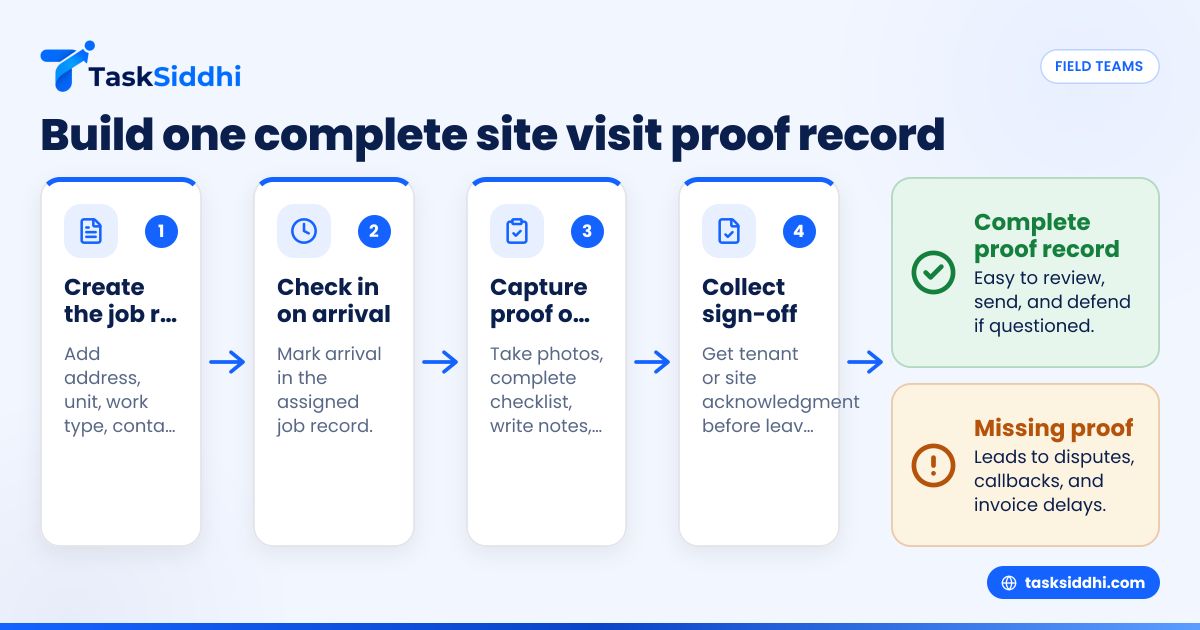
- Create the job record before dispatch Include address, unit, work type, tenant contact, and required proof items. If one client wants a signature and another wants three after photos, define that in advance.
- Require check-in at arrival The worker should open the assigned job and mark arrival. This creates the first timestamp tied to the right record.
- Capture proof during the visit Technicians should take before photos, complete the checklist, write notes, and log any blocked access or added work. This is much better than trying to remember details later.
- Collect sign-off before leaving If a tenant, property staff member, or site contact is present, get the acknowledgment while the worker is still on site. Waiting until later often means it never happens.
- Review and close the job the same day Office staff should check for missing proof, unclear photos, or incomplete notes before sending updates to the client or preparing invoices.
This is where structured workflows matter more than messaging apps. A task board and field workflow can keep jobs, proof, and status in one place using boards and views and automation.
Build separate rules for different visit types
Not every property visit needs the same evidence. Create proof templates by job category:
- Unit repair visits
- Preventive maintenance
- Turnover work
- Inspections
- Exterior grounds work
- Common-area cleaning
- Emergency callouts
That keeps your team from overshooting on simple jobs and under-documenting high-risk visits.
How can you reduce disputes with property managers and tenants?
Use one proof standard for every visit, and make it easy to review quickly. Most disputes happen because proof is incomplete, unclear, or scattered across texts, emails, and paper notes.
Why disputes happen
Disputes usually come from one of these gaps:
- No one can confirm the worker actually arrived.
- The photo does not match the reported job.
- The work description is too vague.
- The property manager expected more detail.
- The tenant says access never happened.
- The invoice arrives before proof is organized.
Many disputes are really documentation failures, not service failures.
A simple dispute-prevention checklist
Before you mark any visit complete, confirm:
- The address and unit are correct.
- Arrival and departure times are recorded.
- Photos are clear and attached to the right job.
- Notes explain what was done.
- Any exception or issue is documented.
- Sign-off is captured when required.
When managers can open one record and see the full visit history, they ask fewer follow-up questions. That saves office time and helps invoices get approved faster.
If your team wants cleaner visibility across jobs, statuses, and proof, that is where features and reporting become useful.
Can AI help with site visit verification?
Yes, but AI should support your process, not replace basic proof collection. An ai site visit workflow can help flag missing photos, incomplete notes, or jobs closed without sign-off.
Where AI can help in real operations
For property management vendors, AI is most useful when it reduces office review time. For example, an ai site visit process might help identify records that are missing an after photo, point out jobs with no checkout time, or highlight repeated access-denied notes at the same building.
That kind of help matters when your dispatcher or operations manager reviews dozens of jobs per day. Instead of manually checking every record line by line, they can focus on exceptions.
Still, AI is not the proof itself. Your legal and billing confidence still depends on the original record: photos, timestamps, notes, and sign-off. If the worker did not capture the basics, no software can invent trustworthy evidence after the fact.
Best practices for photos, timestamps, and tenant sign-off
The details of capture matter. Poor photos and weak notes create almost as many issues as missing proof.
Photo proof best practices
Ask your team to follow a simple photo standard:
- Take one wide shot to show location.
- Take one close shot to show the issue or completed work.
- Include identifying details where possible, such as unit numbers or room context.
- Use before and after photos for repair, cleaning, and turnover work.
- Do not rely on random camera roll uploads later.
Blurry or out-of-context images create avoidable questions. If the site is dark, the worker should retake the photo before leaving.
Timestamp best practices
Timestamps are more useful when they are tied to specific workflow steps:
- Arrival
- Work started
- Work completed
- Departure
- Sign-off collected
This gives the office a more complete story than one image time alone. It also helps when a client asks whether a visit ran long or whether a crew returned later that day.
Sign-off best practices
Tenant or contact sign-off should be short and practical. The person signing should confirm visit acknowledgment, not write a long statement. Keep it tied to the specific service record.
Train workers on what to do if the tenant refuses to sign or is not present. In that case, they should record that fact in notes and complete all other proof steps. Missing sign-off should be explained, not ignored.
How to roll this out across a 5 to 30 person vendor team
Small and midsize field teams often fail at rollout because they try to change everything at once. Start with one visit type, one proof standard, and one review routine.
A practical rollout plan
- Choose one service category first Start with the job type that causes the most disputes. For many vendors, that is occupied-unit maintenance or turnover work.
- Define the proof package Decide exactly what is required: number of photos, checklist items, notes, and sign-off rules.
- Train with examples Show workers what a good record looks like and what an incomplete record looks like.
- Review daily for two weeks Catch missing proof early. Fast feedback changes habits faster than a monthly audit.
- Expand to other visit types Once one workflow is stable, add more templates.
A field-friendly setup matters here. Teams in the field need a fast mobile app, clear time tracking, and a repeatable workflow for service jobs.
What managers should measure
You do not need a complex dashboard at first. Track a few simple numbers:
- Visits completed
- Visits with full proof
- Visits missing photos
- Visits missing sign-off
- Access-denied visits
- Disputed invoices
- Repeat visits for the same issue
These numbers show whether your verification process is improving actual operations, not just paperwork.
Common mistakes property management vendors make
Many vendors think verification is a technology problem. Usually, it is a process problem first.
The biggest mistakes to avoid
Relying on worker memory
If notes are written at the end of the day, details get lost.
Allowing each tech to document differently
One worker sends five photos. Another sends one text. The office cannot manage that consistently.
Collecting proof outside the job record
Pictures in text threads and notes in email create chaos later.
Skipping exception notes
If access was blocked, the tenant was absent, or a part was unavailable, document it clearly.
Treating sign-off as optional without rules
If your client expects it, missing sign-off can delay approval and payment.
Reviewing proof too late
If the office checks records three days later, it is much harder to fix missing information.
The goal is not to create more admin. The goal is to create proof once, at the point of work, so nobody has to reconstruct it later.
Choosing a system for site visit verification in the United States
For vendors serving property managers in the United States, the best system is the one your field team will actually use every day. It should make proof capture part of the visit, not an extra office task after the fact.
Look for a system that helps you:
- Assign and schedule site visits
- Standardize proof requirements by job type
- Capture photos and notes in the same record
- Track arrival and completion times
- Collect sign-off when needed
- Review exceptions quickly
- Share reports with clients
If your team is still choosing between manual tools and a more structured workflow, it helps to compare free vs paid approaches before making the shift.
A strong verification process protects revenue. It also improves trust. Property managers are more likely to keep using vendors who make every visit easy to verify.