

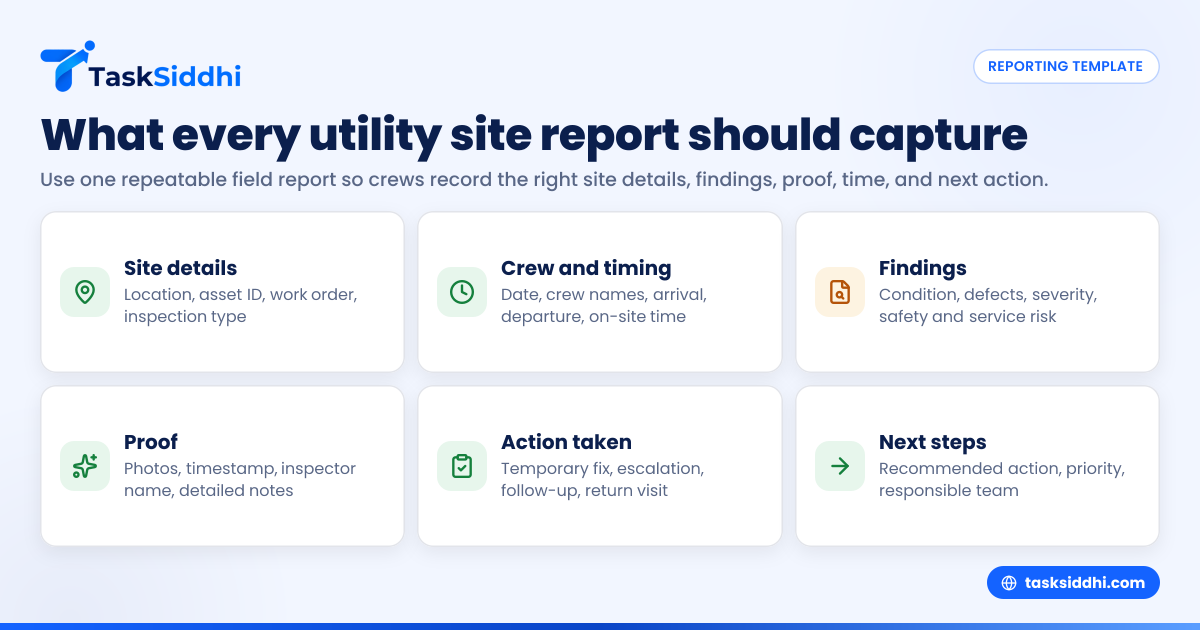
A daily field report template for utility inspection crews is a standard form used to capture what happened at each site visit, who did the work, what was found, and what needs follow-up. In the United States, the best template is simple enough for crews to complete in the field, but structured enough for managers to review work by location, date, crew, and inspection outcome.
Key takeaways
- A strong daily field report template records site details, crew activity, findings, proof, time, and next actions.
- Utility inspection crews need a repeatable format to reduce missing notes, late reports, and unclear handoffs.
- Photos, timestamps, location, asset ID, and issue severity are often the most useful fields for managers.
- A good template should work on a phone in the field and roll up into end-of-day reporting.
- Standardizing reports helps with customer updates, internal accountability, billing support, and audit trails.
- Digital reporting is easier to search, review, and summarize than paper forms or scattered text messages.
Why utility inspection crews need a daily field report template
Utility inspection work creates a lot of information in one day. Crews move between sites, inspect different assets, note safety concerns, document conditions, and flag work that needs follow-up. When that information sits in notebooks, text threads, or photo galleries, it becomes hard to manage.
A daily field report template solves that problem by giving every crew the same structure. It tells inspectors what to record at every stop. It also tells supervisors what they can expect to review at the end of the day.
For utility inspection crews in the United States, this matters for a few practical reasons:
- Service areas can cover large geographic regions.
- Customers expect fast updates when issues are found.
- Managers need clean documentation for internal records.
- Teams often rely on email, phone calls, spreadsheets, and paper.
- Photos and proof from the field need to tie back to the right asset or address.
A daily field report is not just a summary of hours worked. It is a record of field activity, site conditions, findings, exceptions, and next steps. If your crews inspect poles, meters, easements, lines, cabinets, vaults, or utility-adjacent sites, the same principle applies. Every visit should produce a usable report.
What should a daily field report template include?
A daily field report template for utility inspection crews should capture the who, what, where, when, and what-next for each site visit. At minimum, include date, crew member names, site location, asset ID, inspection type, findings, photos, time on site, and required follow-up.
That short list is the core. The best template then expands those items into clear fields that are easy to complete in the field and easy to review later.
1. Report header fields
Start with the top-level details that identify the report.
Include:
- Report date
- Crew name or crew lead
- Inspector names
- Service area or district
- Supervisor name
- Weather conditions, if relevant
- Vehicle or unit number, if relevant
- Shift start and end times
These fields help managers tie the report to a specific team and workday. Weather can matter if visibility, access, or safety affected the inspection.
2. Site identification fields
Every site visit should be linked to a clear location and asset.
Include:
- Site name or customer name
- Street address
- City and state
- ZIP code
- GPS location, if available
- Asset ID, pole number, meter number, or equipment ID
- Work order or job number
- Inspection category
This section prevents one of the most common reporting failures: good notes tied to the wrong location.
3. Visit timing fields
Time data matters for staffing, proof of service, payroll review, and operational planning.
Include:
- Arrival time
- Start inspection time
- End inspection time
- Departure time
- Travel time, if tracked separately
- On-site duration
If your team bills for time or uses labor reports internally, structured timing fields are much better than free-text notes. A digital setup with time tracking can reduce manual entry later.
4. Inspection scope fields
Not every site visit covers the same work. Define what the crew was there to inspect.
Include:
- Inspection type
- Scheduled or unscheduled visit
- Preventive or corrective inspection
- Asset condition checkboxes
- Access check
- Safety check
- Photo documentation required yes or no
- Customer or occupant contact made yes or no
These fields help you compare work across sites and see which types of inspections create the most follow-up work.
Which findings should crews capture at each site?
Crews should capture the condition of the asset, any defects found, the severity of each issue, safety concerns, supporting photos, and the recommended next action. If a finding could trigger future work, the report should make that obvious in one scan.
This is the heart of the report. A manager reading end-of-day submissions should not need to guess what happened at the site.
Condition and finding fields to include
Use a section like this for each inspected asset or location:
- Asset condition: good, fair, poor, critical
- Defect found yes or no
- Defect type
- Severity level
- Immediate safety risk yes or no
- Obstruction or access issue yes or no
- Damage observed
- Maintenance needed yes or no
- Service interruption risk yes or no
- Environmental concern observed yes or no
- Notes
The exact defect list depends on your operation. Keep it specific to your inspection workflows. Avoid broad categories that hide useful detail.
Use clear severity levels
Severity should be standardized. If one inspector writes “urgent” and another writes “important,” reporting becomes messy. Pick a scale that fits your business, such as:
- Monitor
- Routine repair
- Priority repair
- Immediate action required
Put a short definition beside each level in the template. That reduces inconsistency across crews.
Capture proof with every meaningful finding
Proof is often the difference between a useful report and a weak one.
Add fields for:
- Before photo
- Issue close-up photo
- Wide site photo
- After photo, if action was taken
- Timestamp
- Inspector name
- Optional voice note or detailed note
A mobile-first process works best here because crews can upload proof directly from the field. For teams that need site evidence and location-based updates, field visits and the mobile app are especially relevant.
A practical daily field report template
Below is a simple structure you can use as a starting point for utility inspection crews in the United States.
Daily field report template for utility inspection crews
Report details
- Report date:
- Crew lead:
- Crew members:
- Supervisor:
- Service area:
- Shift start:
- Shift end:
- Weather:
Site visit details
- Site number:
- Arrival time:
- Departure time:
- Street address:
- City:
- State:
- ZIP code:
- GPS location:
- Work order or job number:
- Asset ID:
- Inspection type:
Inspection results
- Asset condition:
- Access available: Yes/No
- Safety hazard observed: Yes/No
- Defect found: Yes/No
- Defect type:
- Severity level:
- Service risk: Yes/No
- Environmental concern: Yes/No
- Photos attached: Yes/No
- Customer or occupant contact made: Yes/No
- Summary of findings:
Action taken on site
- Temporary action completed:
- Issue marked for follow-up: Yes/No
- Escalated to supervisor: Yes/No
- Additional crew required: Yes/No
- Return visit needed: Yes/No
Next steps
- Recommended action:
- Priority:
- Responsible team:
- Target follow-up date:
- Notes for office or dispatch:
End-of-day summary
- Total sites visited:
- Completed inspections:
- Incomplete inspections:
- Critical issues found:
- Follow-up jobs created:
- Total on-site hours:
- Total travel time:
- Crew notes:
This template works as a paper form, spreadsheet, or digital form. Digital is easier if you want searchable records, dashboard views, and trend reporting.
How do you make crews actually fill it out?
Make the template short, required, and easy to complete on a phone. If it takes too long, crews will skip fields. If every field matters, they will learn the pattern and complete it faster.
The biggest reporting mistake is creating a perfect office template that fails in the field. Crews are moving, driving, checking assets, and dealing with access issues. Your form has to match that reality.
Keep required fields limited
Not every field should be mandatory. Only require the fields that are essential to run the job well.
Good required fields usually include:
- Date
- Inspector name
- Site location
- Asset ID
- Inspection type
- Findings summary
- Severity
- Photo proof
- Next action
Optional fields can still be useful, but too many required entries slow people down.
Use dropdowns where possible
Structured inputs improve consistency. They also make reporting much easier later.
Use dropdowns or checkboxes for:
- Inspection type
- Asset condition
- Defect type
- Severity
- Follow-up needed
- Action status
Keep free-text notes for exceptions, context, or special situations.
Train crews on what “good” looks like
Do not just hand over the template. Show examples of strong and weak reports.
For example, this note is weak:
- “Pole issue. Needs work.”
This note is stronger:
- “Wood pole at rear alley access shows visible cracking at base. Severity level 3. Two close-up photos attached. Recommend priority repair review within 48 hours.”
That extra clarity saves calls, delays, and confusion.
How should managers review daily field reports?
Managers should review daily field reports by exception first, then by completeness, then by trends. Focus on critical findings, missing proof, overdue follow-up, and repeated issues by area or asset type.
If you manage several crews, you do not need to read every line in the same order. You need a review process that highlights risk and action.
Step 1: Check urgent findings first
Look for:
- Critical severity issues
- Safety hazards
- Service interruption risk
- Sites needing immediate return visits
- Missing escalation on serious findings
This helps supervisors act quickly instead of getting buried in routine updates.
Step 2: Check report completeness
Review whether each report includes:
- Correct site identification
- Time entries
- Findings summary
- Photos
- Follow-up action
If one field is often missing, the template may need to change.
Step 3: Track patterns over time
A good reporting process helps you see more than one day of work. Over a month, you should be able to answer questions like:
- Which crews complete reports on time?
- Which service areas generate the most follow-up work?
- Which defect types appear most often?
- How many sites were inspected versus rescheduled?
- How much time is spent on site versus driving?
This is where digital reporting becomes more valuable than static spreadsheets.
Can AI help with daily field reporting?
Yes, AI can help summarize notes, flag missing fields, and group common issues, but it should support the crew workflow, not replace the original field record. The source data still needs to be accurate, timestamped, and tied to the right site.
Many managers are now looking for ai daily field workflows because crews already collect lots of repeat information. AI can help turn that raw information into cleaner summaries, exception lists, and trend views.
Where AI helps most
AI is useful for:
- Summarizing long notes into short manager-ready updates
- Spotting missing report fields
- Grouping similar defects across multiple reports
- Flagging reports with high-severity findings
- Drafting end-of-day summaries from site entries
Where AI should not be the only source
AI should not replace:
- Photo proof
- Timestamps
- Asset IDs
- Exact location data
- Original crew observations
- Manager review of critical findings
For utility inspection crews, the report still needs a clear factual record first. AI can help organize that record, but it should not invent one.
Common mistakes in utility inspection daily reports
Most daily field reports fail because they are either too vague or too hard to complete. The result is missing facts, unclear findings, and weak follow-up.
Mistake 1: The report reads like a diary
A report should be structured, not a stream of thoughts. If crews write long paragraphs without standard fields, managers cannot compare sites easily.
Mistake 2: Photos are saved separately
Photos need to live with the report. If managers must search phones or folders later, proof gets lost.
Mistake 3: No clear next action
A finding without a next step creates delays. Every issue should show whether it is complete, escalated, or waiting on follow-up.
Mistake 4: The template is too long
A bloated form causes shortcuts. Crews skip fields, copy old notes, or submit late.
Mistake 5: End-of-day reporting is manual
If supervisors must rebuild daily activity from calls, emails, and text messages, reporting quality will stay low. A shared system with boards and views and automation can reduce that cleanup work.
How to roll out a better daily field report process
The easiest way to improve reporting is to standardize one template, test it with one crew, then adjust before a wider rollout.
Step-by-step rollout plan
- List the information you actually use. Remove fields nobody reviews.
- Build one standard template. Keep required fields limited.
- Test it with one crew for one week. Watch where delays or confusion happen.
- Refine the wording. Simplify labels and dropdown choices.
- Set a submission deadline. For example, before shift end or within 30 minutes of the last site.
- Create a manager review routine. Review urgent issues first.
- Measure compliance. Track on-time reports, missing proof, and follow-up completion.
For small utility service teams, this process is often enough to move from scattered notes to useful reporting. If your work also connects to ongoing service calls or recurring jobs, the same approach can support broader service jobs workflows.
Frequently asked questions
What is the difference between a daily field report and an inspection checklist?
An inspection checklist helps crews verify what to inspect. A daily field report captures what happened during the visit, what was found, and what needs follow-up. Many teams use the checklist inside the report.
Should every site visit have its own report entry?
Yes, if you want clear records by location and asset. A separate entry for each site makes proof, timing, and follow-up much easier to track. It also reduces confusion when one day includes many stops.
What is the best format for a daily field report template?
The best format is the one crews will complete consistently in the field. For most teams, that means a phone-friendly digital form with photos, timestamps, and structured fields. Paper can work, but it is harder to search and summarize later.
How detailed should inspector notes be?
Notes should be specific enough that a supervisor understands the issue without calling the inspector back. They should name the asset, describe the condition, state the severity, and recommend the next action. Short and precise is better than long and vague.
Can daily field reports support billing or customer updates?
Yes, they often help support both. Time on site, completed visits, and proof of work can help validate invoices or service summaries. They can also give account managers a cleaner update for customers.