

Job card software for garage door repair businesses in the United States helps you turn phone calls, texts, and paper tickets into a clear service workflow. It gives your office and technicians one place to dispatch jobs, see service history, capture photos and signatures, and close work faster without losing details.
Key takeaways
- Garage door repair teams need more than a calendar. They need dispatch, job cards, proof of work, and service history in one system.
- Good job card software reduces missed appointments, repeat questions, and billing delays.
- The best setup for a small U.S. service business includes mobile access, timestamps, photos, notes, and customer-ready records.
- Service history matters for repeat calls, warranty questions, and training new technicians.
- Proof of completion should include arrival time, work done, photos, customer sign-off, and parts used.
- A simple rollout works best. Start with one workflow, one job card format, and one daily dispatch process.
What is job card software for garage door repair businesses in the United States?
Job card software for garage door repair businesses in the United States is a digital system for creating, assigning, updating, and closing service jobs. It replaces paper work orders, scattered texts, and spreadsheet trackers with one shared record for each customer visit.
For a garage door repair business, a job card usually includes the customer address, contact details, issue description, appointment window, technician assignment, site notes, photos, parts used, labor time, and proof that the job was completed. It should also preserve past visits, because garage door service often depends on what happened at the last appointment.
Many small teams still run dispatch from a whiteboard, phone calls, and a group chat. That works at five jobs a day. It breaks down at fifteen. Once you have multiple technicians on the road, emergency calls, repeat issues, and warranty callbacks, you need a system that shows the real status of every job.
That is where job card software helps. A dispatcher can assign work quickly. A technician can open the job from the field, read the last notes, upload photos, and close the visit from a phone. The office can check what happened without calling three people for updates.
For garage door repair businesses in cities like Houston, Chicago, or Detroit, speed and recordkeeping both matter. Customers want quick response times. Managers want fewer missed details. Digital job cards help with both.
Why garage door repair businesses outgrow paper job cards
Paper job cards feel simple because they are familiar. But they create friction at every stage of the job.
First, dispatch gets messy. A handwritten note can be incomplete. The office may not know whether the technician has seen the update. If a customer changes the time, someone has to relay that change manually.
Second, service history gets lost. A technician may write that the torsion spring was replaced on 03/15/2026, but that paper ticket might stay in a truck or a filing cabinet. When the same customer calls again six months later, the team starts from zero.
Third, proof of completion becomes weak. If a customer disputes the work, you need clear records. A job card with only “fixed garage door” is not enough. You need before and after photos, notes, time on site, and often a signature.
Fourth, billing slows down. If technicians hand in papers at the end of the day or week, your office waits to review them before invoicing. That delay hurts cash flow.
Digital job card software fixes these gaps by making the job record live from start to finish. The office and field team work from the same file. Updates are visible immediately. Records are easier to search. Nothing depends on one person remembering to pass along a sheet of paper.
How does job card software improve dispatch for garage door repair teams?
It gives dispatchers one live view of every job, technician, and status. That makes it easier to assign work, handle schedule changes, and reduce back-and-forth calls.
In practice, dispatch improvement comes from structure. Every new service request follows the same path. Instead of a dispatcher writing notes on sticky pads, the office creates a digital job card with required fields.
What a dispatcher needs to see
A useful dispatch screen should show:
- Customer name and address
- Type of issue
- Scheduled time window
- Assigned technician
- Job status
- Priority level
- Notes from the customer
- Parts or tools likely needed
If your team handles spring replacements, opener issues, sensor problems, cable failures, and emergency door jams, the dispatcher should be able to sort jobs by type and urgency.
A simple dispatch workflow
Here is a practical process for a garage door repair company with 5 to 30 employees.
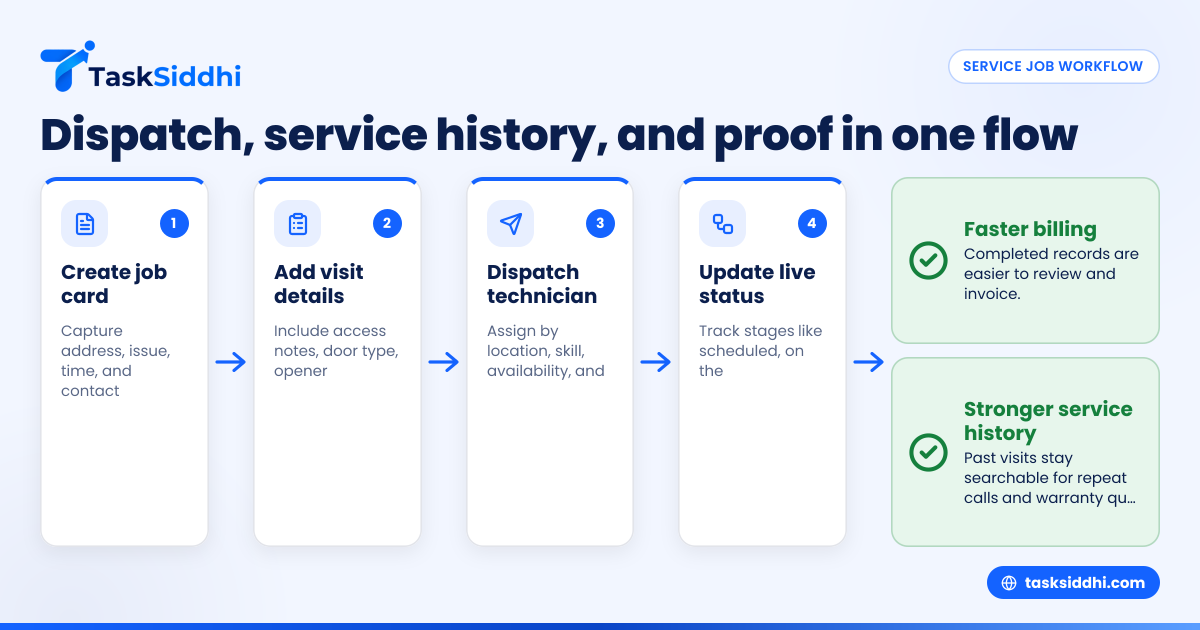
- Create the job card when the call comes in Capture the address, problem description, preferred time, and contact details.
- Add useful pre-visit details Note gate codes, parking instructions, door type, opener brand, or safety concerns.
- Assign the technician Choose based on location, skill, availability, and whether a callback is involved.
- Send the job to the technician The technician sees the full job card on a phone, including notes and prior visits.
- Update status during the day Use simple stages such as scheduled, on the way, on site, parts needed, completed, or callback required.
- Close the job with proof The technician uploads photos, enters work done, logs time, and captures a signature if needed.
A shared board view is often enough for a small business. If you want one place to track jobs by stage, boards and views can help keep dispatch visible without overcomplicating the process.
What should a garage door repair job card include?
A garage door repair job card should include customer details, problem description, technician assignment, service history, labor and parts used, site photos, and proof of completion. If key details are missing, your team wastes time and creates billing and warranty risk.
Below are the fields that matter most.
Customer and site details
Start with the basics:
- Customer name
- Service address
- Phone number
- Email address
- Appointment date
- Arrival window
- Property type
- Access instructions
This sounds simple, but incomplete address data creates avoidable delays. For technicians in busy metro areas, clear site details can save a missed stop.
Problem and diagnosis fields
Your job card should capture the customer’s description first, then the technician’s diagnosis.
Examples include:
- Door off track
- Broken spring
- Opener not responding
- Safety sensor issue
- Frayed cable
- Loud operation
- Remote programming issue
Keep these fields structured when possible. That makes later reporting cleaner.
Service history section
This is one of the biggest reasons to go digital. A technician should be able to see:
- Previous visit dates
- Prior repairs
- Parts replaced
- Notes about door condition
- Warranty-related details
- Repeat issue flags
Service history helps your best technicians make faster decisions. It also helps newer team members avoid repeating past mistakes.
Completion and proof fields
At the end of the job, the card should include:
- Work performed
- Parts used
- Time on site
- Before photos
- After photos
- Technician notes
- Customer signature or approval
- Follow-up needed
For many service businesses, this is where a basic digital ticket becomes an operational record. If your team performs on-site work daily, service jobs shows how a structured process can support field execution.
How do you track service history without making the system slow?
Keep one job card per visit, but link every visit to the same customer and service address. That gives technicians the past context they need without turning the current ticket into a long, confusing document.
The key is to separate the current visit from the customer timeline. The current job card should be easy to use in the field. It should not force a technician to scroll through years of notes just to upload a photo.
Build a usable service history
A good service history setup should answer these questions fast:
- Has this customer called about the same issue before?
- What parts were replaced last time?
- Was the problem fixed fully or temporarily?
- Did the customer decline recommended work?
- Is this a callback?
- Which technician last visited the site?
If a customer in Chicago calls and says, “The same door is sticking again,” your office should be able to pull that history in seconds.
Use tags and categories
You do not need a complex database for a small team. Simple categories can go a long way:
- New install follow-up
- Emergency repair
- Warranty callback
- Opener repair
- Spring replacement
- Annual maintenance
- Estimate only
That structure helps with search, staffing, and review.
Keep technician notes clean
Ask technicians to write notes that another person can understand later. “Adjusted and tested” is weak. “Replaced left torsion spring, balanced door, tested opener, advised customer on worn rollers” is useful.
This is also where an ai job card workflow can help. If your team uses standardized fields and short guided notes, it becomes easier to produce cleaner records and more consistent summaries from technician input.
Why proof of completion matters in garage door repair
Proof of completion protects your business and improves the customer experience. It shows what was done, when it was done, and what condition the site was in before and after the work.
Garage door repair can lead to disputes. A customer may say the door still makes noise. A landlord may want confirmation that the technician visited. A property manager may need photo evidence before approving payment.
What counts as proof of completion
Useful proof often includes:
- Timestamped arrival and completion
- Photos before work
- Photos after work
- Notes on parts replaced
- Test results
- Customer sign-off
- Technician name
For example, if a technician replaces rollers and adjusts track alignment in Detroit, the office should have a clear record of the visit. That record helps when a customer calls back or questions the invoice.
Why photos matter
Photos reduce confusion. They help in three common cases:
- The customer was not on site You can still show the completed work.
- The issue returns Your team can compare condition over time.
- The office needs to review technician work Managers get better visibility without extra calls.
If your jobs happen across homes, warehouses, and commercial sites, field visits can help your team document what happened on site with less manual follow-up.
What does it cost?
For most small garage door repair businesses, the real cost is not just software. It is also missed jobs, delayed invoicing, and time spent chasing technicians for updates.
When owners ask about cost, they often focus only on subscription fees. That matters, but it is only part of the picture.
Calculate the cost of your current process
Look at these common losses:
- Dispatcher time spent calling for status updates
- Revenue delayed because paperwork comes in late
- Repeat visits caused by missing service history
- Disputes from weak proof of completion
- Missed appointments from unclear scheduling
- Time spent re-entering paper notes into QuickBooks or other records
If one technician completes four to six jobs a day, even a few minutes saved per job adds up fast over a month.
Evaluate software by workflow fit
For a garage door repair team, the important question is not “What is the cheapest app?” It is “Can my office and technicians actually use this every day?”
Look for:
- Easy job creation
- Mobile access
- Status updates
- Photo uploads
- Time logging
- Reporting
- Searchable history
If you are comparing options, it can also help to understand free vs paid tools before you commit to a process your team will outgrow.
How should a small garage door repair business roll this out?
Start with one standard job card, one dispatch board, and one closeout checklist. Train the office first, then technicians, and keep the rollout simple for the first two weeks.
The biggest mistake is trying to digitize everything at once. Small service businesses do better with a narrow first phase.
A practical 30-day rollout plan
Week 1: define the workflow
Pick the basic status stages:
- New
- Scheduled
- Dispatched
- On site
- Completed
- Follow-up needed
Decide what fields are mandatory before dispatch and before closeout.
Week 2: train the office team
The office should learn how to:
- Create job cards
- Assign technicians
- Update schedules
- Check status
- Review completed jobs
This matters because most workflow discipline starts at dispatch.
Week 3: train technicians in the field
Focus on only a few actions first:
- Open the assigned job
- Change status
- Add notes
- Upload photos
- Mark complete
For field teams, adoption is easiest when the system works well on a phone. A mobile app is often the difference between clean data and late updates.
Week 4: review and tighten
At the end of the first month, review:
- Which fields technicians skip
- Which statuses confuse dispatch
- Which reports managers actually use
- Which proof items are missing most often
Then simplify. The best workflow is the one your team follows every day.
How can managers measure whether the system is working?
Track completion time, callback rate, technician utilization, and how quickly jobs move from completed to ready for billing. If those numbers improve, your process is getting stronger.
You do not need complicated dashboards at first. Start with a few weekly checks.
Useful metrics for garage door repair teams
Monitor these:
- Jobs completed per technician
- Average time from booking to completion
- Average time on site
- Number of callbacks
- Jobs missing photos or notes
- Jobs not closed by end of day
- Revenue waiting on incomplete paperwork
These metrics show whether the software is improving real operations or just changing where your team types notes.
Use reporting to spot process gaps
For example, if one technician has far more callbacks than the rest, you may need coaching. If jobs in one area are always delayed, routing or scheduling may be the issue. If emergency calls push everything else behind, you may need a separate dispatch rule.
Simple reporting and time tracking can help a manager see where jobs stall, where labor time goes, and which parts of the process need attention.
Common mistakes when choosing job card software
Many owners buy software based on a demo, not on their actual daily workflow. That usually leads to workarounds within a month.
Mistake 1: choosing a generic tool with no field workflow
A basic task app may look clean, but service work needs more than a to-do list. You need job details, site notes, history, and proof.