

An end of day field report is the short record a field employee submits after the last job, visit, or route stop. In the United States, managers should require the few details that prove work happened, support billing, protect against disputes, and make tomorrow’s schedule easier to run.
Key takeaways
- A strong end of day field report is short, consistent, and tied to each job or site visit.
- Managers should require proof, not long stories: time, work done, issues, photos, and customer confirmation when needed.
- The review process should focus on exceptions, not every line, so supervisors can finish fast.
- A standard template reduces missing data, billing delays, and back-and-forth over text messages.
- Mobile submission works best for field teams because reports are more accurate when entered on-site.
- Good reporting helps payroll, invoicing, customer updates, and job costing without adding admin work.
What is an end of day field report?
An end of day field report is the daily summary a field employee sends after completing assigned work. It tells a manager what happened, where the employee went, how long the work took, what the customer said, and what needs follow-up.
For many small teams, this report lives in WhatsApp threads, emails, paper job cards, and memory. That usually works until the business adds more crews, more service calls, or more client sites. Then small gaps become expensive. A missing photo can delay payment. An unclear arrival time can create a customer complaint. A note written on paper can get lost before payroll runs.
A good process fixes this by making every employee submit the same core details in the same format, every day. That does not mean writing a long narrative. It means collecting enough information to answer five questions fast:
- Did the employee go where they were supposed to go?
- What work was completed?
- How much time was spent?
- Were there issues, delays, or return visits needed?
- Is there proof the work happened?
If your team handles field visits, installs equipment, performs inspections, or completes service jobs, this process becomes part of operations, not just reporting.
Why does an end of day field report matter?
It matters because field work creates risk when details are missing. A manager in Houston or Chicago may have ten jobs completed in one day. Without a clear report, that manager cannot confirm job status, approve time, answer a customer, or prepare an invoice confidently.
The end of day field report also supports several practical business needs in the United States:
- Payroll review for hourly employees
- Job costing by crew, route, or technician
- Customer dispute handling
- Documentation for service completion
- Internal reporting for owners and operations managers
- Handoffs to billing teams using QuickBooks or Stripe-based workflows
This is also where teams start asking whether ai end-of-day summaries can reduce manager review time. AI can help summarize patterns later, but the base report still needs clean, consistent inputs from the field. If the source data is weak, the summary will be weak too.
What should managers require from field staff?
Require the minimum set of details that makes the day reviewable and billable. If you ask for too much, people skip it. If you ask for too little, managers still need to chase answers.
At a minimum, every end of day field report should include these fields:
- Employee name
- Date
- Job or site name
- Arrival and departure time
- Work completed
- Materials used, if relevant
- Photos or proof of work, if relevant
- Customer contact or on-site contact
- Issues, delays, or blocked work
- Next action needed
That list covers most field service, property maintenance, inspection, installation, and client-site work. You can add two optional fields if they matter to your business:
- Mileage or travel notes
- Customer sign-off
Required field details that improve report quality
Not all fields have equal value. Some save much more time than others.
Arrival and departure time
This helps payroll, customer communication, and time review. It also gives context if a job took longer than planned.
Work completed
Ask employees to describe output, not effort. “Replaced thermostat and tested cooling cycle” is better than “worked on HVAC.”
Proof of work
Photos, location-tagged check-ins, and before-and-after images reduce disputes. They also help if a manager reviews reports after hours.
Issues and blockers
This should be a required field even when the answer is “none.” If work is delayed because access was denied, parts were unavailable, or the customer changed scope, managers need that the same day.
Next action needed
This is what keeps tomorrow from starting in chaos. If a return visit is needed, note it before the day ends.
A standard process is easier to enforce when work runs from shared boards and views instead of scattered chat threads.
How detailed should an end of day field report be?
It should be detailed enough to support decisions, but short enough to submit in a few minutes. Most reports should take under five minutes when the format is fixed.
Long reports usually signal a broken process. If staff must explain every job from scratch, the business probably lacks a proper job record. The end of day field report should add the daily outcome, not rebuild the whole assignment from memory.
Here is a practical rule:
- Use checkboxes or fixed fields for routine items
- Use one short note box for exceptions
- Require photos only when they matter
- Separate time capture from narrative comments
For example, a technician handling four service calls in Detroit should not write four long paragraphs. The report can list each job with status, time, proof, issue, and next step. That structure gives the manager almost everything needed to review the day quickly.
This is also where some teams look at an ai end workflow to turn completed job entries into a daily summary. That can be useful for a supervisor digest, but only after each job has clean status and proof.
What should field staff submit before clocking out?
They should submit all job updates, final time entries, missing proof, and one short daily exception note. Nothing should remain in a notebook, on a phone camera roll, or in a text message draft.
That sounds simple, but it only works if employees know the exact cutoff. “Before clocking out” should mean before their shift is marked complete, not sometime later that night.
The daily submission checklist
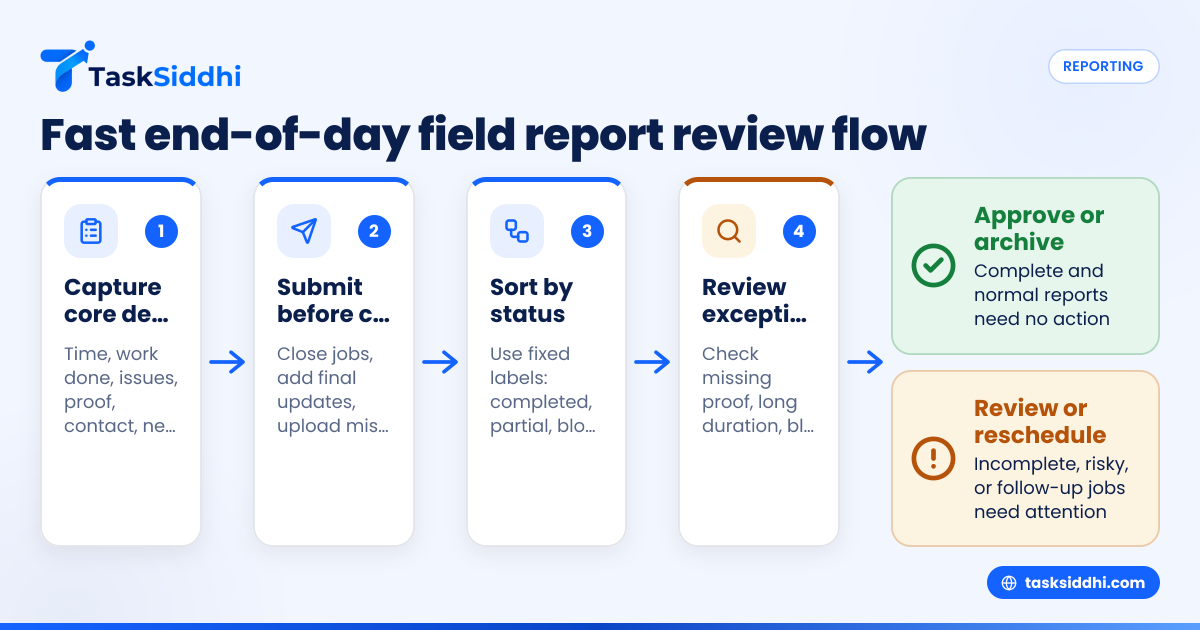
Use a checklist that field staff can follow in the same order every day:
- Close or update every assigned job
- Confirm arrival and departure times
- Upload required photos
- Mark work completed, partial, blocked, or rescheduled
- Add materials or parts used if needed
- Note any customer issues or site access problems
- Flag return visits or manager follow-up
- Submit the final daily report
This checklist reduces the most common problem in field operations: incomplete records discovered after the employee has gone home.
What managers should not require
Do not require duplicate entry across multiple systems. If an employee writes on paper, sends a text, and then fills a spreadsheet, the process will fail. Do not ask for long written narratives for every stop. And do not make proof optional on jobs where disputes are common.
If your team uses a mobile app, the goal is to capture the update once, at the point of work, instead of reconstructing the day later.
How can managers review end of day field reports fast?
Review by exception. Check late jobs, missing proof, long durations, blocked work, and return visits first. A manager should not read every normal update line by line when the team follows a standard format.
Build a fast review method
A fast review process starts with sorting reports into three buckets:
- Complete and normal No action needed. Archive or approve.
- Complete but needs follow-up Work is documented, but parts, pricing, customer callbacks, or rescheduling are needed.
- Incomplete or risky Missing times, missing proof, unclear status, or unusual duration. Review these first.
This approach helps a service manager avoid spending 45 minutes reading ten acceptable reports when only two actually need attention.
Use a manager review checklist
Managers should ask these questions in the same order each day:
- Were all assigned jobs updated?
- Are time entries complete and reasonable?
- Is proof attached where required?
- Are blocked or partial jobs clearly explained?
- Is any customer issue likely to escalate tomorrow?
- Which jobs can move to billing?
- Which jobs need rescheduling, parts, or callbacks?
A simple reporting dashboard can make this easier. If your system includes reporting, managers can spot missing fields, delayed jobs, and repeat issues without opening every record.
The fastest review process for a small U.S. field team
For a team of 5 to 30 people, the fastest process is a fixed template, a daily cutoff time, and one supervisor who reviews exceptions in a single batch. Most teams do not need a complex approval chain.
Here is a simple model that works well:
Step 1: Set one submission deadline
Choose a clear deadline, such as before shift end or by 6:00 PM local time. The exact time matters less than consistency.
Step 2: Standardize status labels
Use only a few status options:
- Completed
- Partial
- Blocked
- Rescheduled
- Return visit needed
If employees invent their own labels, review slows down.
Step 3: Require proof only where it matters
Examples include:
- Installations
- Repairs with visible results
- Site inspections
- Property work
- Customer damage claims
This keeps the end of day field report practical instead of bloated.
Step 4: Review exceptions first
Supervisors should first open:
- Jobs with no proof
- Jobs over expected duration
- Jobs marked blocked or partial
- Jobs with customer complaints
- Jobs needing another visit
Step 5: Push follow-up into tomorrow’s queue
Do not let unresolved notes sit in the report. Convert them into scheduled tasks, callbacks, or return visits. That is where automation can help teams move flagged items into the next action without manual copying.
Common mistakes that make end of day reports useless
Many businesses already have a reporting process, but it fails because of a few repeat mistakes.
Asking for reports too late
If employees submit hours after leaving the site, details get fuzzy. Time estimates become rough. Photos go unsorted. Important facts get forgotten.
Mixing job records with daily summaries
The end of day field report should summarize completed work and exceptions. It should not replace the job record itself.
Leaving proof optional
If customer disputes happen often, optional proof is not enough. Make it required for the right job types.
Using free-text for everything
Free-text notes are slow to write and slow to review. Use fixed fields, status labels, and checkboxes where possible.
Not training managers how to review
Even a good template fails if every supervisor checks reports differently. Create one review checklist and use it every day.
Failing to connect reports to time
A report without time data may not help payroll or job costing. If you need labor visibility, connect the process to time tracking so time and work status match.
A simple end of day field report template
Below is a practical template you can adapt.
Daily employee details
- Employee name
- Date
- Shift start and end time
- Total jobs assigned
- Total jobs completed
Per-job details
- Job number or site name
- Customer or site contact
- Arrival time
- Departure time
- Status: completed, partial, blocked, rescheduled, return visit needed
- Work completed
- Materials or parts used
- Photos attached: yes or no
- Customer sign-off: yes or no, if required
- Issue or delay note
- Next action needed
End-of-day summary
- Total hours worked
- Mileage or travel notes, if used
- Safety issue reported: yes or no
- Escalation needed: yes or no
- Supervisor note, if any
This format keeps the end of day field report useful for operations without turning it into a long form.
How to roll out the process without pushback
The biggest reason field staff resist reporting is not laziness. It is friction. If the process feels repetitive, unclear, or slow, adoption drops.
Start with one team for one week
Test the template with one crew or service group. Find the fields that are often skipped. Remove anything that does not affect payroll, billing, customer updates, or scheduling.
Explain why each field exists
People complete reports more reliably when they understand the purpose. For example:
- Photos protect against disputes
- Time supports payroll and job costing
- Status helps dispatch plan tomorrow
- Issue notes prevent customer surprises
Train on examples, not policy
Show one strong report and one weak report. Most employees learn faster from examples than from written rules.
Review every day at the start
For the first two weeks, supervisors should review daily and correct errors quickly. That is how standards stick.
If your work depends on recurring jobs, client visits, or service routes, centralizing updates in one system built for client work can remove much of the daily chase.
When should you change your process?
Change it when reports are consistently late, incomplete, or not useful in decisions. If supervisors still need to call or text employees after every shift, your current report is not doing its job.
Other warning signs include:
- Billing waits on missing notes or photos
- Payroll disputes rise
- Return visits are forgotten
- Managers cannot tell which jobs are really done
- Daily review takes too long
A better process is not one with more fields. It is one with better required fields, easier submission, and faster exception review.
Frequently asked questions
What is the difference between a job update and an end of day field report?
A job update records what happened on one job. An end of day field report pulls the day together across all assigned work. Many teams need both, but the daily report should rely on job updates instead of duplicating them.
How long should an end of day field report take to complete?
For most field employees, it should take three to five minutes if the format is standardized. If it regularly takes longer, you may be asking for too much narrative or requiring duplicate entry.
Should managers require photos on every field job?
No. Require photos where proof matters for quality control, billing, compliance, or customer disputes. For routine work with low risk, mandatory photos on every stop can slow the team without adding much value.
Who should review the report each day?
Usually the direct supervisor, service manager, or operations manager should review it. For small teams, one person should own the daily review so follow-up actions are clear and consistent.