

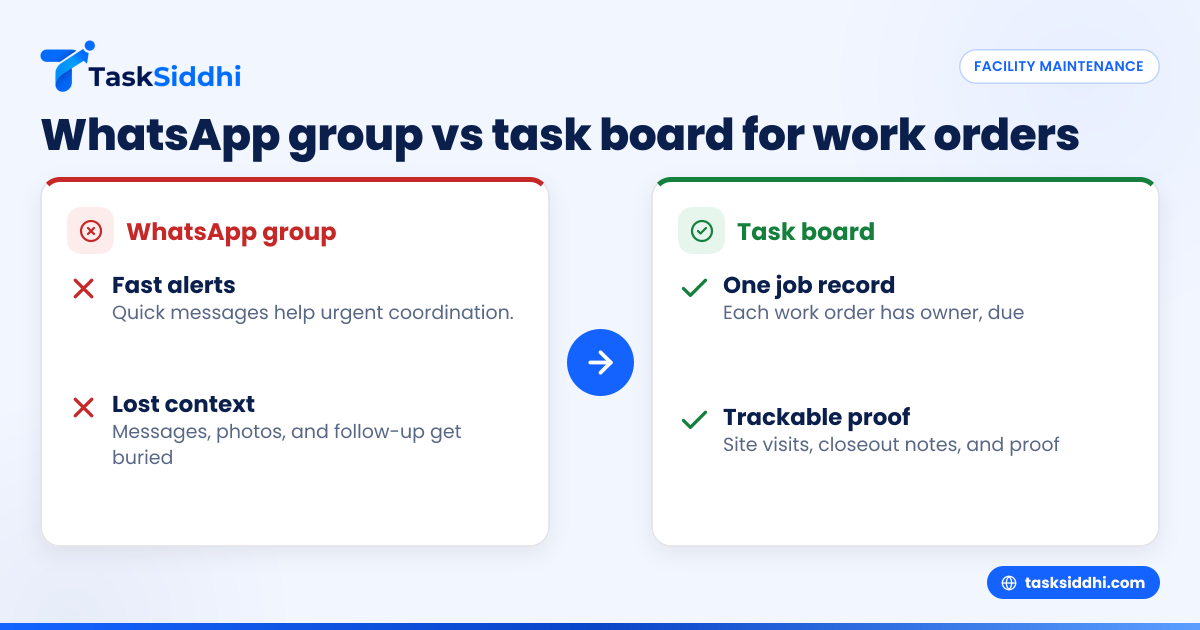
If your facility maintenance team runs work orders through a WhatsApp group, you can get jobs out the door fast, but you will likely lose context, proof, and follow-up as volume grows. A task board gives each job its own record, owner, due date, updates, photos, and status, so supervisors can track site visits and proof without digging through chat.
For U.S. facility maintenance teams handling multiple properties, technicians, and urgent requests, the real choice is not speed versus control. It is whether your team can still find the right message, photo, and job history three days later when a customer calls back.
Key takeaways
- WhatsApp groups are fast for alerts, but weak for structured work order tracking.
- A task board keeps each job in one place with status, owner, due date, and proof.
- Lost messages usually become missed follow-ups, duplicate site visits, and billing delays.
- Facility maintenance teams need a clear system for urgent jobs, recurring work, and field proof.
- A task board works best when managers set simple rules for intake, updates, and closeout.
- Tools with mobile app, field visits, and reporting support can help teams move off chat without slowing down.
Why this choice matters for U.S. facility maintenance teams
Facility maintenance work moves fast. A property manager in Chicago reports a leaking pipe. A retail chain in Houston needs an HVAC check before opening. A warehouse in Detroit wants photo proof after a lighting repair. The team needs to dispatch, update, verify, and close the work order quickly.
A WhatsApp group feels easy because everyone is already there. The message goes out. A technician replies. Someone drops a photo. The supervisor assumes the job is covered.
That works for a small number of jobs. It breaks when several things happen at once.
Messages stack up. Photos arrive without context. A night shift tech replies to an old thread. A supervisor misses a completed job because a new emergency pushed it upward. The office later asks who handled the site visit, when they arrived, and whether proof was sent. Now someone is scrolling through dozens of chat messages trying to rebuild what happened.
A task board changes the unit of work. Instead of one long stream of mixed messages, each work order becomes a trackable item. That item can hold the property, issue type, assigned technician, due date, checklist, photos, and closeout notes.
For facility maintenance teams in the United States, that difference matters because customers expect clear records. They want timestamps, proof of completion, and faster callbacks. Internal teams also need better records for billing, payroll review, and customer disputes.
What goes wrong when work orders live in a WhatsApp group
The biggest problem is not that chat is bad. It is that chat is unstructured.
A WhatsApp group mixes urgent dispatch, casual discussion, old updates, and new work orders in one place. That creates several common failures.
Work orders get buried
A technician may acknowledge a job at 8:05 AM. By 8:45 AM, the group has 40 more messages. A supervisor checking later cannot quickly tell which jobs are still open.
When teams say, “We never got that request,” they often mean the request was in the group but not visible when needed.
Ownership is unclear
In chat, several people may react to the same issue. One says “On it.” Another says “I’m nearby.” A third sends a note from the office. Unless someone clearly assigns the work, teams can double-dispatch or assume another person is handling it.
A board makes the owner visible. One job. One assignee. One current status.
Site proof gets separated from the job
Maintenance teams often need before-and-after photos, lockout confirmation, signed approval, or note of site access. In a group, those files appear as isolated messages. Later, no one knows which photo belongs to which repair.
With a proper work record, proof stays attached to the correct job.
Follow-up work disappears
A technician may report, “Fixed leak but ceiling tile needs replacement.” In chat, that note is easy to miss. If no one creates a follow-up work order, the customer sees an incomplete job.
This is one reason reactive teams stay reactive. They communicate the issue, but they do not convert it into trackable next steps.
What does a task board do better?
A task board turns maintenance work into visible, repeatable workflows. It gives the team one shared place to intake, assign, update, and close jobs.
Each card or task represents a work order. That task can move across statuses such as New, Assigned, On Site, Waiting for Parts, Completed, and Invoiced. Managers get a live view of open work without asking for updates in chat.
A board is also better for teams that need job history. If a property calls back next month, the office can pull the past work order and see who visited, what was done, and what proof was uploaded.
Underneath that, a board supports accountability. If a task has no assignee or due date, it stands out. If jobs sit too long in Waiting for Parts, managers see the bottleneck.
That is difficult to achieve in a group thread, even with disciplined staff. Some teams try to solve this with pinned messages or strict chat formats. Those methods help for a while, but the core problem remains. Chat is designed for conversation, not for structured work tracking.
For teams comparing a WhatsApp group to a task board, the key question is simple: do you need a conversation log, or do you need a work system?
Should facility maintenance teams stop using WhatsApp entirely?
No. Use WhatsApp for fast alerts and urgent coordination, but do not rely on it as the system of record. The board should hold the work order, status, proof, and closeout. Chat should support the work, not replace the record.
That distinction helps teams change without causing resistance. Technicians do not have to abandon quick communication. They just stop treating chat as the place where jobs officially live.
A practical split between chat and board
Here is a simple model that works for many maintenance teams:
- Use WhatsApp for urgent notifications. Example: “Emergency call at building B. Check the board now.”
- Create every real job on the board. Include location, problem, priority, assignee, and due time.
- Post proof inside the task, not only in chat. That includes photos, notes, and completion details.
- Close jobs only on the board. This gives the office one place to confirm completion.
- Review open jobs from the board in daily dispatch. Do not review by scrolling the group.
This approach gives teams both speed and control.
How do you move from chat to a task board without chaos?
Start small. Keep WhatsApp for alerts during the transition, but require every new work order to be created on the board. Train the team on one standard update format and one closeout rule. Within two weeks, managers should review only the board for job status.
The transition fails when leaders try to redesign everything at once. Instead, move in stages.
Step 1: define what must be tracked on every work order
Pick the minimum fields your team needs on every job:
- Property or site name
- Issue type
- Priority
- Assigned technician
- Due date or service window
- Required proof
- Completion notes
Do not start with a complicated form. If the team already resists process, keep the first version simple.
Step 2: create a small set of statuses
Most facility maintenance teams only need five to seven statuses. For example:
- New
- Assigned
- En Route
- On Site
- Waiting
- Completed
- Closed
This is where boards and views become useful. Managers can see open jobs by stage instead of piecing updates together from messages.
Step 3: set one rule for proof
Proof should never live only in chat. If the technician sends a photo in WhatsApp, someone still has to add it to the job record.
Better yet, require technicians to upload proof directly from the field using a mobile app. That removes one extra step and reduces missing records.
Step 4: assign one owner for each job
Even if multiple people touch the work, one person should own the current task. Ownership reduces confusion and improves follow-up.
Step 5: review the board daily
Supervisors should check the board each morning and end of day. The goal is to identify blocked work, overdue visits, and jobs missing proof.
Why do messages get lost even in an ai whatsapp group?
Because the problem is structure, not just search. Even an ai whatsapp group can summarize messages, but it still does not turn a chat into a reliable work order record with ownership, due dates, proof, and status history.
AI can help teams search or summarize, but it cannot fix a messy operating process by itself. If ten maintenance requests, six photos, and three side conversations land in one group, the core issue remains that the work is mixed together.
For facility maintenance teams, the job itself needs a container. That container is the work order record. Once each request has its own record, AI features may become helpful later for summaries or reporting. But they should sit on top of a clean workflow, not replace it.
This is also why managers should be careful about believing that better chat search will solve dispatch problems. Search helps you find a past message. It does not tell you which jobs are still open, who owns them, or whether proof is complete.
What should a work order system include for field maintenance?
It should let you create, assign, update, and close jobs with proof from the field. At minimum, you need statuses, owners, due dates, notes, photos, and mobile access. If managers cannot see open work at a glance, the system is still too close to chat.
Once the basics are clear, you can refine the process.
Work order intake
Every request should enter one queue. That queue may receive calls, emails, or office-entered requests. The key is that all work lands in the same system.
If your current intake lives in email and WhatsApp, the office should convert those requests into tasks right away. That is more reliable than forwarding screenshots all day.
Dispatch and scheduling
The dispatcher or supervisor needs to know who is available, where the technician is going, and which jobs are overdue. A board helps because it shows both the workload and job stage.
For teams with repeated service calls, service jobs workflows can help standardize handoff and completion.
Field updates and proof
Technicians should update status from the field. They should also attach notes and photos inside the job. This is especially important for customer-facing proof.
For site visits, field teams often need arrival notes, completion photos, and exceptions. That is where field visits support matters.
Time and job history
Some teams also need to track labor time for payroll review, customer billing, or estimating future jobs. If technicians are already reporting hours by text, a structured time tracking flow is easier to review later.
Supervisor reporting
Managers need to answer practical questions:
- How many open work orders do we have?
- Which jobs are overdue?
- Which properties generate the most repeat calls?
- Which technicians have the most waiting jobs?
- Which completed jobs are missing proof?
This is where reporting helps more than chat exports or manual spreadsheets.
A simple comparison: WhatsApp group vs task board
Speed
WhatsApp wins on instant communication. A message can go out in seconds.
A task board is nearly as fast once the team has a clear intake process. The extra few seconds to create a proper job record usually save minutes or hours later.
Visibility
A task board wins clearly. Open work, overdue jobs, and blocked jobs are visible at a glance.
WhatsApp requires reading and interpretation. That gets harder as the group becomes more active.
Accountability
A board supports clear assignment and due dates. Chat often creates shared assumptions instead of true ownership.
Proof and documentation
A board keeps proof attached to the job. Chat scatters proof across the message stream.
Follow-up and repeat work
A board makes it easier to create linked follow-up actions. Chat relies on someone remembering to act later.
Reporting
Chat can show that a conversation happened. A board can show how work moved, how long it took, and what is still pending.
How to choose the right setup for a 5 to 30 person maintenance team
Smaller teams often think they do not need a task board yet. In many cases, that is exactly when they should start.
A team of 5 can still miss work orders. A team of 12 can still lose proof. A team of 25 can become impossible to manage if every update lives in a chat thread.
Here is a practical way to decide.
Stay chat-first only if all of these are true
- Very low daily job volume
- One supervisor can remember every open job
- Little need for photo proof
- Very few repeat callbacks
- No need for structured reporting
Most facility maintenance teams grow past this point quickly.
Move to a task board if any of these are true
- You manage multiple sites
- Jobs stay open across several days
- You need before-and-after proof
- Office staff chase technicians for updates
- Customers ask for service history
- Billing waits on completion confirmation
- Jobs get duplicated or forgotten
If that sounds familiar, a task board is no longer a nice-to-have. It is basic operating infrastructure.
A practical rollout plan for U.S. maintenance teams
Do not announce a big software change with a long document. Use a short operating rule.
For example:
- Every new work order goes on the board.
- Every assigned job has one owner and due time.
- Every completed job needs proof in the task.
- Supervisors review the board twice a day.
- WhatsApp is for alerts, not final job records.
Then support the team with simple workflows. Use automation where it reduces repeat admin, such as moving completed jobs for review or flagging overdue tasks.
If your team handles customer projects beyond maintenance, you may also need one place for broader client work. The important thing is consistency. Work should not live partly in memory, partly in spreadsheets, and partly in chat.