

Daily work report software for field service teams in the United States helps you collect job updates in one place instead of chasing texts, paper forms, and spreadsheet entries. The best setup gives technicians a fast mobile workflow, managers a live view of work in progress, and owners clean reports they can use for payroll, billing, and customer follow-up.
Key takeaways
- Daily work reports should capture job status, time, notes, photos, and proof from the field in one standard format.
- Text messages, paper job cards, and spreadsheets break down when your team grows past a few people.
- Good reporting software reduces missing updates, late invoicing, and end-of-day phone chasing.
- Field teams in the United States usually need reports that support payroll, customer communication, and QuickBooks-friendly records.
- Mobile reporting works best when technicians can update jobs from the field in a few taps.
- TaskSiddhi can help with field visits, service jobs, time tracking, and reporting.
What is daily work report software for field service teams?
Daily work report software for field service teams is a system that collects work updates from technicians and crews during the day. It replaces scattered WhatsApp-style group messaging habits, handwritten notes, and spreadsheet follow-ups with one repeatable process.
For a field service business in Chicago, Houston, or Detroit, a daily work report often needs to answer simple questions fast. Who went where today? What work was completed? What is still pending? How many hours were spent? Was there a customer signature, site photo, or note about a return visit?
Without a standard system, each person reports differently. One tech sends a text. Another calls the office. A third turns in a paper sheet two days later. Someone in the office then copies details into a spreadsheet. That creates delays and errors.
Daily work report software solves that by making every job update follow the same structure. Managers can see status changes as they happen. Office teams can prepare invoices faster. Owners can spot bottlenecks before they become customer complaints.
This matters even more for companies with 5 to 30 employees. At that size, work is too complex for memory and text threads, but often too lean for a bloated enterprise system. You need practical reporting that works in the field, not a tool that takes weeks to learn.
Why do texts, paper, and spreadsheets fail?
They fail because they do not create a reliable operating system for field work. They capture fragments of work, not a clean record of the day.
Text messages are fast, but they are not structured. A technician may send “done at 4” with no job number, no address, and no detail. Photos get buried in threads. Different supervisors keep separate conversations. If a customer disputes the visit, finding proof is slow.
Paper job cards have a different problem. They often carry useful detail, but they arrive late. Handwriting can be unclear. Forms get lost in trucks. Office staff retype information into another system, which adds more work and more chances for mistakes.
Spreadsheets seem organized at first. But they depend on manual data entry and strong habits. One manager updates columns daily. Another forgets. Tabs multiply. Versions get emailed around. Soon nobody knows which file is current.
These breakdowns affect real business outcomes in the United States:
- Payroll review takes too long.
- Invoices go out late.
- Supervisors spend evenings calling technicians for missing details.
- Customers receive slower updates.
- Records are harder to pull when a client asks for service history.
- Reporting for internal review becomes a weekly cleanup project.
If your team still runs work mostly through email, texts, and spreadsheets, the issue is usually not effort. The issue is that the system depends on memory. Good daily reporting removes that dependence.
What should a daily work report include?
A daily work report should include the minimum information needed to run the business without extra back-and-forth. If it asks for too much, technicians stop completing it properly. If it asks for too little, managers still need to chase details later.
For most field service teams in the United States, a strong daily report includes:
- Technician or crew name
- Date of work
- Customer name and job location
- Job type or work order number
- Arrival and completion time
- Work completed
- Materials or parts used, if needed
- Photos or proof of work
- Customer notes or issues found
- Follow-up needed or next step
- Signature or completion confirmation, if required
This format gives the office what it needs for payroll support, billing prep, and customer records. It also gives managers a clean daily dashboard instead of a pile of messages.
Some teams also want job profitability and labor hours by task. That is useful, but only after the core reporting habit works. Start with the fields your team will actually complete every day.
A good rule is this: if an office coordinator still needs to make three phone calls to understand what happened on a job, your daily work report is not complete enough.
How do you collect daily updates without slowing technicians down?
Use a short mobile workflow with required fields, fast status changes, and photo uploads. The update should take a minute or two, not ten. If reporting feels like office work, technicians will delay it until the end of the day and details will be missed.
The fastest reporting systems respect field conditions. Techs may be in a basement, on a roof, in traffic between jobs, or speaking with a customer. They need a reporting process that works with short attention windows.
That means your workflow should be simple:
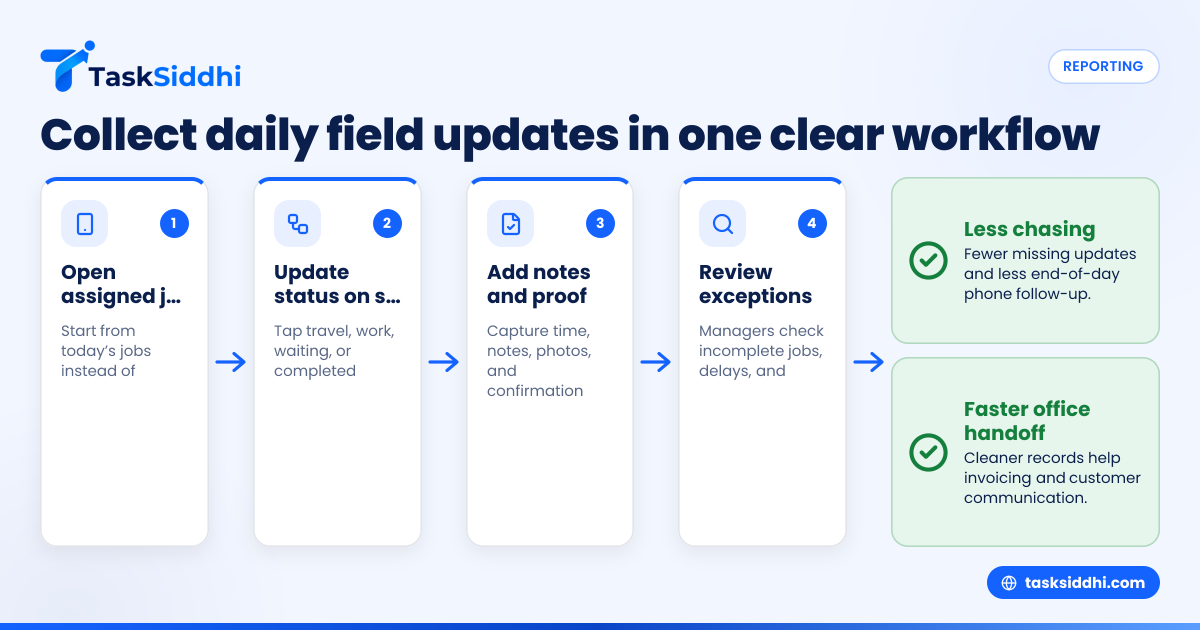
- Open today’s assigned jobs.
- Tap to start travel or work.
- Change status when on site.
- Add notes and photos before leaving.
- Mark complete or flag follow-up.
- Log time automatically or with a quick entry.
This is where a dedicated mobile app matters. It keeps updates tied to the right job instead of scattered across personal messages. A supervisor can then review the day without reconstructing events from memory.
The best setup also uses boards and views so different people see work in the format they need. A dispatcher may want a status board. A service manager may want a technician view. The owner may want end-of-day summaries.
If your team is exploring ai daily work tools, stay practical. AI can help summarize updates and surface missing items, but it cannot fix a broken reporting process by itself. You still need a clear workflow, defined job statuses, and simple required fields.
What does a good daily work report process look like?
A good process is simple, consistent, and fast. Technicians update jobs the same way every time. Managers review exceptions, not every line. The office uses the same records for payroll, billing, and customer follow-up.
In practice, a good process starts before the day begins. Jobs are assigned clearly. Each technician knows where to go, what to do, and how to update progress. During the day, the technician records key milestones instead of writing a long end-of-day summary from memory.
At the end of the day, the manager should not need to ask basic questions. They should be reviewing incomplete jobs, unusual delays, and return visits. That is the difference between collecting reports and running an operation.
What features matter most in daily work report software?
Not every reporting feature matters equally. For field service teams, a few practical features do most of the work.
Job-based reporting
Updates should belong to a job, not just a person. That keeps customer history clean and helps when the same site has repeat visits.
Status tracking
Simple statuses like scheduled, in progress, waiting, completed, and follow-up needed make daily review much easier. They help dispatchers and managers see bottlenecks at a glance.
Time capture
If labor matters to payroll, billing, or job costing, built-in time tracking is important. It reduces manual timesheet cleanup and gives a better record of the workday.
Photos and field proof
Photos, notes, and service proof often matter more than long written updates. If a customer asks whether a technician was on site, proof should be easy to find.
Standard reports
Owners and managers need reports that show completed work, overdue jobs, technician activity, and trends. Strong reporting turns daily updates into something useful for decisions.
Automation
Simple automation can remind staff about missing updates, move jobs to the next stage, or alert the office when a visit is completed. That cuts down on manual follow-up.
Flexible workflows
Different teams work differently. HVAC service, maintenance crews, installation teams, and client-service teams need similar reporting, but not the exact same fields. The software should adapt without becoming complicated.
Can daily work report software help with payroll and invoicing?
Yes. It gives you cleaner time, job, and completion records, which helps payroll review and speeds up invoice preparation. It will not replace your accounting system by itself, but it reduces missing details that delay payroll and billing.
For many small and midsize service businesses in the United States, the real cost of bad daily reporting shows up after the work is done. Payroll questions pile up on Friday. Customer invoices sit in draft because notes are incomplete. Office staff chase technicians for missing times and job details.
Daily work report software creates a cleaner handoff from field to office. If your business uses QuickBooks for accounting, your office team still needs accurate source information. Better reporting improves that source information.
That helps in a few ways:
- Labor hours are easier to verify.
- Completed jobs are easier to invoice.
- Return visits are easier to identify.
- Customer disputes are easier to resolve.
- Managers can review trends before they hurt margins.
For businesses that pay a mix of hourly staff and independent contractors, clean work records also support internal review. You still need to handle payroll, 1099 reporting, and tax compliance in the right systems and with the right advice. But better daily reports make the underlying records less messy.
How should a small field service company roll this out?
Start small, standardize the daily update, and train around one clear workflow. Do not begin with every edge case. Begin with the few fields your team must complete on every job, then improve after two weeks of real use.
A rollout usually works best in five steps.
1. Define one standard daily update
Decide what every technician must submit for every job. Keep it short. Usually that means status, time, notes, and proof.
2. Clean up job statuses
Use a small set of statuses. If you have too many, people will guess. Clear status names make reports more reliable.
3. Pilot with one team
Start with one supervisor or one service crew. Test the process in real work for one to two weeks. Fix confusion before rolling it out wider.
4. Train for speed, not theory
Show the team exactly when to update a job. For example: on arrival, before leaving, and at completion. Avoid long policy training.
5. Review daily for the first month
Managers should check usage every day. Missing updates should be corrected quickly. If you wait a week, bad habits settle in.
This is also where a single tool matters. If you use one system for job management, reporting, and field updates, adoption is easier. A connected setup using features is easier to maintain than multiple disconnected tools.
How do you measure whether the software is working?
Measure fewer missing updates, faster day-end review, and faster billing readiness. If managers still chase technicians every evening, the process is not working yet, even if the software is in place.
You do not need a complex scorecard. A few operating metrics will tell you if the change is helping:
- Percentage of jobs updated on the same day
- Percentage of completed jobs with proof attached
- Average time supervisors spend chasing missing details
- Time from job completion to invoice-ready record
- Number of jobs marked complete but needing rework
- Percentage of technicians using the mobile workflow consistently
Review these weekly for the first 30 to 60 days. You are not just measuring software usage. You are measuring whether the team is creating better business records.
If you want to use ai daily work summaries, measure them carefully. A summary can save manager time, but only if the source updates are consistent. AI summaries built on poor field input will still produce poor output.
Choosing software that fits a 5-to-30 person team
A smaller field service company usually does not need a giant enterprise platform. It needs software that matches how small teams actually work.
That means looking for software that can:
- Assign and track jobs clearly
- Collect updates from the field on a phone
- Store notes, proof, and status in one place
- Show simple manager dashboards
- Support repeatable reports without spreadsheet cleanup
It should also be easy to adopt. If setup takes months, your team will fall back to texts and paper before the project is finished.
TaskSiddhi is built for teams that need practical work management, not extra admin. You can organize jobs, updates, and teams in one place with client work and service workflows that are easier to review each day.
The key is not choosing the tool with the longest feature list. The key is choosing the one your team will actually use by 4:30 PM on a busy Tuesday.
If you want to stop running field service updates through texts, paper forms, and spreadsheet follow-up, see the product tour or compare plans on pricing.
Frequently asked questions
Is daily work report software only for larger field service companies?
No. Small teams often benefit the most because they usually rely on memory, calls, and spreadsheets. A clear reporting process can remove a lot of owner and manager follow-up even with five to ten people.
What if my technicians do not like entering reports?
That usually means the process is too long or unclear. Keep updates short, mobile-friendly, and tied to the job. If a report takes only a minute or two, adoption improves.
Can this replace spreadsheets completely?
For daily field reporting, often yes. Many teams still export or review data elsewhere for finance or management purposes, but the day-to-day job update process should not depend on spreadsheets.
Do I need separate software for scheduling and daily work reports?
Not always. Many teams do better when scheduling, job tracking, and daily reporting live in one system. That reduces duplicate entry and keeps everyone working from the same job record.