

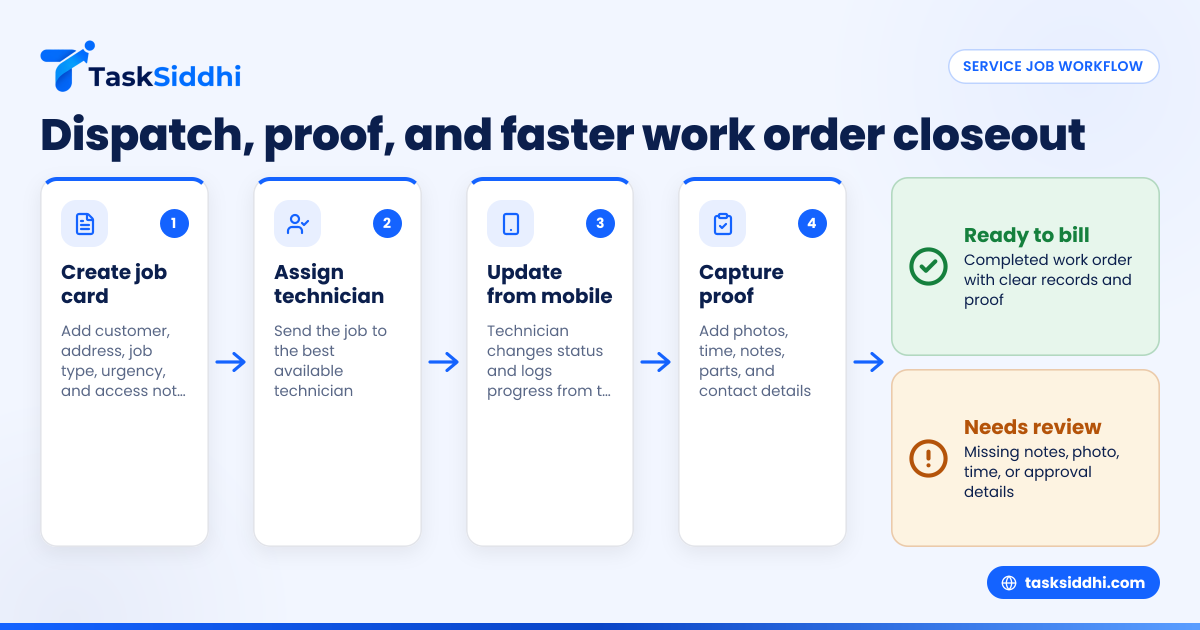
Job card software for locksmith businesses in the United States helps you dispatch mobile technicians, track job status, capture proof of service, and close work orders without chasing texts, paper slips, or missed calls. For locksmith teams handling lockouts, rekey jobs, access control work, and scheduled service calls, the right setup can reduce delays, improve proof, and make billing faster.
Key takeaways
- Locksmith businesses in the United States need one place for dispatch, job details, technician updates, and proof of service.
- A digital job card reduces errors from paper forms, scattered texts, and phone-only updates.
- Faster work order closure depends on clear statuses, mobile proof, time logs, and complete job notes.
- Good software should support field teams, not just office scheduling, especially for same-day and emergency jobs.
- An ai job card workflow is only useful when it saves dispatch time and keeps records accurate.
- Small teams can improve operations without adding heavy software or changing every process at once.
Why locksmith businesses outgrow paper job cards and group chats
A locksmith business moves fast. Jobs come in by phone. Customers want ETAs. Technicians are driving between homes, storefronts, offices, and job sites. Some calls are urgent. Others are planned. Most need clear notes, good proof, and quick invoicing.
That is why paper job cards stop working once your team handles regular daily volume. A handwritten slip can get lost. A photo in a group chat can be hard to find later. A dispatcher may know the plan, but the field tech may not have the latest update.
This problem gets worse when your team handles different types of work. A lockout job needs speed and proof of completion. A rekey job needs hardware notes and counts. A commercial visit may need site access details, before-and-after photos, and customer sign-off. If these details live across calls, texts, notebooks, and spreadsheets, your office spends too much time chasing information.
Job card software for locksmith businesses in the United States gives you a single record for each work order. That record can hold customer details, site address, assigned technician, job type, notes, status, photos, visit proof, and completion time. It becomes the source of truth for both dispatch and follow-up.
For a small locksmith business in Chicago or Houston, that matters because speed wins jobs, but clean records protect margins. If a customer asks what time your technician arrived, what was done, or whether someone approved the work, you should be able to find it fast.
What should job card software do for a locksmith team?
It should help your office send jobs out quickly and help technicians finish jobs with less back-and-forth. That sounds simple, but many tools only solve one side of the problem.
A locksmith team usually needs these basics:
- A board that shows new, assigned, in-progress, and completed jobs
- Job cards with customer, location, lock issue, access notes, and contact information
- Technician assignment and reassignment
- Mobile updates from the field
- Time logs for labor visibility
- Photos and proof of service
- Simple reporting on completed work, open jobs, and technician activity
TaskSiddhi supports this kind of setup with boards and views, service jobs, and a mobile app designed for field teams.
What goes on a locksmith job card?
A locksmith job card should be short enough to use fast, but complete enough to avoid mistakes. That balance matters on urgent calls.
A practical locksmith job card usually includes:
- Customer name and phone number
- Service address
- Job type, such as lockout, rekey, repair, install, or access control service
- Priority or urgency level
- Technician assigned
- Scheduled time or promised ETA
- Site notes, including gate code, suite number, or property manager contact
- Work requested
- Parts or hardware used
- Photos, signatures, or other proof
- Start time and completion time
- Final notes for invoicing or follow-up
If your techs skip fields because the form is too long, simplify it. If your office still has to call back for missing details, add the missing fields. Good job card design is not about more fields. It is about getting the right details at the right moment.
How do you dispatch mobile locksmith jobs faster?
Use one live job board, short job cards, and clear status changes. Dispatch is faster when everyone sees the same job record and technicians update progress from the field without extra calls.
Emergency locksmith work creates pressure. A customer is locked out. A store cannot open. A property manager needs a tenant changeover done today. In these moments, speed comes from clarity, not complexity.
A faster dispatch workflow looks like this:
- The office creates a new job card as soon as the call comes in.
- The dispatcher adds location, job type, urgency, and any access notes.
- The job is assigned to the best available technician.
- The technician sees the job on mobile and changes status when en route.
- The office can answer customer ETA questions from the board, not by calling the tech.
- The technician updates the card after work is complete.
- The office reviews the completed card and closes the work order.
This process is much stronger than a text message dispatch. Texts are quick, but they are not structured. They do not create a reliable work history. They are also hard to search later.
A board-based system helps your office answer basic questions immediately:
- Which jobs are still unassigned?
- Which technician is tied up on a longer service call?
- Which completed jobs are missing proof?
- Which work orders are done but not yet ready to bill?
These are the operational questions that affect revenue. If your dispatcher cannot see the answers in seconds, your team loses time all day.
For locksmith businesses, dispatch speed is not just about emergency calls. It also affects route planning, customer communication, and same-day capacity. When jobs are visible in one system, it becomes easier to insert a nearby service call, reassign a delayed visit, or follow up on a missed access window.
How can proof of service reduce disputes?
Proof of service helps you show when your technician arrived, what work was done, and what the result looked like. It reduces billing questions and gives your office cleaner records if a customer disputes the visit later.
For locksmiths, proof matters because the work is often urgent, mobile, and hard to verify after the fact. A customer may not remember the time. A property manager may ask who approved the work. A commercial client may want confirmation that a lock change was completed at a specific door.
That is why proof of service should be part of the job card, not stored somewhere else. Good proof often includes:
- Arrival and completion times
- Photos before and after work
- Notes on lock condition or hardware installed
- Customer name or on-site contact
- Signature, if your process uses one
TaskSiddhi supports field updates and field visits, which is useful when your technicians need to record visit proof on site instead of writing details later from memory.
Types of locksmith jobs where proof matters most
Some jobs carry higher risk if records are weak.
These include:
- Commercial lock changes
- Master key system work
- Access control service visits
- Tenant turnover rekeys
- Warranty callbacks
- Insurance-related service calls
- Property management work across multiple units
In these cases, a missing note or missing photo can slow payment or trigger a dispute. A complete digital job card gives your office something solid to refer to.
What does an ai job card actually help with?
An ai job card can help draft job details, standardize descriptions, or suggest next steps, but it only adds value if your team still reviews the record and keeps field updates accurate.
In a locksmith business, speed matters, but accuracy matters more. If a customer says “front office deadbolt sticks, side entry keypad not syncing, and back door closer feels off,” your office may enter that in different ways depending on who took the call. That creates messy records.
An ai job card workflow can help normalize those notes into a cleaner format. It may also help dispatchers turn rough call notes into a more structured work order. But the software still needs human review. Locksmith work often depends on site-specific facts that only the customer or technician can confirm.
So think of AI as support, not replacement. It can help with consistency. It should not guess critical site details or completion proof.
The real question is whether the system helps your team do the basics better:
- Create cleaner job cards
- Reduce typing
- Avoid missing fields
- Keep status updates current
- Make completed work easier to review
If it does those things, it is useful. If it adds complexity, your team will stop using it.
How do locksmith businesses close work orders faster?
Close work orders faster by making completion proof mandatory, keeping job statuses simple, and reviewing finished cards from one queue. The office should not need to chase technicians for basic details after every job.
Many locksmith teams think the job ends when the technician drives away. Operationally, it does not. The job only ends when the work order is complete enough to invoice, file, or follow up.
That is where many small businesses get stuck. The technician finished the work, but:
- No one logged the hardware used
- The final note is too vague
- There is no completion photo
- The office does not know if the customer approved the work
- Labor time is missing
- The job still shows as in progress
Closing work orders faster requires a repeatable process.
A simple closeout process for locksmith teams
- Technician marks the job as completed on mobile.
- Technician adds required photos, notes, and used parts.
- Technician logs time or confirms duration.
- Office reviews completed jobs in one list.
- Office checks that proof and notes are present.
- Office closes the work order and sends it to invoicing.
This process is easier when your team has time tracking and reporting tied to the same workflow. It reduces the gap between field completion and office billing.
Use simple statuses
Too many statuses slow teams down. Most locksmith businesses can start with:
- New
- Assigned
- En route
- In progress
- Completed
- Closed
That is enough to answer most dispatch and billing questions. If your team uses ten statuses, people will forget which one to choose. Keep it simple.
Make required fields truly required
If completion proof matters, do not rely on memory. Set a basic rule for every finished job:
- Completion note
- Time spent
- At least one photo, where appropriate
- Customer or site contact name
This is how you stop incomplete work orders from piling up at the end of the day.
Choosing software for a locksmith business in the United States
Not every service tool fits a locksmith operation. Some tools are built for long projects. Others are mainly for invoicing. Some are too heavy for a team of 5 to 30 people.
Look for software that fits the way locksmith jobs actually happen in the United States:
- Phone-driven service requests
- Same-day dispatch
- Mobile technicians
- Residential and commercial site visits
- Repeat work for property managers and business clients
- Fast handoff from completed work to billing in tools like QuickBooks or Stripe, if that is part of your process
Your buyers may also care about how organized your operations are. Larger commercial customers often expect clean records, reliable communication, and professional follow-up. Even when they do not ask for a security review, they still expect your business to handle work orders in a controlled way.
Questions to ask before you switch
Use these questions when reviewing any job card tool:
- Can dispatchers see all open and active jobs in one place?
- Can technicians update jobs from the field without calling the office?
- Can each work order hold photos, notes, and proof of service?
- Can managers see which jobs are complete but not yet closed?
- Can the team learn it quickly?
- Can you adapt the workflow to lockouts, rekeys, repairs, and scheduled service?
TaskSiddhi is useful here because it focuses on practical field and service workflows through features, not bloated setup.
A practical rollout plan for a small locksmith team
Do not try to redesign your whole business in one week. Start with one workflow and make it stick.
Step 1: Standardize your main job types
Pick the four or five jobs you do most:
- Lockout
- Rekey
- Lock repair
- New hardware install
- Commercial service call
Create a standard job card format for each. Keep required fields lean.
Step 2: Set your status rules
Decide what each status means. For example, “completed” might mean the technician finished the work and added proof. “Closed” might mean the office reviewed it and it is ready for billing.
Write this down. Train everyone the same way.
Step 3: Start with one dispatcher and one field lead
Pilot the process with a small group first. This helps you catch missing fields and confusing steps before rolling it out to the full team.
Step 4: Measure two things for 30 days
Track:
- Time from job completion to work order closure
- Number of jobs missing proof or notes
If both improve, your system is working.
Step 5: Add automation carefully
Once the basics are stable, use automation for repetitive tasks, such as moving a job to a review stage after technicians mark it completed. Do not automate a broken process. Fix the workflow first.
Common mistakes locksmith businesses make with job card software
The first mistake is copying old paper habits into a digital tool. If your digital form is just a paper form on a screen, you will still have delays.
The second mistake is making the card too detailed. Field teams need speed. Ask only for information that helps dispatch, proof, billing, or follow-up.
The third mistake is failing to separate “completed” from “closed.” A job can be physically done but still not ready for invoicing.
The fourth mistake is skipping mobile usability. If technicians cannot update jobs easily from the field, your office will keep calling them for status. That defeats the purpose.
The fifth mistake is choosing software before defining the process. Tools work best when your team already knows what must happen on every service call.
For locksmith teams managing jobs from phone calls, texts, and spreadsheets, moving to a clear digital workflow often matters more than any advanced feature. The real gain is visibility. Everyone sees the same job, the same status, and the same proof.