

Site visit proof is the record that shows a field job happened, where it happened, when it happened, and what was done. For small field teams in the United States, good site visit proof usually includes photos, timestamps, location details, notes, customer sign-off, and a clear link back to the job card.
Key takeaways
- Site visit proof protects revenue, reduces billing disputes, and helps managers verify work without constant phone calls.
- A complete proof record should connect five things: job, worker, location, time, and outcome.
- Photos alone are not enough. You also need notes, timestamps, and a simple approval trail.
- Standardizing proof collection makes training easier for teams that currently work from calls, texts, and paper forms.
- Mobile-first workflows work best for field teams because proof is captured on-site, not reconstructed later.
- A simple system with field visits, mobile app, and reporting can help small teams stay organized.
Why site visit proof matters for small field teams
If your team handles installs, repairs, inspections, maintenance, or client visits, site visit proof is not just admin work. It is part of how you get paid and how you prevent arguments later.
Many small businesses in cities like Houston, Chicago, and Detroit still run field work through text threads, calls, paper notes, and spreadsheets. That works until a customer says the technician never came, says the work was incomplete, or questions the hours on the invoice. When that happens, the business needs more than a memory or a message screenshot.
Good site visit proof helps in several ways:
- It confirms the team arrived at the correct site.
- It shows the visit happened on a certain date and time.
- It records what the team saw and what they did.
- It supports invoices and service reports.
- It helps owners review team performance.
- It creates a basic audit trail for customer questions.
For US businesses, this also matters when larger clients expect cleaner documentation. Commercial clients, property managers, and operations teams often want job records that look professional and can be shared by email. If your buyer has internal compliance or vendor review requirements, clear records can help you look more dependable.
What counts as site visit proof?
Site visit proof is any evidence that confirms a field visit took place and documents the result. The strongest proof combines several records instead of relying on one item.
A complete record usually includes:
- Job details Work order number, customer name, address, scheduled time, and assigned worker.
- Arrival record Check-in time, check-out time, and the person who attended the site.
- Location confirmation The service address and, where appropriate, captured location data tied to the visit.
- Photos or video Before, during, and after images. These should be tied to the job, not stored loose in someone’s camera roll.
- Work notes What was inspected, repaired, installed, tested, or discussed.
- Customer acknowledgment Signature, approval note, or a clear message that the work was accepted.
- Follow-up actions Parts needed, return visit required, estimate pending, or issue escalated.
This is why photos by themselves often fail. A photo can show a room, a unit, or a finished repair. But without time, address, notes, and job context, it may not resolve a dispute.
What should you capture on every site visit?
Capture the minimum proof set every time: who went, when they arrived, where they were, what they found, what they did, and the result. Add photos and customer acknowledgment whenever the work affects billing, safety, completion, or future follow-up.
That short list is enough for most small teams to build a reliable habit. The goal is not to turn a site visit into paperwork. The goal is to make every visit easy to verify later.
The minimum proof checklist
Use this checklist for almost every field job in the United States:
- Job number or ticket number
- Customer name
- Full service address
- Assigned technician or field worker
- Arrival time
- Departure time
- Short work summary
- At least one on-site photo
- Completion status
- Customer sign-off or note if unavailable
For higher-risk work, expand the checklist. For example, a property maintenance company might add access notes, unit number, damaged area photos, and materials used. A commercial HVAC team might record equipment serial numbers, filter changes, test results, and safety observations.
Match the proof to the type of work
Different teams need different levels of detail.
Service jobs:
Repairs and maintenance need before-and-after photos, diagnosis notes, and completion status. A service jobs workflow helps keep all of that tied to one record.
Site inspections and visits:
Inspections need condition notes, issue lists, photos by area, and next steps.
Client work:
If the visit is billable consulting, project supervision, or account support, proof may focus more on notes, decisions, and tracked time. This is where client work and time tracking matter.
How do you document site visit proof without slowing the team down?
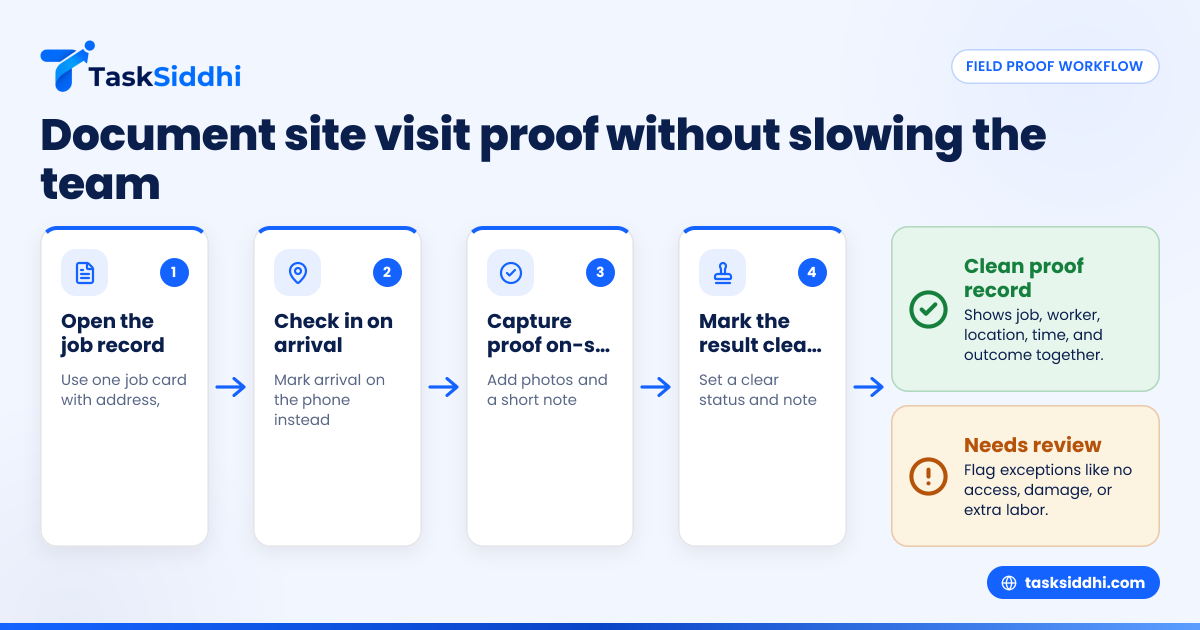
Use a short, repeatable workflow on the technician’s phone: open the job, check in, add photos and notes, mark status, and close the visit. Keep required fields to the essentials so the team finishes proof on-site instead of recreating it later.
That simple flow is what makes adoption realistic. Most field teams do not fail because they dislike documentation. They fail because the process is too long, too vague, or split across too many apps.
A practical five-step workflow
Here is a process that works well for small teams of 5 to 30 people.
- Start from one job record Every visit should begin from one task or job card. That record should include address, contact, scope, and assigned worker. Using boards and views, managers can sort work by date, area, or technician.
- Check in on arrival The worker opens the job on their phone and marks arrival. This is better than texting “on site” into a group chat.
- Capture proof during the visit Add photos while doing the work. Add a short note before leaving the site. This keeps details accurate.
- Mark result clearly Use statuses like completed, needs revisit, waiting on parts, or estimate required. Avoid vague updates like “done” if more work is actually pending.
- Close the loop with the office Once the visit is completed, the office should be able to review proof, prepare billing, and plan any next steps without chasing the technician.
Keep the proof form short
If your team needs ten minutes to close a site visit, they will skip steps. Most small teams do better with a form that takes under two minutes after the work is done.
Start with only the fields you truly use:
- arrival
- departure
- summary note
- 1 to 3 photos
- outcome
- sign-off if needed
You can always add more later. Simplicity beats a perfect form that nobody completes.
What makes site visit proof strong enough to support billing?
Strong site visit proof links the visit to the invoice. It should show the work requested, the time on site, the proof of completion, and any exceptions. If a customer questions a charge, your team should be able to pull one clean record fast.
That matters because billing disputes usually happen weeks later, after memory has faded. If your office uses QuickBooks or Stripe for the finance side, your field documentation still needs to be complete before finance sends the invoice.
Build records that answer common customer questions
Most billing disputes come down to a few questions:
- Did your technician actually come out?
- Did they arrive on the date promised?
- What exactly did they do?
- Why did the job take that long?
- Why is a return visit needed?
- Why is there an extra charge?
Your site visit proof should answer those questions without a long call. A good job record can often be summarized into a service report or completion update sent by email.
Store proof with the job, not in personal devices
If technicians keep photos, notes, and customer messages on their own phones, you do not really have a company record. You have fragments.
A work-management system keeps proof attached to the job card. That is easier to review, easier to search, and much safer when an employee is out sick or leaves the company. This is where a shared set of features matters more than another chat thread.
Common mistakes that weaken site visit proof
Most proof problems come from inconsistency, not bad intent. The team is busy, the office is rushing, and everyone assumes they will remember details later.
Here are the most common mistakes.
Taking photos with no context
A good photo helps. A random photo does not. If the image is not tied to the job, location, and notes, it may not prove much.
Writing vague notes
Notes like “checked unit” or “fixed issue” do not help later. Better notes are still short, but specific. For example: “Reset breaker, tested rooftop unit, cooling restored, advised customer to monitor over 24 hours.”
Recording time after the fact
Backfilled times are less reliable. They also create confusion when a customer compares your report with their own building logs or front desk notes.
Not separating completion from follow-up
A visit can be completed even if the overall issue is not resolved. For example, the inspection may be complete, but the repair may still require parts. Your statuses should reflect that clearly.
No manager review for exceptions
Most routine jobs can close fast. But unusual jobs should be flagged for review. Examples include no access, customer refusal, safety concern, extra labor, or damage found on-site. With simple automation, those cases can be routed faster.
Can an ai site visit workflow help a small team?
Yes, but only if it reduces admin work and keeps proof organized. An ai site visit process should help teams capture notes, sort records, and surface missing details. It should not replace clear photos, timestamps, or real manager review.
For small field teams, AI is useful when it supports consistency. For example, it may help turn rough technician notes into a cleaner summary, or help managers spot jobs missing photos or sign-off. But the core evidence still comes from the actual visit.
That means your workflow should still be built around real actions on-site:
- opening the right job
- checking in
- adding proof during work
- closing the visit cleanly
If someone talks about AI as a shortcut that removes the need for documentation, be careful. AI can improve records. It cannot invent trustworthy proof after a bad process.
A better way to think about it is this: first build a simple proof routine, then use AI where it saves office time. If your team already works from digital job cards, reporting becomes far more useful because the underlying records are complete.
How should you train technicians to capture better proof?
Train on the exact proof standard, show examples of good and bad records, and review a few real jobs each week. Most teams improve quickly when expectations are simple, visual, and tied to actual customer disputes.
Training does not need to be formal. It just needs to be consistent.
A simple training method
Use this four-part approach:
- Show the minimum checklist Put the checklist in writing. Keep it short.
- Demonstrate on a phone Walk through one completed job from start to finish.
- Share two examples Show one strong proof record and one weak one. The difference becomes obvious fast.
- Review the first week closely Managers should check submissions daily at first. Fix habits early.
Make managers accountable too
Technicians are not the only reason proof breaks down. Managers also cause problems when they accept incomplete records, change standards every week, or ask for updates in three different places.
Pick one process. Use it every day. If the office wants proof, it should look in the job record first, not start another text chain.
For teams currently using paper job cards and spreadsheets, moving to digital often works best when done in stages. Start with new visits only. Then add repeat customers and recurring work once the team has the habit.
Build a proof standard your customers can trust
The best site visit proof system is boring in a good way. It is predictable, fast, and easy to review. Customers trust it because your team uses the same standard every time.
A strong standard should answer these questions:
- Was the worker on-site?
- Was the right work attempted or completed?
- Is there evidence to support billing?
- Is the next step clear?
If your current process lives across calls, texts, camera rolls, and paper notes, you do not need a giant software project to improve it. You need one job record, one mobile workflow, and one proof checklist.
That is often enough to reduce office follow-up, speed up invoicing, and give owners better visibility into daily field work.
If you want to move beyond ad hoc updates, a shared workflow for field visits gives small teams a cleaner way to manage jobs from dispatch to proof collection.
See how it works on the product tour or compare plans on the pricing page.
Frequently asked questions
Is site visit proof the same as a timesheet?
No. A timesheet mainly tracks hours worked. Site visit proof shows that a specific visit happened and documents what was done, where, and with what result.
Do small field teams really need customer signatures?
Not always. For many jobs, photos, notes, and timestamps may be enough. But signatures or acknowledgments help on higher-value work, disputed jobs, or any visit tied closely to billing approval.
How many photos should a technician take?
Take only the number needed to prove the condition and outcome clearly. For many jobs, one before photo and one after photo are enough. More complex work may need photos from several areas.
Should proof be collected for free estimates too?
Usually, yes. A simple record helps your office track visit volume, sales follow-up, and no-decision outcomes. It also helps if the customer later says your team never came out.
What is the biggest mistake with site visit proof?
The biggest mistake is inconsistency. If every technician documents visits differently, your office cannot rely on the records. A short standard process solves most of the problem.
Can mobile documentation work for older or less tech-friendly teams?
Yes, if the process is simple. Most teams adapt when the workflow is short and based on a phone screen, not a long form. The key is keeping required steps limited to what matters most.