

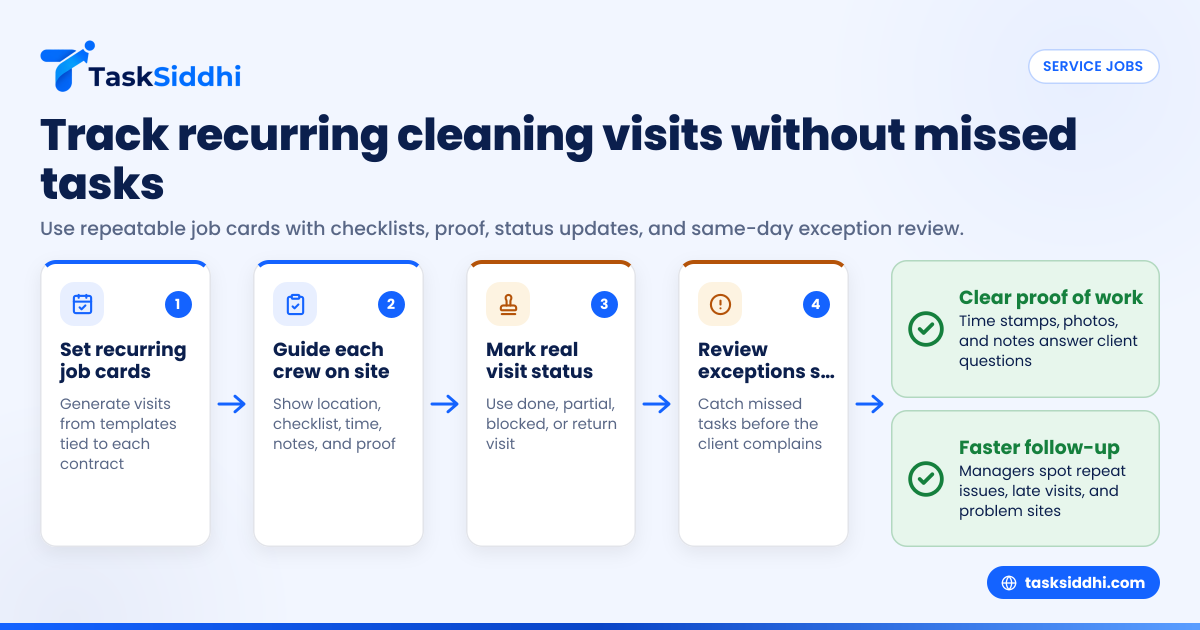
Commercial cleaning teams need job card software when recurring visits, proof photos, and missed tasks become too hard to manage in texts, paper sheets, and spreadsheets. The right setup gives each crew a clear job card, a simple checklist, time stamps, proof of work, and a fast way to see what was skipped before a client calls.
Key takeaways
- Job card software for commercial cleaning teams should handle recurring service visits, site checklists, proof photos, and missed-task follow-up.
- The best setup is simple for crews in the field and clear for supervisors in the office.
- A good job card should show location, scope, frequency, assigned cleaner, time in and out, and proof of completion.
- Missed tasks matter less when managers catch them the same day and trigger a return visit fast.
- Reporting should help you spot late visits, repeat issues, and problem sites across crews and shifts.
- Mobile-first tools work better for commercial cleaning because most updates happen on site, not at a desk.
What is job card software for commercial cleaning teams?
Job card software for commercial cleaning teams is a system that turns each cleaning visit into a trackable job. It assigns work, shows the checklist, records time, collects proof of work, and flags incomplete tasks.
For a commercial cleaning company in Chicago, Houston, or Detroit, this matters because many jobs repeat every day, every week, or several times a week. Crews may clean offices after hours, rotate buildings, cover sick shifts, and handle urgent callouts. If the team still runs on WhatsApp-style group messages, Excel sheets, and paper job cards, small errors become client complaints fast.
A basic cleaning job may sound simple. In reality, each visit has details that matter:
- Which building and entrance
- Which areas are in scope
- What tasks must be done today
- What tasks are weekly or monthly only
- What supplies are needed
- Who completed the work
- What time the crew arrived and left
- Whether the client asked for extra work
- Whether proof photos were taken
- Whether any task was missed
That is why many owners search for job card software for commercial cleaning teams. They do not just need a digital to-do list. They need a repeatable operating system for service visits.
Why do commercial cleaning teams outgrow paper job cards?
Paper job cards work for a very small team with one manager and a few nearby accounts. They break when you add more sites, more shifts, and more recurring work.
The short answer is that paper hides problems until the client notices them. Software makes those problems visible on the day of service.
When a crew uses paper, the manager often cannot answer basic questions quickly. Was the site visited? Did the team clean the restrooms? Did they empty the exterior trash? Was the nightly floor check skipped? Did anyone upload proof? If a supervisor must call three people to piece together the answer, the process is too slow.
Common problems with paper and spreadsheets
Commercial cleaning teams in the United States often hit the same issues:
- Recurring tasks are hard to control. Daily, weekly, and monthly work gets mixed together. Crews either miss infrequent tasks or do unnecessary work.
- Proof of work is inconsistent. Some supervisors take photos. Others text them. Others forget. The office has no standard record.
- Shift handoffs are messy. If a night crew leaves a note on paper, the day manager may not see it in time.
- Missed tasks stay hidden. A skipped lobby, supply refill, or breakroom clean may only surface when the client emails a complaint.
- Job history is hard to search. You cannot easily review the last six visits for one building and spot a pattern.
- Time records are unreliable. Start and end times may be guessed or written later from memory.
This is where a digital job card helps. It gives every visit one place for instructions, checklists, time, proof, and notes.
What should a cleaning job card include?
A cleaning job card should be short enough for crews to use quickly but detailed enough to prevent confusion. If the card is too long, staff skip it. If it is too vague, quality drops.
Core fields for every recurring cleaning visit
For most commercial cleaning teams, every job card should include:
- Site name and full address
- Contact person and phone number
- Date and shift window
- Assigned crew member or team
- Visit type, such as nightly clean or weekly deep clean
- Area-by-area checklist
- Special instructions
- Supply or equipment notes
- Time started and time finished
- Photo proof, where needed
- Issue notes, such as locked area or access delay
- Status, such as done, partially done, or needs revisit
A good system also separates daily work from weekly and monthly work. For example, a medical office in Houston may require nightly restroom cleaning, twice-weekly floor machine work, and monthly vent dusting. If all three appear on every job card, crews will either ignore the list or mark things done without checking.
Proof of work should be practical
Proof of work in commercial cleaning is not about collecting random photos. It is about collecting useful records. That means the proof should answer a client question clearly.
Useful proof often includes:
- Before and after photos for problem areas
- Time-stamped completion records
- Site notes for exceptions
- Photos of locked areas or blocked access
- Photos of supply restocking where relevant
Too much proof creates admin work. Too little proof creates disputes. Set standards by account. A bank branch may need entry and exit proof. A general office may only need photos for issue resolution or monthly quality checks.
How do you track recurring service visits without losing control?
Use recurring schedules tied to repeatable job cards. Each visit should generate from a template, but still allow site-specific notes, exceptions, and proof.
For commercial cleaning, recurring service is the whole business. One office may be cleaned Monday through Friday. Another may need three evening visits a week. Another may require a monthly floor strip and wax. If your system treats every visit as a fresh manual job, managers waste hours building the same work over and over.
Build a repeatable visit structure
A simple approach works best:
- Create one board by service team, region, or account type. This helps managers see scheduled, active, completed, and problem jobs in one place. Tools with boards and views make it easier to sort work by status, site, or assignee.
- Create job card templates by service type. Make separate templates for nightly cleans, weekly detail work, move-out cleans, and special projects.
- Set recurrence by contract. Match the schedule to the client agreement. Do not rely on staff memory.
- Add site-specific instructions. Include alarm notes, access windows, parking details, and areas that need extra attention.
- Keep checklists short and clear. Group tasks by area so crews can move through the building logically.
- Review exceptions daily. Recurring work should be automatic, but exception handling should be visible.
Recurring jobs need a clear exception process
Even well-run cleaning operations face exceptions:
- The building is locked
- The client asks to skip an area
- A spill needs urgent attention
- A cleaner calls out
- Weather causes a delay
- An extra task is requested on arrival
Your process should let the crew mark what happened on the job card, attach proof if needed, and notify the manager quickly. That is more useful than finding out the next morning through a text thread.
For teams that handle many recurring sites, service jobs workflows are especially helpful because the work repeats but the exceptions change every day.
How can managers catch missed tasks before the client complains?
Use checklists, required status updates, and same-day review of incomplete work. The goal is not perfect data. The goal is fast visibility.
A missed task is not always a major failure. Sometimes a cleaner could not access a room. Sometimes a shift ran short. The real problem is when nobody sees the miss until the customer sends an angry email.
Turn “missed” into a trackable outcome
Many teams mark every job as done even when part of it was skipped. That hides risk. A better system allows a visit to be marked:
- Completed
- Partially completed
- Needs return visit
- Blocked
- Rescheduled
That small change improves quality control. It tells the office what actually happened.
Use simple rules for incomplete work
Create rules like these:
- If a critical task is missed, the crew must mark the visit as partially completed.
- If access was blocked, the crew must add a note and photo.
- If a return visit is needed, the manager schedules it before the end of the shift.
- If the same site has repeated misses, the supervisor reviews the checklist and staffing.
This is where an automation workflow can help. For example, a partially completed card can be routed for supervisor review right away instead of waiting for someone to notice it later.
Proof matters most when something went wrong
Proof of work is most valuable when there is an exception. If a cleaner marks “trash room inaccessible” and uploads a photo of the locked door with a time stamp, your team can answer the client quickly and professionally.
Without that proof, the office may only have a vague verbal update. That creates avoidable disputes.
How does an ai job card help a commercial cleaning manager?
An ai job card can help organize notes, highlight incomplete fields, and make follow-up faster. It is most useful when it supports your process, not when it replaces clear checklists and manager review.
In practice, commercial cleaning managers do not need flashy features. They need fewer missed details. If an ai job card helps summarize job notes, flag missing proof, or surface repeat issues at one site, it can save time. But the basics still matter more: clear checklists, assigned ownership, and same-day visibility.
Think of AI as a helper for admin work, not a replacement for field discipline. If your crew does not mark tasks correctly, no layer of AI can fix weak inputs. Start by standardizing the job card. Then use AI features carefully where they remove repetitive office work.
What reports should commercial cleaning owners review every week?
Review completion rate, partially completed visits, late starts, repeat issues by site, and proof-of-work compliance. Weekly reports should help you spot risk early and coach supervisors before accounts become unstable.
Many cleaning businesses collect data but do not review it in a useful way. Weekly reporting should answer a few practical questions:
- Which accounts had incomplete visits?
- Which crews started late most often?
- Which sites generated repeat complaints or issue notes?
- Which jobs lacked required proof?
- Which contracts create too many exceptions?
Focus on operational reports, not vanity reports
A helpful weekly review may include:
- Visit completion by account This shows where service consistency is slipping.
- Missed or partial task trends This reveals checklist or staffing problems.
- Time-on-site patterns If one nightly clean keeps taking much longer than planned, the scope may have changed.
- Proof compliance This helps supervisors see where standards are being skipped.
- Revisit volume A high number of return visits often points to weak staffing, poor training, or unclear scope.
With strong reporting, managers can review service quality by site, by crew, or by date range instead of chasing updates manually.
How to roll out job card software without upsetting your crews
Most commercial cleaning software rollouts fail for one reason. Managers add too much process too fast. Crews feel watched, confused, or slowed down.
The fix is to start with the smallest useful system.
A simple rollout plan for a 5 to 30 person cleaning team
- Pick one service type first. Start with recurring evening cleans, not every job in the business.
- Standardize one job card template. Include only the fields you will actually review.
- Train supervisors before cleaners. Supervisors need to know how to check quality, handle exceptions, and close the loop.
- Use mobile updates only. Crews should not need to carry extra paper. A mobile app helps them update jobs where the work happens.
- Require proof only where it matters. Do not make every cleaner upload six photos at every site if nobody reviews them.
- Review daily for two weeks. Catch confusion early. Adjust the checklist and instructions.
- Add more accounts gradually. Once the first group works well, roll the process out to the rest.
Keep the field experience simple
For cleaners, the software should answer five questions fast:
- Where am I going?
- What am I doing?
- What is different today?
- How do I show it is done?
- What do I do if I cannot complete it?
If the tool cannot answer those quickly, adoption will suffer. This is why mobile-first workflows matter so much for field visits. The action happens at the customer site, often after hours, with little time for back-and-forth.
Choosing software that fits commercial cleaning operations
Not every job management system fits recurring cleaning work. Some are better for one-time projects. Others are too focused on invoicing or sales. Commercial cleaning teams need software that supports repeated site visits and clear proof of service.
Look for these capabilities
When comparing options, ask whether the system can support:
- Recurring job cards
- Site-specific checklists
- Assigned crews and shift visibility
- Time capture for each visit
- Proof photos and notes
- Partial completion statuses
- Supervisor review
- Searchable job history
- Mobile use in the field
- Reporting by site, crew, and date
Time records matter too. Even if your payroll stays in another system, time tracking tied to job completion helps managers compare planned versus actual site time.
Do not overbuy
A 12-person cleaning company does not need a huge enterprise setup. It needs something simple enough to use every day. If your current process lives across paper, group texts, and spreadsheets, the first win is visibility. Once jobs, proof, and exceptions are in one system, you can improve quality much faster.
If you are comparing a lightweight tool with a more structured one, this guide on free vs paid can help frame the tradeoffs.
Where TaskSiddhi fits for commercial cleaning teams
TaskSiddhi fits teams that need a practical way to run recurring service work, track job status, capture field updates, and review results without chasing scattered messages. It is especially useful when supervisors need one place to assign work, monitor visits, and follow up on exceptions.