

A team task tracker Excel alternative for construction subcontractors is a shared system that keeps punch lists, site visits, follow-ups, and proof of work in one place. Instead of hunting through spreadsheets, texts, and paper notes, your team gets a clear board, current job status, and a record of who did what and when.
Key takeaways
- Excel breaks down when multiple supers, foremen, and field crews update jobs at the same time.
- A better setup ties punch lists, site visits, photos, due dates, and crew follow-ups to one task or job card.
- Construction subcontractors in the United States need simple field updates that work from a phone on active job sites.
- The best system reduces missed items, duplicate trips, and “I thought that was done” handoff mistakes.
- Reporting, time logs, and proof from the field help owners spot delays early and close work faster.
- An ai team task workflow is only useful if it makes field updates faster, not more complicated.
Why Excel stops working for subcontractor task tracking
Excel is familiar. That is why many subcontractors start there. A project manager creates a sheet for punch items, another for site visits, and maybe a third for service calls or warranty work.
It works for a while. Then real job site conditions take over.
A superintendent in Houston updates a punch item by phone. A foreman in Chicago texts that the crew finished it. Someone in the office marks it done in the spreadsheet. Later, the GC says the item is still open because no photo was attached and no one logged the revisit. Now the team is arguing about versions instead of finishing work.
That is the core problem with spreadsheets. They store rows. They do not manage the flow of work well across field and office teams.
Construction subcontractors usually need more than a task list. They need:
- job-specific punch items
- owner or GC follow-ups
- site visit records
- photos and notes from the field
- due dates by trade, crew, or building area
- repeat visits for failed inspections
- clear status changes
- accountability across several people
When all of that lives in Excel, it becomes fragile. One wrong sort changes the sheet. One forgotten update creates a bad handoff. One crew lead working from an old file means the office no longer knows what is true.
A team tracker should reflect how subcontractor work really happens. One item is identified, assigned, visited, documented, reworked if needed, and then closed with proof. That is hard to manage in static rows and tabs.
What should a team task tracker Excel alternative for construction subcontractors do?
It should let your team track work from assignment to closeout in one place. Each task should hold the status, due date, owner, site notes, photos, and next step so field and office teams see the same record.
For subcontractors, this means fewer calls to clarify status and fewer missed items during punch or closeout. The goal is not more software. The goal is one reliable source of truth.
It should handle task flow, not just task storage
Most subcontractors do not lose money because they cannot list tasks. They lose money because tasks stall between people.
For example:
- A GC sends a punch list by email.
- The project manager copies items into Excel.
- The foreman gets a text with only some of the items.
- The crew completes the easy ones first.
- No one records which units still need access.
- A revisit gets scheduled, but not written down clearly.
- The office assumes everything is complete.
That process creates delays, return trips, and rework. A better tracker uses boards or status-based views to show where each item sits right now. That is why many subcontractors move to boards and views instead of staying in spreadsheets.
It should support field proof
Construction work needs evidence. If a punch item is fixed, someone should be able to show the date, the note, and often the photo. If a site visit happened, the office should know who went, what was found, and what changed next.
This matters for closeout, billing support, and internal accountability. It also matters when there is a disagreement between your team and a GC or site super.
A spreadsheet can hold a note saying “done.” That is not the same as a complete field record.
It should be easy on a phone
Many field crews will not open a laptop on a job site. If updates depend on office staff entering everything later, your tracker will always lag behind reality.
A practical system lets a foreman or technician open the mobile app, update the task, attach proof, and move on. That speed matters on active sites where crews are jumping between buildings, units, and inspection issues.
How do subcontractors manage punch lists in one place?
Use one shared system where each punch item is a task with an owner, due date, status, location, and photo record. Keep updates tied to the item itself so the office, field crew, and supervisor all see the same history.
Punch lists create chaos when details are split across email, Excel, and text messages. The issue is not only volume. It is context. Every punch item has a location, trade detail, priority, and often a follow-up condition.
A cleaner setup starts with one record per item. Each record should answer basic questions fast:
- What is the exact issue?
- Where is it?
- Who owns it?
- When is it due?
- What happened on the last visit?
- Is proof attached?
- Is it actually closed?
Build punch list templates by job type
Subcontractors often repeat the same work patterns. A drywall subcontractor may see the same finish correction categories. An electrical subcontractor may have recurring device, labeling, or trim issues. A flooring subcontractor may track repairs by room, unit, or building.
Templates help your team create consistent tasks. The office should not have to rewrite the same fields each time. Standard fields keep follow-up clean and reporting more useful later.
A good punch workflow often includes:
- Project name
- Building, floor, or unit
- Trade issue type
- Description
- Assigned crew lead
- Due date
- Status
- Photo before
- Photo after
- Revisit needed yes or no
This is where a task board becomes more useful than Excel. Instead of only filtering rows, managers can see open, in progress, awaiting revisit, and completed items visually.
Separate “work done” from “accepted and closed”
One common mistake is marking punch work complete the moment a crew leaves the site. In reality, many items are only complete internally. They are not closed until they are reviewed, accepted, or at least documented well enough for handoff.
That means using clearer statuses such as:
- assigned
- on site
- completed by crew
- pending review
- closed
This prevents false confidence. It also reduces the number of “why is this still open?” calls from the GC.
How should site visits and crew follow-ups be tracked?
Track site visits as part of the same job record, not in a separate sheet. The visit, notes, photos, next action, and follow-up owner should stay attached to the task so nothing gets lost between the field and office.
Site visits are where many subcontractor processes fail. The visit happens. Notes get written in a truck notebook or sent in a text. Then nobody turns that information into the next assigned action.
Turn each visit into a next step
A site visit should not end with “checked site.” It should produce a decision.
After a visit, your system should make it easy to record:
- arrived on site
- issue confirmed or not confirmed
- materials needed
- access problem
- crew return required
- customer or GC contact needed
- target date for next step
This is especially important for service-oriented subcontractors handling callbacks, warranty visits, or corrective work. If the visit and the next task are disconnected, work slows down.
TaskSiddhi’s field visits workflow is useful here because field proof and follow-up actions can stay close to the work item instead of living in scattered messages.
Keep crew follow-ups visible to managers
Crew follow-up gets missed when it depends on memory. A foreman may plan to return Thursday. A PM may assume materials are already ordered. The office may think the GC has granted access. If none of that is logged clearly, the return trip becomes another surprise delay.
A shared tracker should show follow-up work by crew, date, and status. Owners and managers should be able to scan what is blocked, what is due today, and what needs escalation.
This is also where reporting becomes practical. You can review open punch items, repeated revisits, and stalled jobs before they become margin leaks.
What does a better workflow look like day to day?
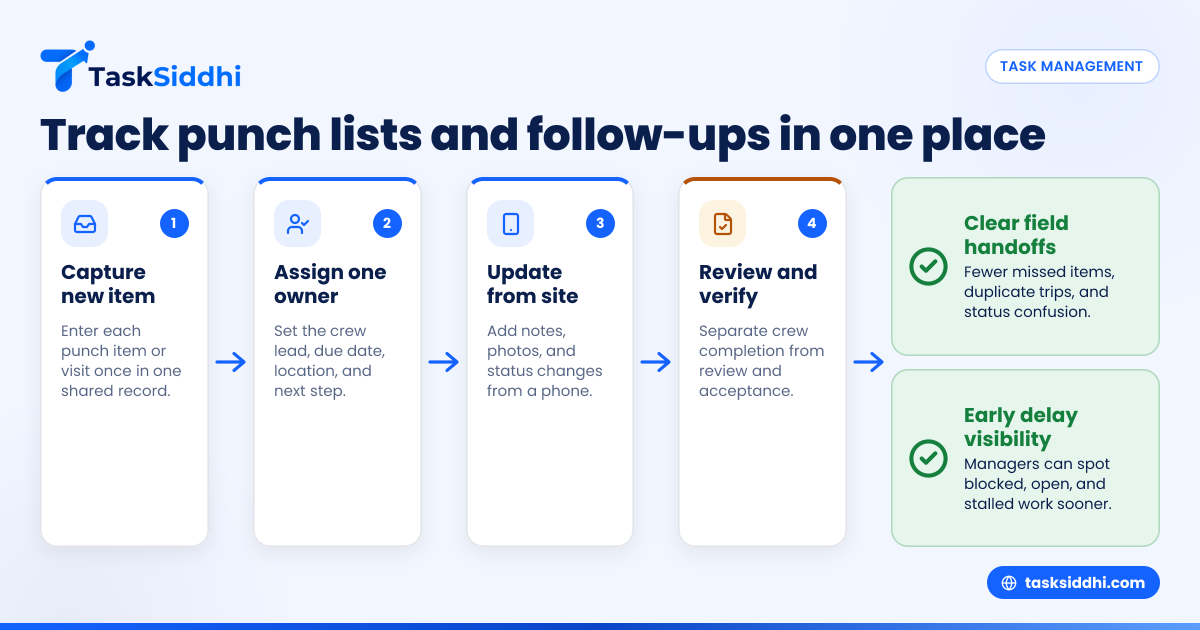
It starts with one place for new work, one clear owner for each item, and a simple status path from assignment to proof and closeout. The best workflows reduce back-and-forth and make the next action obvious.
Here is a practical day-to-day workflow for a subcontractor with 5 to 30 people.
1. Capture every new item in one system
New work may come from email, a site walk, a superintendent call, or an internal quality check. However it comes in, it should be entered once and assigned once.
Do not leave new items in an inbox to “move later.” That is how work disappears.
2. Assign by crew lead, not just by company
If a task is assigned to “field team,” no one owns it. Assign it to a real person. That person can still delegate work on site, but accountability starts with one named owner.
3. Add location and proof requirements upfront
A punch item without location details wastes time. A follow-up without proof requirements creates arguments later. Write both at the start.
For example:
- Building C, 2nd floor, Unit 214
- Patch and repaint corner bead by entry
- Attach after photo before moving to review
4. Use status changes to trigger action
Statuses should be operational, not decorative. Each one should mean something:
- assigned = ready to schedule
- on site = crew is handling now
- blocked = waiting on access, material, or approval
- completed by crew = ready for review
- closed = finished and accepted internally
This is where automation can help managers reduce manual reminders and keep follow-ups from sitting idle.
5. Review open work every day
Subcontractors do not need a two-hour meeting for this. A 10-minute daily scan of open, overdue, and blocked items can prevent missed visits and unplanned overtime.
6. Use time records when labor matters
Not every subcontractor needs detailed time logs on every punch item. But when service work, revisits, or small corrective jobs affect margin, time tracking helps show where labor is going.
If a simple closeout issue has required three return trips and six crew hours, that is valuable information. It helps with estimating, staffing, and client conversations later.
Why do U.S. subcontractors move off Excel?
Because Excel shows tasks, but it does not manage field execution well. Subcontractors need live status, mobile updates, proof of work, and cleaner handoffs between PMs, foremen, and crews.
In the United States, subcontractors also deal with tighter documentation expectations from GCs, owners, and commercial clients. Even when there is no formal system requirement, buyers often expect fast status answers, clean closeout records, and reliable communication.
The hidden cost of spreadsheet-based tracking
Excel looks cheap because the file already exists. The real cost shows up elsewhere:
- extra site visits
- missed punch items
- duplicate work
- slower billing support
- foremen answering status calls instead of running crews
- PMs rebuilding the same report every Friday
A single missed follow-up on a commercial job in Detroit or a repeat site visit across a spread-out Houston service area can cost more than the software you were trying to avoid.
Better visibility improves scheduling
When managers can see all open work by status and crew, they can schedule more intelligently. They stop overloading one foreman while another team has capacity. They also spot clusters of work by site and reduce windshield time.
That matters for subcontractors doing active closeout work across multiple projects at once.
Choosing the right setup for your team
The best tracker is the one your field team will actually use. If it takes too many taps, asks for too much text, or forces the office to clean up every update, adoption will drop fast.
Look for these basics first
Before you evaluate features, check whether the system can handle the daily reality of subcontractor work:
- Fast task creation
- Clear assignment
- Mobile-friendly updates
- Site notes and photos
- Status-based workflow
- Manager visibility
- Simple reporting
If your team runs both field work and office follow-ups, a flexible system for service jobs or client work can be more useful than a generic task list.
Avoid overbuying
Some subcontractors jump from Excel to a heavy project platform built for enterprise general contractors. That can create new problems. The software may be powerful, but daily use becomes slow and expensive for a smaller team.
Most growing subcontractors need practical work management first. They do not need a complicated rollout.
If you want structure without excess weight, start with core features that improve assignment, field updates, and reporting. Then add process depth as the team gets consistent.
Think about reporting before closeout season
Do not wait until a client asks for status by building, foreman, or aging punch item. If your system cannot answer those questions quickly, your managers will return to exporting data and rebuilding reports by hand.
Even a simple weekly review of open items, overdue work, and repeat visits can improve operations fast.
Can an Excel alternative help a small subcontractor team?
Yes. Even a team of 5 to 30 people benefits when task ownership, field notes, and follow-ups live in one shared place instead of separate sheets and texts.
Small teams feel spreadsheet pain sooner because the same people wear multiple hats. The owner may estimate jobs, review field status, chase closeout, and answer customer calls in the same day. A foreman may supervise labor while also updating the office.
That is why a simple, shared tracker often has outsized value for smaller subcontractors. It reduces mental load. It makes handoffs clearer. It shortens the path from “we found an issue” to “here is proof it was handled.”
Some teams start by comparing free vs paid options. That is reasonable. But the real question is whether the tool saves enough field time, admin time, and repeat trips to justify the change.