

Field team task management is the system you use to assign jobs, track progress, and prove work across crews in the field. For home services franchises in the United States, it matters most when you have multiple locations, several crew leaders, and too many jobs moving through texts, calls, spreadsheets, and paper job cards.
Key takeaways
- Field team task management gives franchise owners one clear way to assign, track, and close work across locations.
- Texts and paper break down fast when dispatch, field proof, time logs, and job status live in different places.
- The best setup uses standard job cards, mobile updates, proof of work, and simple reporting by location and crew.
- Franchise operations need local flexibility with central visibility, so each branch can run jobs without going off process.
- A practical rollout starts with one workflow, one region, and a short list of required updates from the field.
Why field team task management matters for home services franchises
Home services franchises run on fast response and repeatable execution. That sounds simple until you add multiple branches, mixed crews, changing schedules, and customers who want updates right away.
A franchise owner in Houston may have one branch handling HVAC tune-ups, another doing plumbing service calls, and a third managing installation jobs. Each location may use its own habits. One branch relies on phone calls. Another uses a WhatsApp-style group chat. A third still prints paper work orders every morning. The result is confusion, missed follow-ups, and poor visibility.
Field team task management fixes that by giving every job a clear record. You can see who owns the task, what happened on site, whether proof was captured, how long it took, and what still needs action. For franchise businesses, this is not just a convenience. It is how you keep service quality consistent across locations.
Without a shared system, managers spend their day asking the same questions:
- Who took this job?
- Did the tech arrive?
- Was the customer home?
- Where are the photos?
- Why is this still open?
- Did this branch finish today’s service backlog?
When the answers live in texts or on paper, nobody sees the full picture. That becomes expensive very quickly.
What breaks when crews run on texts and paper?
Texts and paper can work for a tiny team. They fail when your franchise has several locations, route-based jobs, or recurring service work.
The first problem is missing context. A text saying “done” does not tell you what was completed, what parts were used, whether the customer signed off, or if there is a callback risk. A paper form may include those details, but only if it comes back to the office complete and readable.
The second problem is no live status. A branch manager in Chicago should not need five calls to learn whether a crew reached the third stop of the day. If one technician calls in sick, the reassignment process should not depend on everybody checking the same text thread.
The third problem is weak accountability. If there is a customer complaint on Friday, you need a job record with timestamps, notes, and proof. Paper gets misplaced. Photos stay on personal phones. Text threads split across devices. Then nobody knows what actually happened.
The fourth problem is reporting. Franchise owners want to compare locations. They want to know which branch closes jobs on time, which crews run late, which service types create the most callbacks, and where work is piling up. That is hard to do with spreadsheets updated by hand at the end of the week.
A better setup gives the office and the field one shared workflow. That is where boards and views, a mobile app, and basic reporting become useful in daily operations.
What should a franchise owner standardize first?
Start with one standard job card and one status flow. If every location uses different fields and different words for the same stage, you will lose control fast.
Pick a few required fields for every field job:
- Customer name and address
- Service type
- Scheduled date and arrival window
- Assigned technician or crew
- Required checklist items
- Photos or proof of work
- Notes from the site
- Final status
Then standardize statuses. Keep them simple. For example:
- New
- Scheduled
- En route
- On site
- Waiting on customer
- Needs follow-up
- Completed
- Closed
This helps every location report work in the same language. It also makes it easier for regional managers to review branch performance without decoding local habits.
How do you keep multiple franchise locations on one process?
Use one shared job structure with room for branch-level details. Central teams should define required stages, proof, and reporting fields, while each location can add notes, local dispatch rules, and service-specific checklists.
That short answer matters because franchises often overcorrect. Some allow every branch to make up its own process. Others force a rigid workflow that does not fit the work. The better path is a core operating model with limited local variation.
For example, every branch may need before-and-after photos for completed work. Every branch may need timestamps for arrival and completion. But only one location may need a special checklist for older homes or high-rise access. Standardize what leadership must see. Keep local flexibility where crews need it to do the job well.
Build a task flow that works for office staff and crews
Good field team task management is not just about assigning tasks. It is about reducing back-and-forth between dispatch, branch managers, and technicians.
Here is a practical workflow for a home services franchise.
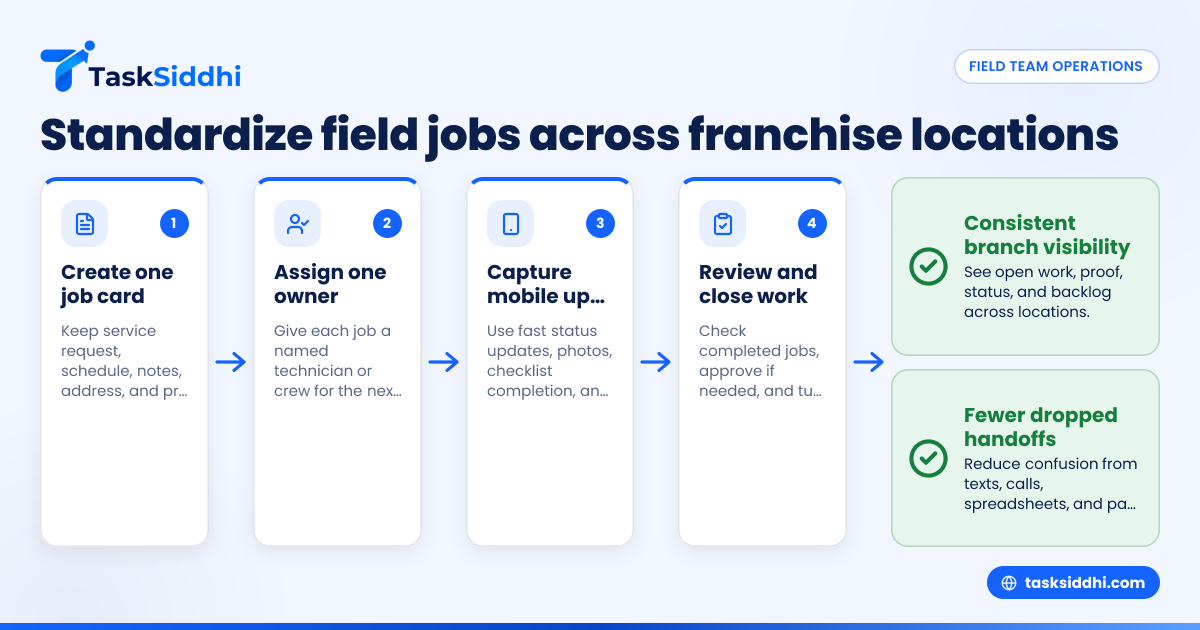
1. Create a clear job card
Each task should act like the single source of truth. It needs the service request, schedule, job notes, address, and proof requirements in one place.
This is where structured boards help. A team can sort work by location, crew, due date, or status using features built for day-to-day execution.
2. Assign ownership, not just a due date
A task without an owner becomes a group problem. Every job should have a named person or crew responsible for the next action.
That matters even more when branches share overflow work. If Detroit crews support a nearby territory during peak season, each task still needs one accountable owner.
3. Define what field updates are required
Do not ask crews to type long reports from driveways. Ask for short, useful updates instead.
Examples include:
- Tap “en route”
- Tap “on site”
- Add 2 photos
- Mark checklist complete
- Add short completion note
- Flag follow-up if parts are needed
This keeps updates fast enough to happen in real time.
4. Close the loop before the day ends
Jobs should not stay in a vague “done” state. Completed work should be reviewed, approved if needed, and moved to a closed stage. Open follow-ups should become new tasks with owners and dates.
This is one place where automation can reduce manual chasing. The goal is not complexity. The goal is fewer dropped handoffs.
Can an ai field team setup actually help small franchise crews?
Yes, if it reduces manual follow-up and makes status updates easier. An ai field team approach should save time on assignment, reminders, and summaries, not add another layer of admin for crews already moving all day.
For most home services franchises, the phrase sounds bigger than the actual need. Owners do not need a complicated system. They need practical help with routine work. That includes turning service requests into tasks, prompting crews for missing updates, and summarizing what happened by location.
The key is to use simple workflows first. If your branch managers still rely on phone calls to learn where jobs stand, advanced features will not fix the core problem. Start with visible tasks, live status, and proof of work. Then add smarter rules on top.
A small franchise team often benefits more from consistent task design than from anything labeled AI. Once the basics are in place, managers can use faster assignment, cleaner summaries, and exception-based follow-up. That is where an ai field team workflow becomes useful in a real business setting.
What should technicians update from the field?
Technicians should update only the information needed to keep work moving and prove the job happened. Anything extra usually gets skipped.
For most home services crews, the right mobile update set is small:
- Job started
- Job paused or blocked
- Job completed
- Photos added
- Notes added
- Follow-up required
This is why mobile matters so much. If updates are easy on a phone, crews will use them. If they need to wait until they get back to the branch office, the data will be late or incomplete. A purpose-built mobile app makes the difference between live operations and end-of-day guesswork.
Use proof of work as a standard, not an exception
Franchise leaders should decide early what proof is required for each job type. This protects the branch, the brand, and the customer experience.
Common proof includes:
- Before and after photos
- Arrival and completion timestamps
- Site notes
- Customer acknowledgment when needed
For teams doing on-site service, field visits workflows help keep this consistent across technicians and locations.
Track time where labor visibility matters
Not every service call needs detailed labor tracking. But franchise owners usually want to see time spent by crew, service type, or branch when margins are tight.
If some locations regularly run over scheduled time, basic time tracking can highlight whether the issue is travel, staffing, training, or job scope.
How should headquarters view branch performance?
Headquarters should look for patterns, not just totals. The best branch view shows open jobs, aging work, completion speed, proof compliance, and follow-ups by location.
A central office should not just ask, “How many jobs closed?” That can hide weak execution. One branch may close many low-value tasks but leave callbacks unresolved. Another may show good completion volume but poor proof capture.
A better branch dashboard looks at:
- Jobs created vs. completed
- Open jobs older than 24 or 48 hours
- Average time from scheduled to completed
- Jobs missing photos or notes
- Follow-ups created after completion
- Workload by technician or crew
With reporting, franchise managers can review trends without waiting for branch admins to build spreadsheets each week.
Compare locations without creating branch politics
Use the same scorecard for every branch. Keep it short and operational. If you track too many metrics, teams stop trusting the numbers.
A useful example scorecard might include:
- Open jobs at day end
- On-time completion rate
- Jobs missing proof
- Average days to close follow-ups
- Active workload per tech
That gives leaders enough visibility to coach managers and support underperforming locations.
A simple rollout plan for a home services franchise
Many franchises delay change because they think the rollout will disrupt the whole operation. It does not have to.
Start with one workflow and one region.
Step 1: Pick one service line
Choose a common, repeatable job type. Preventive maintenance, inspection visits, or standard service calls are good starting points.
Do not begin with your most complex installation workflow. Start where the team can learn fast.
Step 2: Use one shared board
Put all jobs for the pilot branch or region into one board with clear statuses and required fields. This gives office staff and technicians one place to work.
Teams that need structured service jobs or recurring client work can expand later. The first goal is visibility.
Step 3: Keep field updates minimal
Ask technicians for only a few actions from the phone:
- Start
- Arrive
- Add proof
- Complete
- Flag follow-up
If you ask for too much detail on day one, adoption drops.
Step 4: Review exceptions daily
For the first two weeks, managers should review:
- Jobs still open after due date
- Tasks missing proof
- Reassigned work
- Follow-ups not scheduled
This helps you refine the process before rolling it to more branches.
Step 5: Roll out branch by branch
Once one location runs cleanly, copy the same structure to the next. Resist the urge to redesign the system for every manager.
The simpler your rollout, the faster crews trust it.
Common mistakes franchises make with field team task management
Trying to replace every process at once
If you switch scheduling, invoicing, payroll, and dispatch all at the same time, your team will push back. Start with task visibility and proof of work first.
Letting each branch rename every status
This makes central reporting nearly useless. Keep the core stages the same across locations.
Asking for too much technician data
Crews in the field need fast updates. Long forms create low compliance and poor-quality notes.
Ignoring branch managers during setup
Franchise owners often design a process from headquarters that sounds good on paper. Branch managers know where jobs get stuck. Include them early.
Measuring output without measuring exceptions
Completed jobs matter, but unresolved follow-ups, missing proof, and aging tasks tell you where service quality is slipping.
Choosing software without overbuying
Many home services franchises do not need a giant enterprise rollout. They need a tool their branch managers and technicians will actually use every day.
Look for a system that supports:
- Shared task boards
- Mobile updates
- Job ownership
- Proof from the field
- Time visibility where needed
- Reporting by branch and crew
Also look at ease of adoption. A complicated setup usually sends teams back to texts and paper.
If you are comparing software, it helps to understand free vs paid options before deciding how much structure your operation needs.
Frequently asked questions
What is field team task management?
Field team task management is the process of assigning, tracking, and closing work done outside the office. In a home services franchise, it helps branch managers and owners see job status, proof of work, and follow-ups across crews and locations.
Why are texts and paper a problem for franchise operations?
Texts split job details across devices and people. Paper forms are slow to return and easy to lose. Both make it hard to see live status, compare branch performance, and respond quickly to customer issues.
How many task statuses should a home services franchise use?
Most franchises do well with six to eight statuses. That is enough to show job progress without confusing crews or making branch reporting messy. Keep the names simple and use the same core statuses across all locations.
Should technicians track time on every field job?
Not always. Time tracking helps most when labor cost, route efficiency, or job duration affects margins. If you do use it, keep it simple so technicians can update it quickly from the field.