














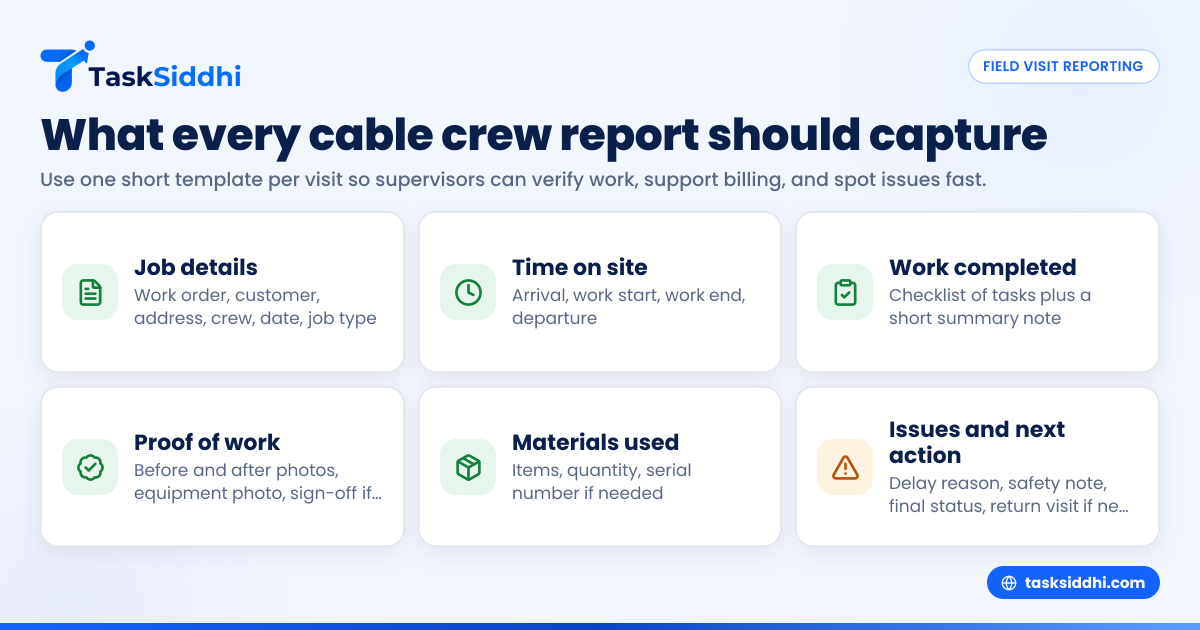
A daily work report app for cable installation crews should capture the facts a supervisor needs to verify the visit, protect billing, and spot problems early. In the United States, that usually means job details, crew time, materials used, proof of work, customer sign-off when needed, and a short issue log that can be reviewed the same day.
Key takeaways
- A good daily report records what happened at each field visit, not just whether the job was “done.”
- Supervisors should collect time, location, work completed, photos, materials, delays, safety notes, and follow-up actions.
- Standard fields reduce missed details and make payroll, invoicing, and reporting easier.
- Mobile reporting matters because cable crews work across neighborhoods, buildings, and job sites all day.
- Clear daily reports help defend invoices, coach technicians, and find repeat issues by crew, area, or job type.
What a daily work report app should do for cable installation crews
Cable installation work moves fast. A crew may complete residential installs in the morning, service calls at noon, and a commercial activation late in the day. If supervisors rely on phone calls, texts, paper notes, or memory, details get lost.
That creates real business problems. Hours are harder to approve. Materials go untracked. Customers dispute what was installed. Callbacks increase because nobody sees the pattern soon enough.
A daily work report app for cable installation crews solves that by giving every field visit the same reporting structure. Each technician or crew lead records the job while still on site or right after leaving. The supervisor sees a clean, consistent report instead of a pile of scattered updates.
For many teams, the main goal is simple. You want to know what work was assigned, what actually happened, what proof exists, and what needs follow-up.
That sounds basic, but it changes how field operations run. It improves accountability without adding much admin time. It also makes handoffs cleaner between dispatch, supervisors, billing, and customer service.
If your crew still sends updates through group texts and end-of-day spreadsheets, a work management system with field visits, reporting, and a mobile app can make daily reporting much more reliable.
What should supervisors collect from every field visit?
Collect the facts needed to confirm the visit, verify labor, document the installation, record materials, note issues, and decide the next action. The report should be short enough to finish in minutes but detailed enough to support billing, payroll, customer service, and quality control.
Supervisors should avoid two extremes. One is a report so short that it is useless. The other is a report so long that crews skip it or fill it in poorly. The best format captures only what operations, payroll, and customer-facing teams truly need.
1. Basic job identification
Every report should start with the core job information:
- Job number or work order number
- Customer name
- Service address
- Unit, suite, or apartment number if needed
- Technician or crew names
- Supervisor or dispatcher assigned
- Visit date
- Arrival and departure time
These fields sound obvious, but they prevent confusion later. In cable work, address errors and unit mix-ups are common. A report tied to the wrong apartment or suite creates billing issues and callback risk.
2. Job type and scope
Supervisors should know what kind of visit happened. Add a simple field for:
- New install
- Upgrade
- Service repair
- Disconnect
- Equipment swap
- Commercial activation
- Site survey
- Follow-up visit
Then include the planned scope. For example:
- Install modem and router
- Run interior coax
- Activate service
- Replace damaged connector
- Test signal levels
- Mount equipment in telecom room
This helps compare the original assignment to the actual work performed. It also helps identify which job types create the most delays or repeat visits.
3. Time on site
A daily report should capture labor clearly. At minimum, collect:
- Travel start or dispatch time if relevant to your process
- Arrival time on site
- Work start time if different
- Work end time
- Departure time
- Breaks if your team tracks them in the field
Time data supports payroll review and customer billing. It also helps supervisors see whether some neighborhoods, building types, or service categories take longer than expected.
If your team bills commercial clients for labor or service windows, this data matters even more. A weak time record can turn into a billing dispute.
Using in-app time tracking is usually more dependable than asking crews to rebuild their day from memory after the fact.
4. Work completed
This is the heart of the report. The technician should record what was actually done, in plain language. Keep it structured. A checklist works well.
Examples include:
- Installed customer-premises equipment
- Activated internet service
- Tested upload and download connectivity
- Replaced splitter
- Re-terminated cable end
- Mounted hardware
- Labeled lines
- Verified signal strength
- Educated customer on equipment use
Add one short free-text summary. Ask the crew to answer one question: “What was completed on this visit?”
That gives supervisors a readable record without forcing long narratives.
5. Proof of work
Cable installation teams need evidence. The report should allow crews to attach:
- Before photos
- After photos
- Equipment photos
- Connection point photos
- Signal test screenshots if used in your process
- Photos of obstacles or access issues
- Customer sign-off where required by your workflow
Proof is useful for more than customer disputes. It helps train newer technicians. It lets supervisors audit quality without driving to every site. It also protects the business if a customer later claims the crew did not complete the work.
6. Materials and equipment used
Materials tracking often breaks down in field teams. Daily reports should include the items used on the visit, such as:
- Cable length used
- Connectors
- Splitters
- Wall plates
- Mounting hardware
- Modems or routers installed
- Replacement parts
- Customer-premises equipment serial numbers if needed
Even simple quantity fields help. You do not need a complex inventory system to gain value. A clean record of common materials can show where waste happens or where van stock planning needs work.
7. Problems, delays, and blocked work
Supervisors do not just need finished-job data. They need to know what got in the way. Add a section for:
- No access to unit
- Customer not home
- Wrong address
- Missing equipment
- Damaged line
- Unsafe conditions
- Need permit or building access
- Signal issue outside unit
- Weather delay
- Reschedule required
This turns daily reporting into an operational tool. Instead of hearing about a blocked job two days later, the supervisor can act the same day.
8. Next action
Every field visit should end with one clear status:
- Completed
- Completed with follow-up needed
- Incomplete, return visit required
- Escalated to supervisor
- Escalated to network or infrastructure team
- Customer reschedule needed
- Waiting for parts
This small field matters. Without it, jobs fall into a gray area where nobody is sure what happens next.
Why do paper forms and WhatsApp updates fail?
They fail because they are hard to standardize, easy to lose, and difficult to review at scale. A supervisor cannot quickly compare crews, spot repeat issues, or verify proof from scattered messages and handwritten notes.
Paper and chat updates seem convenient at first. Technicians already use their phones. A paper sheet feels fast. But the information arrives in different formats every time.
One technician writes “done.” Another sends three photos with no context. A third forgets the unit number. A fourth reports hours at the end of the week. Supervisors then spend time chasing missing details instead of managing the field.
The hidden cost of unstructured reporting
The cost is not only admin time. It shows up in:
- Missed billable work
- Slower payroll approval
- More callbacks
- Customer disputes
- Weak technician coaching
- Poor visibility across crews
- Slow response to problem areas
In a city like Houston or Chicago, crews may cover wide service areas in one day. Without one reporting format, supervisors cannot see where jobs stall, which crew needs support, or what issues are repeating by neighborhood or building type.
What a structured app changes
A reporting app creates one workflow for every visit. The same fields appear every time. The same status options exist for every job. The same proof is attached in the same place.
That structure makes reports easier to review and easier to trust. Supervisors can sort by technician, date, status, delay reason, or job type. They can also use boards and views to see what is complete, what is blocked, and what needs a return visit.
What should the daily report template look like?
Use a short, repeatable template with required fields for job details, time, work completed, materials, photos, issues, and next steps. The best template takes just a few minutes to finish on a phone and gives supervisors enough detail to review the same day.
Below is a practical template supervisors can use for cable installation crews.
Recommended field visit report template
Job details
- Work order number
- Customer name
- Address
- Technician or crew
- Date
- Job type
Time
- Arrival time
- Work start time
- Work end time
- Departure time
Work completed
- Checklist of standard tasks
- Short summary note
Materials used
- Item
- Quantity
- Serial number if needed
Proof
- Before photos
- After photos
- Equipment photo
- Sign-off if required
Issues
- Delay or problem reason
- Safety note if any
- Additional comments
Final status
- Complete
- Incomplete
- Follow-up required
- Escalated
- Return visit needed
Keep the template short enough to finish in the field
If the template takes 15 minutes, crews will rush it or skip it. Keep most fields tap-based, like dropdowns, checkboxes, and status selections. Use free text only where it adds value.
This is where teams start to look for ai daily work support. Not to replace judgment, but to reduce typing, standardize summaries, and help supervisors review many reports faster.
How should supervisors review daily reports?
Supervisors should review reports the same day, check exceptions first, and follow a simple pattern: incomplete jobs, missing proof, unusual hours, material gaps, and repeat issue reasons. The review should take minutes per crew, not hours of detective work.
Review exceptions before routine completions
Do not start with all completed jobs. Start with the visits that need action:
- Incomplete jobs
- Jobs with no proof attached
- Jobs with very short or very long time on site
- Jobs marked as escalated
- Jobs with customer access issues
- Jobs that require a return visit
This lets the supervisor handle risk first. Completed jobs with clean proof can be reviewed more quickly later.
Build a same-day review habit
A strong rhythm looks like this:
- Crews submit each report after the visit.
- The supervisor checks reports midday and at end of day.
- Exceptions are reassigned or escalated immediately.
- Billing or admin gets confirmed completion data.
- Operations reviews patterns weekly.
This process is much easier when reports feed into one system with automation and clear status tracking.
Use reports for coaching, not just control
Daily work reports should not feel like surveillance. They should help supervisors coach the team.
For example, if one technician in Detroit has more repeat visits for connector issues, the supervisor can check photos, compare job notes, and provide targeted coaching. If one crew consistently spends longer on multi-unit buildings, the issue may be access planning, not technician performance.
What metrics actually matter for cable crew reporting?
Focus on completion rate, return visits, average time on site, blocked-job reasons, materials used, and proof compliance. These metrics help supervisors improve field execution without drowning in data that nobody uses.
Core metrics to track weekly
Start with six practical measures:
- Jobs completed per technician or crew
- Average time on site by job type
- Percentage of jobs with full proof attached
- Return visit rate
- Top delay or blockage reasons
- Materials used by job type
These metrics are useful because they lead to action. If completion rates dip, check routing, scheduling, or training. If proof compliance is low, fix the reporting process. If return visits rise, inspect installation quality or assignment accuracy.
Avoid vanity reporting
Do not collect metrics just because the app can show them. Every metric should answer one management question:
- Are crews finishing assigned work?
- Are jobs taking longer than expected?
- Are invoices and payroll supported by records?
- Are certain issues repeating?
- Which crews need support?
That is where reporting becomes valuable. The point is not more dashboards. The point is faster decisions.
How can a daily work report app help billing and payroll?
It helps by tying crew time, job completion, proof of work, and materials to each field visit. That makes approvals faster and reduces disputes between field teams, supervisors, office staff, and customers.
Support payroll with cleaner time records
For payroll, supervisors often need a dependable view of who worked where and for how long. Daily field reports are not the only payroll record in every business, but they are often the easiest way to validate field activity.
A clean report can answer basic questions fast:
- Did the crew arrive on site?
- How long were they there?
- Was the visit completed?
- Was there a valid reason for delay?
- Did the technician actually perform the assigned work?
Support invoicing and customer communication
For invoicing, especially on commercial work or service contracts, a strong daily report supports the invoice with facts. It shows the work order, service date, time on site, work completed, materials used, and proof.
When a customer asks what happened on 03/14/2026 at a downtown Chicago site, your office should not need to call three people and search old text threads. The answer should already be in the visit record.
Choosing the right app for cable installation teams
Many tools can store notes. Fewer are built around real field operations. Cable installation teams need an app that works on phones, handles repeatable job records, supports proof from the field, and gives supervisors a fast way to review work.
Look for these practical capabilities
When evaluating a daily work report app for cable installation crews, check for:
- Mobile-friendly reporting
- Custom job fields
- Photo attachments
- Time capture
- Status-based workflows
- Easy supervisor review
- Searchable past job records
- Team-level visibility
- Reporting by technician, date, and job type
A flexible system built for service jobs and client work is usually a better fit than a generic chat tool or a spreadsheet.
Start with one crew and one report standard
Do not try to redesign every workflow at once. Start with one daily report template and one crew or region. Run it for two weeks. Then fix the fields that nobody uses and add the fields that supervisors keep asking for.
That approach gives you better adoption. It also prevents overbuilding the process.