

If you run fire sprinkler inspections on phone calls, spreadsheets, and paper forms, job card software gives you one place to plan visits, record findings, and prove work was done. For fire sprinkler inspection companies in the United States, the right setup helps you track service visits, deficiencies, photos, signatures, and technician time without chasing updates across texts and email.
Key takeaways
- Job card software helps fire sprinkler inspection companies organize inspections, service calls, and follow-up repairs in one workflow.
- A good setup should capture site details, deficiency notes, photos, timestamps, signatures, and technician activity from the field.
- The biggest gain is not just speed. It is cleaner handoffs between office staff, inspectors, and customers.
- Mobile-first job cards reduce missed steps during site visits and make proof of work easier to retrieve later.
- Reporting matters. Managers need clear visibility into open deficiencies, overdue follow-ups, and technician workload.
- For small and mid-sized teams in the United States, the best system is usually the one crews will actually use every day.
What is job card software for fire sprinkler inspection companies?
Job card software for fire sprinkler inspection companies is a tool that helps you create, assign, update, and close inspection and service jobs. Each job card acts like a digital work packet for one visit, one system, or one customer request.
Instead of relying on paper forms or a stack of emailed PDFs, your team works from one shared record. That record can include the site address, contact details, scheduled date, inspector notes, deficiency items, images, status, and proof of completion.
For a fire sprinkler company in Chicago or Houston, this matters because jobs rarely end with one simple visit. One property may need a scheduled inspection, a deficiency list, a return visit, and a separate repair approval. If those steps live in different places, details get lost.
Job card software keeps that process connected. The inspection creates findings. Findings create follow-up work. Follow-up work stays visible until complete.
Why does this matter for sprinkler inspections?
It matters because sprinkler inspection work depends on accurate records, fast follow-up, and clear proof of service. If your office cannot quickly answer what was inspected, what failed, what was fixed, and when a technician was onsite, customer trust drops fast.
For many smaller companies, the real problem is not the inspection itself. It is the admin around it. Someone writes notes in the field. Someone else types them later. Photos stay on a phone. Deficiencies are emailed separately. A customer asks for proof three weeks later, and the office starts digging.
That creates three business risks.
First, you lose time. Admin staff spend hours pulling together service history.
Second, you miss revenue. Deficiency work can sit unquoted or unscheduled.
Third, you weaken accountability. If a technician forgets a photo or a signature, you may not know until after the visit.
With structured service jobs, each visit follows the same flow. Your office can see what is scheduled, what is in progress, and what still needs action.
Common pain points job cards solve
Most fire sprinkler inspection companies with 5 to 30 people see the same issues:
- Job details are shared in text messages or email threads
- Inspectors use different note formats
- Deficiency items are hard to track by building or customer
- Photos are not tied to the right work order
- Return visits get missed or delayed
- Managers cannot see field progress in real time
- Payroll and billing require manual cleanup
- Customers ask for documentation that takes too long to find
A digital job card reduces these gaps by standardizing what your team captures on every visit.
What should a sprinkler inspection job card include?
A fire sprinkler inspection job card should include everything your technician needs to do the work and everything your office needs to verify and follow up on it. The point is to avoid separate notes, separate photo folders, and separate follow-up lists.
At a minimum, each card should contain:
Site and customer information
Start with the basics. Include the property name, site address, contact person, phone number, and access instructions. Add building-specific notes such as riser room location, gate codes, or after-hours entry details.
For multi-site customers, this becomes critical. A property manager in Detroit may oversee several buildings. Your team should know exactly which site the visit covers.
Job type and scope
Specify whether the visit is an inspection, test, deficiency review, emergency service call, or repair follow-up. Add a short scope summary so the technician knows what is expected before arriving.
A clear scope also helps your office separate routine visits from billable repair work.
Checklist and required steps
Use a repeatable structure. This keeps work consistent across technicians. If your team handles different service lines, your templates may vary, but the same idea applies. Required fields should prompt the technician to complete each key part of the visit before closing the job.
Deficiency notes
This is one of the most important sections. Deficiencies should be easy to record, easy to review, and easy to convert into follow-up work. If they are buried inside freeform notes, they are much harder to action.
Good job cards let technicians log findings while onsite, with short descriptions and related photos.
Photos, timestamps, and signatures
Proof of work should be part of the workflow, not an afterthought. Photos help show condition, access, completed work, and visible issues. Timestamps and sign-off details help confirm that the visit happened and when.
For field-heavy teams, field visits are much easier to manage when proof is stored on the same record as the job itself.
How do you track deficiencies without losing follow-up work?
Use one job card for the visit and a clear next-step workflow for every deficiency. Each issue should move from finding to review to scheduled action, instead of staying buried in technician notes.
In practice, this means your inspection job should not end when the technician leaves the site. It should trigger office review and, if needed, a separate repair or return visit.
Build a simple deficiency workflow
The best workflows are simple enough for a small team to follow every day. You do not need a complex system. You need a visible one.
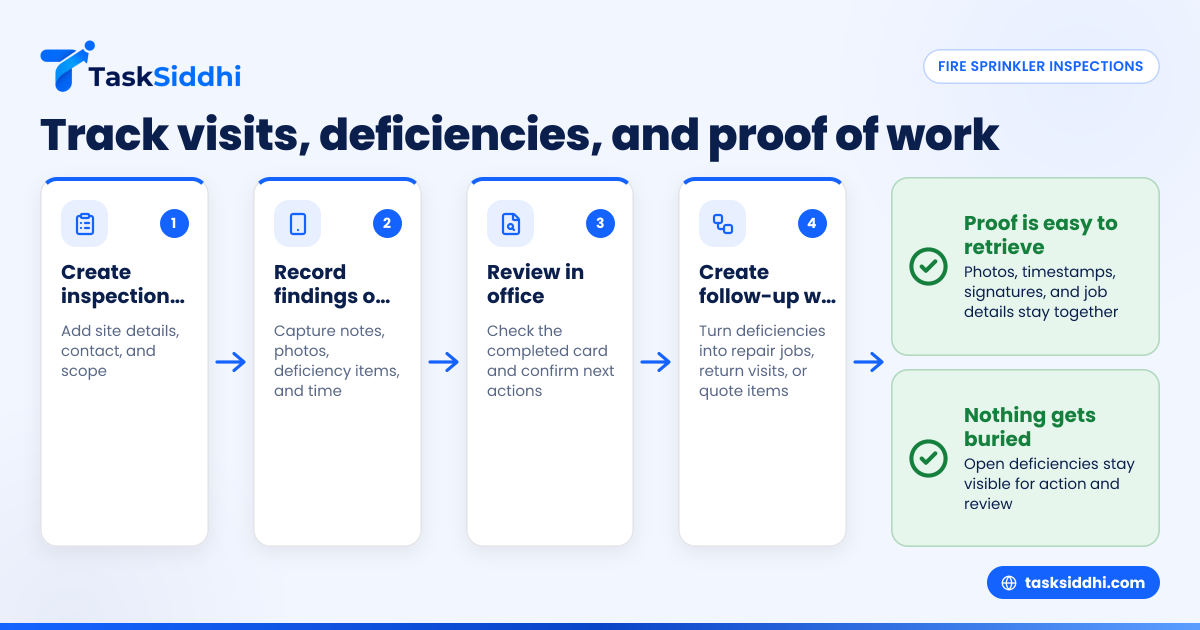
A practical setup often looks like this:
- Create the inspection job The office schedules the visit with site details and scope.
- Record findings onsite The technician adds notes, photos, and deficiency items during the inspection.
- Review in the office A coordinator or manager checks the completed card and confirms next actions.
- Create follow-up work Deficiencies become separate repair jobs, return visits, or customer quote items.
- Track until closed Open items stay visible until completed, deferred, or otherwise resolved.
This is where boards help. With boards and views, managers can separate jobs into stages like Scheduled, In Progress, Needs Review, Deficiency Follow-up, and Closed.
Make deficiencies visible by status
If deficiency items only live inside closed inspection notes, they disappear from daily operations. Instead, treat them as active work that needs an owner and a next date.
For example, after a weekly review, your office may move unresolved items into a “Quote Needed” or “Schedule Repair” stage. That gives your team a simple way to see what is stuck.
This visibility is often more valuable than fancy features. Many companies do not need a complicated ai job card system. They need a disciplined process that turns field findings into action.
How do technicians capture proof of work in the field?
Technicians should capture proof of work on their phone during the visit, inside the same job card they use for notes and status updates. That keeps photos, timestamps, signatures, and job details together.
When proof is captured live in the field, your office no longer has to collect screenshots, texted photos, or handwritten notes after the fact.
Use a mobile workflow your team will actually follow
A field workflow only works if it is simple. If technicians must jump between multiple apps, they will skip steps. That is why a dedicated mobile app matters for service teams.
A practical proof-of-work process includes:
- Open the assigned job card at arrival
- Confirm site details and contact
- Add inspection notes during the visit
- Attach photos to the same record
- Update status before leaving
- Capture customer or onsite acknowledgment if needed
- Mark the visit complete
This creates a clean service trail. If a customer later asks whether your technician was onsite on 03/14/2026 at 10:30 AM, your office can pull the job card instead of reconstructing the day from memory.
Standardize what counts as proof
Do not leave this to individual technician preference. Set a minimum standard for every visit. For example:
- Arrival and completion time
- Before or issue photos
- Notes on work performed
- Deficiency documentation
- Customer acknowledgment when applicable
That simple standard improves consistency across your entire team.
What features matter most for a small sprinkler inspection company?
The most important features are scheduling, mobile job updates, deficiency tracking, proof of work, time logs, and reporting. If the system makes these six tasks easy, it will likely deliver value faster than a bloated platform.
Many companies get distracted by large enterprise feature lists. But for a 7-person or 20-person sprinkler inspection team, adoption matters more than complexity.
Scheduling and assignment
You need to assign jobs fast and see who is handling what. The office should be able to plan daily and weekly workloads without searching through messages.
Repeatable job templates
Inspection work benefits from repeatable structure. Templates reduce missed steps and help newer technicians follow the right process.
Mobile updates from the field
If updates happen only when crews return to the office, your data is already stale. Real-time status changes keep dispatch and customer communication cleaner.
Time and labor visibility
Time data helps with payroll review, job costing, and understanding where your day goes. Built-in time tracking is useful when you want technician hours tied directly to each visit.
Reports for open work
Managers need a simple way to answer questions like:
- Which inspections were completed this week?
- Which deficiency jobs are still open?
- Which technicians are overloaded?
- Which customers have aging follow-up work?
That is where reporting helps. You can review workload and exceptions without reading every individual card.
Setting up your workflow in 30 days
Most small service teams do not need a long software project. They need a practical rollout with clear rules. The goal is to move active work into one system without overwhelming the team.
Week 1: map your current process
Write down how jobs move today. Start from the customer request or scheduled inspection. End with completed paperwork, follow-up work, and billing handoff.
Look for breakpoints:
- Where do notes get lost?
- Where do photos sit?
- Who creates follow-up work?
- When does the office find out a deficiency exists?
This gives you the real workflow to improve.
Week 2: define job card fields and stages
Set up the job card structure your team will use every day. Keep it lean. Too many required fields will slow adoption.
Decide on statuses such as:
- Scheduled
- In Progress
- Needs Review
- Follow-up Required
- Completed
If certain steps repeat on every job, use automation to reduce manual movement and reminders.
Week 3: train technicians on one standard process
Train the team on one path from arrival to closeout. Keep it concrete. Show them how to open the card, add notes, attach photos, update status, and finish the visit.
Do not train on every possible feature. Train on the daily workflow only.
Week 4: review and tighten
After the first live week, look at what was missed. If technicians skip photos or leave statuses unchanged, simplify the process or clarify expectations.
Small fixes at this stage make a big difference later.
How does this help the office team?
It gives the office a live view of scheduled work, completed visits, open deficiencies, and missing information, without calling technicians for updates.
That visibility reduces back-and-forth and helps coordinators act faster on quotes, return visits, billing, and customer requests.
Better handoffs after every inspection
A completed inspection often triggers office work. Someone may need to review notes, prepare follow-up, or send documentation. If the job card is complete, the handoff is cleaner.
Instead of asking, “Did Mike get photos?” or “Was the deficiency list final?” the office can check the record.
Fewer missed revenue opportunities
Deficiency work often drives future jobs. But if findings stay trapped in email or handwritten notes, follow-up slows down. When deficiency items are visible on a board, they are easier to schedule and close.
Stronger customer response
Customers want quick answers. If a property manager calls asking for service history, your staff should not have to search folders for twenty minutes. One shared system improves response speed and confidence.
Common mistakes to avoid
Even good software will not help if the process is unclear. Most failures come from setup and habits, not the tool itself.
Making the job card too complicated
Do not try to capture every possible detail on day one. Start with the fields your team truly needs in the field and the office truly uses later.
Letting technicians use different formats
If one technician writes long notes, another sends texts, and another uploads photos later, your records stay messy. Standardization matters more than perfect customization.
Treating deficiencies as notes instead of work
A deficiency should lead to a visible next step. If not, it is easy to forget and hard to bill.
Ignoring manager review
Someone in the office should own the review process. A completed field card still needs to become action, reporting, and customer communication.
Choosing software that fits a field service team
When comparing tools, focus on your actual use case. Fire sprinkler inspection companies need field execution, office visibility, and proof of work tied together.
That is why many teams prefer software built around task boards, job cards, mobile updates, and service workflows instead of generic project tools. TaskSiddhi brings those core pieces together through features that support scheduling, field updates, proof of work, and follow-up tracking for small service teams.
If your business handles repeat inspections, technician dispatch, and customer follow-up, keep your test simple. Ask whether a coordinator can assign work in minutes, whether a technician can update the job from the field, and whether a manager can see open deficiencies without chasing anyone.