

Reviewing daily work reports from field staff is easier when every job update follows one standard format and lands in one place before the day ends. In the United States, that usually means replacing scattered texts, paper job cards, and Excel files with a simple reporting workflow tied to jobs, sites, time, and proof of work.
Key takeaways
- Daily work reports are easiest to review when every field employee submits the same update format.
- A good report should show job status, time spent, location, photos, notes, and next steps.
- The biggest delay comes from reports arriving across texts, calls, paper, and spreadsheets.
- Managers should review reports in a set order: exceptions first, then missed jobs, then completed work.
- A task board with reporting, time tracking, and a mobile app can reduce manual follow-up.
- The goal is not more data. It is faster decisions, cleaner payroll support, and better customer follow-through.
What are daily work reports from field staff?
Daily work reports from field staff are short records of what happened on each job during the day. In a U.S. service, maintenance, installation, inspection, or client-work business, they help owners and managers answer basic questions fast.
Did the team arrive on time? Was the work completed? Did the customer sign off? Were parts missing? Is an invoice blocked? Does payroll need time confirmation? Is there proof the visit happened?
That is why the best daily work report is not a long narrative. It is a structured update that is quick for the field team to submit and quick for the office to review.
For many small businesses, the current process is messy. A technician in Houston sends photos by text. Another employee writes notes on paper. A supervisor in Chicago updates an Excel file at night. Someone else forgets to log time. The office then spends the next morning chasing details.
That creates three problems:
- Reports arrive late.
- Reports are incomplete.
- Managers cannot trust what they are seeing.
A better system creates one workflow for all field reporting. Every visit, service job, or client task follows the same reporting steps. That consistency is what makes review easier.
Why Excel, texts, and paper break down so quickly
Excel, texts, and paper can work when the team is tiny and the work is simple. They fail when volume grows, jobs move fast, and managers need a same-day view.
Texts are hard to review because they are not structured. One employee sends “done.” Another sends five photos and no note. Another calls instead of texting. Nothing is easy to compare.
Paper job cards are hard to trust because they arrive late and often miss key details. Handwriting can be unclear. Photos and signatures are separate. Office staff must re-enter the information.
Excel becomes the cleanup layer for broken inputs. It does not solve the reporting problem. It only stores the mess after someone manually organizes it.
The result is familiar in many U.S. field teams:
- Managers spend early mornings asking for yesterday’s missing reports.
- Payroll support takes longer because time logs do not match job notes.
- Customer follow-up slows down because office staff cannot see job outcomes quickly.
- Proof of service sits on phones instead of with the job record.
- Leaders have no easy way to spot delays, repeat visits, or unclosed jobs.
This is also why people search for how to review daily work reports from field staff. The real issue is not review alone. The issue is how the reports are collected, standardized, and surfaced.
How should a manager review daily work reports from field staff?
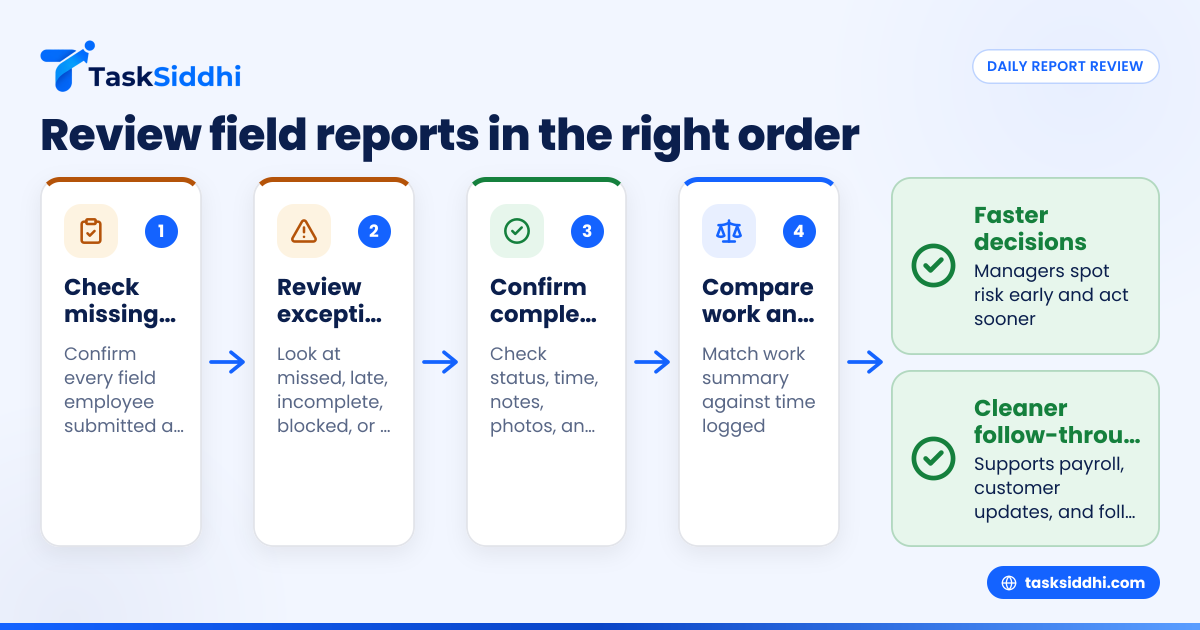
Start with exceptions, not every line item. Review missed jobs, late arrivals, incomplete work, missing proof, and overtime flags first. Then check completed jobs, customer notes, and tomorrow’s follow-ups. A good review process should take minutes, not hours, because the report format is already standardized.
That short answer matters because most managers review in the wrong order. They start at the top of a long spreadsheet or read messages one by one. That wastes time and hides risk.
A better review sequence looks like this.
1. Check who did not submit a report
Before reading details, confirm that every field employee submitted a daily update. If one person is missing, your review is already incomplete.
This first check matters because missing reports create hidden problems:
- Unlogged time
- Unconfirmed site visits
- Delayed customer updates
- Open jobs that look complete
- Payroll or billing disputes later
If your team uses a structured workflow, this should be visible in one place rather than through follow-up calls.
2. Review exception jobs first
Exception jobs need attention before routine completions. These usually include:
- Jobs marked incomplete
- Jobs needing a return visit
- Missing parts or access issues
- Customer complaints
- Safety concerns
- Jobs with no photo proof or weak notes
- Time entries that look too high or too low
This is where a manager creates value. You are not just collecting reports. You are removing blockers before they carry into the next day.
3. Confirm completed work with proof
For jobs marked complete, look for the minimum proof required by your process. That often includes:
- Arrival and completion time
- Job notes
- Photos
- Site or customer confirmation
- Parts or materials used, if relevant
- Clear next step, if anything remains
For teams that do site work, field visits workflows are especially useful because proof of presence and completion can sit alongside the actual job update.
4. Compare work done against time logged
A report is stronger when the work summary and time entry match. If a technician reports a 20-minute fix but logs six hours, that needs review. If a full-day install has no time record, that also needs review.
This does not mean every difference is wrong. Travel, waiting on-site, customer delays, and supply runs all happen. But a manager should be able to see the difference and ask one clear follow-up question.
5. Check tomorrow’s follow-ups before the day ends
The best daily report does not only explain what happened today. It also makes tomorrow easier.
Every incomplete or at-risk job should end with one of these statuses:
- Waiting for customer
- Waiting for parts
- Needs revisit
- Escalated
- Ready to invoice
- Closed
This keeps your next day from starting with guesswork.
What should be included in a daily field report?
A daily field report should include job name, site, status, time spent, notes, photos, and next step. Keep it short and structured. If your team writes long free-form reports, review becomes slow and inconsistent, and important details get buried.
Once that core is in place, add only what helps a manager act. More fields do not always create better visibility.
The minimum fields most U.S. field teams need
For service jobs, site visits, and client work, the daily report usually needs these fields:
- Employee name
- Date
- Customer or site
- Job or task reference
- Arrival time
- Completion time or current status
- Work performed
- Photos or proof
- Parts, materials, or issue notes
- Next step or follow-up need
This format works well because it supports both operations and office review. It can also support payroll discussions, billing prep, and customer updates without requiring a second round of note-taking.
What to avoid in report design
Avoid these common mistakes:
- Too many optional fields
- Long open text sections
- Different report formats for different supervisors
- Reports submitted only at the end of the week
- Proof stored outside the job record
- Time tracked in one tool and notes kept elsewhere
A simple structure is easier to follow in the field. It is also easier to review in the office.
Build a daily review process your team will actually follow
The best reporting system is the one your field staff can complete quickly from the job site. If reporting takes too long, the quality drops. If review takes too long, managers stop doing it consistently.
Here is a practical process for teams of 5 to 30 people.
Step 1: Set one submission deadline
Pick one clear deadline for all field reports. Many teams choose end of shift or a fixed evening cutoff. What matters is consistency.
When every report lands by the same time, managers can review in one block. That is much easier than handling updates across the entire evening.
Step 2: Use one standard job status list
Do not let each employee invent their own wording. “Done,” “completed,” “fixed,” and “all set” may sound the same, but they are not useful for filtering.
Use a short list such as:
- Not started
- In progress
- Completed
- Needs follow-up
- Blocked
- Rescheduled
With boards and views, a manager can quickly sort work by status instead of reading every note in order.
Step 3: Require proof only where it matters
Not every job needs ten photos. Not every visit needs a long summary. But some proof should be mandatory for certain work types.
For example:
- Before-and-after photos for repair work
- Site photo for attendance confirmation
- Customer note for blocked access
- Material note for return visit planning
This keeps the reporting process practical.
Step 4: Review by exception, then by team member
First review the jobs with risk. Then look at each team member’s day as a whole. This helps you see workload balance, travel-heavy schedules, and people who need support.
For service-heavy teams, service jobs workflows help keep job updates and outcomes tied together.
Step 5: Close the loop before the next morning
At the end of review, each exception should have a next action:
- Call customer
- Reassign technician
- Order part
- Approve extra time
- Schedule return visit
- Mark ready for office follow-up
If you skip this step, daily review becomes passive. The point is not just to read reports. The point is to move work forward.
How can software replace Excel, texts, and paper for daily reports?
Software replaces Excel, texts, and paper by giving field staff one place to update jobs, log time, add proof, and submit notes from their phones. Managers then review the same records in a structured view instead of piecing together messages and spreadsheets.
That is the practical shift. You are not digitizing paper for its own sake. You are creating one reliable source of truth for the day’s work.
What good reporting software should do
For field reporting, look for a tool that can:
- Organize work by job, customer, site, or team member
- Support mobile updates from the field
- Capture notes, photos, and status changes
- Track time against jobs
- Show daily activity in a manager-friendly view
- Support follow-up actions after review
TaskSiddhi is built for this kind of work. A manager can use features built around jobs, visits, and work tracking instead of forcing field operations into general-purpose spreadsheets.
Why mobile submission matters
Field employees rarely sit at desks. If reporting depends on waiting until they return to the office, reports will be late or incomplete.
A mobile app helps because updates can happen at the site while details are fresh. Photos, notes, and time entries are more accurate when captured in the moment.
Why time and reporting should stay connected
Managers often review daily reports and time logs separately. That creates extra effort and more mismatches.
When time tracking sits close to job reporting, a manager can review work output and labor input together. That supports cleaner decisions about scheduling, overtime, and follow-up.
Why automation helps small teams
Many owners ask an ai how question without saying it directly. They want to know how the system can reduce manual chasing. In practice, the answer is usually workflow rules, reminders, and status-based actions rather than magic.
Simple automation can help remind staff to submit updates, move jobs based on status, and surface missing proof before the office starts calling around.
A simple scorecard for reviewing report quality
Not all daily reports are equally useful. A simple scorecard helps managers coach the team without creating more admin.
You can grade each report on five checks:
- Was it submitted on time?
- Was the status clear?
- Was the work summary complete?
- Was proof attached where required?
- Was the next step clear?
If a report fails two or more checks, it needs follow-up. If the same person keeps failing the same check, training is needed.
This approach is better than vague feedback like “send better updates.” It gives the team a repeatable standard.
For teams managing recurring jobs and office-client coordination, client work processes also benefit from the same scorecard because client updates rely on clean internal reporting.
How to roll out a better reporting workflow in 14 days
You do not need a long transformation project. Most small field teams can improve daily reporting in two weeks.
Days 1 to 3: document your current process
Write down:
- How reports are sent today
- What details are often missing
- Who reviews them
- What follow-up questions happen every day
- What delays affect customers, payroll, or scheduling
This gives you a baseline.
Days 4 to 6: define one standard report format
Choose the minimum required fields. Keep it short. Remove anything no one uses to make decisions.
Days 7 to 9: test with a small group
Start with two or three field employees. Review their updates daily. Look for missing fields, confusing statuses, and friction in mobile entry.
Days 10 to 12: train the whole team
Show examples of good and poor reports. Explain why the office needs each field. Keep the training practical.
Days 13 to 14: start daily manager review
Set one deadline. Review exceptions first. Close every exception with a next action.
If you are comparing systems, it may also help to read about free vs paid tools before deciding how much structure your team actually needs.
Common mistakes managers make when reviewing field reports
Even with better tools, poor habits can slow review.
Reading every report in full
Managers often spend too much time on routine completions. Scan for exceptions first. Then spot-check routine jobs.
Allowing too many report styles
If one supervisor wants detailed notes and another wants short updates, the team will submit inconsistent reports. Standardization matters more than preference.
Not linking reports to work status
A daily report should update the job, not sit in a separate log. If status and reporting are separate, managers will never fully trust either one.
Waiting too long to act
A report reviewed the next afternoon is often too late to fix the problem. Daily review works best when it happens soon after submission.