

Job card software helps a small service business replace paper work orders with one shared system for jobs, notes, photos, time, and status. In the United States, the right tool should make dispatch, field updates, customer proof, and billing support simpler without adding heavy setup or cost.
Key takeaways
- Good job card software should replace paper, texts, and spreadsheets with one clear job record.
- Small U.S. service teams need mobile updates, photos, signatures, time logs, and easy reporting.
- The best setup is simple enough for technicians to use from day one in the field.
- Look for tools that support dispatch, site proof, job history, and billing handoff to QuickBooks or your office workflow.
- Before you switch, map your current paper process so nothing important gets lost.
- If you serve customers across cities like Chicago, Houston, or Detroit, consistency matters more than fancy features.
What is job card software in the United States?
Job card software in the United States is a system for creating, assigning, updating, and closing service jobs digitally. It replaces paper work orders, whiteboards, and scattered WhatsApp-style group messages with a single job record your office and field team can follow.
For a small service business, that job record usually needs to cover the basics:
- customer name and address
- job type
- scheduled date and time
- technician assigned
- parts or materials used
- photos from the site
- notes about the issue and work done
- proof of visit or completion
- time spent
- job status
If you run HVAC, plumbing, equipment maintenance, cleaning, pest control, repair, or inspection work, paper job cards often fail in the same ways. Handwriting is hard to read. Sheets go missing. Photos stay on personal phones. The office waits for updates. Billing gets delayed because a signed work order never makes it back.
That is why many owners search for job card software united states when they are ready to stop managing service work through binders, spreadsheets, and text threads.
Why are paper work orders a problem?
Paper work orders slow down scheduling, updates, and billing. They also create errors because the office, techs, and customers are often looking at different information.
Here is what usually happens with paper:
- The office writes or prints a work order.
- A technician takes it to the job site.
- Changes happen during the day.
- Extra notes go into texts, calls, or memory.
- Photos sit on a phone.
- The paper returns late, damaged, or incomplete.
- Invoicing gets held up.
For a five-person or 20-person team, these small gaps add up fast. One missing signature can delay payment. One unclear note can trigger a callback. One forgotten part can create a second truck roll.
This matters even more when your team is spread across a metro area. A service company in Houston or Chicago may have technicians moving between several jobs each day. The office needs live status, not end-of-day paper.
The hidden cost of paper job cards
Paper looks cheap because the form itself costs little. The real expense is the labor around it.
You pay for:
- admin time to enter handwritten notes
- repeat calls to clarify job details
- extra trips from incomplete first visits
- slower invoicing
- disputes when there is no photo proof
- weak visibility into technician time and job volume
A small team can absorb this for a while. But once the owner starts chasing updates all day, the process is already too expensive.
What should small service businesses look for first?
Start with usability, not complexity. The best software is the one your office and field team will actually use every day.
If your technicians are not desk workers, the system must be fast on a phone. It should take only a few taps to open a job, update status, add notes, attach photos, and close the work.
Look for these core capabilities first:
1. Easy job creation and assignment
The office should be able to create a job card in minutes. It should include customer details, site address, due date, assigned technician, and the scope of work.
For a growing service team, visual planning also helps. TaskSiddhi offers boards and views that make it easier to see scheduled, in-progress, and completed jobs in one place.
2. Mobile use in the field
Your technicians need a reliable mobile app so they can work from the driveway, basement, plant floor, or customer office. If the system only works well on a desktop, field adoption usually fails.
3. Photos, proof, and visit records
A completed job card should show what happened at the site. That often means arrival proof, notes, before-and-after photos, and customer confirmation. For teams doing on-site work, field visits matter because they create proof when questions come later.
4. Time capture
Even if you bill flat rate, you still need labor visibility. Time tracking helps you understand job profitability, technician workload, and whether estimates are realistic.
5. Status visibility for the office
The office should not need to call every technician for updates. Job status should show whether the work is scheduled, underway, waiting, or complete.
6. Reporting you can act on
You do not need complex analytics at the start. But you do need to answer practical questions. Which jobs are overdue? Which technician has the most open work? How many visits were completed this week? Good reporting supports these decisions.
What features matter most in job card software united states?
The most important features are the ones that reduce missed information between dispatch, the field, and billing. For U.S. small businesses, the software should support the real day-to-day workflow, not force a big-company process onto a small team.
Here is a practical checklist.
Clear customer and site information
Every job card should show the latest address, contact details, service history, and site notes. This helps when one customer has multiple locations or access instructions.
Repeatable job templates
If your team performs standard work, templates save time. Common fields, checklists, and instructions help every technician capture the same information.
Parts, materials, and work notes
Technicians should be able to log what they used and what they found. This makes follow-up service easier and supports billing.
Attachments and photos
Photos often prevent disputes. They also help when a second technician returns later and needs context.
Dispatch and handoff
Jobs should move smoothly from intake to assignment to completion. For recurring service and day-to-day scheduling, the software should support service jobs without extra admin work.
Light automation
You do not need a huge workflow engine. But simple automation can reduce manual steps, such as moving a job to completed after required fields are added.
Billing handoff
Many small U.S. businesses use QuickBooks for accounting and Stripe for payments. Even if your job card system does not do accounting, it should make billing handoff clean. A complete digital job record reduces invoice delays and makes back-office review faster.
Could an ai job card help a small team?
Yes, an ai job card can help if it speeds up routine admin like writing summaries, organizing notes, or standardizing job details. It should support your team’s work, not replace technician judgment or create extra review work.
The key is to stay practical. Small service businesses usually do not need flashy AI tools. They need fewer missed details and less typing.
A useful AI feature might help with:
- turning rough field notes into a clean job summary
- suggesting standard issue categories
- pulling common details into a consistent format
- helping the office review incomplete job cards faster
But even if an ai job card feature sounds interesting, it should not distract you from the basics. If technicians cannot easily add photos, track time, and mark status from the field, AI will not solve the bigger problem.
How do you choose software without overbuying?
Choose software that fits your current workflow with a little room to grow. Small teams usually need fast setup, mobile use, and clear reporting more than they need enterprise-level customization.
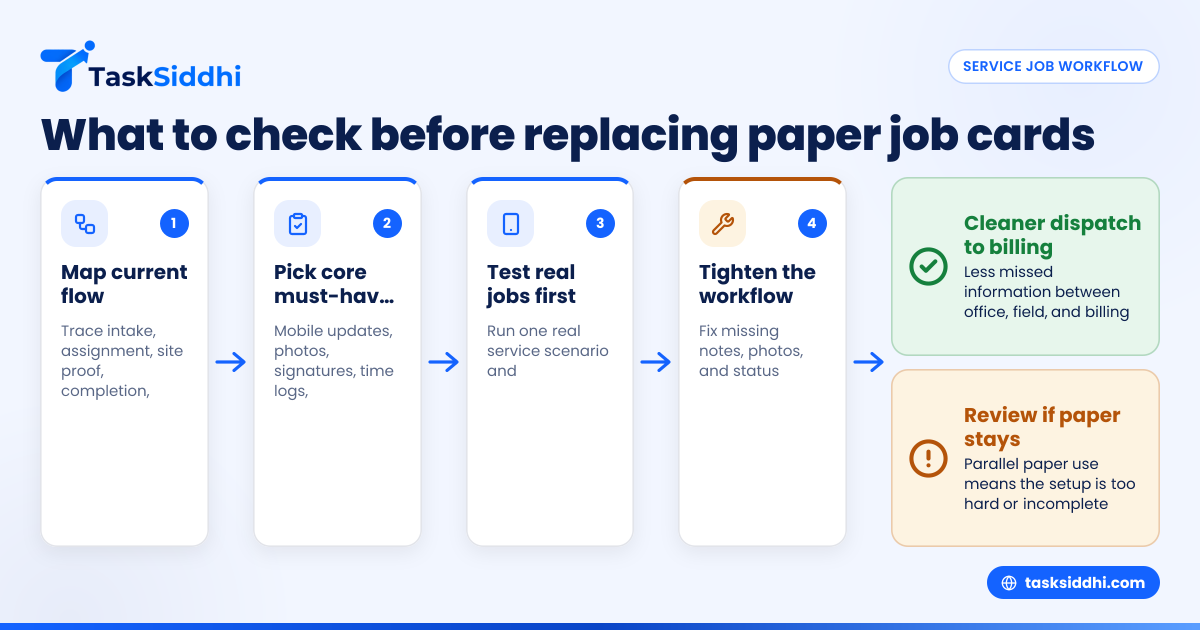
Start by writing down your actual process today. Do not begin with vendor demos. Begin with your own steps.
Map your current work order flow
List what happens from the first customer call to the final invoice:
- How does a job request come in?
- Who creates the work order?
- How is the technician assigned?
- What information does the tech need before arrival?
- What proof is collected on site?
- What must happen before billing?
- Who checks the work is complete?
This exercise usually exposes the real pain points. You may find that the main issue is not scheduling. It may be incomplete notes, missing photos, or slow handoff to billing.
Separate must-haves from nice-to-haves
For most small service businesses, must-haves include:
- phone-friendly field updates
- job notes and photos
- clear status tracking
- time logs
- easy assignment
- simple reports
Nice-to-haves might include deeper customization, advanced dashboards, or very specific workflows.
Check onboarding effort
A tool can look strong in a demo and still fail in the field. Ask yourself:
- Can a technician learn it in one day?
- Can the office create jobs quickly?
- Will managers get updates without chasing people?
- Can old paper habits stop, or will people keep parallel systems?
If your team keeps using paper “just in case,” the software is either too hard or missing a critical part of the process.
What does implementation look like for a 5 to 30 person team?
Implementation should be simple and staged. Do not digitize every process at once. Start with one job type, one team, or one branch, then tighten the workflow before a full rollout.
A practical rollout often looks like this:
Week 1: define the standard job card
Decide what every completed job must contain. For example:
- customer and site details
- scheduled date
- assigned technician
- arrival note
- issue found
- work performed
- photos
- time spent
- completion status
Week 2: set up statuses and owners
Keep statuses simple. For example:
- new
- scheduled
- in progress
- waiting
- completed
Give each stage a clear owner. The office may own new and scheduled. Technicians may own in progress and completed.
Week 3: train one small group
Pick a small team first. Do not train everyone at once. Use real jobs, not fake examples.
Week 4: review errors and tighten the process
Look for missing photos, skipped notes, or status confusion. Fix the process early before rollout to the rest of the team.
Common mistakes when replacing paper work orders
Many software rollouts fail for process reasons, not software reasons. The business tries to digitize chaos instead of simplifying it first.
Mistake 1: copying the paper form exactly
A digital job card should improve the workflow, not preserve every old habit. Keep only the fields that matter for scheduling, proof, and billing.
Mistake 2: forcing technicians to type too much
Field teams need quick inputs. Long forms reduce compliance. Use short notes, clear statuses, photos, and simple checklists where possible.
Mistake 3: skipping office adoption
If dispatchers and managers still rely on texts and side spreadsheets, the software never becomes the source of truth.
Mistake 4: no completion standard
If one technician closes a job with two photos and another closes one with no note at all, reporting becomes unreliable.
Mistake 5: choosing based only on price
Price matters. But the cheapest option can become expensive if it leads to weak adoption, duplicate entry, or missing records. It helps to review free vs paid options with your real workflow in mind.
How does TaskSiddhi fit service job workflows?
TaskSiddhi is built for teams that need a simple task board and work-management system for field and service operations. It helps small teams organize jobs, assign work, track status, capture time, and keep site updates in one place.
For service businesses replacing paper work orders, TaskSiddhi can support practical day-to-day needs:
- create and assign jobs from one shared workspace
- track progress across teams with features built for work management
- capture field updates and proof with mobile-friendly workflows
- monitor time and job movement without chasing the team by phone
- review job history and team output with straightforward reports
This is especially useful for service managers who handle many moving jobs at once and need one clean record instead of scattered calls, messages, and paper.
TaskSiddhi can also work well for businesses that handle a mix of service, project, and recurring customer work. If part of your operation includes longer-running customer delivery, client work can sit alongside service jobs in the same system.
How should you compare vendors?
Compare vendors by running one real service scenario through each tool. Use your own workflow and test the full path from intake to completion.
Ask each vendor or trial account these questions:
- How quickly can I create a new job?
- Can a technician update it from a phone in under a minute?
- How are notes, photos, and time stored?
- Can the office see job status without calling the field?
- What reports can I get weekly?
- How hard is training for a 10-person team?
- What happens when a job changes mid-day?
Also think about customer and buyer expectations. If you serve commercial clients, they may ask process and security questions during procurement. While you should not assume any certification, you should still understand how the software fits your internal controls, especially if larger buyers mention SOC 2 expectations or audit readiness in vendor reviews.
When is the right time to switch from paper?
The right time is usually earlier than owners think. If you are spending hours each week chasing updates, re-entering notes, or delaying invoices, paper is already costing you more than it seems.
A few clear signals mean it is time:
- jobs are missed or duplicated
- techs send updates through many channels
- the office cannot see live job status
- photos and notes are hard to find
- billing waits on paperwork
- the owner acts as the main dispatcher every day
At that point, moving to digital job cards is not about adding software. It is about making the business easier to run.
If you want to see a practical setup for service operations, take the product tour or compare options on pricing.
Frequently asked questions
What is the difference between a job card and a work order?
In small service businesses, the terms are often used the same way. A job card usually refers to the working record of the service job, including updates, notes, photos, and completion details. A work order may also include the original service request and scheduling details.