














Job card software helps small Delaware service businesses track field tasks, staff time, and job status while capturing proof of work done. It replaces spreadsheets and WhatsApp with organized digital job cards, improving efficiency, accountability, and customer communication.
Key takeaways
- Job card software simplifies field task tracking and proof collection for Delaware small service businesses.
- Digital job cards replace paper forms and Excel sheets, reducing errors and delays.
- Features like photo proof, time tracking, and reporting boost productivity and accountability.
- AI job card tools can automate data capture and job updates to save manager time.
- Choose software with mobile app support for technicians working onsite in Delaware.
- Evaluate options based on ease of use, integration with QuickBooks or payment tools, and customization to your workflow.
Why Delaware small service businesses need job card software
In Delaware, managing small teams handling service jobs like HVAC repairs in Wilmington, landscape services in Newark, or cleaning contracts in Dover, is complex. Phone calls, WhatsApp groups, and paper job cards often cause missed info, lost documents, and slow billing.
Job card software replaces these fragmented systems with centralized digital boards and job cards. Your supervisors assign and monitor field work in real time. Workers submit photos, materials used, and job completion proofs right from the site using a mobile phone.
For example, a pest control company in Newark can instantly see which technician is free, what jobs are incomplete, and receive client sign-offs digitally. This improves response times and reduces customer disputes around work quality or hours billed.
How does job card software streamline field task tracking?
Job card software streamlines field task tracking by creating digital job cards for each service assignment that track assigned employee, status, time spent, materials used, and customer approvals.
Instead of juggling paper forms or Excel sheets, managers create a job card on their computer or mobile device. This card includes the client details, scope, expected timing, and any special instructions.
Field workers update job status on their phones — marking start and finish times, adding notes, or uploading proof photos that document work done. This live data replaces guesswork and prevents lost information.
For example, a small Delaware plumbing service in Dover logs service calls in job cards. When a technician arrives onsite, they clock in on the job card, upload photos of pipe repairs, and capture client signoff electronically. The office gets instant visibility and can start invoicing right away.
What is an ai job card and how can it help Delaware service teams?
An ai job card uses artificial intelligence to automate capturing and processing job details like work descriptions, timings, or photos, reducing manual entry and errors.
AI-powered job card software can recognize work-related info from uploaded images or texts and automatically fill fields to speed up job documentation. It can also suggest common parts or tasks based on previous jobs, making data entry faster for your technicians.
Delaware service businesses get higher accuracy and save admin time. Instead of technicians spending minutes typing notes on their phones, AI suggests options or auto-fills reports for the supervisor to review. This is especially helpful for teams with limited administrative support or those handling many similar service calls.
How to choose the right job card software for a Delaware-based small service business
Choosing the right job card software means matching your business needs, team size, and workflows with software features and ease of use.
- Mobile app support: Your field technicians spend time onsite across Delaware—whether in Wilmington, Middletown, or Bear—and need an intuitive mobile app. The app must work offline in low-signal areas and sync updates when connected.
- Customization: Look for software that lets you customize job card fields for service types, parts used, or checklists relevant to your work.
- Proof capture: Support for uploading photos, signatures, or GPS check-ins to validate job completion is essential to track quality and reduce disputes.
- Time tracking and billing integration: Time entries on job cards should feed into payroll or billing platforms like QuickBooks or Stripe. This removes double data entry.
- Reporting: Choose software with reporting that provides insights into team productivity, job status, and client service patterns for informed decision-making.
- Automation: Features like auto-updating job statuses or alerting managers when jobs fall behind save time on manual follow-up.
How does job card software improve customer communication for Delaware small businesses?
Job card software improves customer communication by providing clients timely updates on job progress, transparent reports, and digital proof of completed work.
You can share job cards or summary reports with clients by email directly from the software, keeping everyone informed without back-and-forth phone calls. Clients receiving photos of completed work and approval signatures boost trust.
For instance, a roofing company in Rehoboth Beach can send status updates after each phase—inspection, repair, cleanup—linked to digital job cards. This enhances professionalism and reduces disputes over scope or billing.
What costs should Delaware small business owners expect for job card software?
Job card software pricing varies widely depending on features, number of users, and deployment mode (cloud vs installed).
Many providers offer tiered monthly subscriptions starting around $15-$30 per user for basic task and proof management. Advanced plans with AI job card capabilities, reporting dashboards, and automation typically cost more.
Some vendors also charge setup or training fees, so factor those in. Since your Delaware-based business will save admin time and billing errors with software, consider the ROI rather than just sticker price.
Where possible, try free trials or demo versions to verify the software fits your team’s workflow. You can check free vs paid options and compare plans at pricing.
How to implement job card software in your Delaware field service business
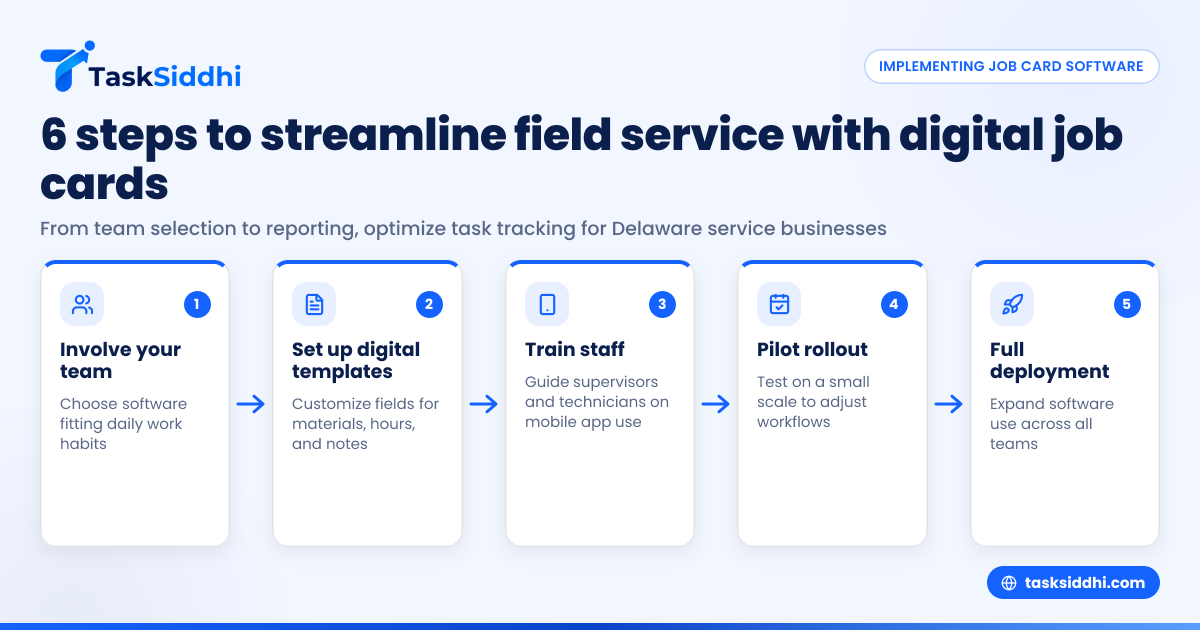
Step 1: Involve your team in choosing software so the solution fits daily work habits.
Step 2: Set up digital job card templates with the fields your workers need (materials, hours, client notes).
Step 3: Train your supervisors and field technicians on how to create and update job cards using the mobile app.
Step 4: Start with a small pilot—maybe one type of service or location—to adjust workflows and customize templates.
Step 5: Gradually roll out across all service teams, providing ongoing support and monitoring usage.
Step 6: Use reporting features to analyze productivity, workflow bottlenecks, and customer satisfaction trends.
How TaskSiddhi helps Delaware small service businesses with job card software
TaskSiddhi offers tailored service jobs management with simple yet powerful job card boards, time tracking, photo proof, and mobile app access. Delaware teams can assign work remotely, track live status, and digitally capture customer approvals.
With automation, common jobs can auto-update status or remind workers of pending tasks. Its reporting tools help managers monitor team efficiency and workload balance. Integrations with tools like QuickBooks streamline billing after job completion.
If your Delaware small business struggles with fragmented job tracking or proof collection, see how it works on the product tour. To find the best fit, compare plans at pricing.
Frequently asked questions
What is job card software used for?
Job card software is used to manage and track service tasks, employees, time spent, materials used, and proof of completed work. It replaces paper or spreadsheet systems with digital job cards accessible via mobile and desktop.
Can job card software help with billing and invoicing?
Yes. Many job card systems integrate or export time and materials data to accounting platforms like QuickBooks, simplifying accurate billing and reducing paperwork.
Does job card software require internet at the job site?
Most offer offline mode where technicians can update job cards without internet. Data syncs automatically once the device reconnects, ensuring continuous productivity in low-signal Delaware areas.
How secure is job card software?
Good software uses encryption and secure cloud servers to protect your business and customer data. Check for compliance with data protection standards and read privacy policies before choosing.
What is the benefit of using an ai job card?
An ai job card automates data capture and field updates by recognizing images or text inputs. This reduces manual entry, speeds up reporting, and improves accuracy for busy teams.
Can I customize job cards to fit my service business?
Yes. Most job card software lets you add or modify fields, checklists, and information relevant to your specific service type, ensuring better alignment with your unique workflows.