














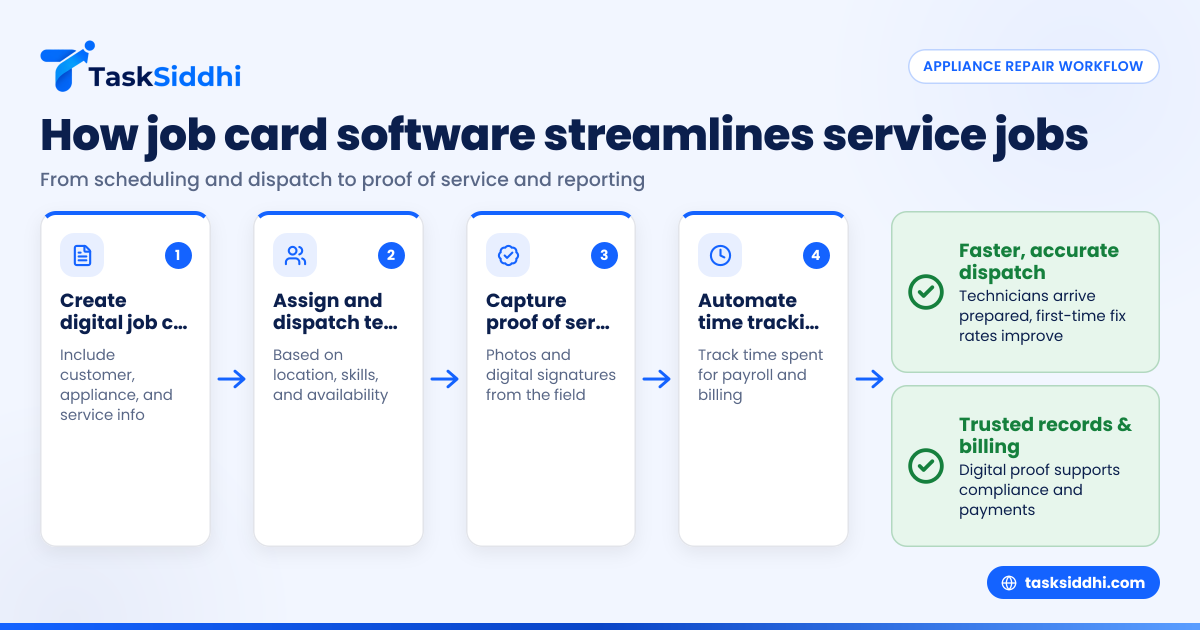
Job card software helps small appliance repair businesses in the United States organize their work, dispatch technicians efficiently, and collect proof of service. It replaces paperwork with digital job cards, schedules visits, tracks time, and stores client details, improving accuracy and saving time.
Key takeaways
- Job card software simplifies scheduling, dispatch, and documentation for appliance repair teams.
- It provides digital proof of service with photos and signatures from the field.
- AI job card features can automate data entry and prioritize jobs based on urgency.
- Integrations with QuickBooks and Stripe streamline billing and payments.
- Mobile apps offer technicians real-time access to job details and site updates.
- Reporting features help managers monitor team performance and client satisfaction.
Why small appliance repair businesses need job card software
Managing a small appliance repair team in cities like Chicago or Houston comes with challenges. Coordinating technicians while juggling customer calls and paperwork often leads to missed details and delays. Using physical job cards or spreadsheets wastes time and risks losing critical information.
Job card software replaces paper forms with digital job cards accessible on mobile devices. Managers create job cards that include customer info, appliance details, and service history. Dispatchers assign jobs to available technicians based on location and skills. This system helps teams:
- Cut down on errors from handwritten notes
- Dispatch technicians faster and more accurately
- Access client and job details on the go
- Record work status, parts used, and time spent
- Collect proof of service instantly
Instead of calling back to the office for updates, field teams capture photos or digital signatures as evidence. This transparency builds trust and reduces disputes. Automated time tracking and detailed job histories contribute to smooth invoicing and payroll.
How can AI job card features help appliance repair teams?
AI job card technology uses machine learning to automate repetitive tasks and improve job prioritization. It can read customer emails or messages to auto-fill job cards with relevant details. AI analyzes historical data to schedule urgent repairs sooner or suggest optimal technician routes.
For example, an AI job card system might flag a refrigerator repair calling for expedited parts ordering. It could also predict delays by identifying job bottlenecks early. These features reduce manual data entry and enhance decision-making, freeing up managers to handle complex issues.
Integrating AI into job card workflows allows smaller appliance service businesses to deliver faster, more accurate service while managing resources efficiently. Though AI features add sophistication, basic job card functionality already boosts team productivity significantly.
What are the key features to look for in job card software?
Choosing job card software for your appliance repair business depends on your team size and workflow. Look for a system with:
- Customizable job card templates to include appliance specs and service checklists
- Easy job assignment and dispatch calendars
- Mobile app support so techs can view work orders on-site
- Time tracking per job for payroll and reporting
- Photo and signature capture for proof of service
- Integration with QuickBooks or Stripe for billing and payments
- Reporting dashboards showing job statuses, technician productivity, and client feedback
- Automated reminders for follow-ups or maintenance contracts
Software like TaskSiddhi offers these features and more, tailored to service teams working from the field. The platform supports boards and views that let you manage jobs visually and track progress easily.
How does job card software streamline technician dispatch?
Job card software streamlines dispatch by centralizing all job details and team availability. The dispatcher can assign tasks instantly using a drag-and-drop interface linked to a shared calendar. When a client calls from Detroit requesting microwave repair, the system checks for the nearest technician free at the right time.
Technicians receive real-time notifications on their mobile devices. They can confirm jobs or request rescheduling. Since the job cards hold all prior service history and parts used, the technician arrives fully prepared. This reduces unnecessary trips and improves first-time fix rates.
Automated alerts during the day keep everyone on schedule. Managers can quickly reassign tasks if a job overruns or if parts are delayed. The digital trail in job cards ensures accountability and helps monitor workload balance.
What compliance and legal benefits does job card software offer?
For small appliance repair firms in the US, maintaining accurate records is key to compliance and customer trust. Digital job cards provide timestamps, client signatures, and photo proof that services were delivered to agreed standards.
This documentation supports warranty claims and protects against liability disputes. It also aids in filing 1099 forms when subcontractors are involved by clearly recording hours and jobs completed. Using job card software reduces reliance on manual logs subject to errors or loss.
Compliance with CAN-SPAM and TCPA rules matters if you use automated texts or emails in client communications—software with integrated messaging ensures opt-in consent and tracks communications. Proper record keeping can also satisfy requirements buyers may have for service quality.
How does job card software fit into your finance and reporting workflow?
Integrating job card data with finance apps like QuickBooks or Stripe takes the hassle out of billing. Once a job is completed and signed off on-site, invoicing can be generated automatically based on parts and labor captured in the job card.
Detailed reports pull together metrics on technician efficiency, job types, and revenue per client. Managers can spot trends like which appliances require frequent repairs or which technicians have high client ratings.
Accurate time tracking on job cards also speeds payroll processing and supports transparent subcontractor payments. Reporting and analytics help owners make informed decisions to scale operations or adjust pricing competitively.
TaskSiddhi’s reporting tools provide customizable insights that fit your day-to-day management needs, enhancing long-term planning.
How secure and accessible is job card software for remote teams?
Security and accessibility matter when your team works across multiple locations or customer sites. Cloud-based job card software lets everyone access up-to-date information securely anywhere with internet.
Role-based access controls prevent unauthorized viewing or editing of sensitive client or payroll data. Data encryption protects records both in transit and at rest.
For field technicians, mobile apps that work offline ensure uninterrupted access even in areas with poor connectivity. Job updates sync automatically when back online.
Being able to access job cards and proof of service from any device ensures smooth collaboration between office, warehouse, and field teams.
How much does job card software cost for small appliance repair businesses?
Job card software pricing varies based on features, number of users, and support options. Some vendors charge per user per month, while others offer bundled plans for small teams.
Many offer a free tier with limited functionality to try before committing. Paid plans typically unlock advanced features like AI job card automation, integrations, and automation rules.
Assess your team’s needs carefully before choosing. Consider the time saved on dispatch and paperwork plus the benefits of accurate job tracking and proof of service when budgeting.
To compare plans that fit your business size, visit TaskSiddhi’s pricing page.
How to implement job card software in your appliance repair business
Switching from paper or spreadsheets to job card software can be smooth with the right approach:
- Identify key workflows and pain points in your current job dispatch and reporting system.
- Choose software that matches your operational needs and integrates with finance or CRM tools you use.
- Set up job card templates with relevant fields for appliance types, service notes, and parts used.
- Train your dispatch team and technicians on mobile app use and job card updates.
- Start with a pilot on a few jobs to iron out issues before rolling out fully.
- Use reporting dashboards to monitor improvements and tweak your workflows.
Regular feedback from field staff ensures the software supports their daily tasks efficiently.
Where can you see job card software in action?
If you manage a small appliance repair business and handle service jobs manually, exploring job card software can transform your operations. From streamlined dispatch and real-time updates to proof of service and integrated billing, it brings all aspects of service management under one roof.
Check out a free product tour to see how TaskSiddhi’s mobile app and digital boards can simplify your service jobs. Compare plans to find one suited for your team size and budget on the pricing page.
Frequently asked questions
What is job card software and how does it help appliance repair businesses?
Job card software digitizes the traditional job sheet, letting teams create, assign, and track service jobs easily. It helps eliminate paperwork errors, speeds up dispatch, and collects proof of service like photos and signatures, improving accuracy and customer satisfaction.
Can job card software integrate with QuickBooks and payment systems?
Yes, many job card solutions offer integrations with popular accounting and payment platforms like QuickBooks and Stripe. This enables automatic invoicing and smoother cash flow management based on completed jobs.
How do AI job card features improve scheduling and dispatch?
AI job card functions automate data entry by extracting info from customer messages and suggest technician assignments based on location and urgency. They can also prioritize tasks dynamically and alert managers to delays, enhancing efficiency.
Is job card software secure for confidential customer data?
Reputable job card software uses encryption, secure cloud storage, and role-based access controls to protect sensitive data. Mobile apps often support offline mode with secure syncing, ensuring data safety for remote field teams.
Do I need a mobile app to use job card software effectively?
Most appliance repair teams benefit greatly from a mobile app, which allows technicians to access job details onsite, update job status, capture proof of service, and communicate with dispatchers, all in real time.
What costs should I expect when adopting job card software?
Costs depend on the number of users and features. Entry-level plans might be free or low-cost, while advanced plans with AI automation, integrations, and detailed reporting cost more. Evaluate your team’s needs and savings on manual work to justify expenses.