














Service job tracking is essential for landscaping teams in the United States to improve dispatch accuracy, manage work in real time, and collect proof of completed jobs with mobile apps. It streamlines communication, enhances accountability, and helps businesses maintain high customer satisfaction.
Key takeaways
- Service job tracking helps organize and dispatch landscaping jobs efficiently across teams in cities like Chicago and Houston.
- Mobile apps enable real-time updates, GPS-based arrival confirmation, and photo proof of work on site.
- Automated time tracking saves manual work and supports accurate payroll and billing.
- AI service job tools can optimize scheduling and resource allocation to maximize team productivity.
- Using a task board with reporting offers insights on job completion rates, delays, and customer feedback.
- Integrating service job tracking with your existing QuickBooks or Stripe accounting system simplifies finance management.
Why landscaping teams need service job tracking
Landscaping businesses in Detroit, Houston, or Chicago often juggle multiple crews across a wide service area every day. These teams typically handle lawn mowing, tree trimming, irrigation checks, and seasonal cleanups. Managing these jobs via calls, emails, or text messaging apps like WhatsApp leads to confusion and missed tasks.
For example, a manager dispatching crews in Chicago’s diverse neighborhoods may lose track of which crews have started or completed jobs due to inconsistent communication. Without a unified system, last-minute schedule shifts or client requests become difficult to coordinate, leading to delays and unhappy customers.
Service job tracking centralizes all tasks in one digital platform. Managers use a job board to assign tasks according to crew skills and location. Each crew member accesses assignments through a mobile app, which allows them to update job status instantly. GPS tracking confirms arrival and departure times, while photo and signature capture provide verifiable proof of work. This reduces errors, saves time, and expedites billing.
How does service job tracking boost dispatch efficiency?
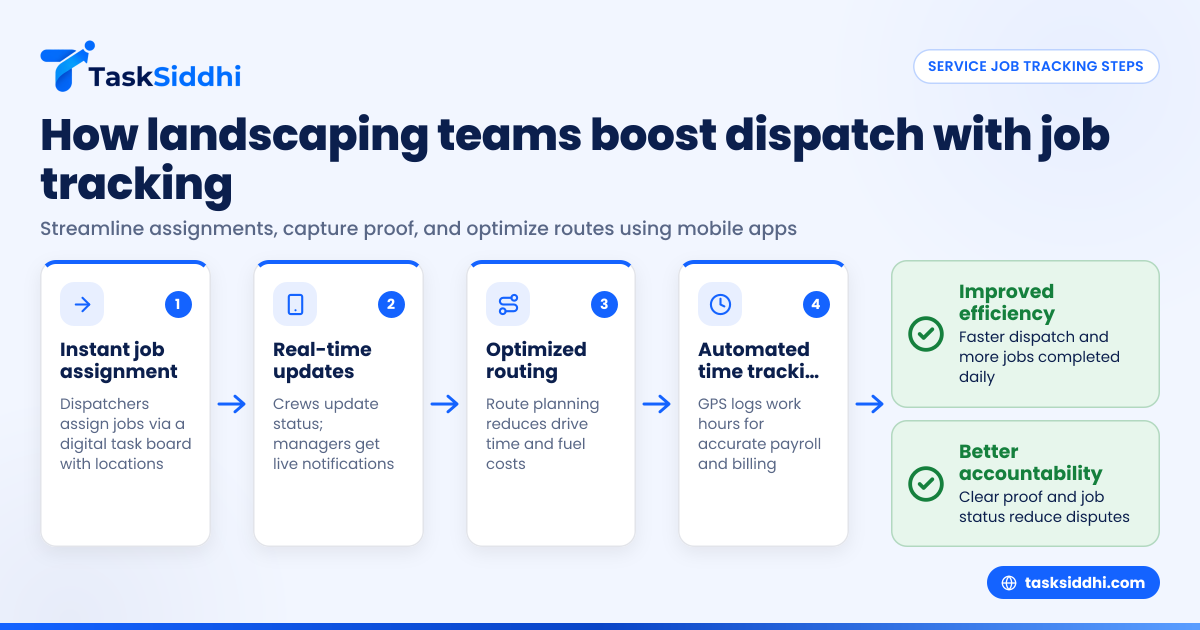
A centralized service job tracking system replaces inefficient phone or chat communication with a clear, visual workflow of landscaping tasks. Here’s how it improves dispatch operations:
1. instant job assignment
Dispatchers view all pending jobs on a task board with job details and locations, for example, a tree pruning job in Houston’s suburbs or a lawn care visit in Detroit’s residential zones. They can assign the job to the closest or best-suited crew through simple drag-and-drop or click-to-assign actions on a digital interface.
2. real-time updates
Crews update job status from their mobile devices as they accept, start, pause, or complete tasks. Managers get live notifications, eliminating the need for multiple daily calls.
For instance, when a Houston crew starts fertilizing a lawn, the manager sees the “in progress” status immediately. If an issue arises, they can communicate with the crew via integrated messaging or reassign jobs quicker.
3. optimized routing
By combining job tracking with route optimization tools, businesses minimize drive times and fuel expenses—critical in spread-out metro areas like Detroit or Chicago. Well-planned routes increase the number of jobs completed daily without overworking crews.
4. automated time tracking
Mobile apps with GPS capabilities automatically log work and travel times, reducing manual time sheet errors. This precision is important for payroll accuracy and compliance with U.S. labor laws. For example, crews can clock in at a client site in Detroit via GPS check-in and clock out when leaving, ensuring precise labor cost calculations and billing.
What are the best ways to capture proof on site?
Collecting proof helps protect landscaping companies against invoicing disputes and builds customer confidence. Here are effective methods:
photos and videos
Workers can capture photos or short videos on their smartphones showing pre- and post-service conditions, such as freshly mulched flower beds or clear irrigation systems. These visual proofs upload directly to each job card for manager and client review.
Example: After trimming hedges in a Chicago garden, crews snap a photo and attach it to the job card, timestamped and geotagged.
digital customer signatures
Obtain customer sign-off using electronic signature capture through the app to confirm satisfaction. This practice supports compliance with contract terms and protects against claims of incomplete work.
detailed job notes
Technicians can add notes about materials used, weather issues, or unexpected complications encountered onsite. These records give managers context for billing or customer communication.
timestamped GPS check-ins
Confirming location with GPS-based arrival and departure logs verifies that work took place at the scheduled time and place, helping resolve customer disputes.
How can AI service job tools help my landscaping business?
Artificial intelligence (AI) embedded in service job tracking systems offers advanced capabilities beyond manual planning. Here’s how AI can enhance your landscaping operations:
predictive scheduling
AI algorithms analyze historical job data, including average time per task and travel distances between clients. Using this data, the system predicts job durations more accurately and helps dispatchers assign realistic workloads.
For example, if trimming an acre of lawn in Detroit usually takes 2 hours, the system schedules accordingly, avoiding overbooking.
dynamic rerouting and rescheduling
When unexpected events occur—like a last-minute cancellation or crew delay—AI tools suggest optimal adjustments. It might reroute crews to nearby jobs or postpone less urgent tasks to maximize productivity.
workload balancing
AI ensures that no crew is overloaded while others remain idle by evenly distributing tasks. This balance maintains morale and reduces burnout.
automated customer notifications
Compliant AI-driven messaging can send appointment reminders or follow-up surveys electronically, streamlining customer communication. These messages adhere to U.S. regulations such as the Telephone Consumer Protection Act (TCPA) and CAN-SPAM, avoiding legal risks.
Step-by-step guide to implementing service job tracking for landscaping teams
Implementing a service job tracking system requires a clear plan:
1. choose the right software
Look for a platform that supports digital job boards, mobile proof capture, time tracking, real-time updates, and reporting. Ensure it offers a user-friendly mobile app usable by your crews in the field.
2. set up team workflows
Configure job boards reflecting your typical landscaping jobs and define statuses like pending, in progress, or completed. Assign user roles (manager, dispatcher, crew) based on responsibilities.
3. train your crews
Conduct training sessions so crews learn how to accept jobs, update job status, upload photos, capture signatures, and use GPS check-ins on the mobile app.
4. begin digital dispatching
Stop relying on WhatsApp groups or phone texts. Assign and update jobs directly on the digital board. Monitor task progress throughout the workday.
5. collect evidence and feedback
Require crews to capture proof of service via photos or customer signatures after each job. Gather client feedback for quality control.
6. analyze data with reporting
Use built-in reporting tools to review job completion rates, identify bottlenecks, and assess customer satisfaction trends.
7. refine processes with automation and AI
Leverage automation features to automate routine tasks like follow-up messages. Use AI suggestions to optimize future scheduling and resource allocation.
What does it cost to add service job tracking software?
Costs depend on the number of users, features, and subscription plans. Providers offer tiered monthly pricing per user or per crew. Some offer free versions with restricted features good for small teams.
In addition to software fees, consider hardware costs if employees need smartphones or tablets. However, most landscaping crews already carry phones.
Return on investment comes via saved administration time, fewer billing mistakes, quicker payment, and improved customer retention.
How do I ensure my data stays secure using mobile apps?
Service job tracking apps designed for U.S. businesses use strong encryption to protect data during transmission and storage. They implement secure user authentication and role-based access controls. Look for apps that provide regular security updates.
Avoid sharing sensitive job details only in chat apps or email where data may be vulnerable. Instead, verify your app complies with data privacy best practices and limits data access based on job roles.
Benefits beyond tracking: reporting and integration
Service job tracking software provides detailed analytics on jobs completed, crew productivity, revenue, and customer feedback.
These insights help you identify profitable routes or problem crews. For example, a report may show a Chicago crew completing on average 15 jobs per day, while another completes only 8, highlighting an opportunity to offer additional training.
Integration with popular accounting tools like QuickBooks and payment systems like Stripe streamlines payroll, invoicing, and expense tracking. This reduces manual data entry errors and saves time during tax season.
Why choose a mobile app for field service teams?
Mobile apps allow landscaping crews to work efficiently onsite—whether at a home in Detroit or a corporate campus in Houston. They can update jobs offline if network coverage is weak and sync later. This flexibility avoids paperwork and speeds up communication.
Real-time location tracking within the app enhances safety, helping managers monitor crew whereabouts during their shift. Mobile time tracking ensures accurate labor costs.
Mobile apps increase task completion rates by getting crews the latest job info instantly. They reduce disputes by tracking proof and capturing signatures immediately.
See how service job tracking works for landscaping teams on our product tour and compare plans to find what fits your business at pricing.
Frequently asked questions
What exactly is service job tracking software?
Service job tracking software helps managers assign, monitor, and document work done by field teams. It provides digital job boards, real-time updates, proof capture, and reporting to streamline operations.
Can I use service job tracking without a smartphone?
While some features may work on desktops, smartphones or tablets are essential for crews to capture proof on site, update job status live, and track time automatically.
How does service job tracking improve customer satisfaction?
By providing timely updates, verified proof of work, and prompt billing, customers feel confident in the service. This transparency reduces disputes and fosters trust.
Are there legal concerns with capturing proof using mobile apps?
Always obtain customer consent before recording images or signatures. Ensure your app complies with privacy laws and handles sensitive data securely.
How does AI influence service job tracking?
AI analyzes past job data and current conditions to optimize schedules, make crew assignments, and automate reminders, improving efficiency and reducing idle time.
Is service job tracking software expensive for small landscaping companies?
There are affordable options designed for small teams. The cost often pays for itself by reducing errors, saving management time, and accelerating invoicing cycles.