














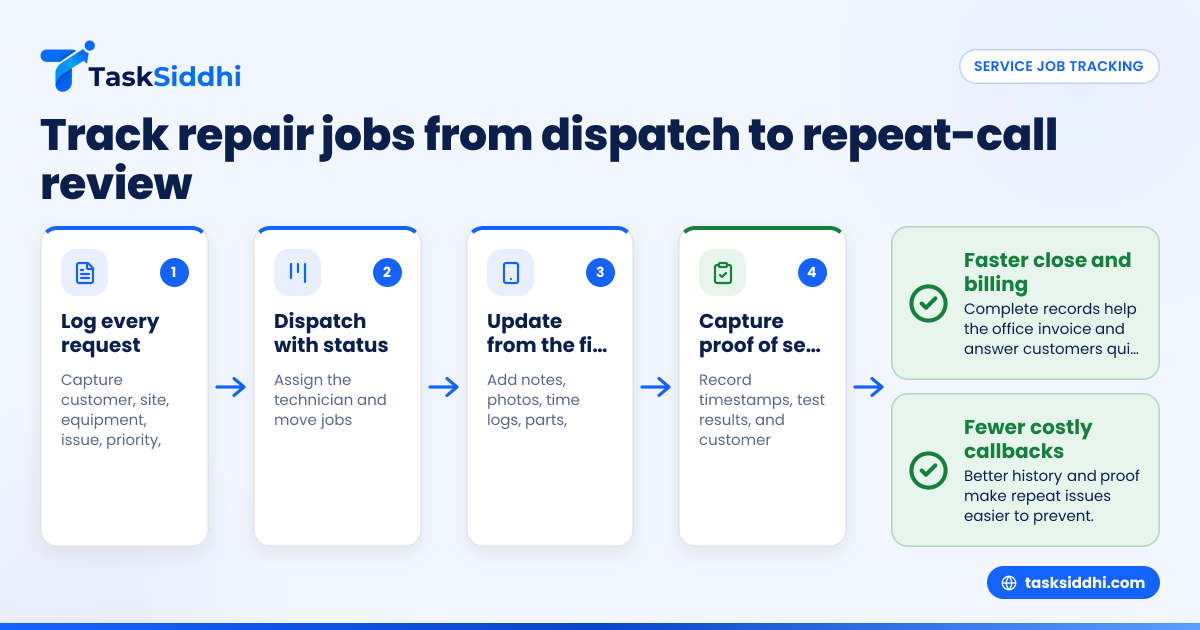
Service job tracking in the United States for commercial kitchen equipment repair teams means turning calls, texts, paper tickets, and technician updates into one clear workflow. For repair companies handling ovens, fryers, refrigeration, dish machines, and prep equipment, good tracking helps you dispatch faster, capture proof of service, and reduce costly repeat calls.
Key takeaways
- Commercial kitchen repair teams need one system for dispatch, status, technician notes, parts, labor, and customer sign-off.
- Proof of service should include timestamps, photos, work performed, parts used, and customer confirmation.
- Repeat calls often come from poor diagnosis, missing parts, weak handoffs, and incomplete job history.
- A simple job board, mobile updates, and time logs can improve visibility without adding admin work.
- Good service job tracking commercial kitchen equipment repair United States practices help owners protect margin and improve response times.
- TaskSiddhi can help teams organize service jobs, use a mobile app, and improve reporting.
Why service job tracking matters for commercial kitchen repair teams
Commercial kitchen repair is high-pressure work. Restaurants, hotels, hospitals, schools, and food service operators need equipment running fast. When a walk-in cooler is warm in Houston or a combi oven fails during lunch prep in Chicago, every hour matters.
Many small repair teams still manage work through calls, text threads, whiteboards, and paper job cards. That works until volume grows. Then jobs get missed, technician updates come late, and managers lose track of what happened on site.
Service job tracking gives you a single record for each call. That record should show:
- customer name and location
- equipment type and model
- issue reported
- priority level
- assigned technician
- scheduled visit time
- photos and notes
- labor time
- parts used
- customer sign-off
- follow-up or repeat call status
Without this structure, dispatch becomes reactive. Your office spends the day asking where a tech is, whether a unit was fixed, and why the customer is calling again.
With a structured system, you can see each job from intake to completion. That matters for speed, billing, and customer trust.
What should a commercial kitchen equipment repair job record include?
A strong job record should show who called, what equipment failed, where the site is, what the technician found, what was done, and whether the fix held. It should also capture labor time, parts used, photos, and customer sign-off so office staff can close the job and spot repeat issues faster.
For commercial kitchen repair, vague records create expensive confusion. “Fixed fryer” is not enough. Your office team, service manager, and even the next technician need more context.
Core fields to capture on every job
At minimum, every job should include:
- Customer and site details Business name, site address, contact person, phone, and site access notes.
- Equipment details Asset type, brand, model, serial number, and kitchen location if known.
- Problem description What the customer reported. Use their words when possible.
- Dispatch details Assigned technician, scheduled window, priority, and status.
- On-site findings Diagnosis, readings, failure symptoms, and conditions at arrival.
- Work performed Repairs completed, adjustments made, parts installed, and test results.
- Proof of service Photos, timestamps, technician notes, and customer acknowledgment.
- Billing inputs Labor hours, travel time if used by your business, and billable parts.
- Next action Closed, return visit needed, parts on order, quote required, or warranty review.
This level of detail helps everyone. Dispatch knows the status. The office can invoice faster. Managers can spot patterns. Technicians avoid walking into a site blind on the second visit.
Why detail matters in food service environments
Commercial kitchens move fast. There may be multiple equipment failures at one site. Different managers may work different shifts. A poor handoff causes delays and frustration.
Detailed records also help when customers question what was done. If your technician has before-and-after photos, time logs, and notes showing unit operation at departure, your team has a much stronger position.
How do you dispatch jobs without losing track of technicians?
Use one dispatch board with clear statuses, assigned technicians, promised windows, and site notes. Technicians should update the job from the field as they travel, arrive, diagnose, pause for parts, and complete work so the office does not need to chase them by phone.
A dispatch process does not need to be complicated. It needs to be consistent. Most repair teams struggle because status updates live in too many places. One update is in a text. Another is on a paper ticket. A third is in someone’s memory.
A simple dispatch workflow for small repair teams
Use this process for every call:
- Log the request immediately Create the job as soon as the customer calls or emails.
- Set priority and promised time Mark whether the issue is emergency, same-day, next-day, or scheduled.
- Assign the best technician Match by skill, territory, and likely parts needs.
- Send complete site information Include address, contact, equipment details, and issue summary.
- Require status changes in the field Move the job through stages like Scheduled, En route, On site, Waiting for parts, Completed.
- Review open jobs twice daily Check jobs still open by noon and end of day.
A visual board makes this easier. For many teams, boards and views are more useful than a spreadsheet because a manager can quickly see what is late, what is in progress, and what needs follow-up.
Use standard statuses
Keep statuses simple. For example:
- New
- Scheduled
- En route
- On site
- Quote needed
- Waiting for parts
- Return visit scheduled
- Completed
- Invoicing
If every technician uses different words, reporting breaks. Standard statuses help managers answer customer questions quickly.
What counts as proof of service for repair jobs?
Proof of service should show that your technician was on site, what work was performed, and the condition of the equipment when the visit ended. Good proof usually includes a timestamp, photos, technician notes, labor time, and customer sign-off or acknowledgment.
In commercial kitchen repair, proof matters because service calls can become disputes. A customer may say the technician never arrived. They may say the equipment was not tested. They may say the same issue returned the next day.
The most useful proof of service elements
For each completed visit, capture:
- arrival and completion times
- technician name
- photos of the equipment and work area
- failed part and replacement part photos when relevant
- notes on diagnosis and repair performed
- operating test results at departure
- customer name and sign-off, if your process uses it
Photos are especially important when conditions on site affect the repair. For example, if a condenser is blocked by grease buildup or a unit has power supply issues outside the equipment, the visual record helps later.
For field teams, field visits workflows can help standardize this record so technicians do not forget the basics during a busy day.
Make proof simple for technicians
Proof of service must be easy to capture. If the process takes too long, technicians will skip steps. A mobile-first job record works best because techs can add photos, notes, and status changes on site. That is where a mobile app becomes practical, not just convenient.
Why do repeat calls happen so often in commercial kitchen repair?
Repeat calls usually happen because the first visit did not capture the full problem, the right parts were not available, the notes were too thin, or the customer’s operating conditions were not documented. Better job history and proof of service make repeat issues easier to prevent and easier to diagnose.
Repeat calls hurt margin fast. The first visit may already include travel, technician time, dispatch time, and admin work. If the job comes back within days, your schedule gets squeezed and profitability drops.
The common causes of repeat calls
Incomplete diagnosis
A technician may fix the visible symptom, not the root cause. For example, replacing a part without documenting voltage issues or airflow restrictions can lead to another breakdown.
Missing parts or tools
If the first visit does not identify all likely parts needs, the second visit may be unavoidable. Better intake notes and equipment history help reduce this.
Weak documentation
When the next technician cannot see what happened before, they start from zero. That increases time on site and raises the chance of another miss.
No test results captured
If “unit running” is the only closing note, you do not know whether proper temperatures, cycles, ignition, or recovery times were verified.
Site conditions not recorded
Commercial kitchens are hard environments. Grease, blocked vents, overloaded circuits, water quality issues, or operator misuse can affect results. If those are not documented, your team may keep getting blamed for the same underlying problem.
Create a repeat-call review routine
Each week, review jobs that reopened within 7 to 30 days. Look for patterns:
- same equipment type
- same site
- same technician
- same part
- same failure symptom
- same customer complaint
This is where reporting helps. You do not need fancy analytics. You need enough visibility to see what is recurring and why.
Build a workflow that technicians will actually use
The best tracking process is the one your technicians follow during a busy shift. If your workflow feels like office paperwork, adoption will fail.
Keep the field process short
Technicians should be able to complete the required updates in under two minutes at each stage. Focus on the essentials:
- change status
- add a note
- attach photo
- log time
- mark next action
A lightweight process supports consistency. If a technician must fill ten long fields before moving a job forward, updates will happen late or not at all.
Use checklists for common equipment types
Commercial kitchen equipment has repeat patterns. A fryer call is not the same as a refrigeration call. Create simple checklists by category:
- refrigeration
- hot side cooking equipment
- dishwashing equipment
- ice machines
- beverage systems
- food prep equipment
Checklists help newer technicians and improve proof quality. They also reduce skipped steps.
Make job history easy to read
Before dispatching a return visit, the assigned tech should be able to see:
- prior issues
- photos from the last visit
- parts replaced
- test results
- customer comments
- open recommendations
That history is often more valuable than a long office handoff call.
Can an ai service job workflow help a small repair company?
Yes, if it reduces manual updates and helps your team keep cleaner records. An ai service job workflow is useful when it supports dispatch, notes, and follow-up without adding extra steps for technicians or creating confusion about what happened on site.
The phrase matters less than the outcome. For a small commercial kitchen repair team, practical AI use should stay focused on simple tasks:
- summarizing technician notes
- flagging incomplete proof of service
- highlighting repeat-call patterns
- reminding teams about open jobs waiting for parts
But do not let AI become a layer that hides the facts. In repair work, the original notes, timestamps, photos, and customer acknowledgment still matter most. AI can assist the process, but it should not replace job history.
A good rule is simple: if an AI feature helps your office spend less time chasing updates, it may be useful. If it creates more checking and correction, it is not helping.
TaskSiddhi is most useful when it supports the basics first, such as features, time tracking, and automation for routine status moves and reminders.
How should you track labor time and job cost inputs?
Track labor time on every visit, even if you bill flat rate for some customers. Time logs help with payroll review, technician utilization, service contract analysis, and understanding which job types are eating margin.
For many owners, labor leakage is hidden in the field. The invoice may show one hour. The actual effort may include travel, waiting for site access, follow-up calls, and a second trip.
Track these time components
Use a consistent method for:
- travel start or dispatch time
- arrival time
- work start
- work end
- completion time
Not every company bills every component. That is fine. But recording the time helps you understand operational reality. It also helps when commercial customers question labor charges.
A clear time tracking record improves both scheduling and profitability review.
Connect service records to billing
When the job record is complete, invoicing is faster. Your office team can see:
- labor hours
- parts used
- proof of completion
- customer sign-off
- follow-up requirements
That makes it easier to send accurate invoices through common tools like QuickBooks or Stripe-connected workflows without chasing technicians for missing paper tickets.
A practical setup for a 5-to-30 person repair team
Most small and midsize repair companies do not need a huge rollout. They need a basic operating system that the office and field team both trust.
Start with these five building blocks
- One intake process Every service request enters the same system.
- One live dispatch board All open jobs and statuses are visible.
- One mobile field workflow Technicians update jobs from the site.
- One proof of service standard Photos, notes, times, and sign-off are required.
- One repeat-call review Managers check reopened jobs every week.
Roll it out in two weeks
Week 1
- define statuses
- decide required job fields
- set proof of service rules
- train dispatch and one field lead
Week 2
- move all active jobs into the workflow
- train the rest of the technicians
- review missing updates daily
- adjust only what causes friction
Do not overbuild on day one. Start simple. Then improve based on real use.
If your business has separate install, planned maintenance, and emergency repair work, keep the core workflow shared but add a few specific fields by job type.
What good service job tracking looks like in daily operations
In a well-run repair business, the owner or service manager can answer these questions in under a minute:
- Which calls are still unassigned?
- Which technicians are on site now?
- Which jobs need a return visit?
- Which completed jobs are missing proof?
- Which customers have the most repeat calls this month?
- Which jobs are waiting for parts?
If you cannot answer these without calling people, your system is too fragmented.
For a commercial kitchen repair company in Detroit, that may mean fewer after-hours calls to technicians. For a team covering a broad area around Houston, it may mean better route planning and fewer wasted trips. For a company serving restaurant groups in Chicago, it may mean stronger documentation when site managers change across shifts.
The business benefit is not just organization. It is better service capacity, better cash flow, and fewer avoidable repeat visits.