














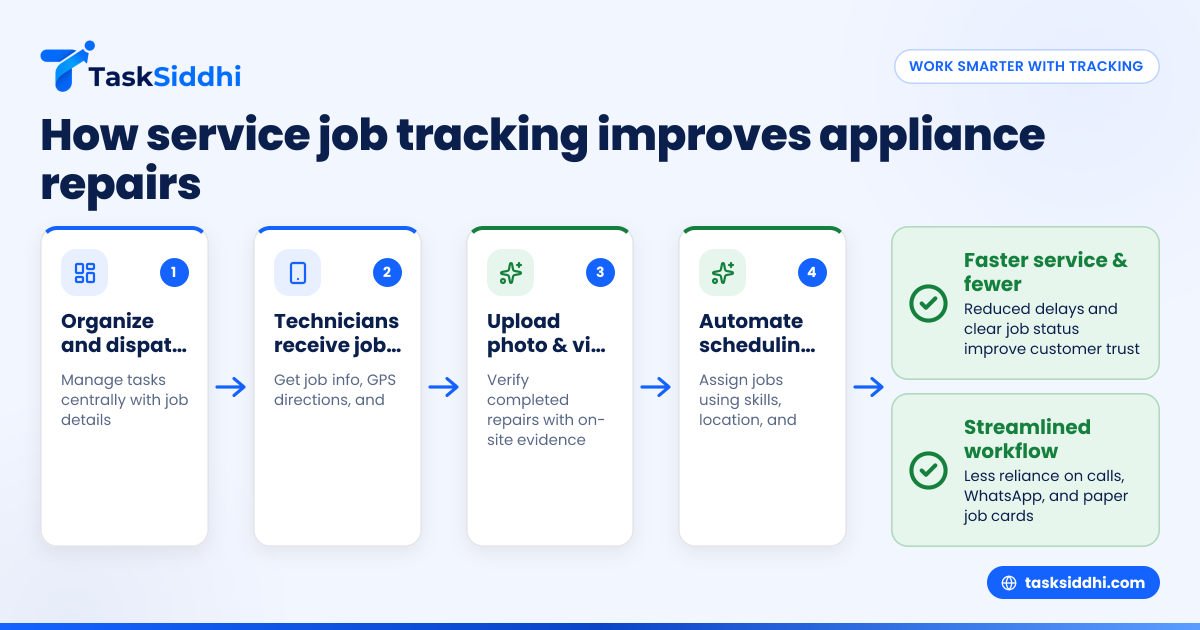
Service job tracking software helps small appliance repair teams in the United States manage dispatching, track their jobs, and confirm completed work with proof. This streamlines communication, boosts efficiency, and improves customer satisfaction all in one app.
Key takeaways
- Service job tracking software organizes repair jobs, simplifying dispatch and follow-up.
- It enables real-time updates and proof of completed work like photos and notes.
- Teams reduce mistakes and improve accountability with mobile access on site.
- AI service job features can automate task assignment, routing, and job prioritization.
- Software integrates with your billing and reporting systems for smooth post-service workflows.
- Using software decreases reliance on WhatsApp groups, paper, and Excel sheets.
Why small appliance repair teams need service job tracking software
Managing a team that repairs appliances in homes across cities like Houston or Detroit comes with challenges. Teams often use WhatsApp groups, phone calls, and paper job cards to assign tasks. This method leads to missed updates, lost details, and unclear job status.
Service job tracking software creates a central platform that acts as your digital job board and dispatch tool. Managers can assign jobs with all necessary info, see which technician is available, and track progress in real time. Field technicians receive job details on their mobile app, check in on site, add photos or video proof, and mark completion quickly.
For example, when a technician is dispatched to repair a washing machine in a Chicago neighborhood, the software alerts them, provides the customer’s contact and location, and stores all job notes. Once the work is done, the technician uploads pictures verifying the fix, and the office staff is notified automatically. This organized flow cuts job confusion and speeds billing.
How does service job tracking software improve dispatch and scheduling?
Service job tracking software automates dispatch and scheduling by using real-time data on team availability, job location, and priority. It assigns jobs to the right technician faster, reducing delays.
Dispatchers no longer juggle multiple calls or spreadsheets. Instead, with a few clicks, they can see open jobs on a map, assign tasks based on proximity or skill, and update the schedule instantly. Technicians use the mobile app to accept jobs, get directions, and report status live.
This enhances efficiency by lowering no-show rates, avoiding duplicate assignments, and minimizing travel time. It means customers get service faster and managers spend less time coordinating work.
What is an ai service job feature, and how can it help my appliance repair team?
AI service job features use artificial intelligence to automate and optimize job assignment, routing, and monitoring. They analyze data like technician skills, job urgency, traffic patterns, and past job durations to recommend the best schedule.
This tech reduces manual errors and cut down on supervisor workload. For example, if an urgent refrigerator repair request arises in Detroit, the AI feature might assign it to the closest qualified technician while postponing less urgent tasks.
Integrating AI helps teams work smarter, saving fuel costs and increasing daily job capacity. It also supports better customer service by predicting potential delays and allowing preemptive communication.
How can service job tracking software verify completed work on site?
Verifying completed work is vital to avoid disputes and ensure quality. Service job tracking software supports this by enabling technicians to upload photo or video proof immediately after repair.
Technicians can capture snapshots of fixed appliances, serial numbers, or replaced parts directly via the mobile app. They add notes explaining the repair steps, which becomes part of the job record visible to managers and customers.
This digital proof safeguards your business against fraudulent claims, helps with warranty records, and enhances transparency. It’s especially useful when customers want confirmation after the technician has left the site but before billing processes start.
Can service job tracking software integrate with accounting and reporting tools like QuickBooks?
Yes. Most service job tracking software can integrate with popular accounting tools such as QuickBooks and payment platforms like Stripe. This connection automates invoicing and improves financial tracking.
Once a job is marked complete and verified, billing details can be transferred directly to QuickBooks, reducing the chance of errors from manual data entry. Service reports generated by the software can summarize work volumes, technician performance, and revenue sources to help managers plan strategically.
Integration with your existing finance stack creates a seamless end-to-end workflow from dispatch to payment collection.
What features should I look for in service job tracking software for my small repair team?
Look for software that offers:
- Easy job creation and dispatch from any device.
- Mobile app access for field technicians with offline capabilities.
- Photo and signature capture for proof of work.
- Real-time job status updates and notifications.
- AI service job automation tools.
- Reporting dashboards to track team productivity.
- Integration with QuickBooks, Stripe, or your accounting system.
- Security features to protect customer information.
Choosing software with these key features will reduce overhead and increase job visibility.
How does service job tracking software help with customer communication?
Service job tracking software improves customer communication by sending timely status updates automatically via email or SMS. Customers receive notifications when a technician is dispatched, a visit is scheduled, and when work is complete with proof.
Reducing reliance on phone calls and texts also cuts chances of miscommunication. Customers can even provide feedback or request follow-ups directly through the app or customer portal if available.
This transparency builds trust and often results in better reviews and repeat business.
How do I transition my small appliance repair team to using service job tracking software?
Start by choosing software tailored to field service teams. Schedule training sessions to familiarize your staff with using the software and mobile apps. Gradually move your dispatch and documentation from paper or WhatsApp groups into the app.
Set clear guidelines for information needed on each job card and proof required. Monitor usage closely in the early days and provide support to technicians to solve any issues. Keep customers informed of the new process to manage expectations.
Once fully implemented, your workflow will be smoother and more professional.
Service job tracking software is essential for small appliance repair teams looking to improve dispatch efficiency, verify completed work reliably, and deliver better customer experiences. To explore how it can help your business, take a product tour or compare our pricing plans.
Frequently asked questions
What is the difference between service job tracking software and general project management tools?
Service job tracking software focuses on field service workflows with features like mobile dispatch, proof of work, and technician tracking. General project management tools often lack mobile job cards and location-based dispatch features needed for appliance repair teams.
Can my technicians use the software offline on job sites without internet?
Yes, most good service job tracking apps offer offline mode, allowing technicians to access job details, record information, and capture proof that syncs automatically when internet is restored.
How does AI improve the accuracy of job scheduling in the software?
AI analyzes factors like technician location, skills, and traffic to make optimal job assignments. This reduces human errors in scheduling and helps ensure jobs are completed faster with fewer reschedules.
Is the software compliant with US privacy and security standards?
Reputable service job tracking software vendors comply with US data privacy regulations and employ standard security measures to protect sensitive customer and business data.
Can I integrate service job tracking software with my current CRM system?
Many software solutions support integrations or data export options to connect with CRM tools. Check with the vendor for supported integrations or APIs.
How fast can we expect to see improvements in dispatch and job completion rates?
Teams often notice faster dispatch times and better job tracking within weeks of using service job software, especially as staff becomes comfortable with streamlined processes.