














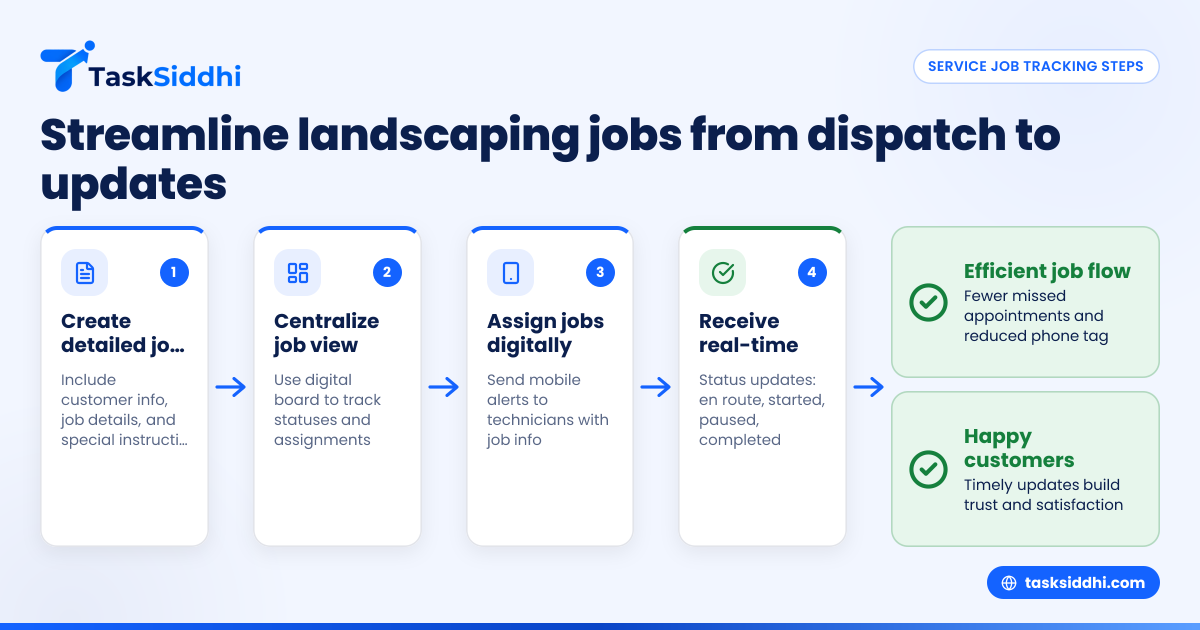
Service job tracking helps landscaping teams in the US keep organized with dispatch, customer updates, and proof of work. It improves efficiency, reduces errors, and boosts customer satisfaction by making every job visible and documented from start to finish.
Key takeaways
- Effective service job tracking streamlines dispatch and scheduling for landscaping teams.
- Mobile apps simplify real-time updates and proof collection on job sites.
- Automated notifications keep customers informed about job progress and completion.
- AI service job tools can help assign jobs faster and optimize routes.
- Tracking improves accountability by recording labor hours, materials, and photos.
- Reporting insights help managers identify bottlenecks and improve team performance.
Why is service job tracking crucial for landscaping services?
Landscaping teams often manage numerous service jobs daily. Whether maintaining lawns, installing irrigation systems, or seasonal cleanups, keeping everything in order is a major challenge. Teams working in cities like Houston or Chicago face unpredictable traffic and varying job complexity, which complicates scheduling and dispatch.
Service job tracking software solves these issues by ensuring every task is assigned, monitored, and documented efficiently. It replaces manual methods like WhatsApp groups, paper job cards, or Excel sheets prone to errors and miscommunication. Instead, it provides a single source of truth that:
- Enables quick dispatch and reassignment as needed.
- Clarifies who is responsible for each task.
- Captures timestamps, photos, and notes as proof of work.
- Sends real-time updates to customers to build trust.
The result is fewer missed appointments, less phone tag, and improved customer satisfaction. Tracking also helps owners manage labor costs and analyze team performance over time.
How can US landscaping teams streamline dispatch with service job tracking?
Dispatch is critical in landscaping. A well-planned schedule means crews spend more time working and less time driving or waiting around.
Service job tracking platforms provide centralized job boards where managers can see all open, in-progress, and completed jobs in one place. You can assign tasks considering technician location, experience, and availability, which helps avoid scheduling conflicts.
Step-by-step dispatch using service job tracking
- Create detailed job cards: Include customer contact info, job description, location, special instructions, and expected duration.
- Centralize job view: Use a digital board to track job statuses and view assignment history. This is much easier than scrolling through chat threads or spreadsheet rows.
- Assign jobs digitally: Send mobile alerts to available technicians with all job details. This replaces phone calls or text messages that can be missed.
- Receive confirmations: Allow technicians to accept jobs or update their status (en route, started, paused, completed) in real time.
- Adjust schedules dynamically: If traffic or weather delays occur, view live updates to reschedule or dispatch backup help instantly.
For example, a Houston-based landscaping company scheduling a morning lawn mowing in Sugar Land and an afternoon tree trimming in The Woodlands can use built-in route optimization to cut down on travel time, fuel, and wear-and-tear on vehicles.
Common dispatch pitfalls to avoid
- Overloading technicians without considering travel distance or skill set.
- Using multiple communication channels causing job info to be missed.
- Manual rescheduling delays when encountering site issues.
- Lack of visibility leading to customer calls asking for updates.
Using a comprehensive tracking system avoids these problems and improves job flow.
What are the best ways to provide proof of service for landscaping jobs?
Proof of service is essential for verifying work quality, resolving disputes, and streamlining invoicing. Landscaping jobs especially benefit from photo and signature evidence given the visible nature of the work performed.
Best practices for proof of service
- Capture GPS-tagged before and after photos: Use mobile phones to take pictures showing the job site condition before starting and after completion. Geotagging ensures photos were taken on location.
- Record work hours: Integrate a time tracking tool that allows technicians to start and stop timers directly linked to the job, logging both onsite and travel hours.
- Collect digital customer signatures: Obtain customer confirmation directly on the technician’s device at job completion. This reduces disputes and paper handling.
- Maintain job notes: Technicians should document unusual observations, weather impacts, or additional material usage. For example, if unexpected weed removal was necessary, record this with cost details.
- Attach all proof to the job card: Keeping photos, signatures, time logs, and notes unified under each job card allows easy review during invoicing or customer queries.
This comprehensive proof package can reduce delayed payments and improve relationships with property owners and commercial clients.
How can I keep customers updated throughout the job?
Proactive and transparent communication is a key differentiator for landscaping businesses. Customers want to know when a crew will arrive, any delays, and confirmation of job completion.
Tips to provide timely updates
- Automate notifications: Set your system to send SMS or email alerts at important milestones, such as when a job is scheduled, the technician is dispatched, or work is done.
- Share progress photos: Send photos directly from the job site, which customers can access instantly, eliminating calls asking “Is my lawn done?”
- Offer live ETAs: Provide estimated time of arrival based on real-time traffic data to avoid frustrations from missed windows.
- Enable two-way communication: Use app-based chat or a dedicated customer portal allowing clients to send updates like gate codes or appointment changes.
- Follow up after service: Send a thank-you note with a satisfaction survey or future service reminders to encourage repeat business.
For a landscaping company in Detroit servicing commercial properties, such updates reduce administrative overhead and improve client trust in long-term contracts.
How does an AI service job tool improve landscaping job tracking?
Artificial Intelligence can transform service job tracking by automating routine decisions and analyzing large data volumes for better operational insights.
Benefits of AI in landscaping job management
- Automated job assignment: AI algorithms assess technician availability, skill sets, location, and workload to assign jobs instantly without manager intervention.
- Route optimization: By factoring in live traffic data, AI suggests the fastest route covering multiple jobs, saving time and fuel.
- Predictive scheduling: AI forecasts how long a particular task will take by analyzing historical data, avoiding underestimating or overbooking appointments.
- Proactive alerts: It detects potential delays or anomalies (for example, a technician not starting a scheduled job) and alerts managers to reallocate resources promptly.
- Performance analytics: AI identifies patterns in job success rates, technician productivity, and customer feedback to recommend improvement areas.
A landscaping business in Chicago could leverage AI to better manage peak summer workloads, ensuring timely mowing and garden maintenance across multiple neighborhoods with minimal downtime.
How do I choose the right service job tracking app for my landscaping team?
Choosing software is a critical investment. The right platform should meet your team’s operational requirements and grow with your business.
Key features to look for:
- Mobile accessibility: Technicians must update jobs, capture photos, and log time from smartphones or tablets even at remote sites.
- Real-time updates: Centralized boards and views let managers monitor job progress continuously.
- Easy data entry: Intuitive interfaces for uploading photos, capturing signatures, and noting job specifics reduce errors and delays.
- Automation: Options for automated notifications and workflow triggers simplify customer communication and internal task handoffs.
- Accounting integration: Compatibility with tools like QuickBooks or Stripe aids invoicing and financial reporting.
- Secure data handling: Protect customer information and job data to meet industry expectations.
What to avoid
- Complex systems requiring extensive training or IT support.
- Generic project management tools not tailored to field services.
- Lack of offline mode for remote job sites with limited connectivity.
Look for platforms designed specifically for service jobs, with capabilities for field visits and time tracking. This specialization saves time compared to adapting general tools.
What features help with time tracking and reporting in landscaping services?
Labor represents a large fraction of landscaping costs. Accurate labor tracking is crucial to controlling budgets and improving quoting accuracy.
Time tracking features to consider:
- Mobile timers: Start/stop timers assigned to each job help technicians report precise work durations.
- Travel time logging: Automatically track time spent driving between appointments versus onsite, which affects billing and payroll.
- Break tracking: Record downtime or lunch breaks separately to monitor productive hours.
- Detailed reports: Generate summary reports sorted by technician, job type, or customer for payroll, analysis, and optimization.
- Data export: Easily transfer time and cost data to payroll or invoicing systems.
Reporting benefits
- Identify technicians who consistently finish jobs ahead of schedule or need support.
- Spot bottlenecks such as jobs frequently exceeding estimated time.
- Understand seasonal fluctuations to optimize staffing.
In Detroit, where crews face weather delays in winter, accurate time and performance reports help managers adapt schedules and maintain profitability.
Can service job tracking software help with customer billing and compliance?
Yes, integrated job tracking provides all information needed for accurate, transparent customer billing.
Billing advantages include:
- Attaching proof of completed work (photos, signatures, time logs) to invoices reduces disputes.
- Tracking materials and labor by job supports itemized billing.
- Integration with QuickBooks or Stripe lets you automate invoice creation and payment tracking.
- Enables compliance with state sales tax requirements by including necessary tax calculations based on job location.
Compliance considerations
- Maintain secure records of customer communication and service details to comply with CAN-SPAM rules for any marketing emails.
- Store customer data with appropriate security controls, building trust and addressing privacy concerns.
For landscaping companies with commercial contracts or seasonal agreements, having full billing and compliance traceability in one platform simplifies administration.
Conclusion
Service job tracking is a game-changer for landscaping businesses across the US. It streamlines dispatch, provides clear proof of work, enhances customer updates, and improves team accountability. Whether in Detroit, Houston, or Chicago, investing in specialized tools can save time, reduce errors, and boost customer satisfaction. See how it works on our product tour or compare plans to find the best fit for your team at pricing.
Frequently asked questions
What is service job tracking software?
It is a digital system that helps teams manage work orders, schedule jobs, track progress, collect proof, and communicate with customers—all in one place.
How does AI improve service job tracking?
AI automates job assignments and route optimization, speeding up dispatch and increasing operational efficiency.
Can service job tracking help with payroll?
Yes, features like time tracking accurately log hours worked per job, helping with payroll calculations and reducing errors.
Is mobile access important for service job tracking?
Very much so. Mobile apps let field technicians update jobs instantly, capture proof, and communicate without delays.
How does service job tracking improve customer experience?
By sending timely updates and providing proof of completed work, it builds customer trust and reduces missed appointments.
Can I integrate service job tracking with accounting software?
Many tools support integration with QuickBooks or Stripe, simplifying billing and financial reporting.