














Paper job sheets still rule in many US small service businesses, but job card software offers a smarter, faster way to manage jobs. This digital tool organizes work details, tracks time, and provides proof of service—transforming messy paperwork into clear, accessible data. For owners and managers, this means fewer errors, easier billing, and better team coordination.
Key takeaways
- Job card software replaces paper job sheets with digital job cards for better accuracy and faster updates.
- It improves field communication and proof of service with photo and signature capture.
- Time tracking and job progress monitoring help control labor costs and deadlines.
- AI job card features automate data extraction and job scheduling, reducing manual work.
- Integrating job card software with accounting tools speeds up billing and reporting.
- Using job card software supports compliance with US business and tax requirements.
What is job card software, and why does my small service business need it?
Job card software is a digital system that replaces paper job sheets by creating electronic job cards for every task or service visit. These job cards capture all details in one place—customer info, job description, time spent, materials used, photos, and signatures.
For small US service businesses, this software streamlines job management, reduces human errors, and improves communication between field staff and the office. Paper job sheets often lead to misplaced or incomplete information, delaying billing and causing disputes. Digital job cards save data in real time on mobile devices with proof of work attached, simplifying workflows in places like Chicago, Houston, and Detroit.
How does job card software improve time tracking and billing accuracy?
Job card software precisely tracks time using start-stop timers or GPS stamps from mobile devices, replacing guesswork or manual entries common in paper forms.
When time data links to the right job card, billing becomes fast and accurate, reducing disputes and improving cash flow. Many solutions integrate with US finance tools such as QuickBooks and Stripe, automating invoice generation and payments, making your billing process more efficient and audit-ready.
What are common challenges with paper job sheets in US service businesses?
Paper job sheets cause lost or damaged forms, illegible or incomplete data, and delays transferring information from field staff to managers. These issues result in billing errors and difficulty tracking job progress.
Because paper lacks real-time updating, managers cannot monitor jobs live or help teams promptly, risking customer dissatisfaction. Also, physical storage is cumbersome and unsuitable for growing businesses needing reliable tax records and audits.
How do AI job card tools enhance field work management?
AI job card features automatically extract job details from photos or scans and predict scheduling needs using past data patterns. This reduces manual entry and speeds up job card creation after visits.
For instance, AI can read part numbers and signatures from images, filling fields automatically. It can also suggest the best technician based on skills and location in real time. These AI enhancements boost team efficiency by minimizing errors and optimizing job assignments.
What should I look for when choosing job card software for my US service firm?
Look for mobile app access, offline support, and simple data syncing. Customizable job card templates tailored to your job types are important too.
Make sure the software captures photos, signatures, and GPS stamps to prove work was done. Integration with QuickBooks supports smooth billing and tax reporting. Strong reporting features help monitor costs and productivity, while AI and automation tools reduce admin work.
How do US small service businesses comply with tax and labor regulations using job card software?
Job card software keeps accurate, timestamped records of labor hours and materials that support correct state sales tax calculations—which vary by US state.
For 1099 subcontractors, digital job cards provide documented proof of services performed, useful during audits or disputes. Automatic start/stop time tracking also helps maintain compliance with wage and hour laws, reducing legal risks and paperwork.
How can I transition my small service business from paper job sheets to job card software?
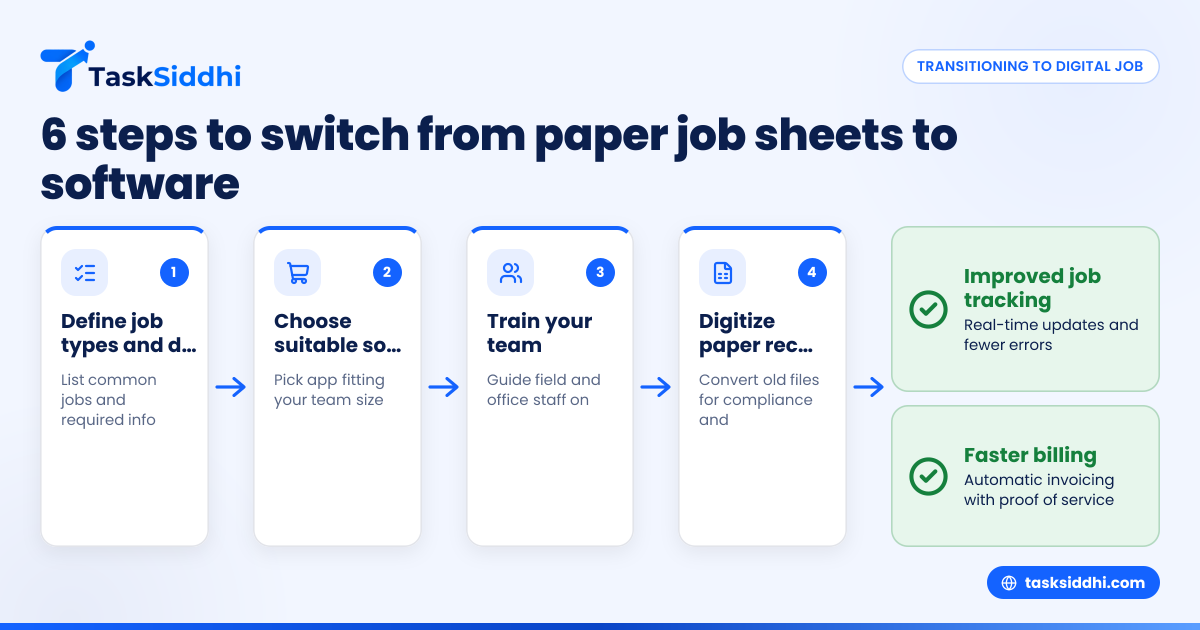
Start with these steps:
- Define common job types and data needed on job cards.
- Select software suitable for your team size and workflow.
- Train your field and office staff on the mobile app and data processes.
- Digitize existing paper records for compliance and reference.
- Run digital and paper systems side-by-side for a few weeks to catch issues.
- Fully switch to digital once the team is confident and data flows smoothly.
A gradual process minimizes disruption and employee resistance.
What are the benefits of using job card software over paper for US service teams?
Job card software delivers real-time job updates, better communication, instant proof of service, easier timekeeping, and faster billing. It enables managers to generate reports on costs, productivity, and client trends.
Mobile access reduces mistakes and clarifies instructions for field workers. For owners, digital records cut admin time and speed invoice accuracy, improving customer satisfaction and business growth.
Ready to see job card software in action?
Discover how TaskSiddhi simplifies service job management with mobile job cards, proof capture, and automatic time tracking. Take a product tour or compare plans at pricing.
Frequently asked questions
Can job card software work without internet access in the field?
Yes, most job card apps support offline mode. Field workers enter details without connectivity, and data syncs automatically when back online, ensuring seamless job tracking even in remote areas.
How does job card software help reduce billing disputes?
By capturing detailed job info, photos, signatures, and accurate time logs, job card software offers clear proof of completed work. This transparency cuts down misunderstandings about charges and speeds up customer payments.
Is it difficult to train employees on using job card software?
Most solutions have easy-to-use mobile apps designed for quick learning. A few training sessions and ongoing support help field teams gain confidence fast, making adoption smooth.
Can job card software integrate with QuickBooks or other accounting tools?
Yes, many platforms offer integrations or export features for common US tools like QuickBooks and Stripe. This automates invoicing and financial reporting, saving time and reducing errors.
What “ai job card” features should I expect?
AI job card tools recognize text and images from photos to auto-fill job details. They analyze past jobs for smarter scheduling and material predictions, reducing data entry and boosting accuracy.
Does job card software comply with US tax record-keeping needs?
Accurate timestamps and material logs help ensure proper state sales tax compliance. Digital records simplify audits and keep your documentation organized for tax purposes.